Latest Cisco, PMP, AWS, CompTIA, Microsoft Materials on SALE Get Now Get Now
Home/
Blog/
VLAN Technologies on Network Switches: Concepts, Types, Configuration, and Commands
SPOTO 2026-07-30 14:06:52
VLAN Technologies on Network Switches

VLANs are how a single physical switch infrastructure gets carved into multiple logical, isolated networks — and they're arguably the single most-used feature in enterprise switching after basic connectivity itself. This guide covers how VLAN tagging actually works under the hood, the different implementation types you can choose between, the exact steps to configure and troubleshoot them, and a ready-to-use command reference across the major switch vendors.

How VLAN Technology Works: Tagging, Broadcast Domains, and Segmentation

Before choosing a VLAN strategy or typing a single command, it's worth understanding the mechanism that makes VLANs possible in the first place.

  1. Start with the problem VLANs solve. Without VLANs, every device connected to a switch (or set of interconnected switches) shares a single broadcast domain — meaning broadcast traffic from any device reaches every other device. As networks grow, this becomes both a performance problem (broadcast traffic multiplies) and a security problem (every device can potentially see every other device's traffic).
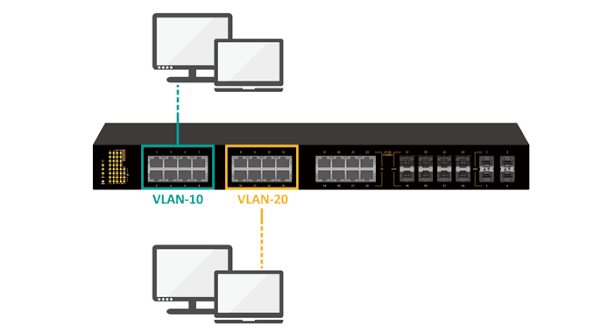
  2. Understand logical segmentation. A VLAN (Virtual Local Area Network) creates a separate broadcast domain within the same physical switch or set of switches, without requiring separate physical hardware. Devices in different VLANs are isolated from each other at Layer 2 by default, even if they're plugged into the same physical switch.
  3. Learn how switches identify which VLAN a frame belongs to. On an access port (a port connecting directly to an end device), the switch simply tags incoming untagged frames with the VLAN configured on that port — the end device itself has no awareness that VLANs exist.
  4. Understand 802.1Q tagging for inter-switch links. When traffic for multiple VLANs needs to travel between switches over a single physical link (a trunk), the 802.1Q standard inserts a 4-byte tag into the Ethernet frame header identifying which VLAN the frame belongs to. The receiving switch reads this tag to know which VLAN's broadcast domain the frame should stay within, then strips the tag again before delivering it to an access port.
  5. Recognize the native VLAN exception. On a trunk port, one VLAN can be designated as the "native" VLAN — frames belonging to it are sent untagged rather than with an 802.1Q tag. This exists mostly for backward compatibility with older equipment, but it's also a common source of misconfiguration if both ends of a trunk don't agree on which VLAN is native.
  6. See how VLANs enable both isolation and controlled communication. Devices within the same VLAN communicate freely at Layer 2. Communication between VLANs requires Layer 3 routing (via a router or a Layer 3 switch with inter-VLAN routing configured), which gives network administrators a deliberate control point for applying security policy between segments.

With the underlying tagging mechanism clear, the next question is which VLAN assignment strategy fits your environment — and that's where the different implementation types come in.

Comparing VLAN Types: Static, Dynamic, Voice, and Private VLANs

Not all VLANs are assigned the same way. Here's how the major implementation types stack up against each other:

Criteria Static (Port-Based) VLAN Dynamic VLAN (802.1X-based) Voice VLAN Private VLAN
Assignment method Manually configured per switch port Assigned dynamically based on device/user authentication (via RADIUS/802.1X) Configured on a port to carry both a device's voice and data traffic on separate VLANs A VLAN subdivided into isolated sub-groups within the same broadcast domain
Configuration effort Low — one command per port Higher — requires RADIUS server integration and 802.1X supplicant configuration Low — a dedicated command alongside the data VLAN on the same port Moderate — requires defining primary and secondary (isolated/community) VLANs
Flexibility for mobile users Low — moving to a different port requires reconfiguration High — the correct VLAN follows the authenticated user/device to whatever port they connect on N/A — designed for a fixed voice device (e.g., IP phone) alongside a PC Low — designed for fixed segmentation, not user mobility
Typical use case Most general-purpose wired ports in a stable environment BYOD environments, hot-desking, environments needing identity-based network access control Ports serving an IP phone with a daisy-chained PC behind it Hosting/data center environments needing device isolation within a shared subnet
Isolation granularity Whole VLAN (broadcast domain) Whole VLAN, but assignment is identity-driven rather than port-driven Separates voice and data traffic onto distinct VLANs on the same physical port Sub-VLAN granularity — devices can be isolated from each other even within the same VLAN
Management overhead Low, but scales poorly with frequent device moves Higher upfront (RADIUS setup), lower ongoing (no manual reconfiguration needed) Low Moderate — more moving parts to document and troubleshoot
Best fit Stable desks, servers, fixed infrastructure Environments with frequent device/user movement or strict access control needs Any port combining an IP phone and a PC Multi-tenant or shared-subnet environments needing device-to-device isolation

Most enterprise networks default to static VLANs for the bulk of fixed infrastructure, layer in voice VLANs wherever IP phones are deployed, and reserve dynamic (802.1X-based) VLANs or private VLANs for the specific use cases — mobility and multi-tenant isolation, respectively — where their added complexity is actually justified.

Configuring and Troubleshooting VLANs: Step by Step

With a VLAN strategy chosen, here's the practical sequence for setting up access ports, trunk ports, and resolving the most common issues that come up afterward. Commands below use Cisco-style syntax.

  1. Create the VLAN(s) on the switch.

switch(config)# vlan 10 switch(config-vlan)# name SALES switch(config)# vlan 20 switch(config-vlan)# name VOICE

  1. Assign an access port to a VLAN.

switch(config)# interface gigabitEthernet 1/0/5 switch(config-if)# switchport mode access switch(config-if)# switchport access vlan 10

  1. Add a voice VLAN to the same port if an IP phone is present.

switch(config-if)# switchport voice vlan 20

  1. Configure a trunk port between switches.

switch(config)# interface gigabitEthernet 1/0/48 switch(config-if)# switchport trunk encapsulation dot1q switch(config-if)# switchport mode trunk switch(config-if)# switchport trunk allowed vlan 10,20 switch(config-if)# switchport trunk native vlan 99

  1. Verify VLAN and port assignments.

switch# show vlan brief switch# show interfaces gigabitEthernet 1/0/5 switchport

  1. Troubleshoot a device that can't communicate — check VLAN assignment first. Confirm the port is in the VLAN you expect using the verification command above; a surprising number of "network down" tickets trace back to a port sitting in the wrong (often default) VLAN.
  2. Troubleshoot cross-switch connectivity issues — check trunk configuration next. Confirm both ends of the trunk allow the same VLANs and agree on the native VLAN.

switch# show interfaces trunk

A native VLAN mismatch between the two ends is one of the most common causes of intermittent or one-way connectivity across a trunk link.

  1. Troubleshoot inter-VLAN communication issues — check Layer 3 routing. If devices in different VLANs can't reach each other, confirm a Layer 3 device (router or Layer 3 switch) has an interface (or SVI) in each relevant VLAN with correct IP addressing.

switch(config)# interface vlan 10 switch(config-if)# ip address 10.10.10.1 255.255.255.0

  1. Confirm end-to-end reachability after making changes. Use basic connectivity testing from an affected device, and re-check the VLAN/trunk verification commands above if the issue persists — most VLAN problems resolve once assignment, trunk configuration, and routing are all confirmed to agree with each other.

Once ports are correctly assigned, trunks agree on allowed and native VLANs, and Layer 3 routing exists where needed, VLAN-related issues become rare — most ongoing work at this layer is simply adding new VLANs or ports rather than re-troubleshooting the fundamentals.

VLAN Configuration Command Cheat Sheet Across Vendors

For quick reference during deployment or troubleshooting, here's a consolidated command set — Cisco IOS commands are shown in full, with HP/HPE (Comware and ProVision) equivalents noted alongside where syntax diverges meaningfully.

# --- Create and name a VLAN --- # Cisco: switch(config)# vlan 10 switch(config-vlan)# name SALES # HP Comware: <HP> system-view [HP] vlan 10 [HP-vlan10] name SALES # HP ProVision: switch(config)# vlan 10 switch(vlan-10)# name SALES # --- Assign an access port --- # Cisco: switch(config-if)# switchport mode access switch(config-if)# switchport access vlan 10 # HP Comware: [HP-GigabitEthernet1/0/1] port link-type access [HP-GigabitEthernet1/0/1] port default vlan 10 # HP ProVision: switch(config)# vlan 10 switch(vlan-10)# untagged 1 # --- Configure a trunk port --- # Cisco: switch(config-if)# switchport mode trunk switch(config-if)# switchport trunk allowed vlan 10,20 # HP Comware: [HP-GigabitEthernet1/0/48] port link-type trunk [HP-GigabitEthernet1/0/48] port trunk permit vlan 10 20 # HP ProVision: switch(config)# vlan 10 switch(vlan-10)# tagged 48 # --- Voice VLAN --- # Cisco: switch(config-if)# switchport voice vlan 20 # --- Verification (Cisco) --- switch# show vlan brief switch# show interfaces trunk switch# show interfaces status # --- Verification (HP Comware) --- <HP> display vlan <HP> display interface brief # --- Verification (HP ProVision) --- switch# show vlans switch# show vlans port 1

Keep this section bookmarked as your quick-lookup reference once you already understand the "why" from the configuration walkthrough above — it's built to be copy-pasted, not re-explained each time.

Bringing It All Together

VLAN technology is straightforward once the pieces click into place: 802.1Q tagging is what lets one physical link carry multiple isolated broadcast domains, the type of VLAN you choose (static, dynamic, voice, or private) depends on whether your priority is simplicity, user mobility, phone deployment, or tenant isolation, and the vast majority of real-world VLAN problems trace back to a port in the wrong VLAN or a trunk disagreement between two switches. Get the tagging concept solid, pick the right VLAN type for each use case rather than defaulting to one everywhere, and keep the command reference above close at hand — that combination covers nearly every VLAN scenario you'll run into.


Latest Passing Reports from SPOTO Candidates
200-301

200-301

200-301-P

200-301-P

200-301-P

200-301-P

200-301

200-301

200-201

200-201

200-301-P

200-301-P

200-301-P

200-301-P

200-201

200-201

200-301-P

200-301-P

200-301-P

200-301-P

Write a Reply or Comment
Home/Blog/VLAN Technologies on Network Switches: Concepts, Types, Configuration, and Commands
VLAN Technologies on Network Switches: Concepts, Types, Configuration, and Commands
SPOTO 2026-07-30 14:06:52
VLAN Technologies on Network Switches

VLANs are how a single physical switch infrastructure gets carved into multiple logical, isolated networks — and they're arguably the single most-used feature in enterprise switching after basic connectivity itself. This guide covers how VLAN tagging actually works under the hood, the different implementation types you can choose between, the exact steps to configure and troubleshoot them, and a ready-to-use command reference across the major switch vendors.

How VLAN Technology Works: Tagging, Broadcast Domains, and Segmentation

Before choosing a VLAN strategy or typing a single command, it's worth understanding the mechanism that makes VLANs possible in the first place.

  1. Start with the problem VLANs solve. Without VLANs, every device connected to a switch (or set of interconnected switches) shares a single broadcast domain — meaning broadcast traffic from any device reaches every other device. As networks grow, this becomes both a performance problem (broadcast traffic multiplies) and a security problem (every device can potentially see every other device's traffic).
  2. Understand logical segmentation. A VLAN (Virtual Local Area Network) creates a separate broadcast domain within the same physical switch or set of switches, without requiring separate physical hardware. Devices in different VLANs are isolated from each other at Layer 2 by default, even if they're plugged into the same physical switch.
  3. Learn how switches identify which VLAN a frame belongs to. On an access port (a port connecting directly to an end device), the switch simply tags incoming untagged frames with the VLAN configured on that port — the end device itself has no awareness that VLANs exist.
  4. Understand 802.1Q tagging for inter-switch links. When traffic for multiple VLANs needs to travel between switches over a single physical link (a trunk), the 802.1Q standard inserts a 4-byte tag into the Ethernet frame header identifying which VLAN the frame belongs to. The receiving switch reads this tag to know which VLAN's broadcast domain the frame should stay within, then strips the tag again before delivering it to an access port.
  5. Recognize the native VLAN exception. On a trunk port, one VLAN can be designated as the "native" VLAN — frames belonging to it are sent untagged rather than with an 802.1Q tag. This exists mostly for backward compatibility with older equipment, but it's also a common source of misconfiguration if both ends of a trunk don't agree on which VLAN is native.
  6. See how VLANs enable both isolation and controlled communication. Devices within the same VLAN communicate freely at Layer 2. Communication between VLANs requires Layer 3 routing (via a router or a Layer 3 switch with inter-VLAN routing configured), which gives network administrators a deliberate control point for applying security policy between segments.

With the underlying tagging mechanism clear, the next question is which VLAN assignment strategy fits your environment — and that's where the different implementation types come in.

Comparing VLAN Types: Static, Dynamic, Voice, and Private VLANs

Not all VLANs are assigned the same way. Here's how the major implementation types stack up against each other:

Criteria Static (Port-Based) VLAN Dynamic VLAN (802.1X-based) Voice VLAN Private VLAN
Assignment method Manually configured per switch port Assigned dynamically based on device/user authentication (via RADIUS/802.1X) Configured on a port to carry both a device's voice and data traffic on separate VLANs A VLAN subdivided into isolated sub-groups within the same broadcast domain
Configuration effort Low — one command per port Higher — requires RADIUS server integration and 802.1X supplicant configuration Low — a dedicated command alongside the data VLAN on the same port Moderate — requires defining primary and secondary (isolated/community) VLANs
Flexibility for mobile users Low — moving to a different port requires reconfiguration High — the correct VLAN follows the authenticated user/device to whatever port they connect on N/A — designed for a fixed voice device (e.g., IP phone) alongside a PC Low — designed for fixed segmentation, not user mobility
Typical use case Most general-purpose wired ports in a stable environment BYOD environments, hot-desking, environments needing identity-based network access control Ports serving an IP phone with a daisy-chained PC behind it Hosting/data center environments needing device isolation within a shared subnet
Isolation granularity Whole VLAN (broadcast domain) Whole VLAN, but assignment is identity-driven rather than port-driven Separates voice and data traffic onto distinct VLANs on the same physical port Sub-VLAN granularity — devices can be isolated from each other even within the same VLAN
Management overhead Low, but scales poorly with frequent device moves Higher upfront (RADIUS setup), lower ongoing (no manual reconfiguration needed) Low Moderate — more moving parts to document and troubleshoot
Best fit Stable desks, servers, fixed infrastructure Environments with frequent device/user movement or strict access control needs Any port combining an IP phone and a PC Multi-tenant or shared-subnet environments needing device-to-device isolation

Most enterprise networks default to static VLANs for the bulk of fixed infrastructure, layer in voice VLANs wherever IP phones are deployed, and reserve dynamic (802.1X-based) VLANs or private VLANs for the specific use cases — mobility and multi-tenant isolation, respectively — where their added complexity is actually justified.

Configuring and Troubleshooting VLANs: Step by Step

With a VLAN strategy chosen, here's the practical sequence for setting up access ports, trunk ports, and resolving the most common issues that come up afterward. Commands below use Cisco-style syntax.

  1. Create the VLAN(s) on the switch.

switch(config)# vlan 10 switch(config-vlan)# name SALES switch(config)# vlan 20 switch(config-vlan)# name VOICE

  1. Assign an access port to a VLAN.

switch(config)# interface gigabitEthernet 1/0/5 switch(config-if)# switchport mode access switch(config-if)# switchport access vlan 10

  1. Add a voice VLAN to the same port if an IP phone is present.

switch(config-if)# switchport voice vlan 20

  1. Configure a trunk port between switches.

switch(config)# interface gigabitEthernet 1/0/48 switch(config-if)# switchport trunk encapsulation dot1q switch(config-if)# switchport mode trunk switch(config-if)# switchport trunk allowed vlan 10,20 switch(config-if)# switchport trunk native vlan 99

  1. Verify VLAN and port assignments.

switch# show vlan brief switch# show interfaces gigabitEthernet 1/0/5 switchport

  1. Troubleshoot a device that can't communicate — check VLAN assignment first. Confirm the port is in the VLAN you expect using the verification command above; a surprising number of "network down" tickets trace back to a port sitting in the wrong (often default) VLAN.
  2. Troubleshoot cross-switch connectivity issues — check trunk configuration next. Confirm both ends of the trunk allow the same VLANs and agree on the native VLAN.

switch# show interfaces trunk

A native VLAN mismatch between the two ends is one of the most common causes of intermittent or one-way connectivity across a trunk link.

  1. Troubleshoot inter-VLAN communication issues — check Layer 3 routing. If devices in different VLANs can't reach each other, confirm a Layer 3 device (router or Layer 3 switch) has an interface (or SVI) in each relevant VLAN with correct IP addressing.

switch(config)# interface vlan 10 switch(config-if)# ip address 10.10.10.1 255.255.255.0

  1. Confirm end-to-end reachability after making changes. Use basic connectivity testing from an affected device, and re-check the VLAN/trunk verification commands above if the issue persists — most VLAN problems resolve once assignment, trunk configuration, and routing are all confirmed to agree with each other.

Once ports are correctly assigned, trunks agree on allowed and native VLANs, and Layer 3 routing exists where needed, VLAN-related issues become rare — most ongoing work at this layer is simply adding new VLANs or ports rather than re-troubleshooting the fundamentals.

VLAN Configuration Command Cheat Sheet Across Vendors

For quick reference during deployment or troubleshooting, here's a consolidated command set — Cisco IOS commands are shown in full, with HP/HPE (Comware and ProVision) equivalents noted alongside where syntax diverges meaningfully.

# --- Create and name a VLAN --- # Cisco: switch(config)# vlan 10 switch(config-vlan)# name SALES # HP Comware: <HP> system-view [HP] vlan 10 [HP-vlan10] name SALES # HP ProVision: switch(config)# vlan 10 switch(vlan-10)# name SALES # --- Assign an access port --- # Cisco: switch(config-if)# switchport mode access switch(config-if)# switchport access vlan 10 # HP Comware: [HP-GigabitEthernet1/0/1] port link-type access [HP-GigabitEthernet1/0/1] port default vlan 10 # HP ProVision: switch(config)# vlan 10 switch(vlan-10)# untagged 1 # --- Configure a trunk port --- # Cisco: switch(config-if)# switchport mode trunk switch(config-if)# switchport trunk allowed vlan 10,20 # HP Comware: [HP-GigabitEthernet1/0/48] port link-type trunk [HP-GigabitEthernet1/0/48] port trunk permit vlan 10 20 # HP ProVision: switch(config)# vlan 10 switch(vlan-10)# tagged 48 # --- Voice VLAN --- # Cisco: switch(config-if)# switchport voice vlan 20 # --- Verification (Cisco) --- switch# show vlan brief switch# show interfaces trunk switch# show interfaces status # --- Verification (HP Comware) --- <HP> display vlan <HP> display interface brief # --- Verification (HP ProVision) --- switch# show vlans switch# show vlans port 1

Keep this section bookmarked as your quick-lookup reference once you already understand the "why" from the configuration walkthrough above — it's built to be copy-pasted, not re-explained each time.

Bringing It All Together

VLAN technology is straightforward once the pieces click into place: 802.1Q tagging is what lets one physical link carry multiple isolated broadcast domains, the type of VLAN you choose (static, dynamic, voice, or private) depends on whether your priority is simplicity, user mobility, phone deployment, or tenant isolation, and the vast majority of real-world VLAN problems trace back to a port in the wrong VLAN or a trunk disagreement between two switches. Get the tagging concept solid, pick the right VLAN type for each use case rather than defaulting to one everywhere, and keep the command reference above close at hand — that combination covers nearly every VLAN scenario you'll run into.

Latest Passing Reports from SPOTO Candidates
200-301
200-301-P
200-301-P
200-301
200-201
200-301-P
200-301-P
200-201
200-301-P
200-301-P
Write a Reply or Comment
Don't Risk Your Certification Exam Success – Take Real Exam Questions
Eligible to sit for Exam? 100% Exam Pass GuaranteeEligible to sit for Exam? 100% Exam Pass Guarantee
SPOTO Ebooks
Recent Posts
Spanning Tree Protocol Demystified: How It Works, Which Variant to Use, and How to Configure It
VLAN Technologies on Network Switches: Concepts, Types, Configuration, and Commands
Layer 2 Switch Protocols Explained: From Loop Prevention to Link Aggregation
Switch MAC Address Table: How It Works, How to Manage It, and How to Secure It
Building a Switched Campus Network That Scales: Design, Vendors, Configuration, and Refresh Planning
Bridging the Boardroom and IT: A Realistic Breakdown of ISACA's CGEIT Certification
Engineering Privacy by Design: What the Updated ISACA CDPSE Means for Your Career
CompTIA Security Get Certified Get Ahead: Sy0-701 Study Guide​
Fortinet's NSE Certification Overhaul: What Changed on July 15, 2026 and What You Need to Do Next
How to Pass the CCIE Lab Exam: A Complete Roadmap From Study Plan to Exam Day
Excellent
5.0
Based on 5236 reviews
Request more information
I would like to receive email communications about product & offerings from SPOTO & its Affiliates.
I understand I can unsubscribe at any time.