Latest Cisco, PMP, AWS, CompTIA, Microsoft Materials on SALE Get Now Get Now
Home/
Blog/
OSPF Stuck in EXSTART: Root Causes, Diagnosis, and the Fix
SPOTO 2026-07-31 15:09:47
OSPF Stuck in EXSTART

An OSPF neighbor stuck in EXSTART is one of the most common — and most misunderstood — adjacency failures in production networks and lab scenarios alike. The link is up, you can ping the neighbor, but the adjacency refuses to progress past EXSTART or EXCHANGE, and routes never populate. This guide walks through exactly why that happens, how EXSTART differs from other stalled states, the precise steps to fix it, and a diagnostic command reference to speed up the next time it happens.

Why OSPF Gets Stuck in EXSTART or EXCHANGE

Before fixing anything, it helps to understand what EXSTART and EXCHANGE are actually trying to accomplish, since that's what reveals why they stall.

  1. Understand what EXSTART is for. In this state, two OSPF routers negotiate master/slave roles and the initial Database Description (DBD) sequence number, before actually exchanging any topology information — think of it as a handshake that has to succeed before real data exchange begins.
  2. Understand what EXCHANGE is for. Once master/slave roles are settled, routers move into EXCHANGE and start actually sending DBD packets describing their link-state databases — this is where the real content of the negotiation happens, and where a stall often first becomes visible even though the root cause originated in EXSTART.
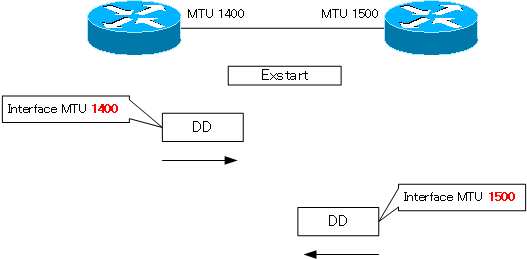
  3. Recognize MTU mismatch as the most common root cause. If two routers have different Maximum Transmission Unit settings on the connecting interface, DBD packets sized for the larger MTU can be dropped or silently truncated by the router with the smaller MTU, since OSPF (unlike some protocols) doesn't automatically fragment these control packets — the neighbor relationship stalls repeatedly at the same point rather than failing outright.
  4. Recognize duplicate router IDs as another major cause. If two routers in the same OSPF domain end up with identical router IDs (often because both were left to auto-select based on loopback or interface IPs, and those happened to collide, or were cloned from a template), the adjacency can flap or stall unpredictably, since OSPF relies on router ID uniqueness for proper LSA origination and acknowledgment tracking.
  5. Recognize unicast/unreachable adjacency issues. Since EXSTART and EXCHANGE packets are sent via unicast (unlike the multicast Hello packets used for initial discovery), an access list, firewall, or asymmetric routing issue that blocks unicast traffic between the two routers — while still permitting multicast Hellos — can allow the neighbor to reach 2-WAY or INIT but never progress further.
  6. Recognize interface queue or CPU-related drops as a less common but real cause. On heavily loaded routers or links experiencing packet loss, DBD packets can be dropped in transit even without a configuration mismatch, causing the same symptom through a purely environmental cause rather than a settings problem.
  7. Understand why the symptom looks identical across these different causes. All of the above manifest the same way — an adjacency cycling between EXSTART and EXCHANGE, or stalling entirely — which is exactly why a systematic diagnostic approach (covered later in this guide) matters more than guessing based on the symptom alone.

Knowing these root causes in advance makes it much easier to interpret exactly where in the neighbor state machine a given adjacency is actually failing — which is the next useful distinction to make before diving into remediation.

EXSTART vs. INIT vs. LOADING: Comparing OSPF Stuck States

Not every stalled OSPF adjacency is an EXSTART problem — different stuck states point to different root causes and require different fixes.

Criteria Stuck in INIT Stuck in EXSTART/EXCHANGE Stuck in LOADING
What's already succeeded Nothing yet — router has only received a Hello without seeing itself listed in return Basic Hello-based two-way communication has succeeded, and master/slave negotiation may have started DBD exchange has completed successfully; routers have agreed on what LSAs each needs
What's failing The neighbor either isn't receiving this router's Hello, or the neighbor list in received Hellos doesn't include this router Master/slave negotiation stalls, or DBD packets aren't being reliably exchanged Link-State Request/Update packets for specific LSAs aren't being received or acknowledged
Most common root cause One-way communication — often an access list, mismatched Hello/Dead timers, or a physical layer issue affecting only one direction MTU mismatch (most common) or duplicate router ID (second most common) Packet loss or unicast reachability issues affecting the larger LSU/LSAck exchange rather than DBD packets specifically
Typical fix Check ACLs, confirm timer values match, verify Layer 1/2 stability in both directions Fix MTU mismatch or resolve router ID collision Check for the same unicast reachability or packet-loss issues that affect EXSTART, since LOADING relies on the same underlying transport
Diagnostic priority Verify Hello packets are being seen bidirectionally first Check MTU on both sides first, then router ID uniqueness Check for packet loss/drops on the link, then unicast reachability

The practical value of this comparison: knowing which state an adjacency is actually stuck in immediately narrows your list of likely causes — a router stuck in INIT almost never has an MTU problem, and a router stuck in EXSTART almost never has a simple ACL-blocking-Hello issue, since it already got past that stage.

Fixing an OSPF Neighbor Stuck in EXSTART: Step by Step

With root causes and state context established, here's the systematic sequence to actually diagnose and resolve the stall.

  1. Confirm the neighbor is genuinely stuck, not just slow. Check the neighbor state a few times over a short interval — a router that's actually stuck will show the same state (or cycle between EXSTART and EXCHANGE) repeatedly rather than progressing to FULL.
router# show ip ospf neighbor
  1. Check interface MTU on both routers first — this resolves the majority of cases. Compare the MTU values directly; even a small mismatch (such as one router at 1500 and the other at 1492 due to a tunnel or encapsulation difference) is enough to cause the stall.
router# show interfaces <interface> | include MTU
  1. Fix a genuine MTU mismatch by aligning the values. Whenever possible, correct the actual MTU setting on the interface with the lower value, rather than working around it, since a real mismatch may cause other issues beyond OSPF.
router(config-if)# mtu 1500
  1. If aligning MTU isn't practical, use ip ospf mtu-ignore as a targeted workaround. This tells OSPF to skip MTU verification during DBD exchange entirely — useful when the MTU difference is intentional (such as certain tunnel interfaces) rather than a misconfiguration, but apply it deliberately, not as a default troubleshooting reflex.
router(config-if)# ip ospf mtu-ignore
  1. Check for duplicate router IDs if MTU checks out clean. Compare router IDs across the OSPF domain, not just between the two neighbors directly involved — a duplicate elsewhere in the topology can still cause instability.
router# show ip ospf | include Router ID
  1. Resolve a duplicate router ID by setting it explicitly. Rather than relying on automatic selection from an interface or loopback address, set the router ID directly and predictably.
router(config-router)# router-id 10.255.255.1
  1. Clear the OSPF process after a router ID change. A router ID change doesn't take effect on an already-established process without a reset.
router# clear ip ospf process
  1. Check for unicast reachability issues if MTU and router ID both check out. Confirm there's no access list, firewall, or asymmetric routing path blocking unicast traffic between the two routers specifically — remember that multicast Hellos succeeding doesn't guarantee unicast DBD/LSU traffic will.
router# ping <neighbor-ip> source <local-interface>
  1. Re-verify neighbor state after each change. Don't stack multiple fixes before checking — verify after each individual change so you know definitively which one resolved the issue, which matters both for real troubleshooting and for lab scenarios where you may need to explain your reasoning.
router# show ip ospf neighbor detail

Working through MTU, then router ID, then unicast reachability, in that order, resolves the overwhelming majority of real-world EXSTART stalls — and doing it in this specific order matters, since MTU and router ID issues are both far more common and far faster to check than deeper reachability problems.

OSPF EXSTART Troubleshooting Command Cheat Sheet

For quick reference the next time an adjacency stalls, here's a consolidated diagnostic command set covering verification, debugging, and the fixes covered above.

# --- Quick state check ---
router# show ip ospf neighbor                          # Current state of all neighbors
router# show ip ospf neighbor detail                     # Detailed per-neighbor state and timers

# --- MTU diagnosis and fix ---
router# show interfaces <interface> | include MTU        # Compare MTU on both routers
router(config-if)# mtu 1500                                 # Align MTU to matching value
router(config-if)# ip ospf mtu-ignore                          # Bypass MTU check (use deliberately)

# --- Router ID diagnosis and fix ---
router# show ip ospf | include Router ID                    # Check router ID domain-wide
router(config-router)# router-id <unique-id>                    # Set explicit router ID
router# clear ip ospf process                                     # Required after router-id change

# --- Unicast reachability check ---
router# ping <neighbor-ip> source <local-interface>              # Confirm unicast path works
router# show ip route <neighbor-ip>                                  # Confirm routing path to neighbor
router# show access-lists                                              # Check for blocking ACLs

# --- Deep diagnostics (verbose output, use narrowly) ---
router# debug ip ospf adj                                                # Adjacency formation events
router# debug ip ospf packet                                               # Raw OSPF packet exchange
router# debug ip ospf events                                                 # General OSPF process events
router# undebug all                                                            # Stop all debugging

# --- Interface-level OSPF detail ---
router# show ip ospf interface <interface>                                       # Timers, area, network type, cost

Keep the MTU and router ID checks at the top of your muscle memory — in both production troubleshooting and timed lab scenarios, those two commands resolve the stall far more often than anything requiring debug output.
Latest Passing Reports from SPOTO Candidates
DC lab

DC lab

sec lab

sec lab

EI lab

EI lab

EI LAB

EI LAB

Sec lab

Sec lab

DClab

DClab

EI Lab

EI Lab

DC lab

DC lab

DC LAB

DC LAB

dc lab

dc lab

Write a Reply or Comment
Don't Risk Your Certification Exam Success – Take Real Exam Questions
Eligible to sit for Exam? 100% Exam Pass Guarantee
SPOTO Ebooks
Recent Posts
Excellent
5.0
Based on 5236 reviews
Request more information
I would like to receive email communications about product & offerings from SPOTO & its Affiliates.
I understand I can unsubscribe at any time.
Home/Blog/OSPF Stuck in EXSTART: Root Causes, Diagnosis, and the Fix
OSPF Stuck in EXSTART: Root Causes, Diagnosis, and the Fix
SPOTO 2026-07-31 15:09:47
OSPF Stuck in EXSTART

An OSPF neighbor stuck in EXSTART is one of the most common — and most misunderstood — adjacency failures in production networks and lab scenarios alike. The link is up, you can ping the neighbor, but the adjacency refuses to progress past EXSTART or EXCHANGE, and routes never populate. This guide walks through exactly why that happens, how EXSTART differs from other stalled states, the precise steps to fix it, and a diagnostic command reference to speed up the next time it happens.

Why OSPF Gets Stuck in EXSTART or EXCHANGE

Before fixing anything, it helps to understand what EXSTART and EXCHANGE are actually trying to accomplish, since that's what reveals why they stall.

  1. Understand what EXSTART is for. In this state, two OSPF routers negotiate master/slave roles and the initial Database Description (DBD) sequence number, before actually exchanging any topology information — think of it as a handshake that has to succeed before real data exchange begins.
  2. Understand what EXCHANGE is for. Once master/slave roles are settled, routers move into EXCHANGE and start actually sending DBD packets describing their link-state databases — this is where the real content of the negotiation happens, and where a stall often first becomes visible even though the root cause originated in EXSTART.
  3. Recognize MTU mismatch as the most common root cause. If two routers have different Maximum Transmission Unit settings on the connecting interface, DBD packets sized for the larger MTU can be dropped or silently truncated by the router with the smaller MTU, since OSPF (unlike some protocols) doesn't automatically fragment these control packets — the neighbor relationship stalls repeatedly at the same point rather than failing outright.
  4. Recognize duplicate router IDs as another major cause. If two routers in the same OSPF domain end up with identical router IDs (often because both were left to auto-select based on loopback or interface IPs, and those happened to collide, or were cloned from a template), the adjacency can flap or stall unpredictably, since OSPF relies on router ID uniqueness for proper LSA origination and acknowledgment tracking.
  5. Recognize unicast/unreachable adjacency issues. Since EXSTART and EXCHANGE packets are sent via unicast (unlike the multicast Hello packets used for initial discovery), an access list, firewall, or asymmetric routing issue that blocks unicast traffic between the two routers — while still permitting multicast Hellos — can allow the neighbor to reach 2-WAY or INIT but never progress further.
  6. Recognize interface queue or CPU-related drops as a less common but real cause. On heavily loaded routers or links experiencing packet loss, DBD packets can be dropped in transit even without a configuration mismatch, causing the same symptom through a purely environmental cause rather than a settings problem.
  7. Understand why the symptom looks identical across these different causes. All of the above manifest the same way — an adjacency cycling between EXSTART and EXCHANGE, or stalling entirely — which is exactly why a systematic diagnostic approach (covered later in this guide) matters more than guessing based on the symptom alone.

Knowing these root causes in advance makes it much easier to interpret exactly where in the neighbor state machine a given adjacency is actually failing — which is the next useful distinction to make before diving into remediation.

EXSTART vs. INIT vs. LOADING: Comparing OSPF Stuck States

Not every stalled OSPF adjacency is an EXSTART problem — different stuck states point to different root causes and require different fixes.

Criteria Stuck in INIT Stuck in EXSTART/EXCHANGE Stuck in LOADING
What's already succeeded Nothing yet — router has only received a Hello without seeing itself listed in return Basic Hello-based two-way communication has succeeded, and master/slave negotiation may have started DBD exchange has completed successfully; routers have agreed on what LSAs each needs
What's failing The neighbor either isn't receiving this router's Hello, or the neighbor list in received Hellos doesn't include this router Master/slave negotiation stalls, or DBD packets aren't being reliably exchanged Link-State Request/Update packets for specific LSAs aren't being received or acknowledged
Most common root cause One-way communication — often an access list, mismatched Hello/Dead timers, or a physical layer issue affecting only one direction MTU mismatch (most common) or duplicate router ID (second most common) Packet loss or unicast reachability issues affecting the larger LSU/LSAck exchange rather than DBD packets specifically
Typical fix Check ACLs, confirm timer values match, verify Layer 1/2 stability in both directions Fix MTU mismatch or resolve router ID collision Check for the same unicast reachability or packet-loss issues that affect EXSTART, since LOADING relies on the same underlying transport
Diagnostic priority Verify Hello packets are being seen bidirectionally first Check MTU on both sides first, then router ID uniqueness Check for packet loss/drops on the link, then unicast reachability

The practical value of this comparison: knowing which state an adjacency is actually stuck in immediately narrows your list of likely causes — a router stuck in INIT almost never has an MTU problem, and a router stuck in EXSTART almost never has a simple ACL-blocking-Hello issue, since it already got past that stage.

Fixing an OSPF Neighbor Stuck in EXSTART: Step by Step

With root causes and state context established, here's the systematic sequence to actually diagnose and resolve the stall.

  1. Confirm the neighbor is genuinely stuck, not just slow. Check the neighbor state a few times over a short interval — a router that's actually stuck will show the same state (or cycle between EXSTART and EXCHANGE) repeatedly rather than progressing to FULL.
router# show ip ospf neighbor
  1. Check interface MTU on both routers first — this resolves the majority of cases. Compare the MTU values directly; even a small mismatch (such as one router at 1500 and the other at 1492 due to a tunnel or encapsulation difference) is enough to cause the stall.
router# show interfaces <interface> | include MTU
  1. Fix a genuine MTU mismatch by aligning the values. Whenever possible, correct the actual MTU setting on the interface with the lower value, rather than working around it, since a real mismatch may cause other issues beyond OSPF.
router(config-if)# mtu 1500
  1. If aligning MTU isn't practical, use ip ospf mtu-ignore as a targeted workaround. This tells OSPF to skip MTU verification during DBD exchange entirely — useful when the MTU difference is intentional (such as certain tunnel interfaces) rather than a misconfiguration, but apply it deliberately, not as a default troubleshooting reflex.
router(config-if)# ip ospf mtu-ignore
  1. Check for duplicate router IDs if MTU checks out clean. Compare router IDs across the OSPF domain, not just between the two neighbors directly involved — a duplicate elsewhere in the topology can still cause instability.
router# show ip ospf | include Router ID
  1. Resolve a duplicate router ID by setting it explicitly. Rather than relying on automatic selection from an interface or loopback address, set the router ID directly and predictably.
router(config-router)# router-id 10.255.255.1
  1. Clear the OSPF process after a router ID change. A router ID change doesn't take effect on an already-established process without a reset.
router# clear ip ospf process
  1. Check for unicast reachability issues if MTU and router ID both check out. Confirm there's no access list, firewall, or asymmetric routing path blocking unicast traffic between the two routers specifically — remember that multicast Hellos succeeding doesn't guarantee unicast DBD/LSU traffic will.
router# ping <neighbor-ip> source <local-interface>
  1. Re-verify neighbor state after each change. Don't stack multiple fixes before checking — verify after each individual change so you know definitively which one resolved the issue, which matters both for real troubleshooting and for lab scenarios where you may need to explain your reasoning.
router# show ip ospf neighbor detail

Working through MTU, then router ID, then unicast reachability, in that order, resolves the overwhelming majority of real-world EXSTART stalls — and doing it in this specific order matters, since MTU and router ID issues are both far more common and far faster to check than deeper reachability problems.

OSPF EXSTART Troubleshooting Command Cheat Sheet

For quick reference the next time an adjacency stalls, here's a consolidated diagnostic command set covering verification, debugging, and the fixes covered above.

# --- Quick state check ---
router# show ip ospf neighbor                          # Current state of all neighbors
router# show ip ospf neighbor detail                     # Detailed per-neighbor state and timers

# --- MTU diagnosis and fix ---
router# show interfaces <interface> | include MTU        # Compare MTU on both routers
router(config-if)# mtu 1500                                 # Align MTU to matching value
router(config-if)# ip ospf mtu-ignore                          # Bypass MTU check (use deliberately)

# --- Router ID diagnosis and fix ---
router# show ip ospf | include Router ID                    # Check router ID domain-wide
router(config-router)# router-id <unique-id>                    # Set explicit router ID
router# clear ip ospf process                                     # Required after router-id change

# --- Unicast reachability check ---
router# ping <neighbor-ip> source <local-interface>              # Confirm unicast path works
router# show ip route <neighbor-ip>                                  # Confirm routing path to neighbor
router# show access-lists                                              # Check for blocking ACLs

# --- Deep diagnostics (verbose output, use narrowly) ---
router# debug ip ospf adj                                                # Adjacency formation events
router# debug ip ospf packet                                               # Raw OSPF packet exchange
router# debug ip ospf events                                                 # General OSPF process events
router# undebug all                                                            # Stop all debugging

# --- Interface-level OSPF detail ---
router# show ip ospf interface <interface>                                       # Timers, area, network type, cost

Keep the MTU and router ID checks at the top of your muscle memory — in both production troubleshooting and timed lab scenarios, those two commands resolve the stall far more often than anything requiring debug output.
Latest Passing Reports from SPOTO Candidates
DC lab
sec lab
EI lab
EI LAB
Sec lab
DClab
EI Lab
DC lab
DC LAB
dc lab
Write a Reply or Comment
Don't Risk Your Certification Exam Success – Take Real Exam Questions
Eligible to sit for Exam? 100% Exam Pass GuaranteeEligible to sit for Exam? 100% Exam Pass Guarantee
SPOTO Ebooks
Recent Posts
Cisco Automation Certification: Your Roadmap From Zero to Certified
Cisco REST API: A Practical Guide to Network Automation
Cisco HSRP Configuration: From First-Time Setup to Advanced Troubleshooting
MPLS LDP Neighbor Down: A Complete Troubleshooting Playbook
OSPF Stuck in EXSTART: Root Causes, Diagnosis, and the Fix
Advanced OSPF for the CCIE Lab: Multi-Area Design, Network Types, and Troubleshooting
Cisco Trunk Ports Explained: 802.1Q Mechanics, DTP Modes, and Troubleshooting
Advanced VLAN Configuration for the CCIE Lab: PVLANs, QinQ, VTPv3, and Troubleshooting
Master the Enterprise Network: A Ground-Level Guide to the CCNP 200-301 (350-401 ENCOR v1.2)
The Latest CCNA 2026 Exam Success Guide (What Real-World Network Engineers Need in 2026)
Excellent
5.0
Based on 5236 reviews
Request more information
I would like to receive email communications about product & offerings from SPOTO & its Affiliates.
I understand I can unsubscribe at any time.