Latest Cisco, PMP, AWS, CompTIA, Microsoft Materials on SALE Get Now Get Now
Home/
Blog/
Cisco REST API: A Practical Guide to Network Automation
SPOTO 2026-07-31 15:30:21
Cisco REST API

Manually logging into dozens (or thousands) of Cisco devices to push configuration changes doesn't scale — and it's exactly the problem Cisco's REST APIs were built to solve. By exposing device and controller functionality over standard HTTP methods, Cisco REST APIs let engineers automate provisioning, monitoring, and troubleshooting through code instead of CLI sessions. This guide covers how the architecture works, how it stacks up against NETCONF and RESTCONF, hands you working Python and Postman templates, and shows how to resolve the authentication errors that trip up almost everyone the first time they call the API.

Understanding Cisco REST API Architecture and Automation Basics

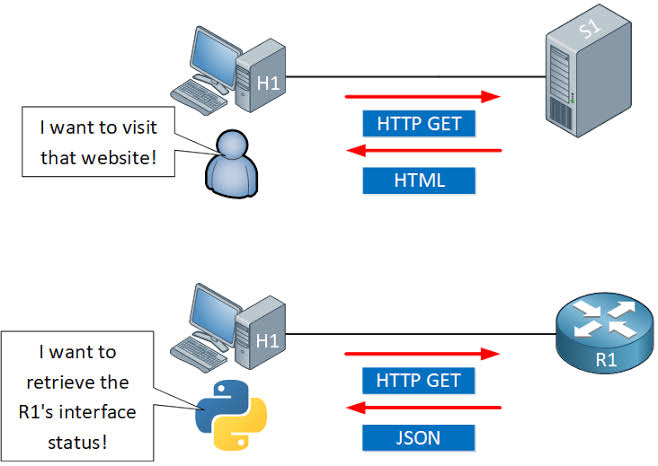
Cisco REST APIs follow the same architectural pattern used across the broader software industry: resources (devices, interfaces, policies, sites) are represented as objects, and standard HTTP methods — GET, POST, PUT, DELETE — are used to read or modify them. Most Cisco automation platforms, including DNA Center, Meraki, and ACI, expose their functionality this way rather than requiring engineers to script raw CLI commands.

Here's how the architecture fits together in practice:

  1. A controller or device exposes an API endpoint. Rather than automating individual routers and switches one by one, most modern Cisco automation happens against a central controller (like Catalyst Center, formerly DNA Center) that manages many devices underneath it.
  2. Requests are authenticated before any data is exchanged. Cisco platforms typically use token-based authentication — you authenticate once, receive a session token, and attach that token to subsequent requests instead of resending credentials every time.
  3. Data is exchanged as JSON. Both the request bodies (when creating or updating resources) and the response payloads (when reading data) use JSON, which is easy to parse and generate from almost any scripting language.
  4. Responses use standard HTTP status codes. A 200 means success, a 401 means an authentication problem, a 404 means the resource doesn't exist, and so on — this predictability is what makes REST APIs so much easier to script against than screen-scraping CLI output.
  5. Automation scripts or orchestration tools call the API in place of manual configuration. Common use cases include bulk device onboarding, automated compliance checks, dynamic VLAN provisioning, and pulling real-time telemetry into monitoring dashboards.

This model works well for controller-driven, JSON-based automation — but it isn't the only protocol Cisco supports for network management. Understanding where REST fits relative to NETCONF and RESTCONF will help you pick the right tool for your environment.

Cisco REST API vs RESTCONF vs NETCONF: Choosing the Right Protocol

Cisco devices and controllers support several management protocols, and the differences between them affect how well they fit your automation strategy.

Feature Cisco REST API (Platform-specific) RESTCONF NETCONF
Data format JSON JSON or XML XML
Data modeling standard Vendor/platform-defined YANG-based YANG-based
Transport HTTPS HTTPS SSH (typically port 830)
Best suited for Controllers (DNA/Catalyst Center, Meraki, ACI) Direct device configuration with structured models Direct device configuration with structured models and transactional changes
Configuration validation Platform-dependent Strong, via YANG models Strong, via YANG models
Transactional commits (candidate config, rollback) Rarely supported Limited Fully supported
Learning curve Low to moderate Moderate (requires YANG familiarity) Higher (requires YANG familiarity and NETCONF operations)

In practice, most enterprises end up using more than one of these depending on the layer they're automating. Cisco's platform-specific REST APIs (on DNA Center, Meraki, or ACI) are usually the fastest way to automate at the controller/orchestration level, since they're purpose-built around each platform's own resources. RESTCONF and NETCONF, by contrast, shine when you need standardized, YANG-modeled configuration directly on individual devices — NETCONF in particular is preferred when transactional safety (validate-then-commit, automatic rollback) matters more than ease of use. If your automation strategy centers on a Cisco controller, the platform's own REST API is usually the right starting point — and the templates below will get you making calls quickly.

Cisco REST API Authentication and Request Templates

Below are ready-to-use templates for authenticating and making calls to Cisco DNA Center / Catalyst Center-style REST APIs. Adjust the base URL and credentials for your platform.

python

# --- Python: Authenticate and retrieve a token ---
import requests
from requests.auth import HTTPBasicAuth

BASE_URL = "https://[controller-ip]"
USERNAME = "[username]"
PASSWORD = "[password]"

auth_response = requests.post(
    f"{BASE_URL}/dna/system/api/v1/auth/token",
    auth=HTTPBasicAuth(USERNAME, PASSWORD),
    verify=False  # Set to True with a valid cert in production
)
token = auth_response.json()["Token"]

# --- Python: Use the token to call an API endpoint ---
headers = {
    "X-Auth-Token": token,
    "Content-Type": "application/json"
}

devices = requests.get(
    f"{BASE_URL}/dna/intent/api/v1/network-device",
    headers=headers,
    verify=False
)
print(devices.json())
# --- Postman: Authentication request ---
Method: POST
URL: https://[controller-ip]/dna/system/api/v1/auth/token
Authorization: Basic Auth (username / password)

# --- Postman: Authenticated GET request ---
Method: GET
URL: https://[controller-ip]/dna/intent/api/v1/network-device
Headers:
  X-Auth-Token: {{token}}
  Content-Type: application/json
# --- cURL equivalent ---
curl -k -X POST "https://[controller-ip]/dna/system/api/v1/auth/token" \
  -u [username]:[password]

curl -k -X GET "https://[controller-ip]/dna/intent/api/v1/network-device" \
  -H "X-Auth-Token: [token]"

These templates cover the core authenticate-then-call pattern used across most Cisco REST APIs. The most common place automation breaks, though, isn't the request logic itself — it's authentication and token handling once scripts run unattended.

Fixing Common Cisco REST API Errors: 401s, Token Expiration, and Timeouts

Authentication-related failures are by far the most frequent issue engineers run into when automating against Cisco REST APIs. Work through these steps when a script that used to work suddenly starts failing.

  1. Confirm the token hasn't expired. Most Cisco controller tokens are short-lived (often around an hour). If a long-running script or scheduled job suddenly starts returning 401 Unauthorized, the token has likely expired mid-run — build in logic to re-authenticate and refresh the token before it lapses, rather than authenticating once at the start of a long process.
  2. Check that the token is being sent in the correct header. A surprisingly common cause of persistent 401 errors is simply sending the token in the wrong header name or format — double-check the platform's documentation for the exact header expected (e.g., X-Auth-Token versus an Authorization: Bearer header, which varies by Cisco platform).
  3. Verify the account has the right role and permissions. A valid token can still produce 401 or 403 errors if the authenticated user lacks permission for that specific API endpoint — check the user's role assignment on the controller.
  4. Resolve SSL certificate validation failures. If requests fail with certificate errors rather than clean HTTP status codes, it's usually because the controller is using a self-signed certificate. For production scripts, install the proper certificate chain rather than permanently disabling verification, which should only be used temporarily in lab environments.
  5. Diagnose connection timeouts separately from authentication errors. A timeout with no HTTP response at all usually points to a network reachability issue, a firewall blocking the API port, or the controller being overloaded — check basic connectivity to the controller's management interface before assuming it's an API-level problem.
  6. Add retry logic with backoff for transient failures. Controllers under heavy load may intermittently reject valid requests; a short retry with exponential backoff resolves most of these without masking genuine, persistent errors.

Working through token validity, header formatting, permissions, and connectivity in that order resolves the overwhelming majority of Cisco REST API errors without needing to dig through controller logs.


Latest Passing Reports from SPOTO Candidates
200-301

200-301

200-301-P

200-301-P

200-301-P

200-301-P

200-301

200-301

200-201

200-201

200-301-P

200-301-P

200-301-P

200-301-P

200-201

200-201

200-301-P

200-301-P

200-301-P

200-301-P

Write a Reply or Comment
Don't Risk Your Certification Exam Success – Take Real Exam Questions
Eligible to sit for Exam? 100% Exam Pass Guarantee
SPOTO Ebooks
Recent Posts
Excellent
5.0
Based on 5236 reviews
Request more information
I would like to receive email communications about product & offerings from SPOTO & its Affiliates.
I understand I can unsubscribe at any time.
Home/Blog/Cisco REST API: A Practical Guide to Network Automation
Cisco REST API: A Practical Guide to Network Automation
SPOTO 2026-07-31 15:30:21
Cisco REST API

Manually logging into dozens (or thousands) of Cisco devices to push configuration changes doesn't scale — and it's exactly the problem Cisco's REST APIs were built to solve. By exposing device and controller functionality over standard HTTP methods, Cisco REST APIs let engineers automate provisioning, monitoring, and troubleshooting through code instead of CLI sessions. This guide covers how the architecture works, how it stacks up against NETCONF and RESTCONF, hands you working Python and Postman templates, and shows how to resolve the authentication errors that trip up almost everyone the first time they call the API.

Understanding Cisco REST API Architecture and Automation Basics

Cisco REST APIs follow the same architectural pattern used across the broader software industry: resources (devices, interfaces, policies, sites) are represented as objects, and standard HTTP methods — GET, POST, PUT, DELETE — are used to read or modify them. Most Cisco automation platforms, including DNA Center, Meraki, and ACI, expose their functionality this way rather than requiring engineers to script raw CLI commands.

Here's how the architecture fits together in practice:

  1. A controller or device exposes an API endpoint. Rather than automating individual routers and switches one by one, most modern Cisco automation happens against a central controller (like Catalyst Center, formerly DNA Center) that manages many devices underneath it.
  2. Requests are authenticated before any data is exchanged. Cisco platforms typically use token-based authentication — you authenticate once, receive a session token, and attach that token to subsequent requests instead of resending credentials every time.
  3. Data is exchanged as JSON. Both the request bodies (when creating or updating resources) and the response payloads (when reading data) use JSON, which is easy to parse and generate from almost any scripting language.
  4. Responses use standard HTTP status codes. A 200 means success, a 401 means an authentication problem, a 404 means the resource doesn't exist, and so on — this predictability is what makes REST APIs so much easier to script against than screen-scraping CLI output.
  5. Automation scripts or orchestration tools call the API in place of manual configuration. Common use cases include bulk device onboarding, automated compliance checks, dynamic VLAN provisioning, and pulling real-time telemetry into monitoring dashboards.

This model works well for controller-driven, JSON-based automation — but it isn't the only protocol Cisco supports for network management. Understanding where REST fits relative to NETCONF and RESTCONF will help you pick the right tool for your environment.

Cisco REST API vs RESTCONF vs NETCONF: Choosing the Right Protocol

Cisco devices and controllers support several management protocols, and the differences between them affect how well they fit your automation strategy.

Feature Cisco REST API (Platform-specific) RESTCONF NETCONF
Data format JSON JSON or XML XML
Data modeling standard Vendor/platform-defined YANG-based YANG-based
Transport HTTPS HTTPS SSH (typically port 830)
Best suited for Controllers (DNA/Catalyst Center, Meraki, ACI) Direct device configuration with structured models Direct device configuration with structured models and transactional changes
Configuration validation Platform-dependent Strong, via YANG models Strong, via YANG models
Transactional commits (candidate config, rollback) Rarely supported Limited Fully supported
Learning curve Low to moderate Moderate (requires YANG familiarity) Higher (requires YANG familiarity and NETCONF operations)

In practice, most enterprises end up using more than one of these depending on the layer they're automating. Cisco's platform-specific REST APIs (on DNA Center, Meraki, or ACI) are usually the fastest way to automate at the controller/orchestration level, since they're purpose-built around each platform's own resources. RESTCONF and NETCONF, by contrast, shine when you need standardized, YANG-modeled configuration directly on individual devices — NETCONF in particular is preferred when transactional safety (validate-then-commit, automatic rollback) matters more than ease of use. If your automation strategy centers on a Cisco controller, the platform's own REST API is usually the right starting point — and the templates below will get you making calls quickly.

Cisco REST API Authentication and Request Templates

Below are ready-to-use templates for authenticating and making calls to Cisco DNA Center / Catalyst Center-style REST APIs. Adjust the base URL and credentials for your platform.

python

# --- Python: Authenticate and retrieve a token ---
import requests
from requests.auth import HTTPBasicAuth

BASE_URL = "https://[controller-ip]"
USERNAME = "[username]"
PASSWORD = "[password]"

auth_response = requests.post(
    f"{BASE_URL}/dna/system/api/v1/auth/token",
    auth=HTTPBasicAuth(USERNAME, PASSWORD),
    verify=False  # Set to True with a valid cert in production
)
token = auth_response.json()["Token"]

# --- Python: Use the token to call an API endpoint ---
headers = {
    "X-Auth-Token": token,
    "Content-Type": "application/json"
}

devices = requests.get(
    f"{BASE_URL}/dna/intent/api/v1/network-device",
    headers=headers,
    verify=False
)
print(devices.json())
# --- Postman: Authentication request ---
Method: POST
URL: https://[controller-ip]/dna/system/api/v1/auth/token
Authorization: Basic Auth (username / password)

# --- Postman: Authenticated GET request ---
Method: GET
URL: https://[controller-ip]/dna/intent/api/v1/network-device
Headers:
  X-Auth-Token: {{token}}
  Content-Type: application/json
# --- cURL equivalent ---
curl -k -X POST "https://[controller-ip]/dna/system/api/v1/auth/token" \
  -u [username]:[password]

curl -k -X GET "https://[controller-ip]/dna/intent/api/v1/network-device" \
  -H "X-Auth-Token: [token]"

These templates cover the core authenticate-then-call pattern used across most Cisco REST APIs. The most common place automation breaks, though, isn't the request logic itself — it's authentication and token handling once scripts run unattended.

Fixing Common Cisco REST API Errors: 401s, Token Expiration, and Timeouts

Authentication-related failures are by far the most frequent issue engineers run into when automating against Cisco REST APIs. Work through these steps when a script that used to work suddenly starts failing.

  1. Confirm the token hasn't expired. Most Cisco controller tokens are short-lived (often around an hour). If a long-running script or scheduled job suddenly starts returning 401 Unauthorized, the token has likely expired mid-run — build in logic to re-authenticate and refresh the token before it lapses, rather than authenticating once at the start of a long process.
  2. Check that the token is being sent in the correct header. A surprisingly common cause of persistent 401 errors is simply sending the token in the wrong header name or format — double-check the platform's documentation for the exact header expected (e.g., X-Auth-Token versus an Authorization: Bearer header, which varies by Cisco platform).
  3. Verify the account has the right role and permissions. A valid token can still produce 401 or 403 errors if the authenticated user lacks permission for that specific API endpoint — check the user's role assignment on the controller.
  4. Resolve SSL certificate validation failures. If requests fail with certificate errors rather than clean HTTP status codes, it's usually because the controller is using a self-signed certificate. For production scripts, install the proper certificate chain rather than permanently disabling verification, which should only be used temporarily in lab environments.
  5. Diagnose connection timeouts separately from authentication errors. A timeout with no HTTP response at all usually points to a network reachability issue, a firewall blocking the API port, or the controller being overloaded — check basic connectivity to the controller's management interface before assuming it's an API-level problem.
  6. Add retry logic with backoff for transient failures. Controllers under heavy load may intermittently reject valid requests; a short retry with exponential backoff resolves most of these without masking genuine, persistent errors.

Working through token validity, header formatting, permissions, and connectivity in that order resolves the overwhelming majority of Cisco REST API errors without needing to dig through controller logs.

Latest Passing Reports from SPOTO Candidates
200-301
200-301-P
200-301-P
200-301
200-201
200-301-P
200-301-P
200-201
200-301-P
200-301-P
Write a Reply or Comment
Don't Risk Your Certification Exam Success – Take Real Exam Questions
Eligible to sit for Exam? 100% Exam Pass GuaranteeEligible to sit for Exam? 100% Exam Pass Guarantee
SPOTO Ebooks
Recent Posts
Cisco Automation Certification: Your Roadmap From Zero to Certified
Cisco REST API: A Practical Guide to Network Automation
Cisco HSRP Configuration: From First-Time Setup to Advanced Troubleshooting
MPLS LDP Neighbor Down: A Complete Troubleshooting Playbook
OSPF Stuck in EXSTART: Root Causes, Diagnosis, and the Fix
Advanced OSPF for the CCIE Lab: Multi-Area Design, Network Types, and Troubleshooting
Cisco Trunk Ports Explained: 802.1Q Mechanics, DTP Modes, and Troubleshooting
Advanced VLAN Configuration for the CCIE Lab: PVLANs, QinQ, VTPv3, and Troubleshooting
Master the Enterprise Network: A Ground-Level Guide to the CCNP 200-301 (350-401 ENCOR v1.2)
The Latest CCNA 2026 Exam Success Guide (What Real-World Network Engineers Need in 2026)
Excellent
5.0
Based on 5236 reviews
Request more information
I would like to receive email communications about product & offerings from SPOTO & its Affiliates.
I understand I can unsubscribe at any time.