Latest Cisco, PMP, AWS, CompTIA, Microsoft Materials on SALE Get Now Get Now
Home/
Blog/
Spanning Tree Protocol Demystified: How It Works, Which Variant to Use, and How to Configure It
SPOTO 2026-07-30 14:20:21
Spanning Tree Protocol Demystified

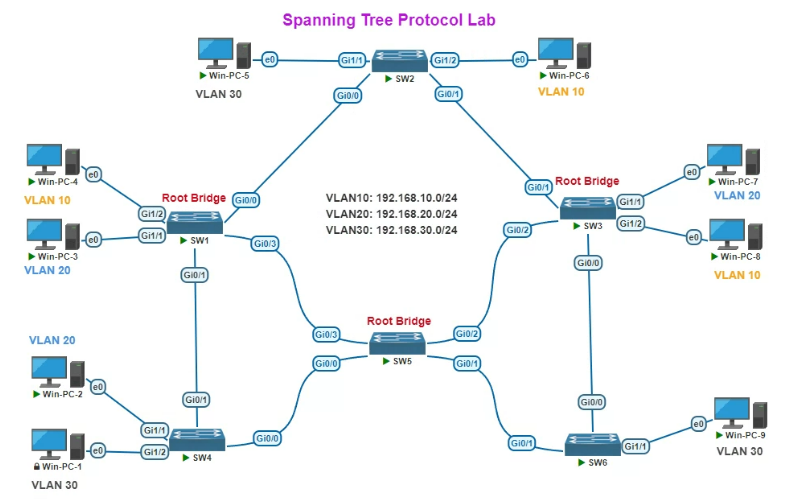
Redundant links keep a switched network resilient — but without something managing them, those same redundant paths create loops that can bring a network down in seconds through broadcast storms and duplicate frames. Spanning Tree Protocol (STP) is the mechanism that makes redundancy safe. This guide covers how STP actually operates under the hood, how to choose between its modern variants, the exact commands to configure and troubleshoot it, and a ready-reference cheat sheet for day-to-day work.

How Spanning Tree Protocol Actually Works

Before touching a single configuration command, it helps to understand the election process and port states that let STP block loops without disconnecting anything permanently.

  1. Understand why loops are dangerous in the first place. A physical loop between switches causes broadcast frames to circulate endlessly, consuming bandwidth exponentially and eventually overwhelming switch CPUs and MAC address tables — this is why STP exists at all, even when redundant links are intentional and desirable.
  2. Learn how switches exchange BPDUs. Switches running STP send Bridge Protocol Data Units (BPDUs) out every port, containing information used to elect a root bridge and calculate the best path to it. BPDUs are exchanged continuously, not just once at startup, which lets STP react to topology changes.
  3. Understand root bridge election. Every switch in the STP domain compares Bridge IDs (a combination of a configurable priority value and the switch's MAC address) advertised in BPDUs, and the switch with the lowest Bridge ID becomes the root bridge — the logical center of the spanning tree that all other switches calculate their best path toward.
  4. See how non-root switches pick their best path. Each non-root switch determines its root port — the port with the lowest-cost path back to the root bridge — based on cumulative path cost (influenced by link speed) advertised in received BPDUs.
  5. Understand designated ports. On each network segment, the switch offering the lowest-cost path to the root becomes responsible for forwarding traffic on that segment, and its corresponding port becomes the designated port. Any other port on that same segment that isn't a root or designated port becomes a blocking port to prevent a loop.
  6. Learn the port states STP cycles through. A port moves through blocking, listening, learning, and finally forwarding states (in traditional 802.1D STP) before it's allowed to pass traffic — this staged progression is what traditionally makes STP convergence slow, since each transition includes a timed delay to avoid temporary loops during topology changes.
  7. Recognize how STP reacts to topology changes. If a link fails or a new one comes up, affected switches recalculate the tree — blocked ports may transition to forwarding once they're recalculated as the new best path, restoring connectivity automatically without manual intervention.

With the underlying election and port-state mechanism clear, the practical question becomes which STP standard to actually run, since the original 802.1D design has been significantly improved upon since it was first standardized.

Comparing STP, RSTP, MSTP, and PVST

Multiple IEEE standards and vendor extensions have evolved from the original Spanning Tree Protocol, each addressing different limitations. Here's how they compare:

Criteria STP (802.1D) RSTP (802.1w) MSTP (802.1s) PVST+ (Cisco)
Convergence time Slow — 30-50 seconds after a topology change Fast — typically 1-2 seconds Fast — same rapid mechanism as RSTP Slow, matching underlying 802.1D timing unless combined with Rapid-PVST+
Spanning tree instances One instance for the entire network One instance for the entire network Multiple instances, each mapped to a group of VLANs One instance per VLAN
Load balancing across VLANs Not supported Not supported Supported — different VLAN groups can use different paths Supported — each VLAN can have a different root bridge and active path
Standard vs. proprietary IEEE standard (largely legacy) IEEE standard IEEE standard Cisco-proprietary (per-VLAN extension of 802.1D or, as Rapid-PVST+, of 802.1w)
Configuration complexity Low Low Higher — requires MST region and instance-to-VLAN mapping Low, but scales with VLAN count since each VLAN runs its own instance
Scalability (many VLANs) Poor fit — no per-VLAN awareness Poor fit — no per-VLAN awareness Strong — designed specifically for large VLAN counts Weaker at very large scale — CPU load grows with VLAN count
Typical use today Rare in new deployments Common baseline in smaller networks Common in large enterprise campus networks Common in Cisco-only environments, usually as Rapid-PVST+
Best fit Legacy compatibility only Small-to-mid networks, simple topologies Large networks with many VLANs needing efficient link use Cisco shops wanting fast convergence with per-VLAN control without full MSTP complexity


In practice, few networks run classic 802.1D STP today. The realistic choice is between Rapid-PVST+ (Cisco's default, giving fast per-VLAN convergence with minimal configuration) and MSTP (better suited once VLAN counts grow large enough that per-VLAN instances become inefficient to manage). Non-Cisco multi-vendor environments typically standardize on RSTP or MSTP directly, since PVST+ is Cisco-specific.

Configuring and Troubleshooting STP: Step by Step

With a variant chosen, here's the practical sequence for setting root bridge priority, hardening access ports with PortFast and BPDU Guard, and resolving the most common STP problems.

  1. Set the STP mode for your chosen variant.
switch(config)# spanning-tree mode rapid-pvst
  1. Deliberately control root bridge election rather than leaving it to chance. Letting the root bridge be elected purely by lowest MAC address often puts it on the wrong (e.g., access-layer) switch — set priority explicitly on your intended core/distribution switch instead.
switch(config)# spanning-tree vlan 10 priority 4096
  1. Configure a secondary root bridge for redundancy. This ensures a predictable failover if your primary root bridge goes down, rather than a random re-election.
switch(config)# spanning-tree vlan 10 root secondary
  1. Enable PortFast on end-device access ports only. PortFast skips the listening/learning delay for ports that will never connect to another switch, letting end devices get network access immediately instead of waiting 30+ seconds.
switch(config-if)# spanning-tree portfast
  1. Enable BPDU Guard alongside PortFast. This protects against a device or rogue switch being plugged into a PortFast-enabled port and accidentally (or maliciously) participating in STP — the port is immediately disabled if a BPDU is received where none is expected.
switch(config-if)# spanning-tree bpduguard enable
  1. Verify STP state and root bridge assignment.
switch# show spanning-tree summary
switch# show spanning-tree vlan 10
  1. Troubleshoot a topology change flap — check for an unstable link first. Frequent topology change notifications (TCNs) usually point to a flapping physical link or a port going up and down repeatedly, not an STP misconfiguration itself.
switch# show spanning-tree detail | include occurr|from
  1. Troubleshoot a suspected bridge loop — look for MAC address table instability. A classic symptom of an actual loop (versus a simple flap) is the same MAC address rapidly moving between different ports in the MAC address table, along with abnormally high CPU utilization.
switch# show mac address-table | include <suspect-mac>
  1. Recover a port disabled by BPDU Guard. If BPDU Guard trips (typically because an unintended device or switch was connected to a PortFast port), the port needs to be manually re-enabled or configured for auto-recovery rather than resolving on its own.
switch(config-if)# shutdown
switch(config-if)# no shutdown

Once root bridge placement is deliberate, PortFast and BPDU Guard are applied consistently across access ports, and TCN/flapping behavior is understood as a symptom to investigate rather than an STP failure itself, most day-to-day STP issues become quick to diagnose rather than mysterious.

Spanning Tree Protocol Command Cheat Sheet

For quick lookup during deployment or troubleshooting, here's a consolidated reference beyond what was already covered step-by-step above.

# --- Mode selection ---
# Classic Cisco PVST+ (802.1D per VLAN)
switch(config)# spanning-tree mode pvst

# Rapid-PVST+ (802.1w per VLAN) - common default
switch(config)# spanning-tree mode rapid-pvst

# MSTP (802.1s)
switch(config)# spanning-tree mode mst

# --- Root bridge control ---
# Set explicit priority (lower = more likely root)
switch(config)# spanning-tree vlan 10 priority 4096

# Auto-calculate priority to become root
switch(config)# spanning-tree vlan 10 root primary

# Auto-calculate priority as backup root
switch(config)# spanning-tree vlan 10 root secondary 

# --- MSTP region and instance mapping ---
switch(config)# spanning-tree mst configuration
switch(config-mst)# name REGION1
switch(config-mst)# revision 1
switch(config-mst)# instance 1 vlan 10,20

# --- Port protection ---
# Skip listening/learning on edge ports
switch(config-if)# spanning-tree portfast

# Disable port if unexpected BPDU received
switch(config-if)# spanning-tree bpduguard enable

# Prevent port from becoming root port       
switch(config-if)# spanning-tree guard root

# Enable both globally on all PortFast ports
switch(config)# spanning-tree portfast bpduguard default

# --- Cost and timers ---
# Manually set path cost on an interface
switch(config-if)# spanning-tree cost 10 

# Adjust BPDU hello interval (use cautiously)
switch(config)# spanning-tree vlan 10 hello-time 2 

# --- Verification ---
# Overall STP mode and status
switch# show spanning-tree summary

# Detailed state for a specific VLAN
switch# show spanning-tree vlan 10

# STP state for a specific interface
switch# show spanning-tree interface gi1/0/1

# View MST region/instance mapping
switch# show spanning-tree mst configuration

# Verbose detail including TCN counts
switch# show spanning-tree detail

Keep this reference handy for moments when the concept is already clear and you just need the exact syntax — pair it with the verification commands from the walkthrough above to confirm any change actually took hold as intended.

Bringing It All Together

Spanning Tree Protocol makes sense once you see it as a continuous negotiation rather than a one-time setup: BPDUs elect a root bridge, port roles get assigned based on path cost, and the resulting tree adapts automatically whenever the topology changes. Choose Rapid-PVST+ or MSTP based on how many VLANs you're managing rather than defaulting to legacy STP, take deliberate control of root bridge placement instead of leaving it to chance, harden access ports with PortFast and BPDU Guard together, and keep the command reference above within reach for troubleshooting. Get those pieces right, and STP becomes one of the most reliable, "set it and forget it" protocols in your network rather than a recurring source of mysterious outages.


Latest Passing Reports from SPOTO Candidates
200-301

200-301

200-301-P

200-301-P

200-301-P

200-301-P

200-301

200-301

200-201

200-201

200-301-P

200-301-P

200-301-P

200-301-P

200-201

200-201

200-301-P

200-301-P

200-301-P

200-301-P

Write a Reply or Comment
Home/Blog/Spanning Tree Protocol Demystified: How It Works, Which Variant to Use, and How to Configure It
Spanning Tree Protocol Demystified: How It Works, Which Variant to Use, and How to Configure It
SPOTO 2026-07-30 14:20:21
Spanning Tree Protocol Demystified

Redundant links keep a switched network resilient — but without something managing them, those same redundant paths create loops that can bring a network down in seconds through broadcast storms and duplicate frames. Spanning Tree Protocol (STP) is the mechanism that makes redundancy safe. This guide covers how STP actually operates under the hood, how to choose between its modern variants, the exact commands to configure and troubleshoot it, and a ready-reference cheat sheet for day-to-day work.

How Spanning Tree Protocol Actually Works

Before touching a single configuration command, it helps to understand the election process and port states that let STP block loops without disconnecting anything permanently.

  1. Understand why loops are dangerous in the first place. A physical loop between switches causes broadcast frames to circulate endlessly, consuming bandwidth exponentially and eventually overwhelming switch CPUs and MAC address tables — this is why STP exists at all, even when redundant links are intentional and desirable.
  2. Learn how switches exchange BPDUs. Switches running STP send Bridge Protocol Data Units (BPDUs) out every port, containing information used to elect a root bridge and calculate the best path to it. BPDUs are exchanged continuously, not just once at startup, which lets STP react to topology changes.
  3. Understand root bridge election. Every switch in the STP domain compares Bridge IDs (a combination of a configurable priority value and the switch's MAC address) advertised in BPDUs, and the switch with the lowest Bridge ID becomes the root bridge — the logical center of the spanning tree that all other switches calculate their best path toward.
  4. See how non-root switches pick their best path. Each non-root switch determines its root port — the port with the lowest-cost path back to the root bridge — based on cumulative path cost (influenced by link speed) advertised in received BPDUs.
  5. Understand designated ports. On each network segment, the switch offering the lowest-cost path to the root becomes responsible for forwarding traffic on that segment, and its corresponding port becomes the designated port. Any other port on that same segment that isn't a root or designated port becomes a blocking port to prevent a loop.
  6. Learn the port states STP cycles through. A port moves through blocking, listening, learning, and finally forwarding states (in traditional 802.1D STP) before it's allowed to pass traffic — this staged progression is what traditionally makes STP convergence slow, since each transition includes a timed delay to avoid temporary loops during topology changes.
  7. Recognize how STP reacts to topology changes. If a link fails or a new one comes up, affected switches recalculate the tree — blocked ports may transition to forwarding once they're recalculated as the new best path, restoring connectivity automatically without manual intervention.

With the underlying election and port-state mechanism clear, the practical question becomes which STP standard to actually run, since the original 802.1D design has been significantly improved upon since it was first standardized.

Comparing STP, RSTP, MSTP, and PVST

Multiple IEEE standards and vendor extensions have evolved from the original Spanning Tree Protocol, each addressing different limitations. Here's how they compare:

Criteria STP (802.1D) RSTP (802.1w) MSTP (802.1s) PVST+ (Cisco)
Convergence time Slow — 30-50 seconds after a topology change Fast — typically 1-2 seconds Fast — same rapid mechanism as RSTP Slow, matching underlying 802.1D timing unless combined with Rapid-PVST+
Spanning tree instances One instance for the entire network One instance for the entire network Multiple instances, each mapped to a group of VLANs One instance per VLAN
Load balancing across VLANs Not supported Not supported Supported — different VLAN groups can use different paths Supported — each VLAN can have a different root bridge and active path
Standard vs. proprietary IEEE standard (largely legacy) IEEE standard IEEE standard Cisco-proprietary (per-VLAN extension of 802.1D or, as Rapid-PVST+, of 802.1w)
Configuration complexity Low Low Higher — requires MST region and instance-to-VLAN mapping Low, but scales with VLAN count since each VLAN runs its own instance
Scalability (many VLANs) Poor fit — no per-VLAN awareness Poor fit — no per-VLAN awareness Strong — designed specifically for large VLAN counts Weaker at very large scale — CPU load grows with VLAN count
Typical use today Rare in new deployments Common baseline in smaller networks Common in large enterprise campus networks Common in Cisco-only environments, usually as Rapid-PVST+
Best fit Legacy compatibility only Small-to-mid networks, simple topologies Large networks with many VLANs needing efficient link use Cisco shops wanting fast convergence with per-VLAN control without full MSTP complexity


In practice, few networks run classic 802.1D STP today. The realistic choice is between Rapid-PVST+ (Cisco's default, giving fast per-VLAN convergence with minimal configuration) and MSTP (better suited once VLAN counts grow large enough that per-VLAN instances become inefficient to manage). Non-Cisco multi-vendor environments typically standardize on RSTP or MSTP directly, since PVST+ is Cisco-specific.

Configuring and Troubleshooting STP: Step by Step

With a variant chosen, here's the practical sequence for setting root bridge priority, hardening access ports with PortFast and BPDU Guard, and resolving the most common STP problems.

  1. Set the STP mode for your chosen variant.
switch(config)# spanning-tree mode rapid-pvst
  1. Deliberately control root bridge election rather than leaving it to chance. Letting the root bridge be elected purely by lowest MAC address often puts it on the wrong (e.g., access-layer) switch — set priority explicitly on your intended core/distribution switch instead.
switch(config)# spanning-tree vlan 10 priority 4096
  1. Configure a secondary root bridge for redundancy. This ensures a predictable failover if your primary root bridge goes down, rather than a random re-election.
switch(config)# spanning-tree vlan 10 root secondary
  1. Enable PortFast on end-device access ports only. PortFast skips the listening/learning delay for ports that will never connect to another switch, letting end devices get network access immediately instead of waiting 30+ seconds.
switch(config-if)# spanning-tree portfast
  1. Enable BPDU Guard alongside PortFast. This protects against a device or rogue switch being plugged into a PortFast-enabled port and accidentally (or maliciously) participating in STP — the port is immediately disabled if a BPDU is received where none is expected.
switch(config-if)# spanning-tree bpduguard enable
  1. Verify STP state and root bridge assignment.
switch# show spanning-tree summary
switch# show spanning-tree vlan 10
  1. Troubleshoot a topology change flap — check for an unstable link first. Frequent topology change notifications (TCNs) usually point to a flapping physical link or a port going up and down repeatedly, not an STP misconfiguration itself.
switch# show spanning-tree detail | include occurr|from
  1. Troubleshoot a suspected bridge loop — look for MAC address table instability. A classic symptom of an actual loop (versus a simple flap) is the same MAC address rapidly moving between different ports in the MAC address table, along with abnormally high CPU utilization.
switch# show mac address-table | include <suspect-mac>
  1. Recover a port disabled by BPDU Guard. If BPDU Guard trips (typically because an unintended device or switch was connected to a PortFast port), the port needs to be manually re-enabled or configured for auto-recovery rather than resolving on its own.
switch(config-if)# shutdown
switch(config-if)# no shutdown

Once root bridge placement is deliberate, PortFast and BPDU Guard are applied consistently across access ports, and TCN/flapping behavior is understood as a symptom to investigate rather than an STP failure itself, most day-to-day STP issues become quick to diagnose rather than mysterious.

Spanning Tree Protocol Command Cheat Sheet

For quick lookup during deployment or troubleshooting, here's a consolidated reference beyond what was already covered step-by-step above.

# --- Mode selection ---
# Classic Cisco PVST+ (802.1D per VLAN)
switch(config)# spanning-tree mode pvst

# Rapid-PVST+ (802.1w per VLAN) - common default
switch(config)# spanning-tree mode rapid-pvst

# MSTP (802.1s)
switch(config)# spanning-tree mode mst

# --- Root bridge control ---
# Set explicit priority (lower = more likely root)
switch(config)# spanning-tree vlan 10 priority 4096

# Auto-calculate priority to become root
switch(config)# spanning-tree vlan 10 root primary

# Auto-calculate priority as backup root
switch(config)# spanning-tree vlan 10 root secondary 

# --- MSTP region and instance mapping ---
switch(config)# spanning-tree mst configuration
switch(config-mst)# name REGION1
switch(config-mst)# revision 1
switch(config-mst)# instance 1 vlan 10,20

# --- Port protection ---
# Skip listening/learning on edge ports
switch(config-if)# spanning-tree portfast

# Disable port if unexpected BPDU received
switch(config-if)# spanning-tree bpduguard enable

# Prevent port from becoming root port       
switch(config-if)# spanning-tree guard root

# Enable both globally on all PortFast ports
switch(config)# spanning-tree portfast bpduguard default

# --- Cost and timers ---
# Manually set path cost on an interface
switch(config-if)# spanning-tree cost 10 

# Adjust BPDU hello interval (use cautiously)
switch(config)# spanning-tree vlan 10 hello-time 2 

# --- Verification ---
# Overall STP mode and status
switch# show spanning-tree summary

# Detailed state for a specific VLAN
switch# show spanning-tree vlan 10

# STP state for a specific interface
switch# show spanning-tree interface gi1/0/1

# View MST region/instance mapping
switch# show spanning-tree mst configuration

# Verbose detail including TCN counts
switch# show spanning-tree detail

Keep this reference handy for moments when the concept is already clear and you just need the exact syntax — pair it with the verification commands from the walkthrough above to confirm any change actually took hold as intended.

Bringing It All Together

Spanning Tree Protocol makes sense once you see it as a continuous negotiation rather than a one-time setup: BPDUs elect a root bridge, port roles get assigned based on path cost, and the resulting tree adapts automatically whenever the topology changes. Choose Rapid-PVST+ or MSTP based on how many VLANs you're managing rather than defaulting to legacy STP, take deliberate control of root bridge placement instead of leaving it to chance, harden access ports with PortFast and BPDU Guard together, and keep the command reference above within reach for troubleshooting. Get those pieces right, and STP becomes one of the most reliable, "set it and forget it" protocols in your network rather than a recurring source of mysterious outages.

Latest Passing Reports from SPOTO Candidates
200-301
200-301-P
200-301-P
200-301
200-201
200-301-P
200-301-P
200-201
200-301-P
200-301-P
Write a Reply or Comment
Don't Risk Your Certification Exam Success – Take Real Exam Questions
Eligible to sit for Exam? 100% Exam Pass GuaranteeEligible to sit for Exam? 100% Exam Pass Guarantee
SPOTO Ebooks
Recent Posts
Spanning Tree Protocol Demystified: How It Works, Which Variant to Use, and How to Configure It
VLAN Technologies on Network Switches: Concepts, Types, Configuration, and Commands
Layer 2 Switch Protocols Explained: From Loop Prevention to Link Aggregation
Switch MAC Address Table: How It Works, How to Manage It, and How to Secure It
Building a Switched Campus Network That Scales: Design, Vendors, Configuration, and Refresh Planning
Bridging the Boardroom and IT: A Realistic Breakdown of ISACA's CGEIT Certification
Engineering Privacy by Design: What the Updated ISACA CDPSE Means for Your Career
CompTIA Security Get Certified Get Ahead: Sy0-701 Study Guide​
Fortinet's NSE Certification Overhaul: What Changed on July 15, 2026 and What You Need to Do Next
How to Pass the CCIE Lab Exam: A Complete Roadmap From Study Plan to Exam Day
Excellent
5.0
Based on 5236 reviews
Request more information
I would like to receive email communications about product & offerings from SPOTO & its Affiliates.
I understand I can unsubscribe at any time.