

An OSPF adjacency that will not form is one of the few network problems that tells you exactly where to look, provided you read the one piece of evidence that matters: the state it is stuck in. OSPF walks through seven states in a fixed order, and each transition depends on a different set of conditions being satisfied. A neighbour stuck in INIT failed a Hello-level check. A neighbour stuck in EXSTART already passed every Hello-level check — including authentication — and is failing on the database exchange, which on Cisco platforms almost always means MTU. Those two facts eliminate roughly two-thirds of the possible causes before you run a second command.
The reason engineers still spend an hour on these is that the instinct is to check everything at once. Someone verifies the IP addressing, then the area, then the timers, then starts a debug that produces four hundred lines a second, and somewhere in that process the actual cause — a passive-interface default inherited from a template, or an access list dropping IP protocol 89 — never gets checked because it was not on the mental list. A structured approach reverses this. Read the state, use the state to select the candidate set, verify the candidates in a fixed order, and only then reach for debugging, scoped to one interface.
This article is that method. Section one walks the seven adjacency states and what each one proves has already succeeded. Section two enumerates the root causes grouped by the state they produce, so the grouping itself is the diagnostic. Section three is the fixed localisation sequence, from Layer 1 upward, with the command that answers each question. Section four covers the fix for each root cause, including the MTU cases where the workaround and the fix are different things. Section five is prevention: the template settings and monitoring that stop these from recurring.
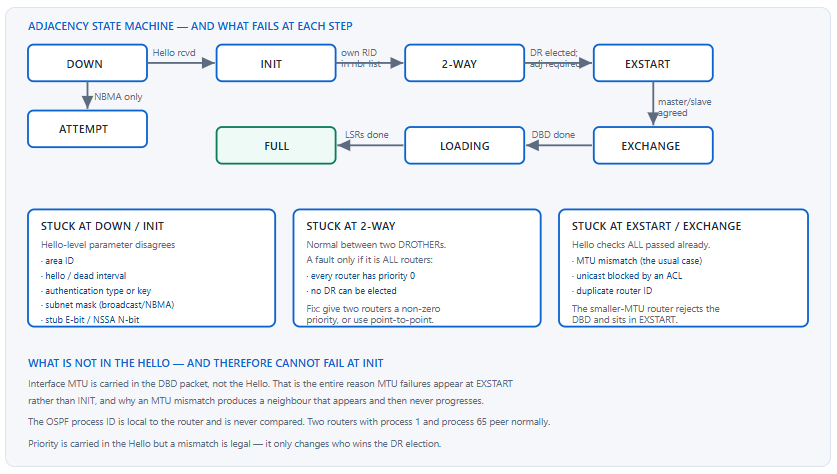
What Do the OSPF Adjacency States Actually Tell You?
What does each state prove has already succeeded?
DOWN means no Hello has been received at all. INIT means a Hello arrived but the local router ID does not appear in the neighbour's Hello neighbour list — communication is one-way. 2-WAY means both routers see each other and the DR election has run; between two DROTHERs this is the final state and is entirely normal. EXSTART means both routers agreed to form a full adjacency and are negotiating master and slave roles through database description packets. EXCHANGE means they are exchanging database summaries. LOADING means they are requesting the LSAs each is missing. FULL means the databases are synchronised. Each state proves everything below it succeeded, which is what makes the state the diagnosis.
A Deeper Dive into the State Machine
DOWN and ATTEMPT
DOWN is the initial state and also the state a neighbour returns to when the dead interval expires. A neighbour that never leaves DOWN is one whose Hellos never arrive, or whose Hellos arrive and are discarded before they are processed. Those two cases are distinguishable: show ip ospf traffic increments an error counter when a Hello is received and rejected, and stays flat when nothing arrives at all.
ATTEMPT applies only to non-broadcast network types. It means the local router is unicasting Hellos to a manually configured neighbour and receiving nothing back. Seeing ATTEMPT on an Ethernet interface means someone set ip ospf network non-broadcast, which is worth knowing immediately.
! Is the router receiving Hellos and discarding them, or receiving nothing?
R1# show ip ospf traffic GigabitEthernet0/0 | begin Errors
  OSPF header errors
    Length 0, Auth Type 0, Checksum 0, Version 0,
    Bad Source 0, No Virtual Link 0, Area Mismatch 0,
    No Sham Link 0, Self Originated 0, Duplicate ID 0,
    Hello 0, MTU Mismatch 0, Nbr Ignored 0,
    LLS 0, Unknown Neighbor 0, Authentication 0,
    TTL Check Fail 0, Adjacency Throttle 0, BFD 0, Test discard 0
! Non-zero Area Mismatch or Authentication means packets ARE arriving
! and being rejected. All zeros means nothing is arriving at all.
INIT: one-way communication
INIT is the most informative state because it proves a great deal. A Hello arrived, its area ID matched, its timers matched, its authentication verified, its subnet mask matched, and its stub flags matched — otherwise it would have been discarded and the neighbour would be DOWN. What has not happened is the neighbour seeing you. Either your Hellos are not reaching it, or they are reaching it and being discarded there. INIT is therefore almost always an asymmetric problem: a one-way ACL, a one-way multicast filter, or a passive-interface on the far side.
2-WAY: often the correct final state
On a broadcast segment, every router forms a full adjacency with the DR and the BDR and stops at 2-WAY with every other router. Two DROTHERs sitting at 2-WAY indefinitely is correct behaviour, not a fault, and mistaking it for one wastes time. The genuine 2-WAY fault is when every router on the segment is at 2-WAY with every other, which means no DR was elected — the usual cause being ip ospf priority 0 applied everywhere by a template.
R1# show ip ospf neighbor
Neighbor ID  Pri  State           Dead Time  Address    Interface
2.2.2.2        0  2WAY/DROTHER   00:00:33   10.0.1.2   GigabitEthernet0/0
3.3.3.3        0  2WAY/DROTHER   00:00:31   10.0.1.3   GigabitEthernet0/0
!
R1# show ip ospf interface GigabitEthernet0/0 | include Priority|Designated
  State DROTHER, Priority 0
  No designated router on this network
  No backup designated router on this network
! ^ Everyone is priority 0. No DR can be elected, so no router ever
!   progresses past 2-WAY and no Type 2 LSA is originated.
EXSTART and EXCHANGE: past the Hello, into the database
Reaching EXSTART proves every Hello-level parameter matched, including authentication. The routers are now exchanging Database Description packets, and the DBD carries a field the Hello does not: the interface MTU. A router that receives a DBD advertising an MTU larger than its own interface MTU rejects the packet. The result is a stalemate where the smaller-MTU router sits in EXSTART retransmitting, and the larger-MTU router often shows EXCHANGE.
! The classic asymmetric MTU signature - check BOTH ends
R1# show ip ospf neighbor
Neighbor ID  Pri  State       Dead Time  Address    Interface
2.2.2.2        1  EXSTART/DR  00:00:36   10.0.1.2   GigabitEthernet0/0
!
R2# show ip ospf neighbor
Neighbor ID  Pri  State       Dead Time  Address    Interface
1.1.1.1        1  EXCHANGE/BDR 00:00:34  10.0.1.1   GigabitEthernet0/0
! ^ Different states on the two ends is the fingerprint. Compare MTU:
!
R1# show interfaces GigabitEthernet0/0 | include MTU
  MTU 1500 bytes, BW 1000000 Kbit/sec, DLY 10 usec,
R2# show interfaces GigabitEthernet0/0 | include MTU
  MTU 9216 bytes, BW 1000000 Kbit/sec, DLY 10 usec,
router ospf <n> is locally significant and is not carried in any packet. A router running process 1 forms adjacencies normally with a router running process 65. This is worth knowing because it removes a check that a surprising number of engineers still perform, and because it contrasts with EIGRP, where the autonomous system number is carried on the wire and must match.What Are the Root Causes, Grouped by the State They Produce?
Which causes produce which symptom?
Causes fall into four groups. Layer 1 and 2 problems — interface down, wrong VLAN, trunk not carrying the VLAN — produce no neighbour and no Hellos in either direction. Hello parameter mismatches — area ID, timers, authentication, subnet mask, stub flags — produce DOWN or INIT with an error counter incrementing. Packet delivery problems — an ACL blocking IP protocol 89, a missing neighbor statement on a non-broadcast link, passive-interface — produce DOWN or INIT with no error counter movement. Database exchange problems — MTU mismatch, duplicate router ID — produce EXSTART or EXCHANGE, or a FULL adjacency that flaps.
A Deeper Dive into the Root Cause Catalogue
The full cause table, indexed by symptom
| Root cause | State produced | Error counter moves? | Fastest confirming command |
|---|---|---|---|
| Interface down / wrong VLAN | No neighbour at all | No | show ip interface brief, show interfaces trunk |
passive-interface on either end |
DOWN, or INIT if one-sided | No | show ip ospf interface brief; passive interfaces are absent |
| Area ID mismatch | DOWN | Yes — Area Mismatch | show ip ospf traffic; debug ip ospf hello |
| Hello / Dead interval mismatch | DOWN | Yes — Hello | debug ip ospf hello — "Mismatched hello parameters" |
| Authentication type or key mismatch | DOWN | Yes — Authentication | debug ip ospf adj |
| Subnet mask mismatch (broadcast) | DOWN | Yes — Hello | debug ip ospf hello shows Mask R / C |
| Stub / NSSA flag mismatch | DOWN | Yes — Hello | debug ip ospf adj — "Mismatched Area Options" |
| Network type mismatch with different timers | DOWN | Yes — Hello | show ip ospf interface | include Network Type |
| ACL blocking IP protocol 89 | DOWN or INIT | No | show access-lists; check hit counters |
Non-broadcast without neighbor |
ATTEMPT or DOWN | No | show ip ospf interface network type |
| All routers at priority 0 | 2-WAY everywhere | No | show ip ospf interface — "No designated router" |
| MTU mismatch | EXSTART / EXCHANGE | Yes — MTU Mismatch | show interfaces | include MTU both ends |
| Duplicate router ID | Flapping, or stuck in EXSTART | Yes — Duplicate ID | show logging | include DUP_RTRID |
| Secondary IP address only | No neighbour | No | show ip interface; OSPF peers on the primary only |
The two causes that leave no trace
passive-interface and a blocking ACL both produce silence rather than an error, which is what makes them the two most time-consuming causes. Neither increments an OSPF error counter, because in one case the router never transmits and in the other the packet never arrives. Both are invisible in show ip ospf neighbor and both look identical to a cable problem.
! passive-interface is invisible unless you look for its absence
R1# show ip ospf interface brief
Interface  PID  Area  IP Address/Mask  Cost  State Nbrs F/C
Gi0/1      1    0     10.0.1.1/24      1     DR    1/1
! ^ Gi0/0 is NOT listed. It is either not in OSPF, or passive.
!
R1# show running-config | section router ospf
router ospf 1
 router-id 1.1.1.1
 passive-interface default
 no passive-interface GigabitEthernet0/1
 network 10.0.0.0 0.255.255.255 area 0
! ^ There it is. Gi0/0 is covered by the network statement but passive.
! An ACL that drops OSPF - check hit counters, not just the config
R1# show access-lists 101
Extended IP access list 101
    10 permit tcp any any established (48291 matches)
    20 permit udp any any eq domain (1204 matches)
    30 deny ip any any (8842 matches)
! ^ No 'permit ospf any any' and the deny is counting. OSPF uses
!   IP protocol 89 to 224.0.0.5 and 224.0.0.6 - both must be permitted.
!
R1(config)# ip access-list extended 101
R1(config-ext-nacl)# 5 permit ospf any any
Duplicate router IDs: the flapping case
Two routers with the same router ID produce a distinctive symptom — adjacencies that reach FULL and then reset repeatedly, with a specific log message. The router ID is not required to be a reachable address, but it must be unique within the OSPF domain. Dynamic selection from the highest loopback makes duplicates easy to create when two devices are built from the same template.
! The log message that names the problem exactly
%OSPF-4-DUP_RTRID1: Detected router with duplicate router ID 2.2.2.2
 in area 0
!
R1# show ip ospf | include Router ID
 Routing Process "ospf 1" with ID 2.2.2.2
R3# show ip ospf | include Router ID
 Routing Process "ospf 1" with ID 2.2.2.2
! ^ Two routers, one ID. Pin unique IDs and restart the process:
!   router-id 3.3.3.3  then  clear ip ospf process
Tunnel and overlay links, where the usual causes behave differently
OSPF over a GRE, DMVPN, or IPsec-protected tunnel adds three causes that do not exist on a physical link. The tunnel's IP MTU is derived from the transport MTU minus encapsulation overhead, so two tunnels built on transports with different MTUs end up with different tunnel MTUs even though nobody configured one — and the DBD comparison uses the tunnel value. Multicast delivery depends on the tunnel type: a point-to-point GRE tunnel carries multicast natively, while a multipoint tunnel needs NHRP to resolve where to replicate, so a spoke whose NHRP registration has failed will see no Hellos despite the tunnel being up. And on DMVPN the correct network type is point-to-multipoint on both hub and spokes, because a DR election over a hub-and-spoke overlay places the DR somewhere that cannot reach every other router.
! Tunnel MTU is derived, not configured - check what OSPF sees
R1# show interfaces Tunnel0 | include MTU
  MTU 17916 bytes, BW 100 Kbit/sec, DLY 50000 usec,
R1# show ip ospf interface Tunnel0 | include Network Type|MTU
  Process ID 1, Router ID 1.1.1.1, Network Type POINT_TO_MULTIPOINT
!
! Pin the tunnel IP MTU explicitly so it cannot drift with the transport
interface Tunnel0
 ip mtu 1400
 ip tcp adjust-mss 1360
 ip ospf network point-to-multipoint
!
! On DMVPN, no NHRP mapping means no multicast replication
R1# show dmvpn | include Ent|Peer
    1 203.0.113.20    10.1.0.2    UP 00:42:11     D
! ^ A spoke absent from this list will never receive a Hello.
network statement covering both subnets. Cause: OSPF sources its Hellos from the primary address only and forms adjacencies only on the primary subnet. Secondary subnets are advertised as connected prefixes but carry no adjacency. Confirm: show ip interface GigabitEthernet0/0 | include Internet address|Secondary and compare against the neighbour's address. Fix: put the OSPF peers on the primary subnet, or use separate interfaces or sub-interfaces rather than secondary addressing.How Do I Localise the Fault in a Fixed Sequence?
What is the correct order of checks?
Six steps, bottom-up, each with one command. Confirm the interface is up and in the right VLAN. Confirm OSPF is actually running on the interface and is not passive. Confirm the two ends are on the same subnet with the same mask. Compare the Hello-level parameters — area, timers, authentication, network type, stub flags. Check whether packets are arriving and being rejected by reading the error counters. Only then enable debugging, scoped to the single interface. Running a debug first is the most common inefficiency, because five of the six steps produce an answer faster and without risk.
A Deeper Dive into the Localisation Sequence
Step 1: is the link actually up and carrying the VLAN
R1# show ip interface brief | include Gi0/0
GigabitEthernet0/0     10.0.1.1    YES manual up      up
!
! On a switched path, the VLAN must be allowed end to end
SW1# show interfaces trunk | begin forwarding state
Port        Vlans in spanning tree forwarding state and not pruned
Te1/1/1     10,20,100
! ^ If the OSPF VLAN is missing here, no Hello will ever cross.
!
! Prove Layer 3 reachability before blaming OSPF
R1# ping 10.0.1.2
!!!!!
R1# ping 224.0.0.5
Reply to request 0 from 10.0.1.2, 4 ms
! ^ Pinging the AllSPFRouters multicast address confirms multicast
!   delivery, which is what Hellos depend on.
Step 2: is OSPF enabled and non-passive on this interface
R1# show ip ospf interface brief
Interface  PID  Area  IP Address/Mask   Cost  State Nbrs F/C
Gi0/1      1    0     10.255.0.1/30     1     P2P   1/1
! Gi0/0 absent = not in OSPF, or passive. Check both:
!
R1# show ip ospf interface GigabitEthernet0/0
%OSPF: OSPF not enabled on GigabitEthernet0/0
! ^ Not covered by any network statement, or no 'ip ospf 1 area N'
!
! If it IS enabled but passive, the brief output omits neighbours:
R1# show running-config | include passive-interface
 passive-interface default
 no passive-interface GigabitEthernet0/1
Step 3: same subnet, same mask
On broadcast and non-broadcast networks the network mask is carried in the Hello and compared. On point-to-point network types it is not, which is why a /30 facing a /31 works on point-to-point and fails on broadcast — a genuinely confusing behaviour that is worth knowing.
R1# show ip ospf interface GigabitEthernet0/0 | include Internet Address|Network Type
  Internet Address 10.0.1.1/24, Area 0, Attached via Network Statement
  Process ID 1, Router ID 1.1.1.1, Network Type BROADCAST, Cost: 1
!
R2# show ip ospf interface GigabitEthernet0/0 | include Internet Address|Network Type
  Internet Address 10.0.1.2/25, Area 0, Attached via Network Statement
  Process ID 1, Router ID 2.2.2.2, Network Type BROADCAST, Cost: 1
! ^ /24 vs /25 on a broadcast segment. Hellos are discarded silently
!   at the mask check. On point-to-point this would have worked.
Step 4: compare the Hello-level parameters side by side
! One command per router, then diff the two outputs
R1# show ip ospf interface GigabitEthernet0/0 | include Area|Network Type|Timer|authentication|Priority
  Internet Address 10.0.1.1/24, Area 0, Attached via Network Statement
  Process ID 1, Router ID 1.1.1.1, Network Type BROADCAST, Cost: 1
  Transmit Delay is 1 sec, State DR, Priority 1
  Timer intervals configured, Hello 10, Dead 40, Wait 40, Retransmit 5
  Message digest authentication enabled
    Youngest key id is 1
!
! Area type flags, which are compared but not shown above
R1# show ip ospf | begin Area 0
    Area BACKBONE(0)
        Number of interfaces in this area is 2
! A 'It is a stub area' line here that the neighbour lacks = mismatch
Step 5: read the error counters before debugging
This step separates "packets are not arriving" from "packets are arriving and being rejected", which halves the remaining search space and costs nothing. Clear the counters, wait one or two Hello intervals, and read them again.
R1# clear ip ospf traffic
R1# ! wait 30 seconds
R1# show ip ospf traffic GigabitEthernet0/0 | begin OSPF header errors
  OSPF header errors
    Length 0, Auth Type 0, Checksum 0, Version 0,
    Bad Source 0, No Virtual Link 0, Area Mismatch 3,
    No Sham Link 0, Self Originated 0, Duplicate ID 0,
    Hello 0, MTU Mismatch 0, Nbr Ignored 0,
    LLS 0, Unknown Neighbor 0, Authentication 0,
! ^ 3 Area Mismatch errors in 30 seconds at a 10-second Hello =
!   every Hello is being rejected on area ID. Go check the area.
Step 6: scoped debugging, only if the first five did not resolve it
! Always scope by interface first - an unfiltered OSPF debug on a
! router with a large database can destabilise it
R1# debug condition interface GigabitEthernet0/0
R1# debug ip ospf hello
R1# debug ip ospf adj
!
! Force a fresh attempt without clearing the whole process
R1(config-if)# shutdown
R1(config-if)# no shutdown
!
! Typical outputs, each naming a distinct cause
OSPF-1 HELLO Gi0/0: Mismatched hello parameters from 10.0.1.2
OSPF-1 HELLO Gi0/0: Dead R 40 C 40, Hello R 30 C 10  Mask R 255.255.255.0 C 255.255.255.0
OSPF-1 ADJ   Gi0/0: Rcv pkt from 10.0.1.2 : Mismatched Area Options 0x12 and 0x02
OSPF-1 ADJ   Gi0/0: Nbr 2.2.2.2 has larger interface MTU
!
R1# undebug all
R1# no debug condition all
When the two routers disagree: capture the packet
Occasionally both routers insist their configuration is correct and the debug output on each is unhelpful — typically when a device in the middle is modifying or dropping packets. Embedded Packet Capture answers the question directly by showing what actually arrived on the wire, including the Hello's area ID, timers, mask, and options byte. It runs on the router itself, needs no SPAN session, and takes four commands.
! Capture OSPF on one interface, then read the decoded Hello
R1# monitor capture CAP interface GigabitEthernet0/0 both
R1# monitor capture CAP match ipv4 protocol 89 any any
R1# monitor capture CAP start
R1# ! wait two hello intervals
R1# monitor capture CAP stop
R1# show monitor capture CAP buffer detailed | include Area|Hello|Dead|Mask|Options
! The decoded fields are the ground truth. If they differ from what
! the far router believes it sent, something in between is rewriting.
R1# no monitor capture CAP
debug ip ospf hello output, R is the received value and C is the locally configured value. Reading them in that order tells you immediately which end is wrong without having to log into the other router. It appears in the dead interval, hello interval, and mask fields on the same line.| Step | Question | Command | Rules out |
|---|---|---|---|
| 1 | Is the link up and carrying the VLAN? | show ip interface brief; ping 224.0.0.5 |
Layer 1 and 2, multicast delivery |
| 2 | Is OSPF enabled and non-passive here? | show ip ospf interface brief |
Missing network statement, passive-interface |
| 3 | Same subnet and mask? | show ip ospf interface |
Addressing and mask mismatch |
| 4 | Do the Hello parameters match? | show ip ospf interface both ends |
Area, timers, auth, network type, priority |
| 5 | Are packets arriving and being rejected? | show ip ospf traffic after a clear |
Separates delivery from validation |
| 6 | What exactly is the router complaining about? | debug condition interface + debug ip ospf adj |
Everything remaining |
show commands, and running them in order resolves most adjacency faults before debugging becomes necessary at all.How Do I Fix Each Root Cause?
Which fixes are real fixes and which are workarounds?
Most causes have a single correct fix: match the parameter. MTU is the exception, because it has both a fix and a workaround that are frequently confused. The fix is to make the MTU identical on both interfaces. The workaround is ip ospf mtu-ignore, which tells OSPF to skip the MTU check in the DBD — the adjacency then forms, but the underlying MTU mismatch remains and will drop large LSAs or large data packets later. Use mtu-ignore to confirm a diagnosis, then remove it and fix the MTU.
A Deeper Dive into the Fixes
Fixing MTU properly
Three separate MTU values can be involved. The interface MTU governs the Layer 2 frame size. The IP MTU, set with ip mtu, governs IP packets and defaults to the interface MTU. On tunnel interfaces the tunnel MTU is derived from the transport MTU minus encapsulation overhead. OSPF's DBD carries the IP MTU, so on a tunnel it is the tunnel's effective IP MTU that matters, not the physical interface's.
! The fix: make them match. Changing MTU bounces the interface.
R1(config)# interface GigabitEthernet0/0
R1(config-if)# mtu 9216
! Or set only the IP MTU if the L2 MTU must stay put:
R1(config-if)# ip mtu 1500
!
! The workaround - diagnostic only, do not leave it in place
R1(config-if)# ip ospf mtu-ignore
! ^ Adjacency forms; large LSAs may still be dropped in transit.
!
! Verify what OSPF is actually using
R1# show ip ospf interface GigabitEthernet0/0 | include MTU
  MTU mismatch detection: enabled
ip ospf mtu-ignore in production Symptom: the adjacency is FULL and stable, but the database is inconsistent between the two routers, or large LSAs periodically fail to propagate and specific prefixes are missing on one side. Cause: mtu-ignore suppressed the safety check that exists precisely because a genuine MTU mismatch will silently drop large packets. The adjacency forms; the LSA flooding does not reliably work. Confirm: compare show ip ospf database database-summary on both routers; the counts will differ. Fix: remove mtu-ignore and correct the MTU on both interfaces. Treat the command as a diagnostic that must never be committed.Fixes for the Hello-level mismatches
Each of these has one correct fix — make the parameter match — but they differ sharply in blast radius, and that difference decides whether the change needs a window. Timer, authentication, and network-type changes affect a single adjacency and recover within seconds once both ends agree. Area ID and stub-flag changes affect every router in the area simultaneously, because the flag is compared on every Hello and a partially applied change leaves the area partitioned until it is complete. Addressing changes sit in between: they affect one segment but usually require coordination with whatever else uses that subnet. Decide which category you are in before typing, not afterwards.
| Cause | Fix | Disruptive? | Note |
|---|---|---|---|
| Area ID mismatch | Correct the network or ip ospf N area M statement |
Yes — the interface leaves one area and joins another | Check for overlapping network wildcards |
| Timer mismatch | ip ospf hello-interval and ip ospf dead-interval |
Brief | Dead defaults to 4× Hello; setting Hello resets Dead |
| Authentication mismatch | Match type and key; see the dedicated key rollover procedure | Brief | Retype keys rather than comparing type 7 hashes |
| Subnet mask mismatch | Re-address, or change to point-to-point network type | Yes | Point-to-point does not compare the mask |
| Stub / NSSA flag mismatch | area N stub or area N nssa on every router in the area |
Yes — all adjacencies in the area drop until consistent | Configure in one change window |
| Network type mismatch | ip ospf network matched on both ends |
Brief | Broadcast vs point-to-point can reach FULL and still fail SPF |
| All routers priority 0 | Set a non-zero priority on two routers, or use point-to-point | Brief | Point-to-point removes the election entirely |
Fixing the delivery problems
! Permit OSPF explicitly - protocol 89, both multicast groups
ip access-list extended TRANSIT-IN
 permit ospf any host 224.0.0.5
 permit ospf any host 224.0.0.6
 ! Unicast OSPF is used for DBD, LSR, LSU and non-broadcast Hellos
 permit ospf any any
 deny   ip any any log
!
! Non-broadcast requires explicit neighbours on the hub
router ospf 1
 neighbor 10.1.0.2
 neighbor 10.1.0.3
!
! Un-passive the interface that needs to peer
router ospf 1
 no passive-interface GigabitEthernet0/0
Fixing duplicate router IDs
Changing a router ID does not take effect until the OSPF process restarts, which drops every adjacency on that router. Schedule it. Pin router IDs explicitly on every router so the situation cannot arise from a loopback being added later.
R3(config)# router ospf 1
R3(config-router)# router-id 3.3.3.3
% OSPF: Reload or use "clear ip ospf process" command, for this to take effect
R3# clear ip ospf process
Reset ALL OSPF processes? [no]: yes
! ^ This drops every adjacency on R3. Not a casual command.
Fixing an adjacency that forms and then flaps
A flapping adjacency is a different problem from one that never forms, and the fix is rarely a parameter. Three causes dominate. A duplicate router ID produces resets with a matching log message. A unidirectional or marginal link drops Hellos intermittently, which shows as Dead timer expired with clean interface counters at the moment of the drop but rising input errors over time. And control-plane starvation drops Hellos during traffic bursts, which correlates with output drops on the egress queue rather than with anything in OSPF.
! Distinguish the three: read the reason string, not just the event
R1# show logging | include ADJCHG
%OSPF-5-ADJCHG: Process 1, Nbr 2.2.2.2 on Gi0/1 from FULL to DOWN,
 Neighbor Down: Dead timer expired
!   -> Hellos stopped arriving. Link quality or congestion.
%OSPF-5-ADJCHG: Process 1, Nbr 2.2.2.2 on Gi0/1 from FULL to DOWN,
 Neighbor Down: Interface down or detached
!   -> Layer 1. Look at the interface, not at OSPF.
!
! Correlate with interface health at the moment of the drop
R1# show interfaces GigabitEthernet0/1 | include error|drop|reset
     0 input errors, 0 CRC, 0 frame, 0 overrun, 0 ignored
     14283 output drops; 0 output errors, 0 collisions, 3 interface resets
! ^ Output drops with no input errors = congestion, not a bad link.
!   The fix is QoS for control plane traffic, not an OSPF timer change.
ip ospf mtu-ignore is the only command in this catalogue that makes the symptom disappear without addressing the cause, which is exactly why it ends up permanently in configurations where an intermittent LSA problem later has no obvious explanation.How Do I Stop Adjacency Problems From Recurring?
What prevents these rather than fixing them?
Five things. Pin router IDs explicitly so they cannot drift when a loopback is added. Use passive-interface default with explicit exceptions so an interface is peering only when someone decided it should be. Standardise MTU across the whole infrastructure so there is no mismatch to find. Use point-to-point network type on every two-router link so DR election, priority, and mask comparison all stop being possible failure modes. And monitor adjacency changes rather than discovering them from user reports — %OSPF-5-ADJCHG in a log aggregator turns a two-hour investigation into a timestamped event.
A Deeper Dive into Prevention
A baseline template that removes most causes structurally
! ===== Standard OSPF baseline for every router =====
router ospf 1
 ! Never let the router ID be chosen for you
 router-id 10.255.255.1
 ! Log every adjacency transition, with a reason
 log-adjacency-changes detail
 ! Opt-in peering: nothing peers unless explicitly allowed
 passive-interface default
 no passive-interface GigabitEthernet0/1
 no passive-interface GigabitEthernet0/2
 ! Reference bandwidth so 10G and 100G links differ in cost
 auto-cost reference-bandwidth 100000
 network 10.0.0.0 0.255.255.255 area 0
!
! Every routed inter-device link
interface GigabitEthernet0/1
 ip ospf network point-to-point
 ! Explicit MTU so it is stated rather than inherited
 mtu 1500
 ip ospf 1 area 0
Why passive-interface default is the single highest-value line
It inverts the failure mode. Without it, a network 10.0.0.0 0.255.255.255 area 0 statement enables OSPF on every interface in that range, including user VLANs, DMZ segments, and links to third parties — all of which will happily send Hellos to anyone listening. With it, only interfaces you explicitly named ever peer. The security benefit is obvious; the troubleshooting benefit is that show ip ospf interface brief becomes an accurate list of intended adjacencies, so a missing entry is immediately meaningful.
! The list of peering interfaces becomes a design document
R1# show ip ospf interface brief
Interface  PID  Area  IP Address/Mask   Cost   State Nbrs F/C
Gi0/1      1    0     10.255.0.1/30     1      P2P   1/1
Gi0/2      1    0     10.255.0.5/30     1      P2P   1/1
! ^ Two interfaces, two neighbours each showing 1/1 (full/count).
!   Anything reading 0/1 or absent is an immediate finding.
Detailed adjacency logging
log-adjacency-changes detail logs every state transition rather than only the transition to and from FULL, and includes the reason. That single extra word turns a log entry from "the neighbour went down" into "the neighbour went down because the dead timer expired" or "because the interface went down" — which is the difference between knowing there was a problem and knowing what it was.
! Without 'detail' - only FULL transitions, no reason
%OSPF-5-ADJCHG: Process 1, Nbr 2.2.2.2 on Gi0/1 from FULL to DOWN,
 Neighbor Down: Dead timer expired
!
! With 'detail' - every transition, so you see where it stalled
%OSPF-5-ADJCHG: Process 1, Nbr 2.2.2.2 on Gi0/1 from LOADING to FULL,
 Loading Done
%OSPF-5-ADJCHG: Process 1, Nbr 2.2.2.2 on Gi0/1 from EXCHANGE to LOADING,
 Negotiation Done
%OSPF-5-ADJCHG: Process 1, Nbr 2.2.2.2 on Gi0/1 from EXSTART to EXCHANGE,
 Negotiation Done
! ^ A neighbour that repeatedly reaches EXSTART and falls back tells
!   you it is an MTU or DBD problem without any further investigation.
MTU standardisation as a design decision
MTU mismatches persist because MTU is set in several places by several teams. The server team enables jumbo frames on a VLAN, the network team sets it on the switch SVI but not the router sub-interface, and an OSPF adjacency somewhere stops forming three weeks later. Pick one value for the routed infrastructure, state it explicitly in the interface template rather than relying on defaults, and audit it.
! Audit every OSPF-enabled interface's MTU in one pass
R1# show ip ospf interface brief | exclude Interface
! ...then for each, compare against the neighbour:
R1# show interfaces | include ^[A-Z].*is up|MTU
GigabitEthernet0/1 is up, line protocol is up
  MTU 1500 bytes, BW 1000000 Kbit/sec
GigabitEthernet0/2 is up, line protocol is up
  MTU 9216 bytes, BW 1000000 Kbit/sec
! ^ Two different values on one router is a finding in itself.
What to monitor
| Signal | Source | What it catches | Threshold worth alerting on |
|---|---|---|---|
%OSPF-5-ADJCHG |
Syslog | Any adjacency transition | More than one per interface per day |
%OSPF-4-DUP_RTRID1 |
Syslog | Duplicate router IDs | Any occurrence |
| Neighbour count per interface | SNMP / streaming telemetry | A peer that quietly disappeared | Any drop from the expected count |
| OSPF header error counters | show ip ospf traffic |
Packets arriving and being rejected | Any sustained increment |
| Database LSA count | show ip ospf database database-summary |
Divergence between routers in an area | Counts differing between area peers |
| Interface MTU inventory | Configuration audit | Mismatches before they cause an outage | Any value differing from the standard |
Dead timer expired as the reason. Nothing in the configuration changed. Cause: Hellos are being dropped in a congested queue, or the control plane is being starved. On a link with heavy traffic and no QoS protection for control-plane packets, OSPF Hellos compete with data. Confirm: show interfaces output drops correlating with the flaps; show policy-map interface showing no priority treatment for IP precedence 6. Fix: classify and protect routing-protocol traffic in the egress policy, and apply Control Plane Policing so inbound control traffic is not dropped by a burst. Raising the dead interval hides the symptom without fixing it.show ip ospf neighbor and check the uptime column across every router, not just the pair you touched. A change that fixed one adjacency and quietly reset three others is a common outcome, particularly with area type or authentication changes, and the uptime column exposes it in one screen.Conclusion
OSPF adjacency troubleshooting has a reputation for being fiddly, and it is not. It is a decision tree with one root: the state. That state is the product of a strictly ordered sequence of checks, so a neighbour that reached a given state has demonstrably passed every check below it. DOWN and INIT mean a Hello parameter disagrees or a Hello is not arriving. 2-WAY between DROTHERs is correct; 2-WAY everywhere means no DR could be elected. EXSTART and EXCHANGE mean the Hellos matched perfectly, including authentication, and the problem lives in the database exchange — almost always MTU, because MTU is the one parameter carried in the DBD rather than the Hello.
The method that follows is six non-invasive checks in a fixed order, with debugging as a last resort rather than a first instinct. Confirm Layer 1 and 2, confirm OSPF is enabled and not passive, confirm the addressing, compare the Hello parameters, read the error counters to separate delivery failures from validation failures, and only then debug — scoped to one interface. Five of those six steps are show commands that cannot destabilise anything, and in practice they resolve the majority of cases before step six is needed.
What actually removes this class of problem from a network, though, is not diagnostic skill but a template that eliminates the possibilities: passive by default so nothing peers accidentally, point-to-point on every two-router link so DR election and mask comparison stop being failure modes, one MTU value across the routed infrastructure, pinned router IDs, and detailed adjacency logging so the next event is a timestamped fact rather than an investigation. Build the lab, break each cause deliberately, and note which state each one produces — that mapping is the entire skill, and it takes an afternoon to internalise.
External Links Recommendations
- Cisco — OSPF Neighbor Problems Explained: the canonical list of adjacency requirements and the symptom each mismatch produces.
- RFC 2328 — OSPF Version 2: Section 10 defines the neighbour state machine, and Section 10.5 lists the Hello parameters that must match.
- Cisco — Why Are OSPF Neighbors Stuck in EXSTART/EXCHANGE State?: the MTU mismatch case in detail, including
ip ospf mtu-ignore. - Cisco — What Are OSPF Areas and Virtual Links?: area types and the option-bit comparisons performed during adjacency formation.
- Cisco IOS-XE OSPF Configuration Guide: current syntax for
passive-interface,log-adjacency-changes,ip ospf mtu-ignore, and network types. - Cisco — Configuring IP Access Lists: permitting routing protocols, including OSPF as IP protocol 89.
- Cisco Learning Network — CCIE Enterprise Infrastructure: current blueprint and lab equipment list.
Reference Notes
- RFC 2328, Section 10.1 — the neighbour states: Down, Attempt, Init, 2-Way, ExStart, Exchange, Loading, and Full.
- RFC 2328, Section 10.5 — receiving Hello packets: the checks on network mask, HelloInterval, RouterDeadInterval, and the E-bit before a Hello is accepted.
- RFC 2328, Section 10.4 — the decision on whether a full adjacency is required, which is why two DROTHERs remain at 2-Way.
- RFC 2328, Section 9.4 — Designated Router election, and the effect of interface priority 0.
- RFC 2328, Section A.3.3 — the Database Description packet, including the Interface MTU field that is not present in the Hello.
- RFC 2328, Section 10.6 — receiving Database Description packets, including rejection when the advertised MTU exceeds the receiving interface's MTU.
- RFC 2328, Section 8.1 — OSPF runs directly over IP as protocol number 89, using 224.0.0.5 (AllSPFRouters) and 224.0.0.6 (AllDRouters).
- RFC 2328, Appendix D — authentication types and the fact that authentication is verified before the packet is processed further.
- Cisco, "OSPF Neighbor Problems Explained" — the full list of parameters that prevent adjacency formation and their corresponding symptoms.
- Cisco, "Why Are OSPF Neighbors Stuck in EXSTART/EXCHANGE State?" — MTU mismatch behaviour and the diagnostic role of
ip ospf mtu-ignore. - Cisco IOS-XE OSPF Configuration Guide — the OSPF process ID is locally significant and is not required to match between neighbours.
- Cisco IOS-XE OSPF Configuration Guide —
log-adjacency-changes detaillogs all state transitions with a reason, rather than only transitions to and from FULL.