

Spanning tree's four protection features are usually taught as a list of commands to memorise, and that framing hides the only thing that matters: each one answers a different question about what a port should do with BPDUs. PortFast says "this port has no switch behind it, so skip the delay". BPDU Guard says "if a BPDU arrives here, something is wrong — take the port out of service". BPDU Filter says "do not participate in spanning tree on this port at all", which is either a mild optimisation or a loop-generating catastrophe depending entirely on where you configured it. Loop Guard says "this port should be receiving BPDUs, and if they stop while the link stays up, block rather than promote".
Placement decides whether each feature protects you or breaks you. BPDU Guard on an access port is a control; BPDU Guard on an uplink error-disables a working link the moment spanning tree does its job. Loop Guard on a root or alternate port catches a silent neighbour; Loop Guard on an edge port does nothing at all. And BPDU Filter is the one genuinely dangerous command in the set, because the global form and the interface form behave completely differently — the global form politely stops filtering the moment it hears a BPDU, while the interface form silently disables spanning tree on that port and will happily forward a loop for as long as you leave it there.
This article builds a lab that exercises all four and then breaks each one on purpose. Section one lays out the topology, the baseline configuration, and the error-disable recovery framework you need before enabling anything that can shut a port down. Section two covers PortFast — what it actually skips, why it does not disable spanning tree, and the topology-change behaviour that is arguably its more important function. Section three puts BPDU Guard and BPDU Filter side by side and dissects the global-versus-interface asymmetry. Section four covers Loop Guard, its interaction with UDLD, and why it is mutually exclusive with Root Guard. Section five is the placement matrix and the failure catalogue.
spanning-tree bpdufilter enable reads like a filter rather than an off switch is why it remains the most dangerous command in Layer 2 switching.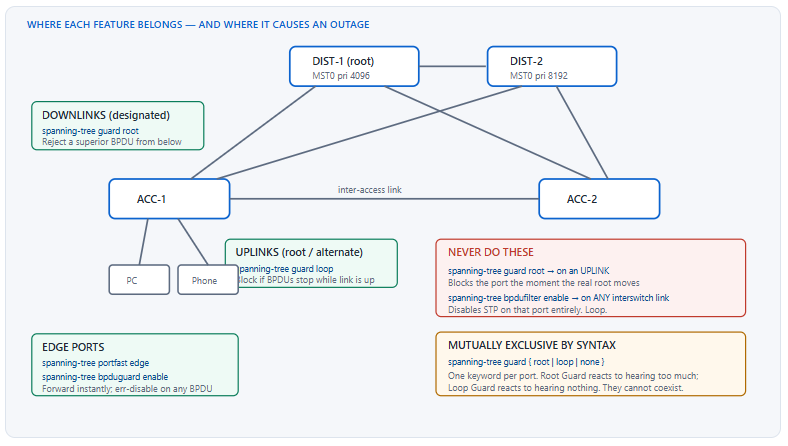
What Does the Lab Need Before You Enable Any Protection Feature?
What has to be in place first?
Three things. A stable spanning-tree topology with a deliberately placed root bridge, so you can tell an intentional block from a protection-feature block. An error-disable recovery policy, because three of these four features can shut a port down and a lab where ports stay down after you fix the cause wastes an enormous amount of time. And a clear inventory of which ports are edge, which are uplinks, and which are downlinks — the entire placement decision follows from that classification, and applying features by interface range without it is how Root Guard ends up on an uplink.
A Deeper Dive into Baseline and Topology Preparation
Pin the root before you protect anything
Root Guard and Loop Guard both make sense only relative to a known root. If the root is wherever the lowest MAC address happens to be, you cannot say which ports are designated and which are root or alternate, and therefore you cannot place either feature correctly. Set priorities explicitly on both distribution switches before touching a protection command.
! ===== DIST-1: primary root =====
spanning-tree mode rapid-pvst
spanning-tree vlan 10,20,100,200 priority 4096
!
! ===== DIST-2: secondary root =====
spanning-tree mode rapid-pvst
spanning-tree vlan 10,20,100,200 priority 8192
!
! Confirm before proceeding - this must match your design
!   show spanning-tree vlan 10 | include Root ID|This bridge
Error-disable recovery, configured before anything can trip
BPDU Guard error-disables. So do port security violations and UDLD in aggressive mode. Without recovery configured, every trip requires a manual shutdown/no shutdown. Configure recovery for the causes you expect, choose an interval you can tolerate, and verify with show errdisable recovery.
! ===== Recovery framework - configure this FIRST =====
errdisable recovery cause bpduguard
errdisable recovery cause psecure-violation
errdisable recovery cause udld
errdisable recovery cause link-flap
errdisable recovery interval 300
!
! Detection sensitivity for link flapping
errdisable flap-setting cause link-flap max-flaps 5 time 10
ACC-1# show errdisable recovery
ErrDisable Reason            Timer Status
-----------------            --------------
bpduguard                    Enabled
psecure-violation            Enabled
udld                         Enabled
link-flap                    Enabled
dtp-flap                     Disabled
...
Timer interval: 300 seconds

Interfaces that will be enabled at the next timeout:

Interface      Errdisable reason       Time left(sec)
---------      -----------------       --------------
Gi1/0/5        bpduguard                     241
Classifying ports before applying anything
Write the classification down, because the commands differ per class and a range command applied across classes is the root cause of most protection-feature outages.
| Port class | Example | STP role | Features to apply | Features that would be wrong |
|---|---|---|---|---|
| Edge / access | ACC-1 Gi1/0/1–40 | Designated, edge | PortFast edge, BPDU Guard, port security | Loop Guard (no effect), Root Guard (no effect) |
| Uplink to distribution | ACC-1 Te1/1/1–2 | Root or alternate | Loop Guard, UDLD aggressive | Root Guard — blocks on a legitimate root move |
| Downlink to access | DIST-1 Te1/0/1–8 | Designated | Root Guard, UDLD aggressive | Loop Guard — syntactically excluded anyway |
| Distribution interlink | DIST-1 to DIST-2 | Designated / root | UDLD aggressive, Loop Guard on the non-root side | BPDU Filter — catastrophic |
| Server trunk (hypervisor) | ACC-1 Gi1/0/45 | Designated, edge | PortFast edge trunk, BPDU Guard | Plain PortFast — will not apply to a trunk |
Baseline verification commands
! Global feature state in one view
ACC-1# show spanning-tree summary
Switch is in rapid-pvst mode
Root bridge for: none
Extended system ID           is enabled
Portfast Default             is disabled
Portfast Edge BPDU Guard Default   is disabled
Portfast Edge BPDU Filter Default  is disabled
Loopguard Default            is disabled
PVST Simulation              is enabled
Bridge Assurance             is enabled
EtherChannel misconfig guard is enabled
UplinkFast                   is disabled
BackboneFast                 is disabled
spanning-tree portfast edge bpduguard default enables BPDU Guard only on ports that are already PortFast edge ports. spanning-tree bpduguard enable on an interface applies regardless of PortFast state. Where an interface command exists it always wins over the global default, which is how you carve exceptions out of a blanket policy.How Does PortFast Work, and Why Does It Not Disable Spanning Tree?
What exactly does PortFast skip?
PortFast moves a port straight from blocking to forwarding when the link comes up, skipping the listening and learning states — roughly 30 seconds of delay under classic 802.1D timers. It does not disable spanning tree on the port. The port continues to send BPDUs and, critically, continues to process received ones. If a BPDU arrives, the port loses its edge status immediately and rejoins the normal state machine. PortFast's second and less-discussed function is that an edge port does not generate a Topology Change Notification when it goes up or down, which prevents every PC boot from triggering a network-wide MAC address table flush.
A Deeper Dive into PortFast Behaviour and Variants
The topology change problem PortFast actually solves
When a non-edge port transitions, spanning tree generates a topology change. Every switch that receives it shortens its MAC address aging timer from the default 300 seconds to the forward delay, typically 15 seconds. Entries age out, traffic to those destinations floods, and on a large flat network that flood is measurable. On an access switch with 400 user ports and no PortFast, the network experiences a topology change every time anyone powers on a laptop. The forwarding delay is what people notice; the flooding is what actually hurts.
! Observe the topology change counter before and after enabling PortFast
ACC-1# show spanning-tree vlan 100 detail | include topology change
  Number of topology changes 1847 last change occurred 00:00:12 ago
          from GigabitEthernet1/0/23
! ^ 1847 changes and the source is a user access port. That port
!   needs PortFast. The count should be in single digits, not thousands.
The three PortFast forms
Access ports, trunk ports, and the global default each need a different command. The trunk form matters more than it used to, because hypervisor uplinks and server NIC teams are trunks that are nonetheless edge ports — there is no switch behind them, but they carry tagged VLANs.
! Form 1: access edge port
interface range GigabitEthernet1/0/1 - 40
 switchport mode access
 switchport access vlan 100
 spanning-tree portfast edge
!
! Form 2: trunk to a hypervisor - plain portfast will NOT apply here
interface GigabitEthernet1/0/45
 description ---- ESXi host uplink ----
 switchport mode trunk
 switchport trunk allowed vlan 10,20,100,200
 spanning-tree portfast edge trunk
!
! Form 3: global default - applies to access ports only
spanning-tree portfast edge default
! Carve out an exception on a specific port:
!   spanning-tree portfast edge disable
spanning-tree portfast being configured. Cause: the access form of PortFast has no effect on a port in trunk mode; the trunk keyword is required. Confirm: show spanning-tree interface Gi1/0/45 detail and look for The port is in the portfast edge mode — its absence on a trunk means the wrong form was used. Fix: spanning-tree portfast edge trunk. Never apply this to a port facing a real switch.Losing edge status, and why that is the safety net
An edge port that receives a BPDU stops being an edge port. This is defined behaviour and it is what makes PortFast tolerable without BPDU Guard — a switch plugged into a PortFast port does not immediately create a loop, because the port reverts to normal spanning tree and goes through listening and learning. The window before that happens is small but non-zero, and during that window the port is forwarding. BPDU Guard closes the window entirely by shutting the port instead.
ACC-1# show spanning-tree interface GigabitEthernet1/0/23 detail

 Port 23 (GigabitEthernet1/0/23) of VLAN0100 is designated forwarding
   Port path cost 4, Port priority 128, Port Identifier 128.23.
   Designated root has priority 4196, address 0011.2233.4455
   Timers: message age 0, forward delay 0, hold 0
   Number of transitions to forwarding state: 1
   Link type is point-to-point by default
   The port is in the portfast edge mode
   BPDU: sent 1204, received 0
! ^ 'received 0' is the healthy state for an edge port. Any non-zero
!   receive count means something upstream is speaking spanning tree.
PortFast and Loop Guard do not combine
Loop Guard applies to non-designated ports — root ports and alternate ports. An edge port is designated by definition, so Loop Guard has nothing to act on there. Configuring both is not an error and produces no warning; Loop Guard is simply inert. This matters when you enable spanning-tree loopguard default globally and assume it covers everything: it covers exactly the ports where it is meaningful and silently ignores the rest.
spanning-tree portfast edge is how you tell it.How Do BPDU Guard and BPDU Filter Differ, and Why Is One Dangerous?
What does each one do when a BPDU arrives?
BPDU Guard error-disables the port. Any BPDU, superior or inferior, from any device, triggers it. The port stops forwarding entirely and stays down until recovery. BPDU Filter does the opposite: it stops the port from sending BPDUs and, in its interface form, causes received BPDUs to be discarded without processing. That means the port neither participates in spanning tree nor reacts to a switch appearing behind it. The global form is far safer — it applies only to PortFast edge ports, sends a small number of BPDUs when the link comes up, and disables itself the moment it receives one, returning the port to normal spanning tree.
A Deeper Dive into Guard, Filter, and the Global/Interface Asymmetry
BPDU Guard configuration and both forms
! Global form: applies ONLY to ports already in PortFast edge mode
spanning-tree portfast edge bpduguard default
!
! Interface form: applies regardless of PortFast state, and
! overrides the global setting on this port
interface range GigabitEthernet1/0/1 - 40
 spanning-tree portfast edge
 spanning-tree bpduguard enable
!
! Explicit exception on a port that must tolerate BPDUs
interface GigabitEthernet1/0/44
 spanning-tree bpduguard disable
What a BPDU Guard trip looks like
! The two log messages, in order
%SPANTREE-2-BLOCK_BPDUGUARD: Received BPDU on port GigabitEthernet1/0/5
 with BPDU Guard enabled. Disabling port.
%PM-4-ERR_DISABLE: bpduguard error detected on Gi1/0/5, putting Gi1/0/5
 in err-disable state
!
ACC-1# show interfaces status err-disabled
Port      Name               Status       Reason               Err-disabled Vlans
Gi1/0/5   user access        err-disabled bpduguard
!
! Recovery is automatic if configured; otherwise bounce the port
ACC-1# show errdisable recovery | include bpduguard
bpduguard                    Enabled
The BPDU Filter asymmetry, stated precisely
This is the single most important table in the article. The two forms of the same feature have almost opposite risk profiles.
| Behaviour | Global: spanning-tree portfast edge bpdufilter default |
Interface: spanning-tree bpdufilter enable |
|---|---|---|
| Applies to | PortFast edge ports only | Any port, edge or not |
| BPDUs sent at link-up | Yes — a small number are sent before filtering engages | None, ever |
| On receiving a BPDU | Filtering is disabled, PortFast status is lost, normal STP resumes | The BPDU is discarded and ignored |
| Effect on spanning tree | None once a neighbour appears — it self-corrects | Spanning tree is effectively off on that port |
| Loop risk | Low | High — a loop will form and will not be detected |
| Legitimate use | Suppressing BPDU leakage to customer edge ports | Almost none in an enterprise network |
! The safe form - self-correcting, edge ports only
spanning-tree portfast edge bpdufilter default
!
! The dangerous form - do not put this on an interswitch link
interface GigabitEthernet1/0/47
 spanning-tree bpdufilter enable
! ^ This port now neither sends nor processes BPDUs. If another
!   switch is behind it, spanning tree cannot see the loop it forms.
%SW_MATM-4-MACFLAP_NOTIF, and spanning tree reporting a stable topology throughout because it never saw the redundant path. Cause: spanning-tree bpdufilter enable was applied to an interface that faces another switch, so neither end learns the other exists. Confirm: show spanning-tree interface <intf> detail shows BPDU: sent 0, received 0 on a link that is up and passing traffic. Fix: remove the command. If the goal was to stop BPDU leakage toward a customer or partner, use the global PortFast form, which self-corrects, or use BPDU Guard instead.BPDU Guard and BPDU Filter on the same port
If both are configured on a port, the filter takes precedence and the guard never fires — because the guard needs to see a BPDU in order to act, and the filter discards it before that happens. The combination therefore silently disables the protection you thought you had. It appears in configurations more often than you would expect, usually because both were applied by separate templates.
! Audit for the dangerous combination across the whole switch
ACC-1# show spanning-tree interface GigabitEthernet1/0/5 detail | include Bpdu|portfast
   The port is in the portfast edge mode
   Bpdu guard is enabled
   Bpdu filter is enabled
! ^ Filter wins. BPDU Guard will never fire on this port.
!
! Global summary of what is enabled by default
ACC-1# show spanning-tree summary | include Portfast|Loopguard
Portfast Default                   is enabled
Portfast Edge BPDU Guard Default   is enabled
Portfast Edge BPDU Filter Default  is disabled
Loopguard Default                  is disabled
BPDU Guard versus Root Guard — different triggers
Both react to received BPDUs, but on different criteria and with different consequences. BPDU Guard fires on any BPDU and error-disables the port, requiring recovery. Root Guard fires only on a superior BPDU — one that would make the sender the root — and puts the port into root-inconsistent state, which self-clears when the superior BPDUs stop for max age. BPDU Guard belongs on edge ports where no BPDU should ever arrive. Root Guard belongs on downlinks where BPDUs are expected but a root claim is not.
| Feature | Trigger | Port outcome | Recovery | Correct placement |
|---|---|---|---|---|
| BPDU Guard | Any BPDU received | err-disabled (link down) | Manual, or errdisable recovery timer | Edge / access ports |
| Root Guard | Superior BPDU received | root-inconsistent (blocking, link up) | Automatic when superior BPDUs stop for max age | Downlinks toward access switches |
| Loop Guard | BPDUs stop on a non-designated port | loop-inconsistent (blocking, link up) | Automatic when a BPDU is received | Uplinks: root and alternate ports |
| BPDU Filter (interface) | — no trigger, always active | Port ignores spanning tree entirely | — | Nowhere on an interswitch link |
show spanning-tree inconsistentports lists every port blocked by a guard feature and names the reason. A port blocked by the algorithm — an ordinary alternate port — does not appear here. That distinction is the fastest way to separate "spanning tree is working" from "a protection feature fired".How Does Loop Guard Protect Against a Link That Goes Silent?
What failure does Loop Guard actually catch?
The case where a link stays physically up but stops delivering BPDUs in one direction. Without Loop Guard, an alternate port that stops receiving BPDUs ages out the stored information, concludes there is no better path, becomes designated, and starts forwarding — creating a loop, because the far end is still forwarding too. Loop Guard changes that outcome: instead of promoting the port, it moves it to loop-inconsistent state, which is a blocking state. The port stays down for traffic and comes back automatically the moment a BPDU is received again. Loop Guard operates per VLAN under PVST+ and per instance under MST.
A Deeper Dive into Loop Guard Operation and Placement
Where it applies and where it is inert
Loop Guard acts only on non-designated ports — root ports and alternate ports. On a designated port it does nothing, because a designated port is expected to send rather than receive. This is why the global form is safe to enable network-wide: spanning-tree loopguard default applies to every point-to-point port, and on the ones where it is meaningless it simply never fires.
! Global form - applies to all point-to-point ports
spanning-tree loopguard default
!
! Interface form - explicit, and overrides the global setting
interface range TenGigabitEthernet1/1/1 - 2
 description ---- uplinks to distribution ----
 spanning-tree guard loop
 udld port aggressive
!
! Disable on a specific port that must not be loop-guarded
interface TenGigabitEthernet1/1/3
 spanning-tree guard none
What a Loop Guard event looks like
! Loop Guard blocks - note this is per VLAN
%SPANTREE-2-LOOPGUARD_BLOCK: Loop guard blocking port
 TenGigabitEthernet1/1/2 on VLAN0100.
!
! ...and unblocks automatically when BPDUs return
%SPANTREE-2-LOOPGUARD_UNBLOCK: Loop guard unblocking port
 TenGigabitEthernet1/1/2 on VLAN0100.
!
ACC-1# show spanning-tree inconsistentports

Name                 Interface                Inconsistency
-------------------- ------------------------ ------------------
VLAN0100             TenGigabitEthernet1/1/2  Loop Inconsistent
VLAN0200             TenGigabitEthernet1/1/2  Loop Inconsistent

Number of inconsistent ports (segments) in the system : 2
ACC-1# show spanning-tree interface TenGigabitEthernet1/1/2 detail

 Port 106 (TenGigabitEthernet1/1/2) of VLAN0100 is broken
   (Loop Inconsistent)
   Port path cost 2000, Port priority 128, Port Identifier 128.106.
   Designated root has priority 4196, address 0011.2233.4455
   Timers: message age 20, forward delay 0, hold 0
   Number of transitions to forwarding state: 3
   Link type is point-to-point by default
   Loop guard is enabled on the port
   BPDU: sent 5821, received 4402
! ^ 'broken' with 'Loop Inconsistent' is Loop Guard working. Note the
!   receive counter has stopped incrementing while sent keeps climbing.
Loop Guard and Root Guard are mutually exclusive by syntax
Both are configured with the same command — spanning-tree guard {root | loop | none} — so a port can hold only one. That is not an arbitrary restriction: the two react to opposite conditions. Root Guard blocks a port for hearing a BPDU that is too good; Loop Guard blocks a port for hearing nothing at all. A port that needed both would be a port whose expected BPDU behaviour you had not decided.
! These cannot coexist - the second command replaces the first
interface TenGigabitEthernet1/1/1
 spanning-tree guard root
 spanning-tree guard loop
!
! Verify which one actually took effect
ACC-1# show running-config interface TenGigabitEthernet1/1/1 | include guard
 spanning-tree guard loop
! ^ Only 'loop' survives. If you meant 'root', you just lost it silently.
Loop Guard versus UDLD — overlapping, complementary, not interchangeable
Both detect a link that has gone quiet while staying up, but at different layers and with different scope. UDLD works on the media and protects any port type, including routed interfaces where no spanning tree runs; it takes the port out of service. Loop Guard is a spanning-tree feature and protects only ports where spanning tree expects to receive; it blocks the port for the affected VLANs while leaving the link up. Cisco's guidance is to run both on switch-to-switch links, because each catches cases the other misses.
| Property | Loop Guard | UDLD aggressive |
|---|---|---|
| Layer | Spanning tree (Layer 2 control plane) | Media / link layer |
| Scope | Root and alternate ports only | Any port, including routed interfaces |
| Detection time | Max age — 20 seconds by default | ~3 message intervals — 45 s default, 21 s at 7 s |
| Granularity | Per VLAN (PVST+) or per instance (MST) | Whole port |
| Action | Block the port for affected VLANs; link stays up | Err-disable the whole port |
| Recovery | Automatic on receiving a BPDU | Requires errdisable recovery or manual reset |
| Requires far-end support | No | Yes — both ends must run UDLD |
What RSTP's dispute mechanism adds, and what Bridge Assurance adds beyond it
Two further mechanisms cover cases Loop Guard alone does not. The dispute mechanism, defined in the RSTP state machine, works on received BPDUs rather than on their absence: if a port receives an inferior BPDU whose sender claims to be designated and is still in learning or discarding state, the local port concludes the neighbour is not hearing it and moves itself to discarding. That catches a one-way link from the opposite direction to Loop Guard — the side that is still receiving, rather than the side that has gone deaf. It requires no configuration and is active whenever RSTP or MST is running, which is one of several reasons to prefer them over classic 802.1D.
Bridge Assurance goes further by turning every point-to-point port into a bidirectional keepalive: BPDUs are sent on all ports regardless of state, including blocking ports, and a port that stops receiving them is moved to an inconsistent state. Because it must be enabled on both ends of every link to work, and because a neighbour that does not support it will be blocked, it is deployed as a network-wide decision rather than per port. On Catalyst platforms it applies in Rapid PVST+ and MST modes; on Nexus it is commonly enabled on inter-switch links by design.
! Bridge Assurance - enable globally, then per port-type on links
spanning-tree bridge assurance
!
interface TenGigabitEthernet1/1/1
 ! Both ends must support and enable it, or the port is blocked
 spanning-tree portfast network
! ^ 'portfast network' marks the port as a switch-to-switch link,
!   which is what Bridge Assurance operates on. Verify with:
!   show spanning-tree summary | include Bridge Assurance
show interfaces status err-disabled and show spanning-tree inconsistentports together tells you in two commands which mechanism acted and therefore what kind of fault you are looking at.Which Protection-Feature Placements Break Production Networks?
What goes wrong most often?
Six placements. Root Guard on an uplink isolates an access switch the moment a planned root move happens. Interface BPDU Filter on an interswitch link disables spanning tree and produces a storm. BPDU Guard and BPDU Filter on the same port silently cancels the guard. PortFast on a port facing a real switch creates a forwarding window before edge status is lost. No PortFast at all on user ports floods the network with topology changes. And BPDU Guard with no error-disable recovery turns a transient event into a permanent outage requiring manual intervention.
A Deeper Dive into the Failure Catalogue
Root Guard on the wrong side of the link
Root Guard rejects superior BPDUs. On a downlink toward an access switch, a superior BPDU means an access switch is claiming to be root, which should never happen and is exactly what you want to block. On an uplink toward the distribution layer, superior BPDUs are the normal case — that is where the root lives. Applying Root Guard there means that any time the root improves, the uplink blocks and the access switch is cut off.
BKN*. The log reads %SPANTREE-2-ROOTGUARD_BLOCK: Root guard blocking port TenGigabitEthernet1/1/1 on VLAN0100. Cause: Root Guard was applied to every trunk on the access switch with a single range command, including the uplinks. Confirm: show spanning-tree inconsistentports lists the uplinks as Root Inconsistent. Fix: remove Root Guard from every port that could ever be a root port. On an access switch, that means all uplinks — Root Guard belongs on the distribution switch's downlinks instead. Recovery is automatic once the superior BPDUs stop, so removing the command clears the state.
! WRONG - blanket application on an access switch
interface range TenGigabitEthernet1/1/1 - 2
 spanning-tree guard root
!
! RIGHT - Loop Guard on the access switch uplinks...
ACC-1(config)# interface range TenGigabitEthernet1/1/1 - 2
ACC-1(config-if-range)# spanning-tree guard loop
!
! ...and Root Guard on the distribution switch downlinks
DIST-1(config)# interface range TenGigabitEthernet1/0/1 - 8
DIST-1(config-if-range)# spanning-tree guard root
Missing PortFast measured as a topology-change flood
The symptom is not obvious because nothing is down. Users report intermittent slowness, unicast traffic appears to flood, and switch CPUs run higher than expected. The cause is that every access port link transition generates a TCN, every TCN shortens MAC aging network-wide, and entries age out faster than the network can relearn them.
! Find the ports generating topology changes
DIST-1# show spanning-tree vlan 100 detail | include topology change|from
  Number of topology changes 28194 last change occurred 00:00:04 ago
          from TenGigabitEthernet1/0/3
!
! Follow it downstream to the access switch and repeat
ACC-1# show spanning-tree vlan 100 detail | include topology change|from
  Number of topology changes 28190 last change occurred 00:00:06 ago
          from GigabitEthernet1/0/17
! ^ A user access port with no PortFast. Enable it and the count stops.
!
! Blanket fix on an access switch, with the edge default
ACC-1(config)# spanning-tree portfast edge default
ACC-1(config)# spanning-tree portfast edge bpduguard default
PortFast facing a real switch
Someone connects a small desk switch to a PortFast port. The port forwards immediately, and for the brief period before the first BPDU arrives it is bridging two paths. Rapid PVST+ and MST recover quickly, but the exposure window is real and depends on how quickly the attached device begins sending BPDUs — an unmanaged switch never does, so the port keeps its edge status indefinitely while forwarding a potential loop.
show mac address-table | include <flapping MAC> shows the same address on two ports; %SW_MATM-4-MACFLAP_NOTIF in the log names both. Fix: BPDU Guard does not help here either, since no BPDU is ever sent. Use storm control and port security to bound the damage, and use switchport port-security maximum to make a multi-device port visible.
! Defence in depth for an edge port an unmanaged switch might reach
interface range GigabitEthernet1/0/1 - 40
 spanning-tree portfast edge
 spanning-tree bpduguard enable
 ! Bound a storm even if STP never sees the loop
 storm-control broadcast level pps 1k 500
 storm-control multicast level pps 2k 1k
 storm-control action shutdown
 ! Make an extra device on the port visible
 switchport port-security
 switchport port-security maximum 3
 switchport port-security violation restrict
The full placement matrix
| Port | PortFast | BPDU Guard | BPDU Filter | Loop Guard | Root Guard | UDLD |
|---|---|---|---|---|---|---|
| User access port | Yes (edge) | Yes | No | No effect | No effect | No |
| Hypervisor / server trunk | Yes (edge trunk) | Yes | No | No effect | No effect | No |
| Access switch uplink | No | No | Never | Yes | Never | Yes (aggressive) |
| Distribution downlink | No | No | Never | Excluded by syntax | Yes | Yes (aggressive) |
| Distribution interlink | No | No | Never | Yes, on the non-root side | No | Yes (aggressive) |
| Partner / customer handoff | Sometimes (edge) | Yes | Global form only | No | Consider | No |
A complete, defensible access-switch template
! ===== ACC-1: complete protection posture =====
spanning-tree mode rapid-pvst
spanning-tree portfast edge default
spanning-tree portfast edge bpduguard default
spanning-tree loopguard default
!
errdisable recovery cause bpduguard
errdisable recovery cause psecure-violation
errdisable recovery cause udld
errdisable recovery interval 300
!
! Edge ports inherit the global defaults; add per-port security
interface range GigabitEthernet1/0/1 - 40
 switchport mode access
 switchport access vlan 100
 switchport voice vlan 200
 switchport nonegotiate
 switchport port-security
 switchport port-security maximum 3
 switchport port-security violation restrict
 storm-control broadcast level pps 1k 500
!
! Uplinks: global loopguard default already covers these; UDLD explicit
interface range TenGigabitEthernet1/1/1 - 2
 switchport mode trunk
 switchport nonegotiate
 switchport trunk native vlan 999
 switchport trunk allowed vlan 10,20,100,200
 spanning-tree link-type point-to-point
 spanning-tree guard loop
 udld port aggressive
| Failure | First symptom | Confirming command | Fix | Prevention |
|---|---|---|---|---|
| Root Guard on an uplink | Access switch isolated after a root move | show spanning-tree inconsistentports |
Remove from uplinks; apply on downlinks | Classify ports before applying ranges |
| Interface BPDU Filter on a trunk | Broadcast storm, 100% CPU, MAC flap | show spanning-tree int X detail — sent 0, received 0 |
Remove the command | Ban the interface form in templates |
| Guard + Filter on the same port | BPDU Guard never fires despite being configured | show spanning-tree int X detail |
Remove the filter | One template per port class |
| No PortFast on access ports | Constant topology changes, unicast flooding | show spanning-tree vlan N detail change count |
spanning-tree portfast edge default |
Include in the base template |
| Plain PortFast on a trunk | Hypervisor uplink still takes 30 s | show spanning-tree int X detail |
portfast edge trunk |
Separate template for server trunks |
| No errdisable recovery | Port stays down after the cause is fixed | show errdisable recovery |
Enable per cause with an interval | Configure recovery before the guards |
Conclusion
The four features look like a toolkit and behave like a set of assertions about a port. PortFast asserts that no switch is attached. BPDU Guard asserts that the assertion is worth enforcing with a shutdown. Loop Guard asserts that this port should be receiving BPDUs and that silence means something is wrong. BPDU Filter, in its interface form, asserts that spanning tree does not apply here — and that is the one assertion nobody should be making on a link between two switches, because if it is wrong there is no mechanism left to notice.
The operational rule that follows is about classification rather than configuration. Decide for each port whether a BPDU can legitimately arrive, and if so from which direction. Edge ports get PortFast and BPDU Guard. Ports facing the root get Loop Guard. Ports facing away from the root get Root Guard. Nothing gets interface-level BPDU Filter. Because Root Guard and Loop Guard share one command keyword, the classification is enforced by syntax on those two — but nothing stops you applying either to the wrong side, and an interface range that spans uplinks and downlinks will do exactly that.
Build the reference topology and break each feature deliberately: put Root Guard on an uplink and move the root, put interface BPDU Filter on the inter-access link and watch spanning tree stay convinced the topology is stable while the CPU climbs, remove PortFast from a busy access port and watch the topology-change counter run. Each failure has a distinct output signature in show spanning-tree inconsistentports, show interfaces status err-disabled, and the detail view's BPDU sent/received counters. Recognising those three signatures instantly is the actual deliverable; the commands themselves take five minutes to learn.
External Links Recommendations
- Cisco — Spanning-Tree Protocol Enhancements using Loop Guard and BPDU Skew Detection: Loop Guard operation, its restriction to non-designated ports, and its relationship with UDLD.
- Cisco — Spanning Tree Protocol Root Guard Enhancement: root-inconsistent state, automatic recovery, and correct placement.
- Cisco — Spanning Tree PortFast BPDU Guard Enhancement: the global-versus-interface distinction and error-disable behaviour.
- Cisco — Understanding Rapid Spanning Tree Protocol (802.1w): edge ports, proposal/agreement, and topology-change handling under RSTP.
- IEEE 802.1Q — Bridges and Bridged Networks: the RSTP and MSTP state machines these features modify.
- Catalyst 9300 Layer 2 Configuration Guide: current IOS-XE syntax for PortFast edge, BPDU Guard, BPDU Filter, and guard modes.
- Cisco Learning Network — CCIE Enterprise Infrastructure: current blueprint and lab equipment list.
Reference Notes
- IEEE Std 802.1Q, Clause 13 — RSTP and MSTP port roles: designated, root, alternate, and backup, which determine where Loop Guard and Root Guard are meaningful.
- IEEE Std 802.1Q, Clause 13 — edge port definition: immediate transition to forwarding and suppression of topology change notifications; loss of edge status on receiving a BPDU.
- Cisco, "Spanning Tree PortFast BPDU Guard Enhancement" — BPDU Guard error-disables the port on receipt of any BPDU; the global form applies only to PortFast-enabled ports.
- Cisco, "Spanning Tree PortFast BPDU Guard Enhancement" — the interface-level BPDU Guard command overrides the global default on that port.
- Cisco Catalyst Layer 2 Configuration Guide — global BPDU Filter applies only to PortFast edge ports, transmits BPDUs briefly at link-up, and disables itself on receiving a BPDU.
- Cisco Catalyst Layer 2 Configuration Guide — interface-level BPDU Filter prevents the port from sending BPDUs and causes received BPDUs to be dropped, effectively disabling spanning tree on that port.
- Cisco, "Spanning-Tree Protocol Enhancements using Loop Guard and BPDU Skew Detection" — Loop Guard applies to root and alternate ports and has no effect on designated ports.
- Cisco, "Spanning-Tree Protocol Enhancements using Loop Guard and BPDU Skew Detection" — Loop Guard moves the port to loop-inconsistent state and recovers automatically when a BPDU is received; it operates per VLAN.
- Cisco, "Spanning Tree Protocol Root Guard Enhancement" — Root Guard triggers only on a superior BPDU and places the port in root-inconsistent state, recovering automatically after max age without superior BPDUs.
- Cisco Catalyst Layer 2 Configuration Guide —
spanning-tree guard {root | loop | none}is a single command accepting one keyword, making Root Guard and Loop Guard mutually exclusive on a port. - Cisco Catalyst Layer 2 Configuration Guide — default error-disable recovery interval of 300 seconds and per-cause enablement with
errdisable recovery cause. - Cisco Learning Network, CCIE Enterprise Infrastructure v1.1 blueprint — placement of spanning-tree protection features within the Network Infrastructure domain.