

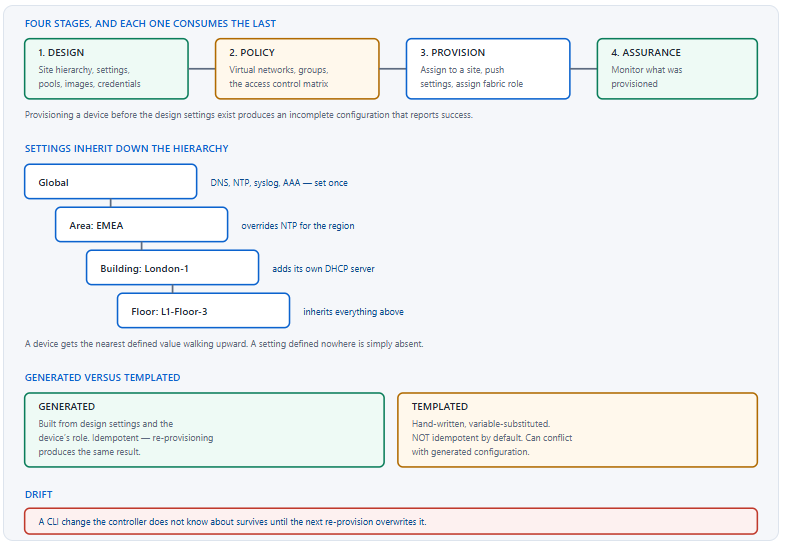
Controller-driven provisioning is a workflow with a fixed order, and most of the trouble people have with it comes from treating the order as advisory. Each stage consumes what the previous one produced: provisioning a device draws on settings defined during design, and a device provisioned before those settings exist receives an incomplete configuration that looks successful. The workflow is not a suggested sequence, it is a dependency chain.
The second source of trouble is the relationship between generated configuration and hand-written configuration. The controller generates most of what a device needs from the design settings and the device's place in the site hierarchy. Anything it does not generate goes in a template, and templates behave differently — they are not idempotent by default, they can conflict with generated configuration, and they are where a well-intentioned addition becomes a provisioning failure on every device in a region.
This article covers the four stages and why the order is fixed, how the site hierarchy decides what each device receives, how templates coexist with generated configuration, how to work through a provisioning failure, and the practices that prevent configuration drift — the state where the controller's view and the device's reality have quietly diverged.
What Are the Four Stages, and Why Is the Order Fixed?
What does each stage produce?
Design produces the raw material: a site hierarchy, network settings such as name servers and time sources, address pools, credentials and software images. Policy produces the segmentation constructs — virtual networks, groups and the access control matrix. Provision applies both to actual devices by assigning them to a site and pushing the resulting configuration. Assurance observes what was provisioned. Each stage reads from the previous ones, which is why the order cannot be rearranged.
A Deeper Dive into the Stages
Why provisioning early is worse than provisioning late
A device provisioned before the design settings exist does not fail — it receives whatever settings were available at that moment, which may be none, and reports success. The configuration on the device is then incomplete in ways that are not obvious: no time source, no logging destination, no name resolution. Those absences surface later as unrelated-looking problems, and the connection back to the provisioning order is not one anybody makes.
! What a fully provisioned device should have
EDGE1# show run | include ^ntp|^logging host|^ip name-server|^snmp-server host
ntp server 10.5.5.30
logging host 10.5.5.20
ip name-server 10.5.5.40
snmp-server host 10.50.50.20 version 2c public
!
! An early-provisioned device is missing some of these
! and nothing reported an error.
!
EDGE1# show ntp status | include synchron
Clock is synchronized, stratum 3, reference is 10.5.5.30
! ^ Unsynchronised clocks make every log timestamp useless,
!   which is discovered during the first incident.
Policy before provision, for the same reason
Virtual networks and groups are consumed when a device is given a fabric role, so they have to exist first. A fabric edge node provisioned before the virtual networks are defined has nowhere to put its anycast gateways, and the correction is to re-provision rather than to add the missing pieces incrementally. The stages are cheap to do in order and awkward to do out of it.
What each stage looks like on the device
| Stage | Produces on the device | Verify with |
|---|---|---|
| Design settings | NTP, syslog, DNS, SNMP, AAA | show run | include ^ntp|^logging|^aaa |
| Credentials | Local users, RADIUS servers | show run | include ^radius|^username |
| Software image | The golden version | show version | include Version |
| Policy | VRFs, group tag configuration | show vrf, show cts environment-data |
| Fabric role | LISP, anycast gateways, tunnels | show run | section router lisp |
| Templates | Whatever you wrote | Depends entirely on the template |
The design work that pays off most
Three items in the design stage carry disproportionate weight because everything downstream depends on them and none is convenient to change later. The site hierarchy, because it decides what every device inherits and restructuring it means re-provisioning everything under the part that moved. The address pools, because a pool that runs out mid-rollout leaves a site half-provisioned. And the golden software image, because version consistency across a site is far easier to establish at the start than to retrofit.
None of these is technically difficult and all three are frequently rushed, because the design stage produces nothing visible and the pressure is to get devices provisioned. The counter-argument is that every hour spent on the hierarchy and the pools is repaid at the second site, where the work is simply reused, and that a badly structured hierarchy is repaid negatively at every site thereafter.
Re-provisioning is the correction mechanism
Most incomplete or incorrect provisioning is fixed by fixing the design and re-provisioning, rather than by editing the device. That is the intended workflow and it is idempotent for generated configuration: pushing the same intent twice produces the same device configuration. It is worth knowing because the instinct — to fix the device directly — produces exactly the drift this article's later sections are about.
! Before re-provisioning, capture what is there
EDGE1# show running-config | redirect flash:before.cfg
EDGE1# show archive config differences
!
! After re-provisioning, compare
EDGE1# show archive config differences flash:before.cfg system:running-config
!
! And confirm the specific things you expected to change
EDGE1# show run | include ^ntp|^logging host
EDGE1# show run | section router lisp
How Does the Site Hierarchy Decide What a Device Gets?
How does inheritance work?
Settings are defined at a level of the hierarchy and apply to everything below it unless a lower level overrides them. A device takes the nearest defined value walking upward from its own position — its floor, then its building, then its area, then global. A setting defined nowhere in that chain is simply absent from the device, with no error, which is the mechanism behind most incomplete provisioning.
A Deeper Dive into the Hierarchy
Define globally, override locally
The pattern that works is to put everything at the global level that is genuinely global — name servers, time sources, logging destinations, authentication servers — and override only where a site genuinely differs. The opposite pattern, defining everything per building, produces a hierarchy where adding a setting means editing it in forty places and where a missed one is invisible until a device from that building behaves differently.
! What a device inherited, seen on the device
EDGE1# show run | include ^ntp server
ntp server 10.5.5.30
ntp server 10.5.5.31
!
! Compare across buildings - these SHOULD match unless
! an override was deliberate
EDGE2# show run | include ^ntp server
EDGE9# show run | include ^ntp server
!
! A difference nobody intended is an override
! somebody added and forgot.
Where a device sits determines everything
Assigning a device to the wrong floor or building gives it the wrong settings, the wrong address pools and potentially the wrong software image — and it does so quietly, because the provisioning succeeds. This is the most common cause of one device in a site behaving differently from its neighbours, and it is checked by comparing the device's configuration against a known-correct peer rather than by reading the hierarchy.
! Two switches in the same closet should differ ONLY in
! addresses and identifiers
EDGE1# show run | include ^ntp|^logging host|^ip name-server
EDGE2# show run | include ^ntp|^logging host|^ip name-server
!
! And in the pools they drew from
EDGE1# show ip interface brief | include Loopback0
EDGE2# show ip interface brief | include Loopback0
!
! Any other difference means one of them is assigned
! somewhere unexpected in the hierarchy.
Address pools and their reservations
Pools are defined globally and reserved to sites, which is what lets a building draw its loopbacks, its infrastructure addresses and its endpoint subnets from a coherent range. A pool that is not reserved to a site cannot be used by devices there, and a reservation that is too small stops provisioning partway through a rollout — at which point some devices are provisioned and some are not, which is the least convenient failure point.
| Pool | Used for | Size against | If exhausted |
|---|---|---|---|
| Underlay / loopback | Fabric node RLOCs | All nodes, all sites, plus growth | Second summary forever |
| Infrastructure | APs and extended nodes | All APs plus growth | APs cannot onboard |
| Endpoint subnets | User and device VLANs | Peak concurrent endpoints | Clients get no address |
| Border handoff | Sub-interface addressing | VNs × borders × upstreams | Handoff cannot be added |
Designing a hierarchy that will not need restructuring
The hierarchy should reflect how the network is operated rather than how the organisation is drawn on a chart. If settings differ by geography, the hierarchy should be geographic; if they differ by business unit, it should follow that. A hierarchy built to mirror an organisational structure that has no bearing on network settings produces levels that never carry an override and therefore do no work, while the distinctions that actually matter have nowhere to live.
The practical test is to ask, for each level being proposed, what setting would be overridden there. A level with no answer is decoration. Two or three levels that each carry real overrides are worth more than six that mostly exist to reflect a reporting line, and they are considerably easier to reason about when a device turns out to have inherited something unexpected.
Network profiles, which bind it together
A profile associates a set of settings and templates with a device type at a level of the hierarchy, so that every access switch in a region receives the same treatment without that being expressed forty times. It is the mechanism that makes the hierarchy do useful work rather than just organise a tree, and a hierarchy with no profiles is one where provisioning is still effectively per device.
How Do Templates Fit Alongside Generated Configuration?
What are templates for?
Everything the controller does not generate. Interface descriptions, quality of service policies, local access lists, platform-specific settings, anything organisational — all of it goes in a template with variables substituted at provisioning time. Templates are powerful and they are also the part of the workflow that behaves least predictably, because they are hand-written configuration being pushed by an automation system that does not understand what it is pushing.
A Deeper Dive into Templates
Templates are not idempotent
Generated configuration expresses a desired state, so pushing it twice produces the same result. A template is a block of commands, so pushing it twice runs the commands twice — which is harmless for most configuration and destructive for anything that appends. A template that adds an access list entry, applied twice, produces two entries; applied ten times over a year of re-provisioning, ten.
! A template that appends - dangerous on re-provision
ip access-list extended SITE-ACL
 permit ip 10.10.0.0 0.0.255.255 any
! ^ Run twice = two identical lines
!
! The safe form - replace rather than append
no ip access-list extended SITE-ACL
ip access-list extended SITE-ACL
 permit ip 10.10.0.0 0.0.255.255 any
!
! Check for the symptom on any device provisioned repeatedly
EDGE1# show ip access-lists SITE-ACL
EDGE1# show run | section ip access-list | count permit
Conflicts with generated configuration
A template that configures something the controller also generates creates a conflict whose outcome depends on ordering, and the ordering is not something the template author controls. The rule that avoids this entirely is that templates should only touch things the controller does not: if a setting can be expressed in the design, it belongs there rather than in a template.
! WRONG - the controller generates this from design settings
ntp server 10.5.5.30
logging host 10.5.5.20
!
! RIGHT - things the controller does not generate
interface range GigabitEthernet1/0/1-24
 description ACCESS - managed by network team
 storm-control broadcast level 5.00
 storm-control action trap
!
! Verify the template landed and did not fight anything
EDGE1# show run interface GigabitEthernet1/0/1
EDGE1# show run | include ^ntp server
! ^ The second should show design settings, not template ones.
Version-controlling the templates
Templates are code, and treating them as code pays off immediately. Kept in a repository, they get a history showing who changed what and why, a review step before anything reaches a device, and the ability to compare what is deployed against what was intended. Kept only inside the controller, they have an edit history at best and no review at all.
The workflow that works is to author and review in the repository, then import to the controller as the deployment step, so the repository is authoritative and the controller holds a copy. That also gives a straightforward answer to the question of what a template looked like before a change broke something, which is otherwise reconstructed from memory at exactly the moment memory is least reliable.
Variables and where they come from
Templates take variables bound at provisioning time — from the site, the device, or values entered during the workflow. A variable that is never bound produces either a literal placeholder in the configuration or a provisioning failure, depending on how the template was written, and the first of those is considerably worse because it succeeds.
! Check for unsubstituted placeholders after provisioning
EDGE1# show run | include \$|{{|}}
! ^ Any output here is a variable that was never bound.
!
! And for the obviously wrong values a default can produce
EDGE1# show run | include description
EDGE1# show run | include ^hostname
!
! A hostname of the literal variable name is the clearest
! possible version of this failure, and it does happen.
Keeping templates small and separate
A single large template covering everything a site needs fails as one unit: any error in it stops the whole thing, and any change to it risks everything it contains. Several small templates, each covering one concern, fail independently and can be applied, tested and revised independently. The cost is a longer list of templates and the benefit is that a change to the access-port template cannot break the quality-of-service configuration.
Platform differences are the other natural boundary. A command valid on one switch family and not another is a template that must be split rather than made conditional, because conditional logic inside a template is harder to test than two templates bound to two platform families. The rule that works is one template, one concern, one platform family.
Testing a template on one device
A template applied to a region is applied to every device in it, so a syntax error or a platform incompatibility becomes a fleet-wide failure in one action. Applying it to a single device first, verifying the result on that device, and only then widening the scope costs one extra step and bounds the blast radius to something recoverable.
| Template risk | Consequence | Mitigation |
|---|---|---|
| Appends rather than replaces | Duplicated configuration over time | Remove-then-add, or use idempotent forms |
| Conflicts with generated config | Unpredictable result | Only template what the controller does not generate |
| Unbound variable | Literal placeholder in the config | Grep for placeholders after provisioning |
| Platform-specific command | Failure on other platforms | Separate templates per platform family |
| Applied at too high a scope | Fleet-wide failure in one action | Test on one device first |
show run on any device shows the same wrong result. Fix: make single-device validation a required step before any template is bound to a scope larger than one device — it costs minutes and bounds the failure to something recoverable.How Do I Troubleshoot a Provisioning Failure?
What is the order?
Reachability and credentials first, because everything else depends on them and both fail in ways that produce confusing downstream errors. Then whether the device is in a manageable state at all. Then the specific content being pushed — image, template, settings — which is where the actual error usually is. Working in that order means each step either passes or explains the ones after it.
A Deeper Dive into Failures
Reachability and credentials
The controller manages devices over a session that has to be established, authenticated and permitted. A credential rotation, an access list applied to management traffic, or a certificate expiry breaks that session, and the resulting provisioning failure is reported as whatever the workflow was attempting rather than as a session problem. Confirming the session exists takes one command and eliminates a large fraction of cases.
! First: can the controller talk to the device at all?
EDGE1# show netconf-yang sessions
Number of sessions : 1
session-id  transport    username   source-host
1           netconf-ssh  dnacadmin  10.50.50.20
!
! Is anything blocking it?
EDGE1# show run | include ^line vty -A 5
EDGE1# show ip access-lists | include 830|22
EDGE1# show logging | include SSH|NETCONF|AUTHFAIL
!
! And the credential itself
EDGE1# show run | include ^username|^aaa authentication login
Device state
A device can be reachable and still not provisionable: mid-upgrade, in a partially provisioned state from a previous failure, or with a configuration lock held by something else. These states produce failures that read as unrelated errors, and checking them is quick.
! Is the device in a state where it can accept changes?
EDGE1# show configuration lock
Parser Configure Lock
Owner PID : -1
!
EDGE1# show install summary
EDGE1# show version | include uptime
!
! And is there an in-flight operation?
EDGE1# show logging | include CONFIG_I|INSTALL|RELOAD
Reading the actual error
Provisioning failures usually carry a specific device-side error that the workflow reports in a summarised form. Getting to the underlying message — in the device's log, at the time of the failure — is what turns "provisioning failed" into a specific line that did not apply. This is nearly always more productive than re-running the workflow and hoping.
! The device's log around the failure time
EDGE1# show logging | include CONFIG_I
%SYS-5-CONFIG_I: Configured from console by dnacadmin on vty0
!
! And any command that was rejected
EDGE1# show logging | include Invalid|% |rejected
!
! What actually changed, if anything did
EDGE1# show archive config differences
EDGE1# show archive
The common causes, ranked
| Cause | Reported as | Check |
|---|---|---|
| Management session down | A vague task failure | show netconf-yang sessions |
| Credential mismatch | Authentication or task failure | Device log for authentication failures |
| Template syntax or platform error | Failure on every device at once | Device log for rejected commands |
| Unbound template variable | Success, wrong config | show run | include placeholder |
| Image mismatch | Failure part-way | show version, show install summary |
| Design setting missing | Success, incomplete config | Compare against a correct peer |
Failures that succeed
The two entries in that table marked as reporting success are the ones worth remembering, because no amount of reading task logs will find them. An unbound variable and a missing design setting both produce a completed provisioning run and a device that is wrong, and both are found only by looking at the device afterwards. That is the argument for a post-provisioning verification step that is separate from the task result.
! Post-provisioning verification - independent of task status
!
! 1. No unsubstituted placeholders
EDGE1# show run | include \$|{{|}}
!
! 2. Design settings all present
EDGE1# show run | include ^ntp server|^logging host|^ip name-server
!
! 3. Matches a known-good peer, apart from identifiers
EDGE1# show run | redirect flash:this.cfg
!    diff against a peer's capture offline
!
! 4. Fabric state rebuilt, if applicable
EDGE1# show lisp session
EDGE1# show cts environment-data | include state
When to stop and roll back
A provisioning run that has failed on some devices and succeeded on others leaves a site in a mixed state, and the instinct is to push forward until it completes. That is usually wrong: a partial state where half the devices have new configuration and half have old is harder to reason about than either extreme, and every subsequent action compounds it. Stopping, characterising which devices are in which state, and deciding deliberately is faster than it feels.
The decision itself is usually straightforward once the states are known. If the failures share a cause that can be fixed quickly, fix it and complete the run. If they do not, roll the successful ones back so the site is uniformly on the previous configuration, and resume in a later window with the cause understood. What does not work is leaving the mixed state in place overnight on the assumption that it will be sorted out tomorrow.
Which Orchestration Mistakes Cause Configuration Drift?
What is drift and why does it matter?
Drift is the state where the controller's model of a device and the device's actual configuration differ. It matters for two reasons: the controller's view becomes unreliable at exactly the moment someone consults it during an incident, and a future re-provision may overwrite whatever was added locally, without warning, at a time nobody connects to the original change.
A Deeper Dive into Drift
The CLI change nobody recorded
show archive config differences or a comparison against the last controller-generated configuration shows the local addition; the device log shows a configuration change at the re-provisioning time. Fix: express the change in the design or in a template so it is part of the intent, and treat any CLI change on a managed device as temporary by definition.The device excluded from management
The template that keeps growing
Drift on devices the controller does not manage
Every network has devices outside the controller's scope — an out-of-band console server, a legacy switch in a corner, equipment belonging to another team. These do not drift in the sense used above, because there is no intent for them to diverge from, and that is precisely the problem: they have no generated configuration, no profile, and no automatic consistency with anything.
The practical answer is to keep a short explicit list of them, with an owner and a reason for each, rather than letting them exist by omission. A device that is deliberately excluded and documented is a known constraint; the same device undocumented is a surprise waiting for whoever next traces a path through it. Reviewing that list quarterly also tends to shrink it, because most entries turn out to have been temporary decisions nobody revisited.
Detecting drift before it bites
Drift is detectable by comparison, and the comparisons that work are between a device and its own archived configuration, and between a device and a peer that should be identical. Both are mechanical and both can be scheduled. What does not work is expecting the controller to report it — the controller's model is one side of the comparison, so it cannot independently notice that the other side has moved.
! Device against its own archive
EDGE1# show archive
EDGE1# show archive config differences
!
! Enable archiving if it is not on - this is the prerequisite
archive
 path flash:archive-
 maximum 10
 write-memory
 log config
  logging enable
  logging size 500
  notify syslog contenttype plaintext
  hidekeys
!
! Then every change is recorded with who and what
EDGE1# show archive log config all
Making the intent the documentation
A controller-driven network has an advantage that a manually configured one does not: the intent is written down somewhere central and is the same for every device that shares a profile. That only holds while the intent is complete, which means that pushing every change through the controller is not merely a discipline for avoiding drift — it is what keeps the documentation accurate as a side effect of doing the work.
The corollary is that a change made at the CLI is a change made outside the documentation, and the cost of that is paid by whoever next tries to understand why one device differs. Framing the rule that way tends to be more persuasive than framing it as a process requirement, because it explains what is actually lost rather than asserting that a rule exists.
The practices that prevent it
Three, and all of them are cultural rather than technical. Every change to a managed device goes through the controller, without exception, so that intent and reality never diverge. Any CLI change made during an incident is recorded and either promoted into the intent or reverted within a defined window. And exclusions from management carry an expiry date, so that a temporary measure cannot become a permanent one by default.
Blueprint framing
The CCIE Enterprise Infrastructure v1.1 blueprint covers automation and orchestration within the software-defined infrastructure domain, and the useful framing is the workflow and its dependencies rather than interface navigation: what each stage produces, why the order matters, and what the relationship is between generated and templated configuration. Those three points cover most of what is asked.
Conclusion
The provisioning workflow is a dependency chain, not a suggested order. Design produces the settings, policy produces the segmentation constructs, provisioning consumes both, and assurance observes the result. A device provisioned before the material it needs exists receives an incomplete configuration and reports success — which is the single most common way a controller-driven deployment ends up with devices that are subtly and invisibly different from each other.
Templates deserve more caution than they usually get. Generated configuration expresses state and is safe to push repeatedly; a template is a block of commands and is not. Anything that appends accumulates over a year of re-provisioning, anything that duplicates generated configuration conflicts unpredictably, and anything applied at region scope without a single-device test can fail across dozens of devices in one action. Testing on one device first bounds all three.
Drift is the long-term risk and it is entirely a matter of practice. The controller cannot detect it, because its own model is one side of the comparison. What detects it is device-side archiving and comparison against peers, and what prevents it is a rule that every change to a managed device goes through the controller — with any incident-time CLI change either promoted into the intent or reverted within a window that somebody actually enforces.
External Links
- RFC 6241 — Network Configuration Protocol (NETCONF)
- RFC 8040 — RESTCONF Protocol
- RFC 7950 — The YANG 1.1 Data Modeling Language
- RFC 8342 — Network Management Datastore Architecture (NMDA)
- Cisco IOS XE — Programmability Configuration Guide
- Cisco — Software-Defined Access Configuration Guide, Catalyst 9300
- Cisco Learning Network — CCIE Enterprise Infrastructure
Reference Notes
- RFC 6241 specifies NETCONF, the configuration protocol used by a controller to read and write device configuration.
- RFC 6241 defines the concept of a configuration datastore and the locking mechanism that prevents concurrent modification.
- RFC 8040 specifies RESTCONF, an HTTP-based interface to the same YANG-modelled datastores.
- RFC 7950 defines YANG, the modelling language in which device configuration and operational state are described for programmatic access.
- RFC 8342 defines the network management datastore architecture, distinguishing intended configuration from applied and operational state.
- Cisco documentation describes the design, policy, provision and assurance workflow stages and the dependency of provisioning on design settings.
- Cisco documentation describes the site hierarchy of areas, buildings and floors, and the inheritance of network settings down that hierarchy.
- Cisco documentation describes network profiles, which associate settings and templates with device types at a level of the site hierarchy.
- Cisco documentation describes template-based configuration with variable substitution applied during provisioning.
- Cisco IOS XE documentation describes the configuration archive and
show archive config differences, which compares a saved configuration against the running one. - Cisco IOS XE documentation describes configuration change logging, which records the commands entered, the user and the session for each change.
- The CCIE Enterprise Infrastructure v1.1 unified exam topics include automation and orchestration within the software-defined infrastructure domain.