

Port security counts MAC addresses on a port and reacts when there are too many. That is the entire feature, and describing it that way immediately explains both what it is good at and why it causes so many outages. It is good at stopping someone plugging an unauthorised switch into a wall port and multiplying the devices on it. It causes outages because the default configuration reacts to the second address by disabling the port, and a great many legitimate situations produce a second address.
The gap between what people think they are configuring and what they are actually configuring is unusually wide here. "Port security" sounds like an identity control and is not — it does not know who anyone is, cannot distinguish an authorised laptop from an unauthorised one, and is satisfied by any device whose address happens to be the one it learned first. It is a count with a reaction, and treating it as anything more sophisticated leads to designs that disappoint.
This article covers what the feature actually enforces, how the three learning modes differ and which to use, what each violation mode really does, how port security coexists with voice VLANs and identity-based access control, and the failure catalogue — the configurations that take ports down for entirely legitimate traffic.
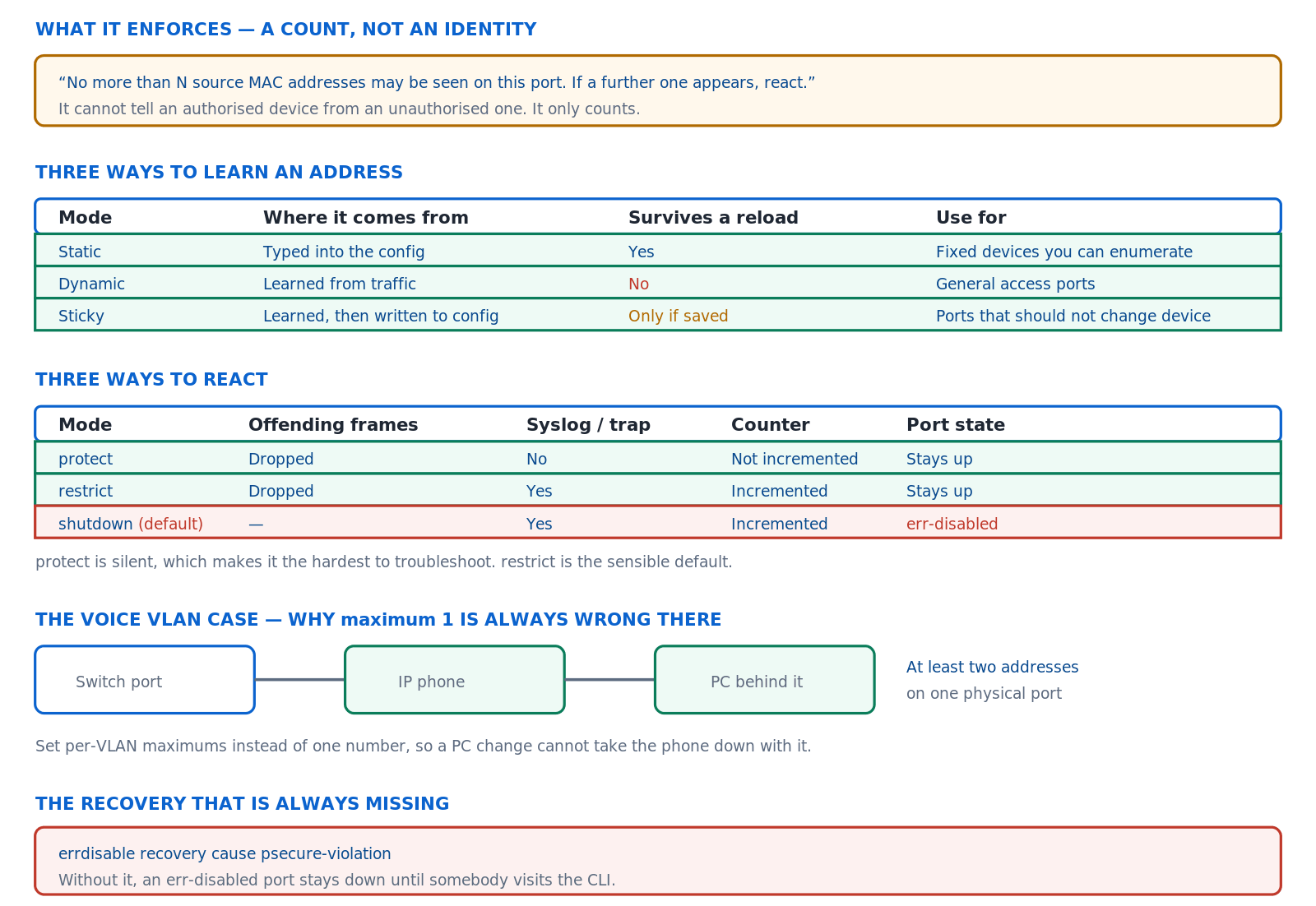
Port security is a count with a reaction. The learning mode decides what is counted, the violation mode decides what happens, and the default combination is the aggressive one.
What Does Port Security Actually Enforce?
What is the rule?
No more than a configured number of source MAC addresses may be seen on a port. Addresses are learned in the order they appear, up to the maximum; the next new address is a violation and triggers whatever reaction is configured. That is all. The feature has no notion of which addresses are legitimate beyond the ones it happened to learn first, and no relationship to any identity system unless one is configured separately.
A Deeper Dive into the Mechanism
What it does and does not stop
It stops the number of devices behind a port from growing — an unauthorised switch or hub, a virtual machine host spawning interfaces, a laptop bridging two networks. It does not stop an attacker who unplugs the authorised device and plugs in their own, because after the entry ages or the port bounces, their address is simply the first one learned. Understanding that boundary is what prevents port security from being sold internally as something it is not.
! The minimum viable configuration
interface GigabitEthernet1/0/12
 description User access
 switchport mode access
 switchport access vlan 10
 switchport port-security
 ! ^ defaults: maximum 1, violation shutdown, dynamic learning
!
! The port must be a fixed access or trunk port first.
! On a port left in dynamic mode the command is rejected:
! Command rejected: GigabitEthernet1/0/12 is a dynamic port.
!
SW1# show port-security interface GigabitEthernet1/0/12
Port Security              : Enabled
Port Status                : Secure-up
Violation Mode             : Shutdown
Maximum MAC Addresses      : 1
Total MAC Addresses        : 1
Sticky MAC Addresses       : 0
Last Source Address:Vlan   : a0b4.0101.5555:10
Security Violation Count   : 0
Where the feature cannot be applied
Port security requires a port whose mode is settled, which rules out any interface still negotiating whether it is an access port or a trunk. It is also inappropriate, and on some platforms unsupported, on a monitor session destination, on a member of a link aggregation group, and on any interface whose purpose is to carry traffic from many devices. These are not arbitrary restrictions — each is a case where counting source addresses either cannot work or has no meaning.
The practical consequence is that a configuration template applying port security indiscriminately will hit one of these eventually, and the failure mode varies from a rejected command at deployment time to an outage months later. Deciding which port roles the feature belongs on, before writing any template, avoids the entire category.
! The port mode must be fixed first
interface GigabitEthernet1/0/12
 switchport mode access
 switchport port-security
!
! On a negotiating port the command is refused:
! Command rejected: GigabitEthernet1/0/12 is a dynamic port.
!
! Check what mode a port is actually in
SW1# show interfaces GigabitEthernet1/0/12 switchport | include Mode
Administrative Mode: static access
Operational Mode: static access
!
! And which ports would be inappropriate targets
SW1# show etherchannel summary | include Po
SW1# show monitor session all | include Destination
Where the addresses are held
Secure addresses live in their own table, separate from the ordinary MAC address table, and each carries a type recording how it was learned. Reading that table is the fastest way to understand why a port is behaving as it is, because it shows exactly which addresses are occupying the available slots and where each came from.
! Every secure address on the switch, and its type
SW1# show port-security address
          Secure Mac Address Table
Vlan  Mac Address     Type              Ports   Remaining Age
----  -----------     ----              -----   -------------
  10  a0b4.0101.5555  SecureSticky      Gi1/0/12      -
  10  a0b4.0102.6666  SecureDynamic     Gi1/0/13      12
  10  0011.2233.4455  SecureConfigured  Gi1/0/14      -
!
! Per-port summary, including violation counts
SW1# show port-security
Secure Port  MaxSecureAddr CurrentAddr SecurityViolation Security Action
                (Count)      (Count)        (Count)
------------------------------------------------------------------
  Gi1/0/12          1            1              0          Shutdown
  Gi1/0/13          3            2              0          Restrict
Ageing, which is off by default
Without ageing, a learned address occupies its slot until the port bounces or the entry is cleared manually. That is the source of a specific and common problem: a device is replaced, its predecessor's address still holds the only available slot, and the new device is a violation. Ageing solves it, and the choice between the two types matters — absolute removes the entry after the configured time regardless of activity, while inactivity removes it only after the device has stopped talking.
! Ageing, which is disabled by default
interface GigabitEthernet1/0/12
 switchport port-security aging time 60
 switchport port-security aging type inactivity
 ! ^ inactivity is almost always the right type: an entry
 !   goes away when the device does, not on a fixed clock
 switchport port-security aging static
 ! ^ only if you want configured addresses aged too
!
! Confirm what is set
SW1# show port-security interface GigabitEthernet1/0/12 | include Aging
Aging Time                 : 60 mins
Aging Type                 : Inactivity
SecureStatic Address Aging : Disabled
What the defaults actually are
| Setting | Default | Consequence | Usually wants to be |
|---|---|---|---|
| Maximum addresses | 1 | A phone plus a PC is a violation | 2–3, or per-VLAN |
| Violation mode | shutdown | The port goes err-disabled | restrict |
| Learning | dynamic | Lost on reload — usually fine | dynamic, or sticky |
| Ageing | disabled | A replaced device is a violation | Inactivity, 60 minutes |
| Err-disable recovery | disabled | Manual intervention per incident | Enabled, 300 seconds |
switchport port-security on its own accepts four defaults at once, and the one that causes outages is invisible because it was never typed. Making violation restrict part of the same block — always, even where the maximum is left at its default — removes the most damaging default by habit rather than by remembering.How Do the Three Learning Modes Differ?
Which should I use?
Dynamic for general access ports, because the addresses are learned automatically and forgotten on a reload, which is the correct behaviour for a port whose occupant changes. Sticky for ports that should keep the same device — a fixed appliance, a payment terminal, a door controller — because the learned address is written into the configuration and enforced thereafter. Static only where the addresses are known in advance and few enough to enumerate, which in practice means a handful of ports.
A Deeper Dive into Learning
Sticky, and the step everyone forgets
Sticky learning converts a dynamically learned address into a configuration line, which is what makes it survive a reload — but only if the configuration is then saved. A switch configured with sticky learning, left unsaved, and rebooted comes back having forgotten everything, relearns whatever is now plugged in, and enforces that instead. The feature appears to work and provides none of the protection it was configured for.
! Sticky learning
interface GigabitEthernet1/0/20
 description Payment terminal - fixed device
 switchport mode access
 switchport access vlan 30
 switchport port-security
 switchport port-security maximum 1
 switchport port-security mac-address sticky
 switchport port-security violation restrict
!
! After the device sends traffic, the address appears
! in the running configuration:
SW1# show run interface GigabitEthernet1/0/20 | include sticky
 switchport port-security mac-address sticky
 switchport port-security mac-address sticky 0011.2233.4455
!
! AND THEN - the step that gets missed
SW1# write memory
! ^ without this the learned address is lost on reload
Removing a sticky address when the device changes
A device replaced on a sticky port is a violation, because the old address is still configured. Clearing it is a configuration change rather than a table operation, which surprises people expecting a clear command to be enough. Knowing both forms — the running-configuration removal and the dynamic clear — saves a site visit.
! Replacing the device on a sticky port
interface GigabitEthernet1/0/20
 no switchport port-security mac-address sticky 0011.2233.4455
!
! Then let it relearn, and save again
SW1# write memory
!
! For a dynamic (non-sticky) entry, clearing is enough
SW1# clear port-security dynamic interface GigabitEthernet1/0/13
SW1# clear port-security dynamic address a0b4.0102.6666
!
! Confirm the slot is free again
SW1# show port-security interface GigabitEthernet1/0/20 | include Total|Last
Static addresses and where they earn their place
A configured address is checked without ever being learned, which means the port accepts that device and nothing else from the moment it is configured. That is genuinely useful for a small number of critical fixed devices, and it is unmanageable at scale because every replacement is a configuration change on a specific switch port. The realistic scope is a list you could print on one page.
! Static: only this device, decided in advance
interface GigabitEthernet1/0/14
 description Door controller - static MAC
 switchport mode access
 switchport access vlan 40
 switchport port-security
 switchport port-security maximum 1
 switchport port-security mac-address 0011.2233.4455
 switchport port-security violation restrict
!
! It appears as SecureConfigured rather than learned
SW1# show port-security address | include 0011.2233.4455
  40  0011.2233.4455  SecureConfigured  Gi1/0/14        -
How many addresses is the right number
The answer comes from what is physically on the port rather than from a security preference. A bare desktop is one. A desktop behind a telephone is two, and three if the phone presents an address on both VLANs. A meeting room plate feeding a small switch is however many that switch serves. Choosing a number without establishing which of these applies produces either a control that does nothing or one that blocks legitimate devices.
The useful habit is to measure rather than estimate. The MAC address table already knows how many addresses each port carries in normal operation, and reading it across a working switch gives the real distribution in one command. A maximum set slightly above the observed peak for that port role is defensible; a maximum set to one because it sounds secure is how the outages start.
! Measure before choosing a maximum
SW1# show mac address-table count
!
! Addresses per port, on a working switch
SW1# show mac address-table dynamic | include Gi1/0/12
!
! A quick distribution across the access range
SW1# show mac address-table dynamic interface GigabitEthernet1/0/12
SW1# show mac address-table dynamic interface GigabitEthernet1/0/13
! ^ ports consistently showing 2-3 are phone-plus-PC;
!   any showing many more are not desktop ports at all
Choosing between them
| Situation | Mode | Why |
|---|---|---|
| General office access port | Dynamic | Occupant changes; relearning is correct |
| Fixed appliance that must not move | Sticky | Learned once, then enforced |
| Critical device, address known | Static | Accepts nothing else from the outset |
| Meeting room or hot desk | Dynamic with ageing | High turnover; entries must expire |
| Port with a phone and a PC | Dynamic, per-VLAN maximum | Two populations with different counts |
show running-config against show startup-config for the sticky address lines. Fix: save after learning, and treat any sticky deployment as incomplete until the addresses appear in the startup configuration.What Do the Violation Modes Actually Do?
What is the difference?
All three drop the offending traffic. They differ in whether anyone is told and whether the port survives. Protect drops silently, without a log message and without incrementing the violation counter, which makes it the hardest to troubleshoot. Restrict drops, logs and counts, leaving the port up. Shutdown puts the port into an error-disabled state, which stops everything on it including the legitimate device that was there first.
A Deeper Dive into Reactions
Why restrict is usually right
Restrict achieves the security objective — the extra device cannot pass traffic — without the collateral damage of taking down the port. The legitimate device continues working, the event is logged and counted, and someone can investigate on a normal timescale rather than as an incident. Shutdown converts a policy violation into an outage, which is appropriate only where that trade is deliberate.
! The sensible general-purpose configuration
interface range GigabitEthernet1/0/1-24
 description User access
 switchport mode access
 switchport access vlan 10
 switchport port-security
 switchport port-security maximum 3
 switchport port-security violation restrict
 switchport port-security aging time 60
 switchport port-security aging type inactivity
!
! What a violation looks like in the log
! %PORT_SECURITY-2-PSECURE_VIOLATION: Security violation
!   occurred, caused by MAC address a0b4.0199.9999 on port
!   GigabitEthernet1/0/12.
!
SW1# show port-security interface GigabitEthernet1/0/12 | include Violation
Security Violation Count   : 14
Why protect is rarely right
Protect drops the offending frames and says nothing. No log message, no trap, no counter. The result is a port where a device silently does not work and every diagnostic on the switch reports the port as healthy — which is a genuinely difficult thing to find if you do not already suspect port security. Its narrow legitimate use is a port where violations are expected and routine, and even there restrict with log rate-limiting is usually better.
! protect - silent, and therefore hard to find
interface GigabitEthernet1/0/30
 switchport port-security violation protect
!
! Note what is NOT here after a violation
SW1# show port-security interface GigabitEthernet1/0/30
Port Status                : Secure-up
Violation Mode             : Protect
Total MAC Addresses        : 1
Security Violation Count   : 0
! ^ Zero. Traffic is being dropped and nothing records it.
!
SW1# show logging | include PSECURE
! ^ empty
What a violation actually is
Two conditions count as one. The obvious case is a new address appearing on a port that has already reached its maximum. The less obvious case is an address that is already secured on one port appearing on a different port in the same VLAN, which is a violation on the second port even if that port is nowhere near its own maximum. The second case is what makes moving a device between ports produce a violation on the port it moved to.
That behaviour is correct — an address genuinely should not be in two places — and it is the reason a device relocated to a new desk sometimes fails at the new port while the old port still holds its entry. The resolution is the same as for any stale entry: age it, clear it, or wait for the old port to go down and release it.
! Same address on a second port is a violation there
SW1# show port-security address | include a0b4.0101.5555
  10  a0b4.0101.5555  SecureDynamic   Gi1/0/12        -
!
! Device moved to Gi1/0/18 - violation on the NEW port
SW1# show port-security interface GigabitEthernet1/0/18 | include Violation|Last
Last Source Address:Vlan   : a0b4.0101.5555:10
Security Violation Count   : 1
!
! Release the old entry and the move succeeds
SW1# clear port-security dynamic address a0b4.0101.5555
Recovering an error-disabled port
A port shut by a violation stays down until someone intervenes, which on a user port means a helpdesk ticket and a delay. Automatic recovery re-enables it after an interval, and if the violation recurs the port goes down again — which is a self-limiting loop rather than a problem. Enabling recovery for this cause is close to mandatory wherever shutdown mode is used.
! Automatic recovery, per cause
errdisable recovery cause psecure-violation
errdisable recovery interval 300
! ^ 300 seconds is the default interval
!
! What is currently configured and pending
SW1# show errdisable recovery
ErrDisable Reason      Timer Status
-----------------      --------------
psecure-violation      Enabled
!
Interfaces that will be enabled at the next timeout:
Interface    Errdisable reason   Time left(sec)
Gi1/0/12     psecure-violation        241
!
! Manual recovery, if you cannot wait
SW1# configure terminal
SW1(config)# interface GigabitEthernet1/0/12
SW1(config-if)# shutdown
SW1(config-if)# no shutdown
Keeping the log readable during a violation storm
Restrict mode logs every violation, and a device that repeatedly sends from an unexpected address can generate a great many messages in a short period. Left alone that fills the log buffer and pushes out everything else, which is a problem precisely when other messages matter. Rate limiting the notification keeps the signal without the volume.
The related habit is to send these messages somewhere they will be seen. A violation logged only to a switch's local buffer is a violation nobody knows about until they happen to look, which defeats the purpose of choosing restrict over protect in the first place. Syslog to a collector, with the violation message pattern alerted on, is what turns the mode choice into something operationally useful.
! Bound the volume from a repeating violation
logging rate-limit 10 except critical
!
! Make sure the messages leave the switch
logging host 10.5.5.20
logging trap informational
snmp-server enable traps port-security
snmp-server enable traps port-security trap-rate 5
!
! What to alert on at the collector
!   %PORT_SECURITY-2-PSECURE_VIOLATION
!   %PM-4-ERR_DISABLE: psecure-violation
!
SW1# show logging | include PSECURE | count
Finding ports that are already down
! Which ports are err-disabled, and why
SW1# show interfaces status err-disabled
Port      Name          Status       Reason           Err-disabled Vlans
Gi1/0/12  User access   err-disabled psecure-violation
!
SW1# show interfaces GigabitEthernet1/0/12 | include line protocol
GigabitEthernet1/0/12 is down, line protocol is down (err-disabled)
!
! And the history
SW1# show logging | include PSECURE_VIOLATION
show interfaces status err-disabled lists ports with reason psecure-violation; show errdisable recovery shows the cause disabled. Fix: switch general access ports to restrict, and where shutdown is genuinely wanted, enable errdisable recovery cause psecure-violation so the port heals itself.How Does Port Security Coexist With Voice VLANs and 802.1X?
What is the interaction?
A voice VLAN puts two device populations on one physical port, so a single maximum is the wrong shape of control — per-VLAN maximums express the intent properly. Identity-based access control overlaps with port security substantially, and on many platforms the two cannot be applied to the same port at all; where a choice has to be made, the identity mechanism is strictly more capable because it knows who the device is rather than merely how many there are.
A Deeper Dive into Coexistence
Per-VLAN maximums
A port carrying a phone and a PC has at least two addresses and often three, because some phones present an address on both the voice and the access VLAN. Setting a single maximum of three works and allows three PCs and no phone, which is not the intent. Per-VLAN maximums say what is actually meant: one device on the data VLAN, one or two on the voice VLAN, and a violation on either does not consume the other's allowance.
! Per-VLAN maximums express the real intent
interface GigabitEthernet1/0/12
 description Phone with PC behind it
 switchport mode access
 switchport access vlan 10
 switchport voice vlan 110
 switchport port-security
 switchport port-security maximum 3
 switchport port-security maximum 1 vlan access
 switchport port-security maximum 2 vlan voice
 switchport port-security violation restrict
 switchport port-security aging time 60
 switchport port-security aging type inactivity
!
! Verify the split
SW1# show port-security interface GigabitEthernet1/0/12 vlan
Default maximum: 3
VLAN   Maximum  Current
  10         1        1
 110         2        1
Shutting down one VLAN rather than the port
Where shutdown behaviour is genuinely required on a voice port, the per-VLAN form limits the damage: a violation on the data VLAN disables that VLAN on the port and leaves the phone working. That is a considerably better outcome than a violation caused by a user's laptop taking the telephone down with it, and it is a small configuration change.
! Disable only the offending VLAN, not the whole port
interface GigabitEthernet1/0/12
 switchport port-security violation shutdown vlan
!
! A violation now shows the affected VLAN, port stays up
SW1# show interfaces status err-disabled
Port      Name    Status       Reason            Err-disabled Vlans
Gi1/0/12  Phone   connected    psecure-violation  10
! ^ VLAN 10 disabled, voice VLAN 110 still forwarding.
!
! Recovery for the per-VLAN form
SW1# clear errdisable interface GigabitEthernet1/0/12 vlan 10
Identity-based access control does more
802.1X authenticates the device or user and returns an authorisation — a VLAN, an access list, a group tag — which is a different category of control from counting addresses. MAC authentication bypass extends it to devices with no supplicant, using the address as an identity checked against a central policy rather than against whatever was learned first. Where both are available, the identity mechanism supersedes port security rather than complementing it.
! Identity-based control on the same access port
interface GigabitEthernet1/0/12
 switchport mode access
 switchport access vlan 10
 switchport voice vlan 110
 authentication port-control auto
 authentication host-mode multi-domain
 ! ^ one data device and one voice device, by design
 authentication order dot1x mab
 authentication priority dot1x mab
 authentication violation restrict
 mab
 dot1x pae authenticator
 dot1x timeout tx-period 7
 spanning-tree portfast
!
! The host mode is the equivalent of a maximum, done properly
SW1# show access-session interface GigabitEthernet1/0/12 details
Migrating from one to the other
Replacing port security with identity control is not a swap made in one change window, because 802.1X failing closed on a port with no supplicant takes the device off the network. The sequence that works is the same one used for any identity rollout: run authentication in a mode that observes without enforcing, discover which devices can authenticate and which need address-based fallback, and only then enforce — removing port security from the port at the point enforcement begins.
Doing it the other way round, by removing port security first and adding 802.1X later, leaves a window with no control at all. Doing both at once on a port that platform does not support produces a rejected command or an unpredictable interaction. Port by port, observe then enforce then remove, is slower and does not generate outages.
! Stage 1 - observe only, port security still in place
interface GigabitEthernet1/0/12
 authentication open
 authentication port-control auto
 authentication host-mode multi-domain
 mab
 dot1x pae authenticator
! ^ authentication runs and failures are still permitted
!
! Stage 2 - review what would have failed
SW1# show access-session interface GigabitEthernet1/0/12 details
SW1# show authentication sessions | count Unauthorized
!
! Stage 3 - enforce, and remove port security in the
!           same change on that port
interface GigabitEthernet1/0/12
 no authentication open
 no switchport port-security
Host modes, which do what maximums were doing
| Host mode | Allows | Equivalent to | Use for |
|---|---|---|---|
single-host |
One address total | maximum 1 |
High-security ports |
multi-domain |
One data plus one voice | Per-VLAN maximums | Phone with a PC |
multi-auth |
Many, each authenticated | No port security equivalent | Ports behind a small switch |
multi-host |
Many, only the first authenticated | — | Rarely — weak by design |
Which Port Security Failures Cause Outages Instead of Preventing Them?
What are the failures worth memorising?
Five. The default maximum of one on a port with a phone. Shutdown mode with no recovery. Sticky learning that was never saved. A stale entry occupying the only slot after a device is replaced. And port security applied to an uplink or a virtualisation host port, where many addresses are legitimate and expected.
A Deeper Dive into the Failure Catalogue
The virtualisation host
show port-security interface shows the current count at the maximum and a rising violation count; show mac address-table interface shows many addresses. Fix: do not apply port security to these ports at all. The control it provides is meaningless where many addresses are correct, and an interface template that applies it to every access port will eventually reach one of them.The replaced device
show port-security address lists an address on that port that does not match the device now connected. Fix: enable inactivity ageing so entries clear themselves, and for sticky ports remove the configured address explicitly — a clear command does not remove a sticky entry, only a configuration change does.What port security is genuinely good for
Having spent most of this article on its failure modes, it is worth being clear about where it earns its place. A port in a public or semi-public space — a lobby, a meeting room, a warehouse floor, a retail counter — where exactly one known device belongs and anything else is suspicious, is the case the feature was designed for. There, a maximum of one with sticky learning and restrict is proportionate and effective.
It is also a reasonable interim control where no identity infrastructure exists and none is imminent. It requires no server, no certificates and no supplicant configuration, which makes it deployable in an afternoon on a network that would otherwise have nothing. Framing it as a stopgap with known limits, rather than as the access control layer, is what keeps expectations aligned with what it can do.
The interface template applied everywhere
A configuration that works in practice
! A general-purpose access port that will not surprise you
interface range GigabitEthernet1/0/1-40
 description USER ACCESS
 switchport mode access
 switchport access vlan 10
 switchport voice vlan 110
 switchport port-security
 switchport port-security maximum 3
 switchport port-security maximum 1 vlan access
 switchport port-security maximum 2 vlan voice
 switchport port-security violation restrict
 switchport port-security aging time 60
 switchport port-security aging type inactivity
 spanning-tree portfast
 spanning-tree bpduguard enable
!
! And globally, in case shutdown is used anywhere
errdisable recovery cause psecure-violation
errdisable recovery interval 300
!
! Uplinks and infrastructure ports get a DIFFERENT template
! with no port security at all.
Auditing what is actually deployed
! Which ports have it, and are any at their limit?
SW1# show port-security
!
! Ports currently down because of it
SW1# show interfaces status err-disabled
!
! Ports where the count is at the maximum - the next
! new device on any of these is a violation
SW1# show port-security | include Shutdown
!
! Sticky addresses present in running but not startup
SW1# show running-config | include port-security mac-address sticky [0-9a-f]
SW1# show startup-config | include port-security mac-address sticky [0-9a-f]
! ^ a difference between these two is unsaved protection
What to monitor
Three things, and none of them is the violation count on its own. The number of ports currently error-disabled for this cause, which is a direct measure of user impact and should normally be zero. The number of ports whose current address count equals their maximum, because each of those is one device change away from an incident and that is a queue worth watching rather than discovering. And the difference between sticky addresses in the running and startup configurations, which is the only way to detect unsaved protection.
The second is the most useful and the least obvious. A port sitting at its limit is not a problem today and is a scheduled one, and the list is short enough to review. Acting on it — raising the maximum where the port role justifies it, or clearing a stale entry — converts a future ticket into a configuration change nobody noticed.
! Three checks worth scheduling
!
! 1. Ports down right now for this cause
SW1# show interfaces status err-disabled | include psecure
!
! 2. Ports at their limit - the queue of future incidents
SW1# show port-security
! ^ compare CurrentAddr against MaxSecureAddr per row
!
! 3. Unsaved sticky protection
SW1# show running-config | include sticky [0-9a-f]{4}\.
SW1# show startup-config | include sticky [0-9a-f]{4}\.
! ^ any difference means a reload loses the protection
Blueprint framing
The CCIE Enterprise Infrastructure v1.1 blueprint includes port security within the security and services domain, and lab tasks tend to specify behaviour: allow this many devices, react in this specific way, do not take the port down. That phrasing maps directly onto the maximum, the violation mode and the per-VLAN forms, and the marks are usually in the details — the per-VLAN maximum rather than a single number, and remembering that the port must be a fixed access or trunk port before the feature can be enabled at all.
Conclusion
Port security counts source addresses on a port and reacts when there are too many. It is a useful control against the number of devices behind a port growing, and it is not an identity mechanism, cannot distinguish an authorised device from an unauthorised one, and offers nothing against someone who simply unplugs what was there. Being clear about that boundary is what stops it being deployed as something it is not and then disappointing.
Every default is the aggressive choice: one address, error-disable the port, never age an entry, never recover automatically. That combination is defensible as a conservative starting point and wrong for a general access port in nearly every building, particularly one carrying a telephone. A maximum expressed per VLAN, restrict rather than shutdown, inactivity ageing, and automatic recovery produce a configuration that enforces the same policy without generating tickets.
Where an identity infrastructure exists, 802.1X with the appropriate host mode does everything port security does and does it based on who the device is rather than on how many addresses have appeared. The two are alternatives rather than layers. And whichever is chosen, the single most valuable practice is separate interface templates per port role — because the outages in this article are overwhelmingly caused by one desktop template reaching a port that was never a desktop.
External Links
- RFC 3748 — Extensible Authentication Protocol (EAP)
- RFC 2865 — Remote Authentication Dial In User Service (RADIUS)
- RFC 5176 — Dynamic Authorization Extensions to RADIUS
- Cisco — Security Configuration Guide, Catalyst 9300
- Cisco — Layer 2 Configuration Guide, Catalyst 9300
- Cisco TrustSec Configuration Guide
- Cisco Learning Network — CCIE Enterprise Infrastructure
Reference Notes
- Cisco documentation describes port security as limiting the number of secure MAC addresses on an interface and taking a configured action when the limit is exceeded.
- Cisco documentation gives the default maximum number of secure addresses on a port as one, and the default violation mode as shutdown.
- Cisco documentation describes the three secure address types — configured, dynamic and sticky — and notes that sticky addresses are added to the running configuration.
- Cisco documentation states that sticky secure addresses persist across a reload only if the running configuration is saved to the startup configuration.
- Cisco documentation describes the protect violation mode as dropping offending traffic without sending a notification or incrementing the violation counter.
- Cisco documentation describes the restrict violation mode as dropping offending traffic while generating a syslog message and an SNMP trap and incrementing the violation counter.
- Cisco documentation describes the shutdown violation mode as placing the interface in the error-disabled state, and the
shutdown vlanvariant as disabling only the offending VLAN on that interface. - Cisco documentation describes port security ageing with absolute and inactivity types, and notes that ageing is disabled by default.
- Cisco documentation describes
errdisable recovery cause psecure-violationand the recovery interval, which defaults to 300 seconds. - Cisco documentation describes per-VLAN maximum secure address configuration on ports carrying both an access VLAN and a voice VLAN.
- Cisco documentation describes 802.1X host modes, including multi-domain for a single data device and a single voice device on one port.
- The CCIE Enterprise Infrastructure v1.1 unified exam topics include port security within the security and services domain.