

PIM sparse mode is built on an assumption that sounds trivial and turns out to organise the whole protocol: nobody wants the traffic unless they ask. Everything follows from that. Trees are built by receivers pulling towards a known root rather than by sources pushing outwards, which means there has to be a known root, which means every router in the domain has to agree on which address that is. The Rendezvous Point is not a feature bolted onto sparse mode — it is the thing that makes explicit-join forwarding possible at all.
Agreeing on the RP is where the operational complexity lives. Three mechanisms exist and they are not interchangeable. Static configuration is simple and does not fail over. Auto-RP is Cisco's original solution and carries a genuine bootstrapping problem, because it announces the RP using multicast groups that need an RP. BSR is the standards-track answer and avoids that problem by flooding hop by hop. Choosing between them is a design decision that is difficult to reverse once several hundred routers have it configured.
This article covers what sparse mode builds and in what order, the three RP discovery mechanisms and what each costs, the bootstrapping problem in Auto-RP and the two ways around it, making the RP redundant with Anycast RP and MSDP, and the failure catalogue — the RP mismatch that produces a tree with no traffic and the register process that fails in a way no interface counter reveals.
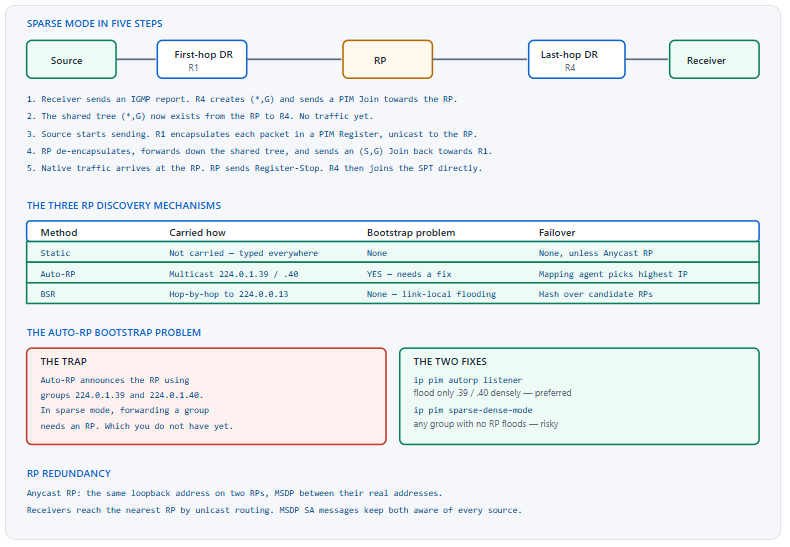
What Does PIM Sparse Mode Actually Build?
What happens between a receiver joining and traffic flowing?
Five steps, in a fixed order. The last-hop router hears an IGMP report and sends a PIM Join towards the RP, creating the shared tree (*,G). The first-hop router encapsulates the source's packets in unicast PIM Register messages addressed to the RP. The RP de-encapsulates them onto the shared tree and simultaneously sends an (S,G) Join back towards the source. When native traffic arrives, the RP sends a Register-Stop and the encapsulation ends. Finally the last-hop router, seeing traffic, joins the shortest path tree directly and prunes itself off the shared tree.
A Deeper Dive into Tree Building
The shared tree exists before any traffic
This is the fact that makes sparse-mode troubleshooting tractable. A (*,G) entry with a populated outgoing interface list proves that the join path from receiver to RP works, entirely independently of whether any source has started. Checking for it before worrying about the source separates two halves of the problem that are otherwise easy to conflate, and it is why the first command after "multicast is not working" should be show ip mroute on the RP.
! Minimum viable sparse-mode configuration
ip multicast-routing
!
interface Loopback0
 ip address 10.0.0.1 255.255.255.255
 ip pim sparse-mode
!
interface GigabitEthernet0/0
 ip address 10.1.1.1 255.255.255.0
 ip pim sparse-mode
!
! ^ Every interface in the multicast path needs this, including
!   the loopback used as the RP address.
!
ip pim rp-address 10.0.0.100
! The shared tree, before any source is active
RP# show ip mroute 239.1.1.1
(*, 239.1.1.1), 00:04:12/00:03:01, RP 10.0.0.100, flags: S
  Incoming interface: Null, RPF nbr 0.0.0.0
  Outgoing interface list:
    GigabitEthernet0/2, Forward/Sparse, 00:04:12/00:03:01
! ^ An OIL entry means the join path from the receiver works.
!   Incoming Null is correct here - the RP is the root.
The Register process, which is unicast
PIM Register messages are unicast from the first-hop router to the RP, which means they follow the unicast routing table and are entirely unaffected by multicast configuration on the intervening routers. A source that is not reaching the RP when unicast connectivity to the RP address is fine is almost always a control-plane filter, a firewall dropping PIM, or an RP address that is not actually assigned anywhere.
! First-hop router state, during registration
R1# show ip mroute 239.1.1.1
(192.0.2.10, 239.1.1.1), 00:00:14/00:02:45, flags: FT
  Incoming interface: GigabitEthernet0/1, RPF nbr 0.0.0.0
  Outgoing interface list:
    GigabitEthernet0/0, Forward/Sparse, 00:00:14/00:03:15
! F = register flag. Still encapsulating.
!
! After the RP sends Register-Stop, the F flag clears
R1# show ip mroute 239.1.1.1 | include flags
(192.0.2.10, 239.1.1.1), 00:02:40/00:02:51, flags: T
! T = SPT bit set. Native forwarding. Registration finished.
SPT switchover and the threshold
On Cisco IOS the last-hop router switches to the shortest path tree on the first packet it receives, because the default SPT threshold is zero. That is usually right — the shared tree through the RP is rarely the shortest path — but it does mean every (S,G) creates state on every router along the source path. Setting the threshold to infinity keeps everything on the shared tree, which trades optimal paths for a much smaller state table and is a legitimate choice in a network with many low-rate groups.
! Default: switch to the SPT immediately (threshold 0)
! Keep everything on the shared tree instead:
ip pim spt-threshold infinity
!
! Or only for specific groups
ip access-list standard LOW-RATE-GROUPS
 permit 239.9.0.0 0.0.255.255
!
ip pim spt-threshold infinity group-list LOW-RATE-GROUPS
!
! Confirm which tree a receiver is on
R4# show ip mroute 239.1.1.1 | include flags
(*, 239.1.1.1), flags: SJC
(192.0.2.10, 239.1.1.1), flags: JT
! J on the (S,G) = joined the SPT. T = SPT bit set.
DR election and why it matters twice
The designated router on a segment does two different jobs depending on where the segment is. On a source segment the DR performs registration; on a receiver segment the DR sends the joins. Election is by highest DR priority, then highest IP address if priorities tie, with a default priority of 1 everywhere — which means, in a default configuration, the DR is simply whichever router has the highest address on the segment, and that is rarely a deliberate decision.
! Make the DR deterministic rather than accidental
interface GigabitEthernet0/0
 ip pim sparse-mode
 ip pim dr-priority 100
!
! Who is the DR right now?
R1# show ip pim neighbor
PIM Neighbor Table
Neighbor          Interface   Uptime/Expires    Ver   DR
Address                                               Prio/Mode
10.1.1.2          Gi0/0       02:41:07/00:01:31 v2    1 / DR S P G
10.1.1.3          Gi0/0       02:40:55/00:01:44 v2    1 / S P G
!
R1# show ip pim interface GigabitEthernet0/0
Address    Interface   Ver/Mode  Nbr Count  Query Intvl  DR Prio  DR
10.1.1.1   Gi0/0       v2/S      2          30           1        10.1.1.2
The mroute flags that answer most questions
| Flag | Meaning | What it tells you |
|---|---|---|
S |
Sparse | The group is operating in sparse mode |
C |
Connected | A directly connected receiver exists |
L |
Local | This router itself is a member of the group |
F |
Register | Still encapsulating to the RP — registration has not completed |
T |
SPT bit | Native traffic is arriving on the shortest path tree |
J |
Join SPT | This router has decided to join the source tree |
P |
Pruned | No outgoing interfaces — nothing downstream wants it |
How Do Routers Find the RP, and Which Method Should I Use?
What is the short answer?
Static RP for a small domain or a lab, because it is one line and cannot fail in an interesting way. BSR for anything standards-based or multi-vendor, because it has no bootstrapping problem and its election is deterministic. Auto-RP where an existing Cisco deployment already uses it, because migrating hundreds of routers is rarely worth the benefit. All three can coexist on one router, which is occasionally useful during a migration and is otherwise a reliable source of confusion about which RP actually won.
A Deeper Dive into RP Discovery
Static RP and the override keyword
A static RP is typed on every router and never changes. The subtlety is precedence: by default a dynamically learned RP — from Auto-RP or BSR — beats a statically configured one for the same group range. The override keyword reverses that. In a network running both, forgetting override means the static configuration is present, visible, and being ignored, which is a difficult thing to notice by reading the configuration.
! Simple - one RP for every group
ip pim rp-address 10.0.0.100
!
! Scoped to a group range
ip access-list standard VIDEO-GROUPS
 permit 239.10.0.0 0.0.255.255
ip pim rp-address 10.0.0.100 VIDEO-GROUPS
!
! Beat any dynamically learned RP for these groups
ip pim rp-address 10.0.0.100 VIDEO-GROUPS override
! ^ Without 'override', Auto-RP or BSR wins and this is ignored.
!
! Which RP is actually in use for a group?
R1# show ip pim rp-hash 239.10.1.1
  RP 10.0.0.100 (?), v2
  Info source: 10.0.0.100 (?), via bootstrap, priority 0, holdtime 150
! ^ "via bootstrap" here means BSR won, not your static line.
Auto-RP, and what the two groups do
Auto-RP has two roles and two multicast groups. Candidate RPs announce themselves on 224.0.1.39, the RP-announce group. Mapping agents listen to those announcements, choose one RP per group range, and publish the result on 224.0.1.40, the RP-discovery group, which every other router listens to. Where several candidates offer the same range, the mapping agent selects the one with the highest IP address — a rule worth knowing because it makes RP preference a function of address allocation.
! On the candidate RP
ip pim send-rp-announce Loopback0 scope 16
! ^ scope is a TTL. It must exceed the hop count to every
!   mapping agent, or the announcements never arrive.
!
! Scoped to specific groups
ip access-list standard AUTORP-GROUPS
 permit 239.0.0.0 0.255.255.255
ip pim send-rp-announce Loopback0 scope 16 group-list AUTORP-GROUPS
!
! On the mapping agent (often the same router, often not)
ip pim send-rp-discovery Loopback0 scope 16
!
! Verify on any router in the domain
R5# show ip pim rp mapping
PIM Group-to-RP Mappings
Group(s) 239.0.0.0/8
  RP 10.0.0.100 (?), v2v1
    Info source: 10.0.0.200 (?), elected via Auto-RP
         Uptime: 01:22:04, expires: 00:02:41
BSR, and why it has no bootstrap problem
BSR messages are sent to 224.0.0.13, the all-PIM-routers link-local address, and are re-originated hop by hop by every PIM router. Because the range 224.0.0.0/24 is never subject to RPF or RP lookup, the mechanism carries itself without needing multicast forwarding to already work. Candidate RPs unicast their advertisements to the elected BSR, and the BSR floods the whole candidate set so that every router runs the same hash and independently reaches the same answer.
! Candidate BSR - highest priority wins, then highest address
ip pim bsr-candidate Loopback0 30 100
!                              ^hash-length  ^priority
!
! Candidate RP - LOWEST priority wins here
ip pim rp-candidate Loopback0 priority 10
! ^ Note the inversion: BSR priority high wins, RP priority low wins.
!
! Scoped candidate RP
ip pim rp-candidate Loopback0 group-list VIDEO-GROUPS priority 10
!
! Who won the BSR election?
R5# show ip pim bsr-router
PIMv2 Bootstrap information
  BSR address: 10.0.0.200 (?)
  Uptime: 02:14:33, BSR Priority: 100, Hash mask length: 30
  Expires: 00:01:52
  This system is a candidate BSR
    Candidate BSR address: 10.0.0.201, priority: 50, hash mask length: 30
! ^ This router lost: priority 50 against the BSR's 100.
The two priority inversions
BSR priority and candidate-RP priority run in opposite directions, and mixing them up produces a configuration that elects the router you wanted to be the backup. For the BSR election, higher priority wins. For candidate-RP selection, lower priority wins, and only when priorities tie does the hash function decide. There is no reason for this inconsistency other than history, and knowing it is worth more than understanding the hash.
| Election | Priority direction | Tie-break | Default |
|---|---|---|---|
| BSR election | Higher wins | Highest BSR address | Priority 0 |
| Candidate RP selection | Lower wins | Hash function, then highest address | Priority 0 |
| Auto-RP candidate selection | No priority field | Highest RP address | — |
| PIM DR election | Higher wins | Highest interface address | Priority 1 |
| IGMP querier election | No priority field | Lowest IP address | — |
Comparing the three properly
| Property | Static RP | Auto-RP | BSR |
|---|---|---|---|
| Standards track | N/A | Cisco proprietary | RFC 5059 |
| Bootstrap problem | None | Yes — needs a listener or dense fallback | None |
| Configuration effort | Every router | Candidates and mapping agents only | Candidates and BSRs only |
| Failover | None without Anycast RP | Mapping agent reselects | Hash reselects across candidates |
| Multi-vendor | Yes | No | Yes |
| Group scoping | By ACL | By group-list | By group-list |
ip pim sparse-mode on its interface Symptom: every router agrees on the RP address, unicast reachability to it is fine, and no group ever forwards traffic. Cause: the loopback carrying the RP address does not have PIM enabled. The RP must be a PIM speaker on the interface that owns its address, or it cannot originate the joins and register-stops the protocol requires. Confirm: show ip pim interface on the RP does not list the loopback. Fix: add ip pim sparse-mode to the loopback. This is the single most common first-deployment error and it produces no error message anywhere.How Do I Configure Auto-RP Without Falling Into the Bootstrap Trap?
What exactly is the trap?
Auto-RP distributes RP information using two multicast groups. In sparse mode, forwarding any multicast group requires knowing the RP for it. Auto-RP's own groups therefore need an RP in order to tell you what the RP is, and a purely sparse-mode domain simply never bootstraps. Two fixes exist: ip pim autorp listener, which floods only 224.0.1.39 and 224.0.1.40 densely while everything else stays sparse; and ip pim sparse-dense-mode, which floods any group that has no known RP and is a much larger hammer.
A Deeper Dive into Auto-RP Bootstrapping
The listener, which is the right answer
ip pim autorp listener is a single global command that makes exactly the two Auto-RP groups behave densely while every interface stays in sparse mode. It solves the problem with the minimum possible blast radius, and there is essentially no argument against it in a domain using Auto-RP.
! The preferred fix - global, one line, minimal scope
ip pim autorp listener
!
! Interfaces stay in plain sparse mode
interface GigabitEthernet0/0
 ip pim sparse-mode
!
! Confirm the Auto-RP groups are being flooded
R5# show ip mroute 224.0.1.40
(*, 224.0.1.40), 01:24:11/stopped, RP 0.0.0.0, flags: DCL
  Incoming interface: Null, RPF nbr 0.0.0.0
  Outgoing interface list:
    GigabitEthernet0/0, Forward/Sparse-Dense, 01:24:11/00:00:00
! ^ D = dense mode. Exactly what the listener creates.
Sparse-dense mode, and why it is risky
ip pim sparse-dense-mode on an interface means any group with a known RP is treated as sparse and any group without one is flooded. That fixes Auto-RP and it also means that losing the RP converts the entire domain to dense mode rather than failing cleanly. A dense-mode flood of a high-rate video group across a campus is a considerably worse outcome than the group not working, and it is a failure mode that only appears during the RP outage nobody rehearsed.
! Works, but the failure mode is a network-wide flood
interface GigabitEthernet0/0
 ip pim sparse-dense-mode
!
! Contain the damage if you must use it
ip pim accept-rp auto-rp
! ^ Only accept joins for RPs learned via Auto-RP.
!
! Or block dense fallback for specific groups entirely
ip access-list standard NO-DENSE
 deny   239.10.0.0 0.0.255.255
 permit any
! Apply as appropriate to your platform's dense-mode controls.
The mapping agent, and having more than one
A mapping agent is the arbiter: it hears every candidate announcement and publishes one decision. Two mapping agents are better than one for availability, and because they both apply the same selection rule — highest RP address for a given range — they produce identical output rather than competing. What they do not do is share state, so a candidate whose announcements reach only one of them creates an inconsistency that is visible only by comparing show ip pim rp mapping on both.
! Two mapping agents, same rule, same answer
! MA-1
ip pim send-rp-discovery Loopback0 scope 32
! MA-2
ip pim send-rp-discovery Loopback0 scope 32
!
! Compare them - they should be identical
MA1# show ip pim rp mapping | include RP |Info
  RP 10.0.0.100 (?), v2v1
    Info source: 10.0.0.200 (?), elected via Auto-RP
MA2# show ip pim rp mapping | include RP |Info
  RP 10.0.0.100 (?), v2v1
    Info source: 10.0.0.201 (?), elected via Auto-RP
! ^ Same RP, different info source. Correct.
The scope value, which is a TTL
The scope parameter on both send-rp-announce and send-rp-discovery is a TTL, not an administrative boundary. It has to be larger than the hop count from the announcing router to the furthest listener, and a value chosen for a small topology stops working when the network grows a few hops. Announcements that die in transit produce a domain where some routers know the RP and others do not, split along a line that follows hop count rather than anything in the configuration.
scope value is a TTL on the announcement and discovery packets. Beyond that many hops, the packets are discarded and those routers never learn anything. Confirm: show ip pim rp mapping is populated on near routers and empty on far ones; counting hops from the announcer to the boundary matches the scope value. Fix: raise the scope on both send-rp-announce and send-rp-discovery — 32 is a reasonable default for an enterprise, and there is no meaningful cost to setting it generously.show ip pim rp-hash on a group tells you which mechanism actually won, and it is worth running on several routers rather than one.ip pim autorp listener resolves that with a far smaller blast radius than putting every interface into sparse-dense mode.How Do I Make the RP Redundant?
What is the standard answer?
Anycast RP. Two or more routers are configured with the same RP address on a loopback, each also has a unique address, and MSDP peering between the unique addresses keeps them aware of each other's active sources. Receivers and sources reach whichever RP is nearest by unicast routing, without knowing there is more than one, and losing an RP means unicast routing converges to the other — which takes as long as your IGP takes and no longer. It works identically under static RP, Auto-RP and BSR, because it operates below all three.
A Deeper Dive into RP Redundancy
Why the anycast address alone is not enough
Two routers sharing an RP address split the domain: sources register with one, receivers join the other, and neither knows about the other's half. MSDP is what closes that. Each RP tells its MSDP peers about every source that registers with it, using Source-Active messages, so an RP with a receiver but no local source still learns the source exists and can join towards it. Without MSDP, Anycast RP is not redundancy, it is a partition.
! ===== RP-1 =====
interface Loopback0
 ip address 10.0.0.100 255.255.255.255   ! the anycast address
 ip pim sparse-mode
interface Loopback1
 ip address 10.0.0.1 255.255.255.255     ! unique, for MSDP
 ip pim sparse-mode
!
ip pim rp-address 10.0.0.100
ip msdp peer 10.0.0.2 connect-source Loopback1
ip msdp originator-id Loopback1
!
! ===== RP-2 =====
interface Loopback0
 ip address 10.0.0.100 255.255.255.255   ! same anycast address
 ip pim sparse-mode
interface Loopback1
 ip address 10.0.0.2 255.255.255.255
 ip pim sparse-mode
!
ip pim rp-address 10.0.0.100
ip msdp peer 10.0.0.1 connect-source Loopback1
ip msdp originator-id Loopback1
Verifying that both halves see everything
! Is the MSDP session up?
RP1# show ip msdp peer
MSDP Peer 10.0.0.2 (?), AS ?
  Connection status:
    State: Up, Resets: 0, Connection source: Loopback1 (10.0.0.1)
    Uptime(Downtime): 04:12:38, Messages sent/received: 251/248
  SA Filtering:
    Input (S,G) filter: none
    Output (S,G) filter: none
!
! Does each RP know about the other's sources?
RP1# show ip msdp sa-cache
MSDP Source-Active Cache - 2 entries
(192.0.2.10, 239.1.1.1), RP 10.0.0.2, BGP/AS 0, 00:03:41/00:05:19
(192.0.2.20, 239.1.1.2), RP 10.0.0.1, BGP/AS 0, 00:11:02/00:05:44
! ^ One learned locally, one from the peer. Both visible.
!
! Count entries as a quick health check
RP1# show ip msdp count
The originator-id, which is not optional
Without ip msdp originator-id, an RP builds its Source-Active messages using the address of the interface the MSDP session runs on — which, in an Anycast RP design where that could be the shared address, produces SA messages that both RPs consider their own and discard. Pointing the originator ID at the unique loopback makes each RP's announcements distinguishable, and it is the line most often missing from an Anycast RP configuration that looks complete.
What each redundancy approach actually gives you
| Approach | Failover time | Needs MSDP | Works with | Notes |
|---|---|---|---|---|
| Anycast RP + MSDP | IGP convergence | Yes | Static, Auto-RP, BSR | The standard answer (RFC 3446) |
| Anycast RP with PIM | IGP convergence | No | Static, Auto-RP, BSR | RFC 4610, uses PIM register forwarding |
| Two candidate RPs via BSR | BSR timeout, ~2 min | No | BSR only | Hash reassigns group ranges |
| Two candidate RPs via Auto-RP | Mapping timeout, ~3 min | No | Auto-RP only | Mapping agent reselects highest address |
| Static RP only | Never | — | — | Requires manual reconfiguration |
Protecting the RP from unwanted state
An RP accepts registers and joins from anywhere in the domain by default, which means any host that starts sending to a group creates state on it. ip pim accept-register filters which sources and groups the RP will accept registrations for, and ip pim accept-rp filters which RPs a router will accept joins for. Both are cheap and both prevent a misconfigured or compromised host from populating the RP with state.
! Only accept registrations from known sources
ip access-list extended VALID-SOURCES
 permit ip 192.0.2.0 0.0.0.255 239.1.0.0 0.0.255.255
 permit ip 192.0.2.0 0.0.0.255 239.10.0.0 0.0.255.255
!
ip pim accept-register list VALID-SOURCES
!
! Only accept joins naming the RP we expect
ip access-list standard EXPECTED-GROUPS
 permit 239.0.0.0 0.255.255.255
!
ip pim accept-rp 10.0.0.100 EXPECTED-GROUPS
!
! Confirm what is being rejected
RP1# show ip pim rp | include Accept
RP1# show ip mroute count | include Forwarding|Other
Which PIM and RP Mistakes Break the Tree Silently?
What are the failures worth memorising?
Five. PIM missing on the RP's own loopback. An RP address that different routers resolve differently, so half the domain builds a tree to one root and half to another. The Auto-RP bootstrap trap. An RPF failure at the RP, which stops the register process from completing while every interface counter looks healthy. And a group that works from one source and not another, which is nearly always an accept-register filter or an SSM range collision.
A Deeper Dive into the Failure Catalogue
Two halves of the domain, two different RPs
override on some devices, an Auto-RP scope that reached only part of the network, or a BSR whose messages are blocked on one link. Receivers join towards one root and sources register with another, so the trees never meet. Confirm: run show ip pim rp-hash 239.1.1.1 on a router from each half and compare the answers, including the Info source line. Fix: make the mapping consistent, and standardise on one discovery mechanism rather than leaving two in place.The register that never completes
show ip rpf 192.0.2.10 on the RP names an interface that does not appear in show ip pim interface. Fix: enable PIM on every interface in the unicast path towards multicast sources, or add a static mroute so the RPF check follows a path that does have PIM.The tunnel interfaces nobody configured
The RP and every first-hop router create PIM register tunnel interfaces automatically. They appear in show ip interface brief, they cannot be configured, and they are occasionally reported as a fault by monitoring systems that flag unknown interfaces. Tunnel0 in the down state on a router that is not currently registering anything is normal, and shutting these interfaces down breaks registration entirely.
! These appear on their own - do not touch them
R1# show ip interface brief | include Tunnel
Tunnel0    10.0.0.1   YES unset  up    up
!
R1# show interfaces Tunnel0 | include Tunnel source|Tunnel proto
  Tunnel source 10.0.0.1 (Loopback0), destination 10.0.0.100
  Tunnel protocol/transport PIM/IPv4
! ^ Destination is the RP. This is the register tunnel.
The diagnostic order that resolves most cases
RP agreement first, because a domain that disagrees about the root cannot build a tree and every downstream symptom is a consequence. Then the receiver half, then the source half, then RPF. Working in that order means each step either passes or explains everything after it, and it avoids the common trap of investigating an mroute entry on one router without knowing whether its RP matches the rest of the network.
! In this order, from several routers, not one
show ip pim rp-hash 239.1.1.1
! ^ same answer everywhere? If not, stop. That is the problem.
show ip pim rp mapping
! ^ how was it learned, and is it expiring?
show ip pim neighbor
! ^ every hop in the path has a neighbour?
show ip mroute 239.1.1.1
! ^ on the RP: is there a (*,G) with an outgoing list?
show ip rpf 192.0.2.10
! ^ on the RP: does this interface have a PIM neighbour?
show ip mroute count
! ^ are packets actually being forwarded, or just state?
Counting packets rather than trusting state
Multicast state and multicast forwarding are different things, and a network can have perfect state while forwarding nothing. show ip mroute count gives per-group packet rates and, critically, a count of packets dropped for RPF failures. A rising RPF-failed counter alongside healthy-looking mroute entries is the clearest possible statement that the state is right and the path is wrong.
! State is not forwarding. Count the packets.
R3# show ip mroute count
IP Multicast Statistics
4 routes using 2914 bytes of memory
Group: 239.1.1.1, Source count: 1, Packets forwarded: 184122, Packets received: 184122
  Source: 192.0.2.10/32, Forwarding: 184122/512/1316/5, Other: 0/0/0
!   Forwarding: pkts/pps/avg-size/kbps   Other: total/RPF-failed/other-drops
!
! An RPF-failed count that climbs is the whole diagnosis
R3# show ip mroute count | include Other
Timers worth knowing before you tune them
PIM hellos are sent every 30 seconds with a holdtime of 105, so a neighbour is declared dead three and a half hello intervals after the last one. Join and prune messages are refreshed every 60 seconds and expire after 210, which is why multicast state survives a brief control-plane interruption but not a three-minute one. The register suppression timer is 60 seconds, so a first-hop router that stops receiving register-stops resumes encapsulating a minute later rather than immediately.
These defaults are well chosen and lowering them is rarely the right response to slow convergence, because the actual recovery path for most failures runs through the unicast routing table rather than through PIM's own timers. A design that needs faster multicast recovery gets it by making the IGP converge faster, not by sending more hellos.
Blueprint framing
The CCIE Enterprise Infrastructure v1.1 blueprint covers PIM sparse mode and RP discovery within the infrastructure domain. Lab tasks tend to specify the RP mechanism rather than leaving it open — "use BSR", "use Auto-RP" — which makes the configuration syntax and the verification command for each one worth having memorised cold. show ip pim rp mapping and show ip pim bsr-router answer most of what a task will ask you to demonstrate.
show ip pim rp-hash run from both ends of the network the first command in any sparse-mode investigation rather than the fifth.Conclusion
Sparse mode is a pull protocol and everything about its operation follows from that. Receivers pull towards a root, so a root has to exist and everyone has to agree on it; sources cannot push, so they register instead; and the shared tree is deliberately a temporary structure that the network abandons for the shortest path as soon as it can. Understanding the five-step sequence — join, register, de-encapsulate, source join, register-stop, then SPT switchover — turns most troubleshooting into locating which step did not complete.
The RP discovery choice is worth making deliberately. Static is honest about having no failover. Auto-RP works well and carries a bootstrap problem that ip pim autorp listener solves in one line, a line that is missing from a striking proportion of deployments that do not work. BSR avoids the problem entirely by using link-local flooding, is standards-track, and inverts the priority direction relative to the BSR election in a way that catches people every time. Whichever is chosen, running only one of them is worth more than any property of the one selected.
Redundancy is Anycast RP with MSDP, and the failover time is your IGP convergence time because that is literally the mechanism. The two lines most often missing are ip msdp originator-id pointing at the unique loopback and ip pim sparse-mode on the RP's own loopback — neither of which produces an error, and both of which produce a domain that is configured, agreed, and silent.
External Links
- RFC 7761 — Protocol Independent Multicast - Sparse Mode (PIM-SM): Protocol Specification (Revised)
- RFC 5059 — Bootstrap Router (BSR) Mechanism for PIM
- RFC 3446 — Anycast Rendezvous Point (RP) mechanism using PIM and MSDP
- RFC 4610 — Anycast-RP Using Protocol Independent Multicast (PIM)
- RFC 3618 — Multicast Source Discovery Protocol (MSDP)
- Cisco IOS XE — IP Multicast: PIM Configuration Guide
- Cisco Learning Network — CCIE Enterprise Infrastructure
Reference Notes
- RFC 7761 specifies PIM Sparse Mode, including the explicit-join model, the shared tree rooted at the Rendezvous Point, and the register mechanism used by first-hop routers.
- RFC 7761 describes the Register and Register-Stop messages, which are unicast between the first-hop router and the RP and therefore follow the unicast routing table.
- RFC 7761 describes the shortest-path-tree switchover, in which a last-hop router joins the source tree directly and prunes itself from the shared tree.
- RFC 7761 specifies PIM Hello messages sent to 224.0.0.13, the ALL-PIM-ROUTERS link-local group, and the designated router election by highest priority then highest address.
- RFC 5059 defines the PIM Bootstrap Router mechanism, in which bootstrap messages are flooded hop by hop and candidate RP advertisements are unicast to the elected BSR.
- RFC 5059 specifies that the BSR election prefers the highest priority value, with the highest BSR address as the tie-break.
- Cisco documentation describes Auto-RP, in which candidate RPs announce on 224.0.1.39 and mapping agents publish group-to-RP mappings on 224.0.1.40.
- Cisco documentation describes
ip pim autorp listener, which floods the two Auto-RP groups in dense mode while all other groups remain sparse, resolving the bootstrap dependency. - Cisco documentation describes the
overridekeyword onip pim rp-address, without which a dynamically learned RP takes precedence over a statically configured one. - RFC 3446 describes Anycast RP using PIM and MSDP, in which multiple RPs share one address and exchange Source-Active messages so that each learns the others' active sources.
- RFC 4610 describes an Anycast-RP mechanism using PIM alone, without requiring MSDP, by forwarding register messages between the anycast RP set.
- RFC 3618 specifies MSDP, including the Source-Active message and the peer-RPF rules that control which SA messages are accepted and forwarded.