

OSPF will form an adjacency with anything that sends a matching Hello. That is the entire threat model. A laptop running a routing daemon on an access port that happens to be in an OSPF-enabled subnet can become a neighbour, inject LSAs, and redirect traffic — no exploit required, just a protocol doing what it was designed to do in 1998. Authentication is what turns "anything that speaks OSPF" into "anything that holds the key", and it is the single highest-value configuration change available on an enterprise IGP.
The mechanics are more layered than the usual "enable MD5" summary suggests. OSPFv2 defines three authentication types in the packet header: type 0 is null, type 1 is a plaintext password, and type 2 is cryptographic — originally keyed MD5, extended by RFC 5709 to HMAC-SHA-1 through HMAC-SHA-512. Type 2 does not put the digest in the header at all; the header carries a key ID, a digest length, and a non-decreasing cryptographic sequence number, while the digest itself is appended after the packet body. That sequence number is what makes replay attacks fail, and it is also the reason a router that reloads can be temporarily rejected by a neighbour that remembers a higher value. On Cisco platforms, authentication can be set per area as a default or per interface as an override, and the interface always wins — which is what makes a mixed deployment and a zero-downtime migration possible.
This article builds OSPF authentication end to end in a lab and then breaks it in the four ways it usually breaks in production. Section one covers planning: the packet fields involved, the area-versus-interface scoping model, and what to decide before typing anything. Section two configures type 1 and type 2 on both scopes and walks the migration path that does not drop adjacencies. Section three covers the modern key-chain approach with HMAC-SHA and automated key rollover via lifetimes. Section four handles the special cases — virtual links, sham-links, and OSPFv3, where the mechanism changes entirely. Section five is a structured troubleshooting method for an adjacency that will not form. It is written for the lab rather than for the written exam, and sits alongside the rest of the CCIE Enterprise Infrastructure lab certification track.
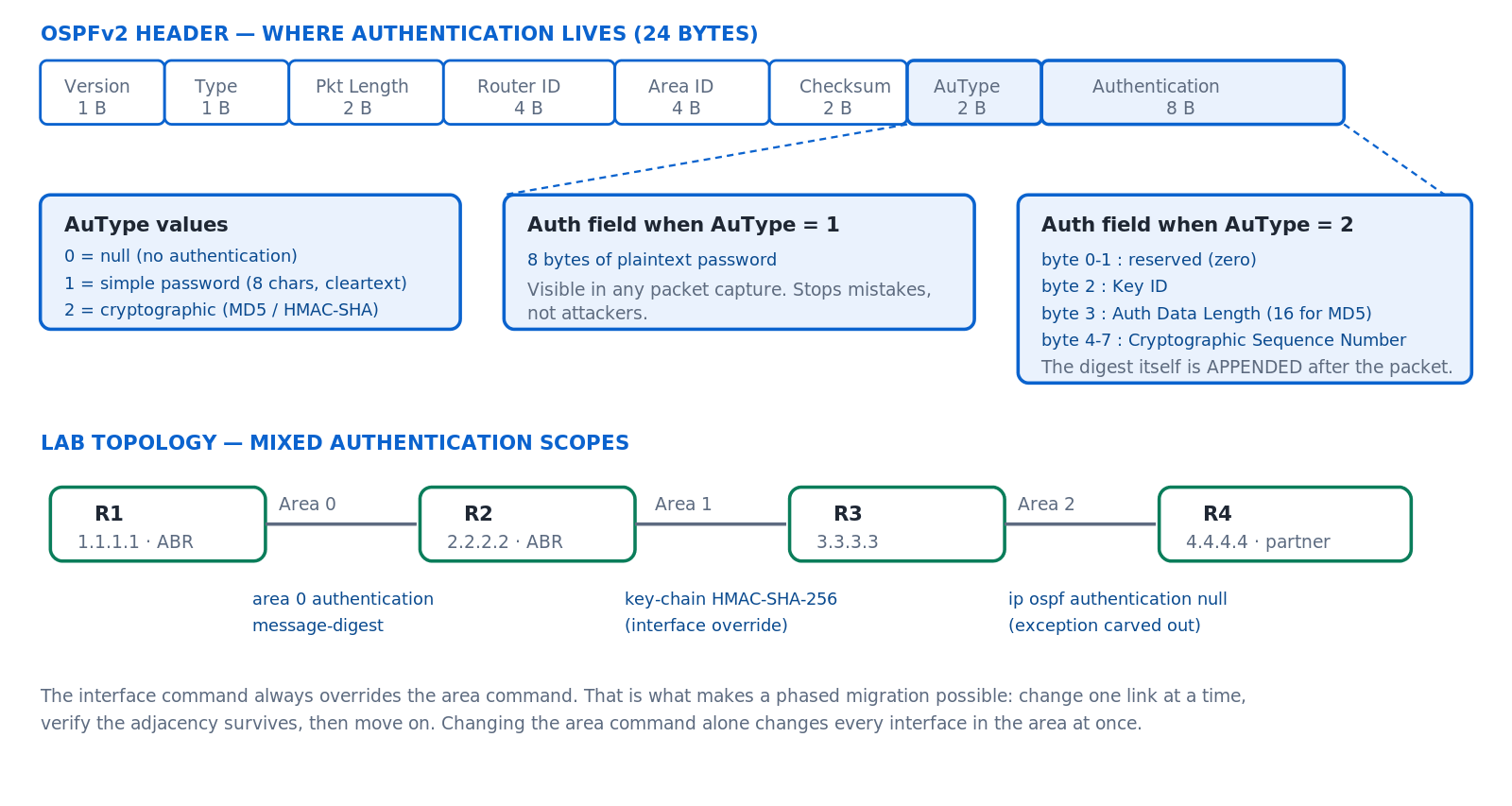
OSPFv2 carries authentication in a two-byte type field and an eight-byte field whose meaning depends on that type; the lab uses three different scopes across four routers to exercise area defaults, interface overrides, and explicit null.
What Do You Need to Plan Before Enabling OSPF Authentication?
What has to be decided first?
Four things. Which authentication type — plaintext type 1 protects against misconfiguration only, while type 2 with MD5 or HMAC-SHA protects against an attacker. Which scope — area-level as a default or interface-level per link, remembering that interface always wins. Which key IDs and how they will be rotated, because a key ID plus a key must match on both ends and a key that never changes is a key that eventually leaks. And what the migration order is, because enabling authentication on one end of a link drops that adjacency until the other end matches, and on a production network the order in which you touch the links determines how long each outage lasts.
A Deeper Dive into the Mechanism and Scoping Model
What the packet actually carries
Every OSPFv2 packet has a 24-byte header ending in a two-byte AuType field and an eight-byte Authentication field. With type 1, those eight bytes are the password in clear text — recoverable from any capture. With type 2, the eight bytes carry a key ID, the digest length, and a 32-bit cryptographic sequence number, while the actual digest is appended after the packet body and is not counted in the packet length field. The sequence number must be non-decreasing from a given neighbour, which is what defeats replay.
Area scope versus interface scope
The area <n> authentication command does not authenticate an area. It sets a default authentication type for every OSPF-enabled interface in that area on that router. The interface commands ip ospf authentication, ip ospf authentication message-digest, and ip ospf authentication null override that default on a single link. Keys are always configured on the interface regardless of which scope selects the type — there is no area-level key.
| Scope | Command | Sets | Overridden by | Use when |
|---|---|---|---|---|
| Area, type 1 | area 0 authentication |
Default AuType 1 for all area 0 interfaces | Any interface command | Uniform policy across a whole area |
| Area, type 2 | area 0 authentication message-digest |
Default AuType 2 for all area 0 interfaces | Any interface command | The usual production baseline |
| Interface, type 1 | ip ospf authentication |
AuType 1 on this link only | — | Legacy peer that cannot do MD5 |
| Interface, type 2 | ip ospf authentication message-digest |
AuType 2 on this link only | — | Phased migration, link by link |
| Interface, null | ip ospf authentication null |
AuType 0 on this link only | — | Carving an exception out of an authenticated area |
Key ID planning
A type 2 key is identified by a number from 1 to 255. Both the key ID and the key string must match between neighbours. That pairing is what makes rollover possible: configure a second key ID on both routers, let both be advertised during the transition, then remove the old one. A design that uses key ID 1 everywhere and never changes it works, but it has no rollover path that does not involve an outage.
! Key ID scheme that supports rotation without downtime
!   Key 1  - deployed 2026-Q1, being retired
!   Key 2  - deployed 2026-Q3, current
!   Key 3  - reserved for the next rotation
! Both routers carry keys 1 and 2 during the overlap window.
Migration order matters
Enabling authentication on one end of a link stops that adjacency until the other end matches. On a point-to-point link the outage lasts as long as it takes you to type the second command. On a broadcast segment with several routers, every router that has not yet been configured drops out. Plan the order so the segment converges rather than partitioning: configure all routers on a segment in one change window, and prefer interface-level commands so you can move one link at a time.
message-digest-key command alone does not enable authentication and causes no disruption. Then enable the type on both ends. Splitting key distribution from type activation turns a two-step disruption into a single short one.
! Step 1 - keys only. No adjacency impact. Do this on both routers.
interface GigabitEthernet0/1
 ip ospf message-digest-key 2 md5 L4bK3y-2026-Q3
!
! Step 2 - activate. Adjacency drops until both ends have this.
interface GigabitEthernet0/1
 ip ospf authentication message-digest
What authentication does not cover, and what to pair it with
Authentication proves that a packet came from a key holder. It does not stop OSPF from running on a link where it should not run at all, and it does not stop a remote attacker from spending your CPU on packets it will ultimately fail. Two companion controls close those gaps and both belong in the same change as the authentication rollout.
passive-interface default flips the model from opt-out to opt-in: OSPF advertises the interface's subnet but sends no Hellos on it, so no adjacency can form. Every interface that genuinely needs a neighbour is then re-enabled explicitly. On an access-layer SVI carrying user traffic, this is the correct configuration even with authentication enabled — a user segment has no business hearing OSPF Hellos at all. TTL security, specified by RFC 5082 as the Generalized TTL Security Mechanism, requires incoming OSPF packets to arrive with a TTL high enough to prove they originated within a small number of hops. A packet spoofed from further away arrives with a lower TTL and is dropped in hardware before the authentication check consumes any CPU.
! Opt-in adjacency model - no Hellos except where explicitly allowed
router ospf 1
 passive-interface default
 no passive-interface GigabitEthernet0/0
 no passive-interface GigabitEthernet0/1
 ! Every other OSPF interface now advertises but never peers
!
! GTSM - drop packets that cannot have come from a directly
! attached or near neighbour, before authentication is evaluated
interface GigabitEthernet0/0
 ip ospf ttl-security hops 1
! Process-wide form:  router ospf 1 / ttl-security all-interfaces
How Do I Configure Type 1 and Type 2 Authentication?
What is the minimum working configuration for each?
Type 1 needs two commands per interface: ip ospf authentication-key <password> to set the password and either ip ospf authentication on the interface or area <n> authentication under the process to activate it. The password is limited to eight characters and travels in clear text. Type 2 needs ip ospf message-digest-key <1-255> md5 <key> plus ip ospf authentication message-digest or the area-level equivalent. Both the key ID and the key string must match the neighbour. Neither command encrypts the key in the configuration by default — add service password-encryption or a type 7 key at minimum.
A Deeper Dive into Type 1 and Type 2 Configuration
Type 1: simple password authentication
Type 1 exists to catch mistakes, not attacks. It stops a router that was patched into the wrong VLAN from joining your OSPF domain, and it does nothing whatsoever against someone with a packet capture. Configure it only where a peer genuinely cannot do type 2, and treat it as a labelling mechanism rather than a control.
! ===== R3: type 1, area-level activation =====
router ospf 1
 router-id 3.3.3.3
 area 2 authentication
 network 10.2.34.0 0.0.0.255 area 2
!
interface GigabitEthernet0/2
 ! Maximum 8 characters. Travels in clear text.
 ip ospf authentication-key Cisco123
!
! At minimum obscure it in the config file
service password-encryption
Type 2 with MD5: the production baseline
! ===== R1: type 2 across all of area 0 =====
router ospf 1
 router-id 1.1.1.1
 area 0 authentication message-digest
 network 10.0.1.0 0.0.0.255 area 0
 network 10.1.12.0 0.0.0.255 area 1
!
interface GigabitEthernet0/0
 description ---- area 0 link to CORE ----
 ip ospf message-digest-key 2 md5 7 08351F1B1D431F5B4A
! ===== R2: mirror image. Key ID AND key string must match. =====
router ospf 1
 router-id 2.2.2.2
 area 0 authentication message-digest
 network 10.0.1.0 0.0.0.255 area 0
!
interface GigabitEthernet0/0
 ip ospf message-digest-key 2 md5 7 08351F1B1D431F5B4A
How the key is stored, and why type 7 is not protection
By default an OSPF key appears in the running configuration in clear text. Adding service password-encryption converts it to a type 7 string, which is a reversible Vigenère-style obfuscation with publicly available decoders — it stops a shoulder-surfer reading a screen and stops nothing else. Anyone who can retrieve the configuration can retrieve the key. Where the configuration is stored in a version-control system, shipped to a management platform, or attached to a support case, treat the key as exposed and rotate it after any such handling. Some IOS-XE releases support AES-encrypted type 6 keys tied to a primary key configured with key config-key password-encrypt, which is meaningfully stronger because the ciphertext alone is not sufficient to recover the key.
! Type 6 (AES) key storage where the platform supports it
key config-key password-encrypt Pr1maryK3y-KeepOffline
password encryption aes
! Existing type 0/7 keys are re-encrypted as type 6 on the next write.
! The primary key is NOT stored in the config - losing it means
! re-entering every encrypted secret on the device.
The interface override, and the null exception
An area configured for message-digest authentication applies that default to every interface. When one link in that area must not be authenticated — a lab segment, a peering with a device that cannot do it, a temporary migration state — the interface-level null command carves it out without changing the area policy.
! Area 2 requires type 1 everywhere, EXCEPT this one link
router ospf 1
 area 2 authentication
!
interface GigabitEthernet0/3
 description ---- link to partner router, no auth agreed ----
 ip ospf authentication null
! ^ AuType 0 on this interface only. Every other area 2
!   interface still uses type 1.
Zero-downtime key rollover with two key IDs
A router configured with more than one message-digest key sends a copy of each packet authenticated with every key it holds, and accepts a packet authenticated with any of them. That overlap is what makes rollover non-disruptive. Add the new key on both ends, confirm the adjacency is stable, then remove the old key from both ends.
! ===== Rollover, step 1: add key 3 on BOTH routers =====
interface GigabitEthernet0/0
 ip ospf message-digest-key 2 md5 OldKey2026Q3
 ip ospf message-digest-key 3 md5 NewKey2027Q1
! Both keys active. Packets are sent twice, once per key.
!
! Verify the overlap is in effect before removing anything
R1# show ip ospf interface GigabitEthernet0/0 | include key
  Message digest authentication enabled
    Youngest key id is 3
    Rollover in progress, 1 neighbor(s) using the old key(s):
    key id 2
!
! ===== Rollover, step 2: remove key 2 on BOTH routers =====
interface GigabitEthernet0/0
 no ip ospf message-digest-key 2
debug ip ospf adj shows Mismatch Authentication Key - Message Digest Key 2. Fix: re-enter the key on both ends. Because the running configuration usually shows the key as a type 7 hash, comparing configurations visually does not prove they match — retype rather than compare.debug ip ospf adj shows packets being dropped despite correct keys. Cause: type 2 requires a non-decreasing cryptographic sequence number per neighbour. The reloaded router restarts its counter low; the neighbour still remembers the previous high value and rejects the packets until it ages out the old neighbour state. Confirm: the condition clears on its own after the dead interval expires on the peer. Fix: usually none needed — wait. If it persists, clear ip ospf process on the peer forces it to discard the remembered state.How Do I Use Key Chains for SHA Authentication and Automated Rollover?
What do key chains add over message-digest keys?
Two things. Stronger algorithms — RFC 5709 extends OSPFv2 cryptographic authentication beyond keyed MD5 to HMAC-SHA-1, HMAC-SHA-256, HMAC-SHA-384, and HMAC-SHA-512, and on IOS-XE those are reachable only through the key-chain syntax. And time-based rollover: each key in a chain can carry a send lifetime and an accept lifetime, so a scheduled rotation happens without anyone touching the routers on the day. The interface command becomes ip ospf authentication key-chain <name>, which replaces both the type selection and the key configuration in one line.
A Deeper Dive into Key Chains, Algorithms, and Lifetimes
Building a key chain
! ===== Key chain with HMAC-SHA-256 =====
key chain OSPF-AREA1
 key 1
  key-string Str0ngK3y-2026-Q3
  cryptographic-algorithm hmac-sha-256
 exit
 key 2
  key-string Str0ngK3y-2027-Q1
  cryptographic-algorithm hmac-sha-256
 exit
exit
!
! Attach it to the interface - this replaces BOTH the type
! selection and the message-digest-key commands
interface GigabitEthernet0/1
 ip ospf authentication key-chain OSPF-AREA1
Algorithm choices and what each costs
| Algorithm | Standard | Digest length | Cisco syntax | When to use |
|---|---|---|---|---|
| Keyed MD5 | RFC 2328 Appendix D | 128 bits | ip ospf message-digest-key N md5 |
Interoperability with older equipment; still widely deployed |
| HMAC-SHA-1 | RFC 5709 | 160 bits | cryptographic-algorithm hmac-sha-1 |
Migration step from MD5 where SHA-256 is unsupported |
| HMAC-SHA-256 | RFC 5709 | 256 bits | cryptographic-algorithm hmac-sha-256 |
The current default choice |
| HMAC-SHA-384 / 512 | RFC 5709 | 384 / 512 bits | cryptographic-algorithm hmac-sha-384 |
Where a compliance regime mandates it |
Lifetimes and automated rotation
Send lifetime controls when a key is used to sign outgoing packets. Accept lifetime controls when it will be honoured on incoming ones. Making the accept lifetime wider than the send lifetime on both ends gives you an overlap window during which either key verifies, so the switchover happens without an adjacency drop even if the routers' clocks are slightly apart. This depends entirely on accurate time — NTP is a prerequisite, not a nice-to-have. Reading this once is not the same as being able to do it under time pressure, which is what repetition against realistic CCIE lab practice scenarios is for.
! ===== Time-based rollover with an overlap window =====
ntp server 10.0.0.10
ntp server 10.0.0.11
!
key chain OSPF-AREA1
 key 1
  key-string Str0ngK3y-2026-Q3
  cryptographic-algorithm hmac-sha-256
  ! Sign with key 1 until the end of the year
  send-lifetime 00:00:00 Jul 1 2026 23:59:59 Dec 31 2026
  ! ...but keep accepting it for a week afterwards
  accept-lifetime 00:00:00 Jul 1 2026 23:59:59 Jan 7 2027
 exit
 key 2
  key-string Str0ngK3y-2027-Q1
  cryptographic-algorithm hmac-sha-256
  ! Start signing on Jan 1...
  send-lifetime 00:00:00 Jan 1 2027 23:59:59 Jun 30 2027
  ! ...but start accepting a week early
  accept-lifetime 00:00:00 Dec 25 2026 23:59:59 Jul 7 2027
 exit
! Verify which key is currently active for send and accept
R2# show key chain OSPF-AREA1
Key-chain OSPF-AREA1:
    key 1 -- text "Str0ngK3y-2026-Q3"
        cryptographic-algorithm hmac-sha-256
        accept lifetime (00:00:00 UTC Jul 1 2026) - (23:59:59 UTC Jan 7 2027)
        [valid now]
        send lifetime (00:00:00 UTC Jul 1 2026) - (23:59:59 UTC Dec 31 2026)
        [valid now]
    key 2 -- text "Str0ngK3y-2027-Q1"
        cryptographic-algorithm hmac-sha-256
        accept lifetime (00:00:00 UTC Dec 25 2026) - (23:59:59 UTC Jul 7 2027)
        [not valid now]
        send lifetime (00:00:00 UTC Jan 1 2027) - (23:59:59 UTC Jun 30 2027)
        [not valid now]
show clock detail on both routers and show key chain to see which key each considers valid. Fix: deploy NTP before deploying lifetimes, and always make accept lifetimes wider than send lifetimes on both ends by more than your worst-case clock skew.Verifying which mechanism an interface is actually using
R2# show ip ospf interface GigabitEthernet0/1
GigabitEthernet0/1 is up, line protocol is up
  Internet Address 10.1.12.2/24, Area 1, Attached via Network Statement
  Process ID 1, Router ID 2.2.2.2, Network Type POINT_TO_POINT, Cost: 1
  Timer intervals configured, Hello 10, Dead 40, Wait 40, Retransmit 5
  Neighbor Count is 1, Adjacent neighbor count is 1
    Adjacent with neighbor 1.1.1.1
  Suppress hello for 0 neighbor(s)
  Cryptographic authentication enabled
    Sending SA: Key 1, Algorithm HMAC-SHA-256 - key chain OSPF-AREA1
Simple password authentication enabled means type 1. Message digest authentication enabled means type 2 with MD5 via message-digest-key. Cryptographic authentication enabled with a Sending SA line means a key chain. If the interface shows none of these, authentication is off on that link regardless of what the area command says.message-digest-key — they are the only path to HMAC-SHA on IOS-XE and the only mechanism that rotates keys on a schedule instead of on a change ticket.How Do I Authenticate Virtual Links, Sham-Links, and OSPFv3?
What is different about these three cases?
Virtual links and sham-links are logical interfaces with no physical port to configure, so their authentication is set on the area ... virtual-link or area ... sham-link statement itself. Both belong to a specific area — a virtual link always belongs to area 0 — which means an authenticated area 0 requires explicit keys on the virtual link even though no physical area 0 interface exists on the transit path. OSPFv3 is a different protocol: the OSPFv3 header has no AuType or Authentication field at all, so authentication is provided either by IPsec AH/ESP as described in RFC 4552 or by the authentication trailer defined in RFC 7166, which is the modern approach and uses familiar key-chain syntax.
A Deeper Dive into the Special Cases
Virtual link authentication
This is one of the highest-frequency lab failures. A virtual link crosses a transit area but belongs to area 0. If area 0 is configured for message-digest authentication, the virtual link needs a key — and because the command is on the virtual-link statement rather than an interface, people forget it and then troubleshoot the transit area instead.
! ===== R1: virtual link through area 1, area 0 is authenticated =====
router ospf 1
 router-id 1.1.1.1
 area 0 authentication message-digest
 ! The virtual link belongs to area 0, so it needs the key too
 area 1 virtual-link 2.2.2.2 authentication message-digest
 area 1 virtual-link 2.2.2.2 message-digest-key 1 md5 VL-K3y-2026
!
! ===== R2: identical, with the peer router ID reversed =====
router ospf 1
 router-id 2.2.2.2
 area 0 authentication message-digest
 area 1 virtual-link 1.1.1.1 authentication message-digest
 area 1 virtual-link 1.1.1.1 message-digest-key 1 md5 VL-K3y-2026
R1# show ip ospf virtual-links
Virtual Link OSPF_VL0 to router 2.2.2.2 is up
  Run as demand circuit
  DoNotAge LSA allowed.
  Transit area 1, via interface GigabitEthernet0/1
  Topology-MTID  Cost  Disabled  Shutdown  Topology Name
        0         64      no        no       Base
  Transmit Delay is 1 sec, State POINT_TO_POINT,
  Timer intervals configured, Hello 10, Dead 40, Wait 40, Retransmit 5
    Adjacency State FULL (Hello suppressed)
  Message digest authentication enabled
    Youngest key id is 1
Sham-link authentication in an MPLS L3VPN
A sham-link runs inside a VRF's OSPF process between two PE routers. Its authentication is configured on the sham-link statement, in the same style as a virtual link, and the area it belongs to is whichever one you named in the command.
! ===== PE-1: authenticated sham-link inside VRF CUST-A =====
router ospf 100 vrf CUST-A
 router-id 10.0.0.1
 area 1 sham-link 10.0.0.1 10.0.0.2 cost 20
 area 1 sham-link 10.0.0.1 10.0.0.2 authentication message-digest
 area 1 sham-link 10.0.0.1 10.0.0.2 message-digest-key 1 md5 SL-K3y-2026
!
PE-1# show ip ospf sham-links | include authentication|key
  Message digest authentication enabled
    Youngest key id is 1
OSPFv3: two different mechanisms
OSPFv3 removed authentication from the protocol header on the assumption that IPv6 would carry IPsec everywhere. RFC 4552 therefore specifies AH or ESP with manually configured security associations, identified by an SPI that must match on both ends. RFC 7166 later reintroduced an authentication trailer appended to OSPFv3 packets, using HMAC-SHA algorithms and key chains — much easier to operate, and the preferred approach on current software.
! ===== OSPFv3 with IPsec AH (RFC 4552) - the older approach =====
interface GigabitEthernet0/1
 ipv6 ospf 1 area 1
 ! SPI must match on both ends; key length is fixed by algorithm
 ipv6 ospf authentication ipsec spi 500 md5 1234567890ABCDEF1234567890ABCDEF
!
! Area-wide form
ipv6 router ospf 1
 area 1 authentication ipsec spi 500 md5 1234567890ABCDEF1234567890ABCDEF
! ===== OSPFv3 authentication trailer (RFC 7166) - preferred =====
key chain OSPFV3-KC
 key 1
  key-string V6-Str0ngK3y-2026
  cryptographic-algorithm hmac-sha-256
!
interface GigabitEthernet0/1
 ospfv3 authentication key-chain OSPFV3-KC
 ospfv3 1 ipv6 area 1
!
! Verify
R2# show ospfv3 interface GigabitEthernet0/1 | include authentication|Key
  Authentication trailer enabled, key chain OSPFV3-KC
| Case | Where configured | Belongs to area | Mechanism | Most common mistake |
|---|---|---|---|---|
| Physical / SVI interface | Interface | The area it is in | Type 1, type 2, or key chain | Key configured, type never activated |
| Virtual link | area N virtual-link statement |
Always area 0 | Type 1 or type 2 | Forgetting it when area 0 is authenticated |
| Sham-link | area N sham-link statement |
The area named in the command | Type 1 or type 2 | Configuring on one PE only |
| OSPFv3, RFC 4552 | Interface or area | The area it is in | IPsec AH or ESP, manual SPI | SPI mismatch; wrong key length |
| OSPFv3, RFC 7166 | Interface | The area it is in | Authentication trailer, key chain | Software on one end does not support it |
area 0 authentication message-digest network-wide, inter-area reachability to one area breaks and show ip ospf virtual-links reports the link DOWN. Every physical interface is fine. Cause: the virtual link belongs to area 0 and inherited the requirement for authentication, but has no key configured on its statement. Confirm: debug ip ospf adj shows Mismatched Authentication type. Input packet specified type 0, we use type 2 on the OSPF_VL0 pseudo-interface. Fix: add authentication message-digest and message-digest-key clauses to the virtual-link statement on both ABRs.How Do I Troubleshoot an Adjacency That Will Not Form?
What is the fastest path to the cause?
Confirm the interface is actually running the authentication you think it is, then read the debug. show ip ospf interface <intf> tells you which of the three mechanisms is active on that link — and its silence on the subject means authentication is off there regardless of the area command. debug ip ospf adj names the failure precisely: a type mismatch, a missing key ID, or a digest mismatch are three distinct messages with three different fixes. Everything else — MTU, network type, timers, area ID, subnet mask — is a separate class of adjacency failure that authentication debugging will not reveal, so rule authentication in or out first rather than mixing the two investigations.
A Deeper Dive into Structured Troubleshooting
Step one: what is actually configured on this link
! The definitive answer for one interface
R2# show ip ospf interface GigabitEthernet0/1 | include authentication|key|Key
  Message digest authentication enabled
    Youngest key id is 2
!
! Area-level defaults, for context
R2# show ip ospf | include Area|authentication
    Area BACKBONE(0)
        Number of interfaces in this area is 1
        Area has message digest authentication
    Area 1
        Number of interfaces in this area is 2
        Area has no authentication
Step two: read the debug, which names the fault exactly
| Debug message | Meaning | Fix |
|---|---|---|
Mismatched Authentication type. Input packet specified type 0, we use type 2 |
The neighbour is sending unauthenticated packets while you require type 2 | Enable the matching type on the neighbour, or set ip ospf authentication null locally |
Mismatched Authentication type. Input packet specified type 1, we use type 2 |
One end is on simple password, the other on cryptographic | Agree on one type; usually promote the type 1 end |
Mismatch Authentication Key - No message digest key 2 on interface |
The neighbour signed with key ID 2 and you do not have that key ID | Add the missing key ID and string locally |
Mismatch Authentication Key - Message Digest Key 2 |
Key ID matches, key string does not | Retype the key on both ends — do not trust a visual diff of type 7 hashes |
Mismatch Authentication Key - Clear Text |
Type 1 passwords differ | Retype ip ospf authentication-key on both ends |
! Scope the debug before enabling it on anything that matters
R2# debug condition interface GigabitEthernet0/1
R2# debug ip ospf adj
!
! Force a fresh attempt without a full process restart
R2(config)# interface GigabitEthernet0/1
R2(config-if)# shutdown
R2(config-if)# no shutdown
!
! Typical output for a key string mismatch
OSPF-1 ADJ   Gi0/1: Rcv pkt from 10.1.12.1, Gi0/1 :
  Mismatch Authentication Key - Message Digest Key 2
!
R2# undebug all
R2# no debug condition all
Step three: separate authentication failures from everything else
An adjacency has several independent requirements, and authentication is only one. If the debug shows no authentication message at all, stop looking at keys. The checks below run in roughly this order and each produces a different symptom.
| Requirement | Must match | Symptom when wrong | Command |
|---|---|---|---|
| Authentication type and key | Both ends | Stuck in DOWN or INIT; explicit debug message | debug ip ospf adj |
| Area ID | Both ends | Hellos ignored; no neighbour appears | show ip ospf interface |
| Hello and Dead intervals | Both ends | No neighbour; Mismatched hello parameters |
show ip ospf interface |
| Subnet and mask | Both ends | Hellos ignored on broadcast networks | show ip interface brief |
| Stub / NSSA flags | Both ends | No neighbour; E-bit or N-bit mismatch | show ip ospf |
| MTU | Both ends | Stuck in EXSTART or EXCHANGE, not INIT | show interfaces; ip ospf mtu-ignore to confirm |
| Duplicate router ID | Must differ | Adjacency flaps; %OSPF-4-DUP_RTRID1 |
show ip ospf |
Step four: verifying the whole domain rather than one link
After a domain-wide authentication rollout, the useful question is not "does this link work" but "did anything drop". Neighbour count and uptime across every router answer it faster than checking links individually.
! Neighbour inventory with uptime - anything recently reset stands out
R1# show ip ospf neighbor

Neighbor ID   Pri  State    Dead Time  Address     Interface
2.2.2.2         1  FULL/DR  00:00:33   10.0.1.2    GigabitEthernet0/0
3.3.3.3         1  FULL/BDR 00:00:35   10.1.12.3   GigabitEthernet0/1
!
! Adjacency change history - did anything flap during the change?
R1# show logging | include OSPF-5-ADJCHG
%OSPF-5-ADJCHG: Process 1, Nbr 2.2.2.2 on Gi0/0 from LOADING to FULL,
 Loading Done
!
! Confirm authentication is on every interface you expect
R1# show ip ospf interface brief
Interface  PID  Area  IP Address/Mask   Cost  State Nbrs F/C
Gi0/0      1    0     10.0.1.1/24       1     DR    1/1
Gi0/1      1    1     10.1.12.1/24      1     BDR   1/1
!
! ...then check each one carries the mechanism you deployed
R1# show ip ospf interface | include ^[A-Z]|authentication
area 0 authentication message-digest command drops every area 0 adjacency on that router simultaneously. Cause: the area command activates type 2 on all area 0 interfaces at once, and any interface without a message-digest-key can no longer authenticate. Confirm: show ip ospf neighbor shows no area 0 neighbours; debug ip ospf adj shows No message digest key on each. Fix: deploy keys to every interface first, verify with show ip ospf interface | include key, and only then issue the area command. Better still, use interface-level activation so you can move one link at a time.no ip ospf authentication message-digest on the local end restores the previous state, but if the change dropped the only path to the remote router, you cannot type it there. On any link that is your sole path to a device, configure the far end first.Conclusion
OSPF authentication is a small mechanism with an outsized operational footprint. The protocol carries two bytes naming a type and eight bytes whose meaning depends on it, and everything else — key chains, lifetimes, SHA algorithms, virtual-link clauses — is Cisco configuration wrapped around those ten bytes. Understanding that the check happens per packet on a per-link basis explains why the area command is a default rather than a policy, why an interface override is the right tool for a migration, and why a virtual link needs its own key even though it has no interface of its own.
The operational method that follows is short enough to memorise. Distribute keys before activating types, because keys alone cause no disruption and activation is the only disruptive step. Prefer interface-level activation for anything running in production, so the blast radius of each change is one link rather than one area. Use key chains and HMAC-SHA-256 on anything modern enough to support it, with accept lifetimes wider than send lifetimes and NTP working before either. And when an adjacency will not form, read the state first — DOWN and INIT point at Hello parameters, EXSTART and EXCHANGE point at MTU — then read the debug message, which names the exact fault rather than hinting at it.
In production this buys you an IGP that will not adopt an unauthorised neighbour and a key rotation path that does not require a maintenance window. In the lab it buys you speed: a task that says "the adjacency across this link must be cryptographically authenticated without affecting other links in the area" resolves to two interface commands once you know the scoping model. Build the four-router topology, enable authentication three different ways across it, then break each one deliberately — mismatch a key string, forget the virtual-link clause, skew a clock against a lifetime — and read what show ip ospf interface and debug ip ospf adj report while it is broken. Those messages are what you will actually be looking at. More CCIE Enterprise Infrastructure material — labs, protocol breakdowns and study guides — is collected on the SPOTO CCIE site.
External Links Recommendations
- RFC 2328 — OSPF Version 2: Appendix D defines the three authentication types, the header fields, and the cryptographic sequence number.
- RFC 5709 — OSPFv2 HMAC-SHA Cryptographic Authentication: the extension from keyed MD5 to HMAC-SHA-1 through HMAC-SHA-512.
- RFC 4552 — Authentication/Confidentiality for OSPFv3: the IPsec AH and ESP approach with manually configured security associations.
- RFC 7166 — Supporting Authentication Trailer for OSPFv3: the modern OSPFv3 authentication mechanism used by the key-chain syntax.
- Cisco — OSPF Neighbor Problems Explained: the full adjacency checklist, including authentication and MTU failure states.
- Cisco IOS-XE OSPF Configuration Guide: current syntax for
ip ospf authentication,message-digest-key, key chains, and virtual-link authentication. - Cisco Learning Network — CCIE Enterprise Infrastructure: current blueprint and lab equipment list.
Reference Notes
- RFC 2328, Section A.3.1 — the OSPFv2 packet header, including the 2-byte AuType field and the 8-byte Authentication field.
- RFC 2328, Appendix D.1 — AuType values: 0 null, 1 simple password, 2 cryptographic authentication.
- RFC 2328, Appendix D.3 — cryptographic authentication: the key ID, authentication data length, and non-decreasing cryptographic sequence number carried in the header, with the digest appended after the packet.
- RFC 2328, Appendix D.2 — simple password authentication uses the 8-byte Authentication field directly and offers no protection against a passive attacker.
- RFC 5709 — HMAC-SHA-1, HMAC-SHA-256, HMAC-SHA-384, and HMAC-SHA-512 as cryptographic authentication algorithms for OSPFv2.
- RFC 4552 — OSPFv3 authentication and confidentiality using IPsec AH and ESP with manually configured security associations identified by SPI.
- RFC 7166 — the OSPFv3 authentication trailer, appended to OSPFv3 packets and keyed via HMAC-SHA algorithms.
- Cisco IOS-XE OSPF Configuration Guide —
area <n> authenticationsets a default for interfaces in the area; interface-levelip ospf authenticationcommands override it. - Cisco IOS-XE OSPF Configuration Guide —
ip ospf message-digest-keyaccepts key IDs 1 through 255; multiple keys may be configured simultaneously to support rollover. - Cisco IOS-XE OSPF Configuration Guide —
ip ospf authentication key-chainand thecryptographic-algorithmkey-chain sub-command for HMAC-SHA authentication. - Cisco IOS-XE OSPF Configuration Guide — virtual-link authentication configured through
area <n> virtual-link <router-id> authenticationandmessage-digest-keyclauses; the virtual link belongs to area 0. - Cisco, "OSPF Neighbor Problems Explained" — adjacency states and the distinction between Hello-level failures (DOWN, INIT) and database-exchange failures such as MTU mismatch (EXSTART, EXCHANGE).