

Programmable interfaces are usually introduced as a replacement for the command line, which is the wrong framing and makes them harder to learn than they need to be. The command line is a language for humans that happens to be parseable; NETCONF and RESTCONF are interfaces to a data model that happens to be readable. The difference that matters is not the transport or the encoding but the fact that there is a schema underneath, describing exactly what may be configured and what shape it takes.
That schema is YANG, and understanding it is most of the work. Once the model is clear — what a container is, why a list needs a key, which nodes are configuration and which are read-only state — both protocols become thin wrappers around operations on it. NETCONF sends remote procedure calls over a persistent session; RESTCONF maps the same tree onto HTTP verbs and URLs. Neither adds semantics the model does not already have.
This article covers what YANG actually describes, how a NETCONF session is established and what its operations do, how RESTCONF expresses the same thing over HTTP, how datastores and commits differ between them, and the failure catalogue — the problems that present as model errors and are almost always something more mundane.
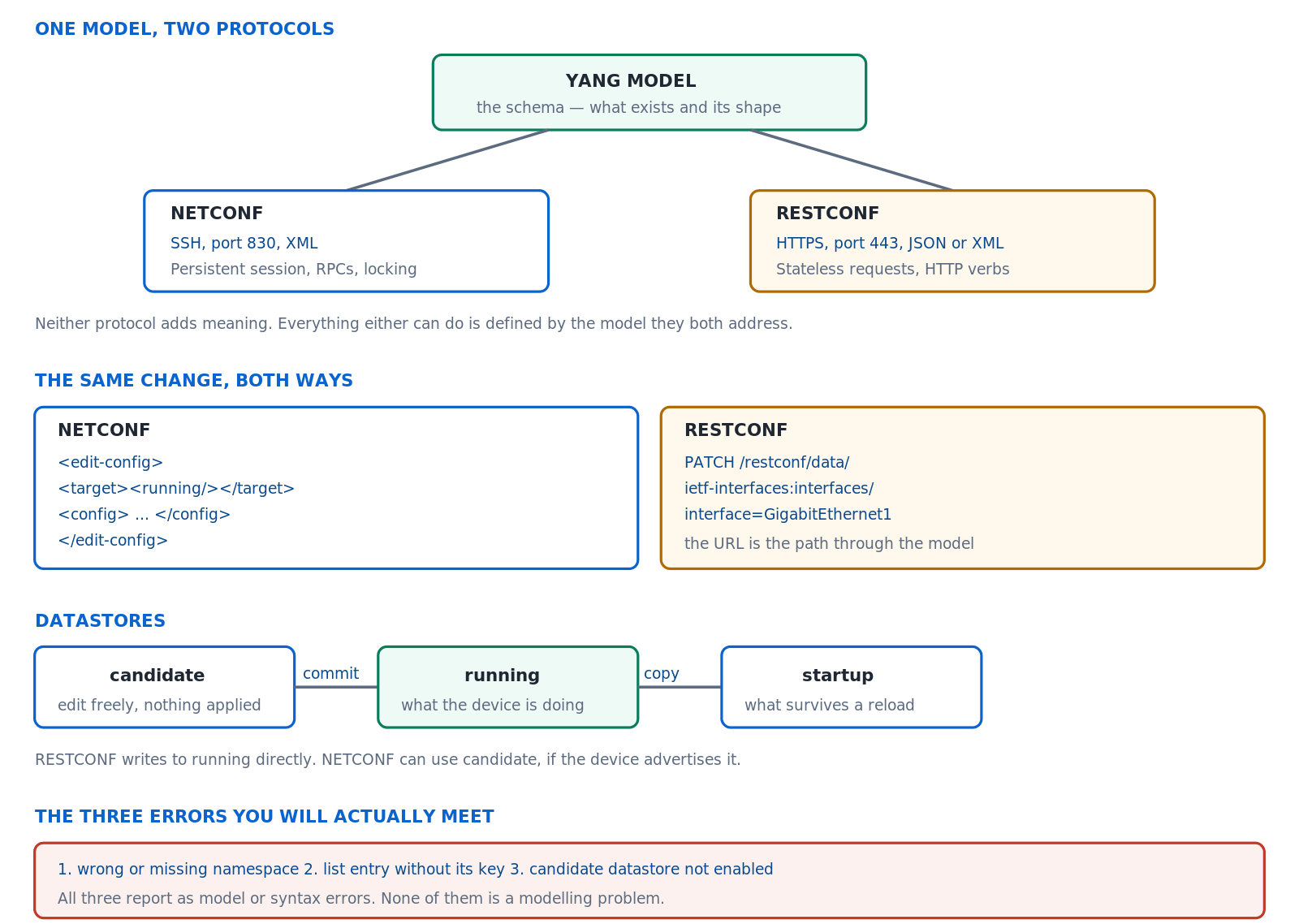
One schema addressed by two protocols. The model defines everything; NETCONF and RESTCONF differ only in transport, encoding and how they handle state.
What Does YANG Actually Describe?
What is in a model?
A tree of nodes with types and constraints. Containers group things. Lists hold repeated entries, each identified by a key. Leaves hold single values with a defined type. Every node is marked as configuration or as read-only state, which is what lets a client ask for one and not the other. The model also declares a namespace, and that namespace is what makes the difference between a request that works and one that is rejected as unknown.
A Deeper Dive into YANG
Reading a model as a tree
YANG source is verbose and the tree representation is what people actually work from. It shows the hierarchy, marks configuration nodes, indicates which leaves are keys, and shows types — everything needed to construct a request, in a form that fits on a screen. Generating it is the first thing to do with any unfamiliar model.
# Render a model as a tree - the practical starting point
$ pip install pyang
$ pyang -f tree ietf-interfaces.yang

module: ietf-interfaces
  +--rw interfaces
  |  +--rw interface* [name]
  |     +--rw name           string
  |     +--rw description?   string
  |     +--rw type           identityref
  |     +--rw enabled?       boolean    <true>
  +--ro interfaces-state
     +--ro interface* [name]
        +--ro oper-status    enumeration

# rw = configuration, ro = read-only state
# *  = a list,  [name] = its key,  ? = optional
The three families of model
Standard models from the IETF are portable across vendors and cover the common ground at the cost of the lowest common denominator. Vendor-neutral community models go further while remaining multi-vendor. Native models expose everything a platform can do and are as portable as the platform is. The choice is the usual trade between portability and coverage, and mixing them in one automation project is normal rather than a compromise.
| Family | Example | Portable | Coverage | Use when |
|---|---|---|---|---|
| IETF standard | ietf-interfaces |
Across vendors | Common ground only | Simple, portable operations |
| Vendor-neutral community | openconfig-interfaces |
Across supporting vendors | Broad | Multi-vendor automation |
| Native | Cisco-IOS-XE-native |
No | Everything the platform does | Anything the others do not cover |
Configuration data and state data are different things
Every node in a model is marked as writable configuration or as read-only state, and the distinction is more useful than it first appears. Configuration is what an operator decided; state is what resulted, including values the device derived for itself. An interface's administrative status is configuration because somebody set it; its operational status is state because the device determined it. Confusing the two produces requests that attempt to write something no client can write.
The practical consequence shows up in retrieval. Asking for configuration returns a document that could be sent back to a device to reproduce the same setup; asking for everything returns that plus counters, statuses and negotiated values, which is much larger and cannot be replayed. Knowing which one you want before making the request avoids parsing a great deal that was never relevant.
This distinction is also what makes model-driven backup meaningful. A configuration-only retrieval of the whole tree is a complete, structured, machine-comparable record of the device's intent — something a text capture of the command line only approximates, because it mixes the two and imposes an ordering that carries no meaning.
Namespaces, which cause most early errors
Every module declares a namespace, and a request must place its data in the right one or the device will reject it as referring to something it does not have. In XML that is an xmlns attribute; in JSON it is a module prefix on the top-level name. Getting it wrong produces an error that says the element is unknown, which reads like a model problem and is a typing problem.
<!-- The namespace is not decoration -->
<interfaces xmlns="urn:ietf:params:xml:ns:yang:ietf-interfaces">
  <interface>
    <name>GigabitEthernet2</name>
    <description>Set by NETCONF</description>
  </interface>
</interfaces>

# In JSON the module name prefixes the top-level container
{
  "ietf-interfaces:interface": {
    "name": "GigabitEthernet2",
    "description": "Set by RESTCONF"
  }
}
Lists need their keys
A list entry is identified by its key, and an operation on a list without supplying the key has not identified anything. This is the second most common early error and it produces a message about a missing element, which again reads as a model problem. The key is visible in the tree output in square brackets, which is one more reason to generate the tree before writing anything.
<!-- WRONG: which interface? -->
<interface>
  <description>New description</description>
</interface>

<!-- RIGHT: the key identifies the entry -->
<interface>
  <name>GigabitEthernet2</name>
  <description>New description</description>
</interface>

# In RESTCONF the key goes in the URL after an = sign
GET /restconf/data/ietf-interfaces:interfaces/interface=GigabitEthernet2
Why the model matters more than the protocol
People arriving from a scripting background often expect the hard part to be the protocol, and it is not. Both protocols can be learned in an afternoon; the model is what takes time, because it is where all the domain knowledge lives. Knowing that an interface has a description leaf is trivial. Knowing which module owns the routing configuration on a given platform, how policy is represented, and which parts are covered by a standard model and which are only in the native one — that is the actual work.
This has a practical implication for how to learn it. Time spent reading tree output for the models you intend to use returns far more than time spent on protocol details, and the fastest way to understand any area is to configure it by hand at the command line and then retrieve that subtree through the model. The correspondence between the two is immediately visible and it teaches the model's shape faster than reading it cold.
It also explains why automation projects stall at the point of touching an unfamiliar feature. The protocol works, the credentials work, the previous scripts work — and nobody knows which nodes express the new requirement. That is a model discovery problem and it is solved by retrieval and comparison rather than by anything protocol-related.
Enabling the interfaces on the device
! Both protocols need AAA before they will start
aaa new-model
aaa authentication login default local
aaa authorization exec default local
username admin privilege 15 secret <password>
!
netconf-yang
restconf
ip http secure-server
! ^ restconf requires the secure HTTP server
!
! Confirm the processes are actually running
R1# show platform software yang-management process
confd            : Running
nesd             : Running
syncfd           : Running
ncsshd           : Running
dmiauthd         : Running
nginx            : Running
!
R1# show netconf-yang datastores
netconf-yang is configured, the device accepts the command, and no session can be established — connections to the port are refused or drop immediately. The configuration looks complete. Cause: the management processes require AAA authorisation to be configured, and without aaa authorization exec they do not start. Enabling the feature does not enable its prerequisites. Confirm: show platform software yang-management process shows processes not running; the running configuration has no aaa authorization line. Fix: configure AAA authentication and authorisation, then confirm every process reports as running before troubleshooting anything client-side.How Does a NETCONF Session Work?
What happens on connection?
The client opens an SSH session to the management subsystem, and both ends immediately send a hello message listing what they support. That exchange is not a formality: it tells the client which datastores exist, whether validation is available, whether the device can roll back on error, and which models it implements. Everything the client subsequently attempts should be governed by what that hello said, and a great deal of trouble comes from assuming a capability that was never advertised.
A Deeper Dive into NETCONF
Reading the capability exchange
<!-- What the device says it can do, at session start -->
<hello xmlns="urn:ietf:params:xml:ns:netconf:base:1.0">
  <capabilities>
    <capability>urn:ietf:params:netconf:base:1.1</capability>
    <capability>urn:ietf:params:netconf:capability:candidate:1.0</capability>
    <capability>urn:ietf:params:netconf:capability:validate:1.1</capability>
    <capability>urn:ietf:params:netconf:capability:rollback-on-error:1.0</capability>
    <capability>urn:ietf:params:netconf:capability:writable-running:1.0</capability>
    <capability>urn:ietf:params:netconf:capability:xpath:1.0</capability>
    <!-- followed by one entry per supported YANG module -->
  </capabilities>
  <session-id>41</session-id>
</hello>

# If :candidate is absent, every example using it will fail.
# Check the hello before assuming.
The operations that matter
Six cover nearly everything. Retrieve configuration, retrieve configuration and state together, edit, lock, unlock, and close. Locking is the one most often skipped and most worth using: it prevents another client or a person at the console changing the configuration underneath an in-progress operation, and releasing it is automatic if the session drops.
| Operation | Does | Note |
|---|---|---|
<get-config> |
Returns configuration from a datastore | Takes a source and an optional filter |
<get> |
Returns configuration and state | Always from running |
<edit-config> |
Changes a datastore | Operation attribute decides merge or replace |
<lock> / <unlock> |
Prevents concurrent modification | Released automatically on disconnect |
<validate> |
Checks a datastore without applying | Requires the validate capability |
<commit> |
Applies candidate to running | Requires the candidate capability |
The edit operation attribute
An edit defaults to merging, which adds and updates without removing anything. Replace substitutes the entire subtree, so anything present on the device and absent from the request is deleted — which is exactly what a declarative tool wants and exactly what surprises someone expecting an additive change. Create fails if the node exists, delete fails if it does not, and remove is a delete that tolerates absence.
<!-- Default: merge. Adds the description, touches nothing else -->
<config>
  <interfaces xmlns="urn:ietf:params:xml:ns:yang:ietf-interfaces">
    <interface>
      <name>GigabitEthernet2</name>
      <description>Merged in</description>
    </interface>
  </interfaces>
</config>

<!-- Replace: this becomes the WHOLE interface entry -->
<interface xmlns:nc="urn:ietf:params:xml:ns:netconf:base:1.0"
           nc:operation="replace">
  <name>GigabitEthernet2</name>
  <description>Only this remains</description>
</interface>
<!-- ^ any address, any other leaf on Gi2, is now GONE -->
Error handling options
An edit carrying several changes can stop at the first failure, continue past it, or undo everything already applied. The last is what most automation wants, because a half-applied configuration is worse than an unapplied one, and it requires the rollback capability to have been advertised. Combined with a test option that validates before applying, it produces an operation that either fully succeeds or changes nothing.
<!-- All or nothing -->
<edit-config>
  <target><running/></target>
  <error-option>rollback-on-error</error-option>
  <test-option>test-then-set</test-option>
  <config> ... </config>
</edit-config>

# error-option:  stop-on-error (default) | continue-on-error | rollback-on-error
# test-option:   test-then-set (default) | set | test-only
Filters, and why they are not optional at scale
An unfiltered retrieval on a device with a substantial configuration returns a very large document, and doing that repeatedly across a fleet is slow enough to matter and heavy enough on the device to be noticed. Filtering narrows the request to the subtree that is actually wanted, which is both faster and considerably easier to parse because the response contains only the relevant nodes.
Two filter styles exist. A subtree filter is a skeleton of the structure being asked for, which is verbose and needs no additional syntax to learn. An XPath filter is a path expression, which is compact and expressive but requires the device to have advertised support for it. Subtree filtering works everywhere and is the safer default for portable code.
The habit worth forming is to never issue an unfiltered retrieval against a production device except deliberately, for a backup. Everything else should name what it wants, which also makes the intent of the code obvious to whoever reads it later.
A working client session
# Python, using ncclient
from ncclient import manager

with manager.connect(host='192.0.2.1', port=830,
                     username='admin', password='<password>',
                     hostkey_verify=False,
                     device_params={'name': 'iosxe'}) as m:

    # what did the device advertise?
    for c in m.server_capabilities:
        if 'candidate' in c or 'rollback' in c:
            print(c)

    # retrieve one subtree
    f = '''<interfaces xmlns="urn:ietf:params:xml:ns:yang:ietf-interfaces"/>'''
    print(m.get_config(source='running', filter=('subtree', f)))

    # change something, safely
    with m.locked('running'):
        m.edit_config(target='running', config=payload,
                      error_option='rollback-on-error')
How Does RESTCONF Map the Same Model to HTTP?
What is the mapping?
The path through the model becomes the URL, and the HTTP verb becomes the operation. Retrieving is a GET, replacing is a PUT, merging is a PATCH, removing is a DELETE, and creating a new entry is a POST to the parent. List keys appear in the URL after an equals sign. Once that correspondence is clear, anyone comfortable with HTTP can operate on a YANG model without learning a new protocol at all.
A Deeper Dive into RESTCONF
The verb table
| Verb | Does | NETCONF equivalent | Fails if |
|---|---|---|---|
GET |
Retrieve | <get-config> / <get> |
The resource does not exist |
PATCH |
Merge | Default <edit-config> |
The parent does not exist |
PUT |
Replace the resource | operation="replace" |
— creates it if absent |
POST |
Create a child | operation="create" |
The child already exists |
DELETE |
Remove | operation="delete" |
The resource does not exist |
Reading and writing one interface
# Retrieve - note the module name before the colon
curl -sk -u admin:'<password>' \
  -H 'Accept: application/yang-data+json' \
  'https://192.0.2.1/restconf/data/ietf-interfaces:interfaces/interface=GigabitEthernet2'

{
  "ietf-interfaces:interface": {
    "name": "GigabitEthernet2",
    "description": "Uplink",
    "type": "iana-if-type:ethernetCsmacd",
    "enabled": true
  }
}

# Merge a single leaf - PATCH leaves everything else alone
curl -sk -u admin:'<password>' -X PATCH \
  -H 'Content-Type: application/yang-data+json' \
  -d '{"ietf-interfaces:interface":{"name":"GigabitEthernet2",
       "description":"Changed by RESTCONF"}}' \
  'https://192.0.2.1/restconf/data/ietf-interfaces:interfaces/interface=GigabitEthernet2'
Query parameters worth knowing
Four of them cover most needs. Content selects configuration, state, or both, which matters because a plain retrieval of a large subtree returns a great deal that is not editable. Depth bounds how far down the tree the response goes. Fields selects specific leaves. And the defaults handling decides whether values equal to their model default are included, which is the reason two apparently identical devices can return different-sized responses.
# Configuration only, no operational state
'.../restconf/data/ietf-interfaces:interfaces?content=config'

# State only
'.../restconf/data/ietf-interfaces:interfaces?content=nonconfig'

# Only the top level, not the whole subtree
'.../restconf/data/ietf-interfaces:interfaces?depth=2'

# Just two leaves from each entry
'.../restconf/data/ietf-interfaces:interfaces?fields=interface(name;enabled)'

# Include or omit values that match the model default
'.../restconf/data/ietf-interfaces:interfaces?with-defaults=report-all'
Status codes carry the diagnosis
RESTCONF returns ordinary HTTP status codes and they mean what they usually mean, which makes debugging more approachable than the equivalent in XML. Unauthorised means credentials. Not found means the path does not exist, which is usually a namespace or a key rather than a missing feature. Conflict means a create was attempted on something that already exists. Bad request means the payload was malformed or the model rejected it, and that response carries a body explaining why.
Reading the body on an error is the step most often skipped, because the status code alone feels sufficient. It is not: the body contains the same structured error information NETCONF returns, including the path that failed, and it converts a generic bad request into a specific statement about which node was wrong. Any client worth using logs it.
There is one distinction worth internalising. A not-found on a path that should exist is nearly always a client-side spelling or namespace problem, whereas a not-found on a container that genuinely is not configured yet is normal — retrieving something absent is not an error condition in the operator's sense, and code should treat the two differently rather than failing on both.
Finding the root and what is supported
The API root is discoverable rather than assumed, which matters when writing a client intended to work across platforms and releases. The same discovery mechanism exposes which models the device implements and which capabilities it supports, giving RESTCONF an equivalent of the NETCONF hello.
# Discover the API root rather than hardcoding it
curl -sk -u admin:'<password>' \
  'https://192.0.2.1/.well-known/host-meta'

<XRD xmlns='http://docs.oasis-open.org/ns/xri/xrd-1.0'>
  <Link rel='restconf' href='/restconf'/>
</XRD>

# What capabilities does it support?
curl -sk -u admin:'<password>' \
  -H 'Accept: application/yang-data+json' \
  '.../restconf/data/ietf-restconf-monitoring:restconf-state/capabilities'

# Which modules are implemented?
curl -sk -u admin:'<password>' \
  '.../restconf/data/ietf-yang-library:modules-state'
Choosing between the two protocols
| Consideration | NETCONF | RESTCONF |
|---|---|---|
| Transaction across many changes | Yes, with candidate and commit | No — each request is independent |
| Locking | Yes | No |
| Rollback on error | Yes | Per request only |
| Ease of ad-hoc use | Needs a client library | Any HTTP tool |
| Encoding | XML | JSON or XML |
| Best for | Configuration management systems | Scripts, integrations, quick queries |
How Do Datastores and Commits Work?
What are the datastores?
Running is what the device is doing. Startup is what it will do after a reload. Candidate, where supported, is a scratch copy that can be edited freely and applied in one operation — which is what makes a multi-part change atomic. A more recent architecture adds two conceptual datastores: intended, meaning the configuration after any templating has been resolved, and operational, meaning everything the device actually has including values it derived itself.
A Deeper Dive into Datastores
The candidate datastore, which must be enabled
On many platforms the candidate datastore is not available until it is explicitly turned on, and enabling it changes how writes behave for every client — direct writes to running are no longer accepted, because the model becomes edit-then-commit. That is a deliberate trade and it is worth making knowingly, because a script that wrote directly to running will stop working the moment candidate is enabled.
! Enabling candidate changes the write model for everyone
netconf-yang feature candidate-datastore
!
! Confirm which datastores now exist
R1# show netconf-yang datastores
Datastore Name : running
Datastore Name : candidate
!
! After this, edit-config to running is refused and the
! sequence becomes: edit candidate, validate, commit.
Edit, validate, commit
# The atomic pattern, with ncclient
with manager.connect(host='192.0.2.1', port=830,
                     username='admin', password='<password>',
                     hostkey_verify=False) as m:

    with m.locked('candidate'):
        m.discard_changes()          # start from a clean copy
        m.edit_config(target='candidate', config=part_one)
        m.edit_config(target='candidate', config=part_two)
        m.validate(source='candidate')
        m.commit()

# Either both parts are applied or neither is.
# A failure anywhere before commit leaves running untouched.
Confirmed commit, which protects against losing the device
A change that breaks management connectivity is unrecoverable remotely, and this is the mechanism that addresses it. A confirmed commit applies the change and starts a timer; if a second confirming commit does not arrive before it expires, the device reverts automatically. It is the programmable equivalent of a scheduled reload as a safety net, and it is considerably more precise.
# Apply, but revert automatically unless confirmed
m.commit(confirmed=True, timeout='120')

# ... verify connectivity and the change from the outside ...

m.commit()          # confirm it, making the change permanent

# If the session drops or the timer expires first, the device
# reverts to the previous running configuration on its own.
Locking, and what it does not protect against
A lock stops another NETCONF client from editing the same datastore, and on most implementations it also blocks configuration from the command line for the duration. That is genuinely useful during a multi-step change, and it is released automatically if the session dies, which avoids the classic problem of a crashed script leaving a device unmodifiable.
What it does not do is prevent a RESTCONF request from taking effect, on platforms where the two interfaces do not share locking, nor stop anything that changes configuration by another path entirely. Treating a lock as an absolute guarantee is therefore optimistic; treating it as protection against the most likely collision — another instance of your own automation — is accurate and still worth having.
The related discipline is to hold locks briefly. A lock held across a long computation, or worse across a wait for human input, blocks everyone else for that period and turns a safety mechanism into an availability problem. Acquire, edit, commit, release.
Saving to startup
Neither protocol saves to startup as a side effect of writing to running, which catches people out in exactly the way an unsaved command-line change does. NETCONF has a copy operation for it; on platforms that expose a save action in the model, RESTCONF can invoke that instead. Whichever is used, it is a separate deliberate step.
# NETCONF: copy running to startup
m.copy_config(source='running', target='startup')

# RESTCONF: invoke the platform's save operation
curl -sk -u admin:'<password>' -X POST \
  -H 'Content-Type: application/yang-data+json' \
  'https://192.0.2.1/restconf/operations/cisco-ia:save-config'

# Confirm from the CLI that they now match
R1# show archive config differences nvram:startup-config system:running-config
Which datastore answers which question
| Datastore | Contains | Writable | Read it to answer |
|---|---|---|---|
running |
Current configuration | Yes, unless candidate is enabled | “What is configured now?” |
candidate |
Staged edits | Yes | “What is about to be applied?” |
startup |
Configuration after reload | By copy only | “Will this survive a restart?” |
operational |
Config plus derived state | No | “What is the device actually doing?” |
Which Programmability Failures Look Like Model Problems?
What are the failures worth memorising?
Five. The interfaces that never started because authorisation was missing. A namespace omitted or wrong. A list operation with no key. A replace that removed everything it did not mention. And a script that worked against one software release and fails against another because the model changed underneath it.
A Deeper Dive into the Failure Catalogue
The accidental replace
operation="replace" used where merge was meant Symptom: a request intended to set one leaf removes the interface's address, its description, and everything else that was configured on it. The request succeeded and the outcome is an outage. Cause: replace substitutes the entire subtree with what was supplied, so any node present on the device and absent from the payload is deleted. In RESTCONF that is the plain meaning of PUT, which reads as an innocuous write to anyone coming from a general HTTP background. Confirm: compare the configuration before and after — everything not in the payload has gone. Fix: use PATCH, or the default merge behaviour in NETCONF, unless full replacement is genuinely intended; and test any replace against a lab device before pointing it at anything else.The model that changed
The silent partial application
Reading the error properly
The error response contains considerably more than the message that client libraries usually surface — a type, a tag, a severity, and frequently the exact path that failed. Printing the whole thing rather than the summary turns most of these failures into a one-line diagnosis, and it is the first change worth making to any script that is proving hard to debug.
<!-- The full error, which names the failing path -->
<rpc-error>
  <error-type>application</error-type>
  <error-tag>missing-element</error-tag>
  <error-severity>error</error-severity>
  <error-path>/interfaces/interface</error-path>
  <error-message>Missing key leaf 'name'</error-message>
</rpc-error>

# In ncclient, print the whole thing rather than str(e)
from ncclient.operations import RPCError
try:
    m.edit_config(target='running', config=payload)
except RPCError as e:
    print(e.type, e.tag, e.path, e.message)
A diagnostic order that works
# Bottom-up, and most cases end in the first two steps
!
# 1. Are the interfaces running on the device?
R1# show platform software yang-management process
!
# 2. Can you connect and authenticate at all?
$ ssh -p 830 admin@192.0.2.1 -s netconf
$ curl -sk -u admin:'<password>' https://192.0.2.1/restconf/data/ietf-yang-library:modules-state | head
!
# 3. Does the device implement the model you are using?
#    (grep the module list from step 2)
!
# 4. Does a plain read of that subtree work?
#    If GET fails, the write was never going to succeed.
!
# 5. Only now, the payload - namespace, keys, operation
R1# show netconf-yang sessions
R1# show netconf-yang statistics
Building something worth keeping
The first useful thing to automate is not configuration but retrieval. A script that collects a configuration-only snapshot of every device on a schedule produces a structured, comparable record that is immediately valuable, cannot break anything, and exercises every part of the stack that a configuration push would — credentials, connectivity, model paths, parsing. Getting that working first means the risky part starts from a proven foundation.
The second is a comparison: today's snapshot against yesterday's, per device, reported as a structured difference. Because the data is modelled rather than textual, the differences are meaningful — a changed leaf rather than a moved line — which makes the output genuinely readable and turns configuration drift into something detected automatically rather than discovered during an incident.
Only then is configuration writing worth attempting, and by that point the model paths for everything being touched are already known from the retrieval work. That ordering is slower to reach the exciting part and considerably faster to reach something dependable.
Blueprint framing
The CCIE Enterprise Infrastructure v1.1 blueprint covers programmability within the automation domain, and the questions are about the model and the mechanics rather than about writing large programs: what YANG describes, what distinguishes the two protocols, which datastores exist, and how a change is made and verified. Being able to construct a correct request by hand — with the right namespace and the list key present — is what that material is testing.
Conclusion
YANG is the part worth learning and the protocols are thin by comparison. A model is a tree of typed nodes, some configuration and some read-only, with lists identified by keys and everything living in a declared namespace. Once that is clear, NETCONF and RESTCONF are two ways of addressing the same tree — one with a persistent session, remote procedure calls and locking, the other with URLs and HTTP verbs.
The differences that matter operationally come down to transactions. NETCONF with a candidate datastore can stage several changes and apply them as one, roll back on error, and confirm a commit so that a change which breaks management reverts itself. RESTCONF can do none of that across requests, which makes it excellent for reading, for single changes and for integration with anything that speaks HTTP, and the wrong choice for a configuration push that must be atomic.
Almost everything that goes wrong early is mundane. The management processes never started because authorisation was not configured. A namespace was omitted. A list key was missing. A replace removed what it did not mention. And a script that worked last year meets a model that has moved on. None of those is a modelling problem, and recognising that is what stops the debugging from starting in the wrong place.
External Links
- RFC 7950 — The YANG 1.1 Data Modeling Language
- RFC 6241 — Network Configuration Protocol (NETCONF)
- RFC 6242 — Using the NETCONF Protocol over Secure Shell (SSH)
- RFC 8040 — RESTCONF Protocol
- RFC 8342 — Network Management Datastore Architecture (NMDA)
- RFC 8343 — A YANG Data Model for Interface Management
- Cisco IOS XE — Programmability Configuration Guide
Reference Notes
- RFC 7950 defines YANG 1.1, including containers, lists, leaves, leaf-lists, and the
configstatement that marks a node as configuration or state. - RFC 7950 specifies that each module declares a namespace, and that list entries are identified by the leaves named in the
keystatement. - RFC 6241 specifies NETCONF, including the
<hello>capability exchange performed at session establishment. - RFC 6241 defines the base operations
<get>,<get-config>,<edit-config>,<copy-config>,<lock>,<unlock>and<close-session>. - RFC 6241 defines the
operationattribute values merge, replace, create, delete and remove, with merge as the default. - RFC 6241 defines the
error-optionvalues stop-on-error, continue-on-error and rollback-on-error, and thetest-optionvalues test-then-set, set and test-only. - RFC 6241 describes the candidate datastore and the confirmed commit capability, in which a commit reverts automatically unless confirmed within a timeout.
- RFC 6242 specifies NETCONF over SSH and assigns TCP port 830 to the NETCONF subsystem.
- RFC 8040 specifies RESTCONF, mapping datastore resources to URLs and operations to the HTTP methods GET, POST, PUT, PATCH and DELETE.
- RFC 8040 defines the query parameters
content,depth,fieldsandwith-defaults, and the discovery of the API root through/.well-known/host-meta. - RFC 8342 defines the network management datastore architecture, adding the intended and operational datastores to the conventional running, candidate and startup.
- The CCIE Enterprise Infrastructure v1.1 unified exam topics include network programmability within the automation domain.