

Reverse path forwarding is the one idea that stops multicast from destroying the network it runs on. A multicast packet has no per-hop destination to constrain it, so a router that simply forwarded everything it received out of every other interface would build loops instantly and permanently. The RPF check is the constraint: accept a packet only on the interface you would use to send a packet back to its source, and drop it everywhere else. One rule, and multicast forwarding becomes loop-free.
It is also the source of most multicast failures, because it couples multicast forwarding to unicast routing in a way that is invisible from either side. A network can have perfect unicast connectivity, correct PIM configuration, agreed RP, healthy neighbours, and still drop every packet — because the path traffic actually takes and the path the router would use to reach the source are different interfaces. Unicast does not care about that asymmetry. Multicast fails completely on it.
This article covers what the RPF check compares and against what, which tables the lookup consults and in what order, how to fix a failure without disturbing unicast routing, how to locate the failing hop rather than guessing, and the cases that present as RPF failures and are something else — equal-cost paths, tunnels, and the state that looks correct while a counter quietly climbs.
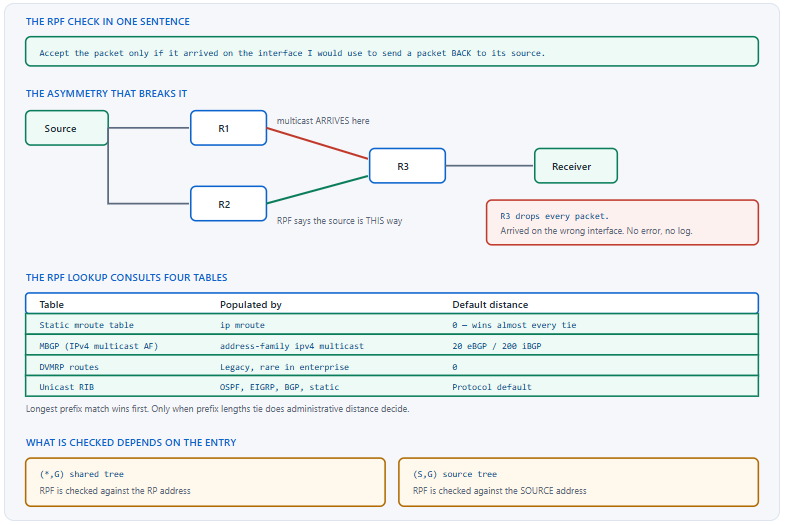
What Is the RPF Check and What Is It Checking Against?
What is the rule?
When a multicast packet arrives, the router looks up the path back towards the packet's source and compares the interface that lookup returns with the interface the packet actually arrived on. If they match, the packet is accepted and forwarded out the outgoing interface list. If they do not, the packet is discarded and a counter increments. That is the whole mechanism, and it guarantees loop freedom because a looping packet must eventually arrive on an interface that is not on the path back to its source.
A Deeper Dive into the Check
What "the source" means depends on the entry
For an (S,G) entry the RPF check is against the source address, which is the intuitive case. For a (*,G) entry there is no known source, so the check is against the RP address instead — the shared tree is rooted at the RP, so the RP is what "upstream" means. That distinction matters in practice: a group whose (*,G) passes RPF and whose (S,G) fails has a working path to the RP and a broken one to the source, which immediately halves the search space.
! The primary command - what does the router think?
R3# show ip rpf 192.0.2.10
RPF information for ? (192.0.2.10)
  RPF interface: GigabitEthernet0/2
  RPF neighbor: ? (10.0.23.2)
  RPF route/mask: 192.0.2.0/24
  RPF type: unicast (ospf 1)
  Doing distance-preferred lookups across tables
  RPF topology: ipv4 multicast base
!
! Compare with where traffic actually arrives
R3# show ip mroute 239.1.1.1 | include Incoming
  Incoming interface: GigabitEthernet0/1, RPF nbr 10.0.13.1
! ^ Mismatch. Every packet on Gi0/1 is being dropped.
The counter that proves it
An RPF failure produces no log message and no interface error. The only direct evidence is the drop counter in show ip mroute count, which reports RPF-failed packets separately from other drops. A counter that climbs while the mroute state looks entirely healthy is the clearest single symptom in multicast, and checking it early avoids a long investigation of state that was correct all along.
! The RPF-failed counter, which is the smoking gun
R3# show ip mroute count
IP Multicast Statistics
6 routes using 4218 bytes of memory
Group: 239.1.1.1, Source count: 1, Packets forwarded: 0, Packets received: 44219
  Source: 192.0.2.10/32, Forwarding: 0/0/0/0, Other: 44219/44219/0
!   Other: total / RPF-failed / other-drops
! ^ Received 44219, forwarded 0, ALL failed RPF.
!
! Watch it move
R3# show ip mroute count | include Other
Why unicast tolerates what multicast cannot
Asymmetric routing is normal and harmless for unicast. A TCP session whose packets take one path outbound and another inbound works perfectly, because each direction is forwarded independently on destination address alone and neither router ever compares the two. Multicast has no such independence: the RPF check explicitly compares the forward path of the data with the reverse path in the routing table, so any asymmetry between them is fatal rather than cosmetic.
Where asymmetry comes from
| Cause | Why it produces asymmetry | Typical fix |
|---|---|---|
| Unequal IGP metrics on parallel links | Traffic follows one link, the route points at the other | Align metrics, or a static mroute |
| Redistribution with different costs per direction | Each direction picks a different best path | Fix the redistribution metrics |
| A GRE or DMVPN tunnel carrying the data | The route to the source points at the physical path | Static mroute pointing at the tunnel |
| eBGP multihop or a route-server topology | The BGP next hop is not the physical neighbour | MBGP, or a static mroute |
| Deliberate traffic engineering or PBR | Data is steered off the routed path on purpose | Static mroute matching the engineered path |
RPF in a VRF
Multicast inside a VRF performs the RPF check against that VRF's routing table, and every diagnostic command needs the VRF named or it reads the global table and returns a confidently wrong answer. This is the same class of error as any other VRF diagnostic, and it is particularly easy to make here because the output format is identical whether or not the keyword was included.
! Every RPF command is VRF-scoped
R3# show ip rpf vrf RED 192.0.2.10
R3# show ip mroute vrf RED 239.1.1.1
R3# show ip mroute vrf RED count
R3# show ip pim vrf RED neighbor
!
! And so is the static mroute that fixes it
ip mroute vrf RED 192.0.2.0 255.255.255.0 10.0.23.2
show ip rpf before anything elseIt takes one command and one source address to know whether the router agrees with reality. If the RPF interface matches where traffic arrives, the problem is somewhere else entirely and you have eliminated the largest single category of multicast failure in about four seconds.Which Table Does the RPF Lookup Actually Use?
What is the resolution order?
Four tables are consulted: the static mroute table, MBGP's IPv4 multicast address family, DVMRP routes, and the unicast RIB. The router takes the longest prefix match across all of them first, and only when two candidates have the same prefix length does administrative distance decide. Because a static mroute has a default distance of zero and is usually configured as a specific prefix, it wins in practice — but the ordering is longest match first, not table priority first, and assuming otherwise produces surprises.
A Deeper Dive into the Lookup
Longest match beats distance
This is the rule people get backwards. A static mroute for 192.0.2.0/24 with distance 0 loses to a unicast route for 192.0.2.10/32 with distance 110, because /32 is longer than /24 and prefix length is evaluated first. Anyone writing a static mroute to override a specific host route needs to match or exceed its prefix length, and writing a /24 in the hope that distance 0 will carry it is a common and quiet failure.
! This does NOT override a /32 unicast route
ip mroute 192.0.2.0 255.255.255.0 10.0.23.2
!
! This does - same prefix length, lower distance
ip mroute 192.0.2.10 255.255.255.255 10.0.23.2
!
! Confirm which one won
R3# show ip rpf 192.0.2.10
RPF information for ? (192.0.2.10)
  RPF interface: GigabitEthernet0/2
  RPF neighbor: ? (10.0.23.2)
  RPF route/mask: 192.0.2.10/32
  RPF type: static
  ! ^ "static" here means the mroute table, not a static route
The static mroute, which affects nothing else
ip mroute populates a table used only by the RPF check. It does not appear in show ip route, does not influence unicast forwarding, and does not create any forwarding entry of its own. That is precisely what makes it the right tool for an asymmetry that exists on purpose: it corrects the multicast view without touching the unicast design that produced the asymmetry deliberately.
! Syntax: source, mask, RPF neighbour or interface, [distance]
ip mroute 192.0.2.0 255.255.255.0 10.0.23.2
ip mroute 192.0.2.0 255.255.255.0 Tunnel0
ip mroute 0.0.0.0 0.0.0.0 10.0.23.2 200
! ^ a catch-all with high distance, used only as a last resort
!
! It is invisible to unicast
R3# show ip route 192.0.2.0
% Network not in table
R3# show ip rpf 192.0.2.10 | include type|route
  RPF route/mask: 192.0.2.0/24
  RPF type: static
!
! And it has its own table
R3# show ip mroute static
Mroute: 192.0.2.0/24, RPF neighbor: 10.0.23.2, distance: 0
MBGP, which is the scalable version of the same idea
The IPv4 multicast address family carries a separate set of prefixes used only for RPF. It exists so that a network can have one topology for unicast forwarding and a different one for multicast RPF without configuring a static mroute on every router, which is exactly the requirement in a provider network or a large enterprise with engineered paths. The prefixes are ordinary BGP NLRI with a different subsequent address family identifier, so all the normal policy tools apply.
! Advertise a multicast-only view of the source networks
router bgp 65000
 neighbor 10.0.23.2 remote-as 65000
 !
 address-family ipv4 unicast
  neighbor 10.0.23.2 activate
  network 10.0.0.0 mask 255.255.0.0
 exit-address-family
 !
 address-family ipv4 multicast
  neighbor 10.0.23.2 activate
  network 192.0.2.0 mask 255.255.255.0
 exit-address-family
!
! The multicast table is separate
R3# show bgp ipv4 multicast
     Network          Next Hop            Metric LocPrf Weight Path
 *>i 192.0.2.0/24     10.0.12.1                0    100      0 i
!
R3# show ip rpf 192.0.2.10 | include type
  RPF type: mbgp
Reading the RPF type field
RPF type shows |
Source of the answer | Configured with |
|---|---|---|
unicast (ospf 1) |
The unicast RIB, via OSPF | Nothing multicast-specific |
unicast (eigrp 100) |
The unicast RIB, via EIGRP | Nothing multicast-specific |
static |
The static mroute table | ip mroute |
mbgp |
BGP's IPv4 multicast address family | address-family ipv4 multicast |
dvmrp |
A DVMRP route | Legacy interoperability only |
Equal-cost paths and the tie-break
Where two equal-cost paths lead back to the source, the RPF check must pick one, and by default it picks the one with the highest next-hop IP address. That is deterministic but arbitrary — nothing about the multicast design chose it — so a network with parallel links has a multicast path decided by address allocation. Enabling multipath changes the behaviour to hashing across the available paths, which spreads load but makes the incoming interface for a given group harder to predict.
! Default: highest next-hop address wins, single path
R3# show ip rpf 192.0.2.10 | include neighbor
  RPF neighbor: ? (10.0.23.2)
! ^ with 10.0.13.1 also equal-cost, .23.2 won on address
!
! Load-split across equal-cost paths instead
ip multicast multipath
! Hash on source only - all groups from one source take one path
!
ip multicast multipath s-g-hash basic
! Hash on source AND group - better spread across groups
!
ip multicast multipath s-g-hash next-hop-based
! Includes the next hop, so the split survives a path change better
show ip mroute static, and show ip rpf still reports the unicast interface. Nothing looks wrong. Cause: the RPF lookup takes the longest prefix match across all tables before it considers administrative distance. A /24 static mroute simply loses to a /32 host route learned by the IGP, regardless of distance 0. Confirm: the RPF route/mask line in show ip rpf shows a longer prefix than the one you configured. Fix: configure the static mroute with a prefix at least as long as the competing unicast route, or remove the more specific route from the IGP.How Do I Fix an RPF Failure Without Breaking Unicast?
What are the options?
Four, in increasing order of scope. A static mroute, which corrects one router's view of one source range and touches nothing else. MBGP, which distributes a multicast-specific topology to many routers at once. Enabling PIM on the interface the RPF check already points at, which is the right fix when the asymmetry is not real and PIM is simply missing. And changing the IGP so that the paths are symmetric, which is the correct answer when the asymmetry was accidental in the first place.
A Deeper Dive into the Fixes
First, decide whether the asymmetry is deliberate
This determines everything that follows. If the traffic path and the routing path differ because someone engineered it that way — a tunnel, a PBR policy, a deliberately preferred link — then the routing table is right and multicast needs a static mroute or MBGP to be told about the exception. If the asymmetry is accidental, patching it with a static mroute leaves a fragile network with a hidden dependency, and fixing the metrics is the better answer.
! Establish which path traffic takes vs which path RPF picks
R3# show ip rpf 192.0.2.10 | include interface|neighbor
  RPF interface: GigabitEthernet0/2
  RPF neighbor: ? (10.0.23.2)
!
R3# show ip route 192.0.2.10
Routing entry for 192.0.2.0/24
  Known via "ospf 1", distance 110, metric 30
  Last update from 10.0.23.2 on GigabitEthernet0/2
!
R3# traceroute 192.0.2.10
! ^ if the trace leaves via Gi0/2, the paths agree and the
!   RPF failure is on a different router entirely.
PIM missing on the RPF interface
A very common case that presents as an RPF failure and is not one. The RPF lookup returns the correct interface, traffic would arrive on it, and the interface has no PIM enabled — so there is no neighbour to send a join to and no adjacency to accept traffic from. show ip rpf looks perfect and show ip pim interface does not list the interface at all, which is the pair of commands that identifies it.
! RPF points at Gi0/2 - is PIM even running on it?
R3# show ip pim interface
Address     Interface   Ver/Mode  Nbr Count  Query Intvl  DR
10.0.13.3   Gi0/1       v2/S      1          30           10.0.13.3
! ^ Gi0/2 is absent. That is the fault.
!
! Fix
interface GigabitEthernet0/2
 ip pim sparse-mode
!
! Confirm a neighbour forms
R3# show ip pim neighbor GigabitEthernet0/2
Multicast over a tunnel
A GRE or DMVPN tunnel is the classic deliberate asymmetry: the data arrives through the tunnel while the route to the source points at the physical interface underneath. The fix is a static mroute naming the tunnel as the RPF interface, plus PIM enabled on the tunnel itself. Both are required, and configuring only one produces a failure that looks identical to configuring neither.
! PIM on the tunnel itself
interface Tunnel0
 ip address 172.16.0.1 255.255.255.252
 ip pim sparse-mode
 tunnel source GigabitEthernet0/0
 tunnel destination 203.0.113.5
!
! And tell RPF that sources are reachable through it
ip mroute 192.0.2.0 255.255.255.0 Tunnel0
!
! Verify both halves
R3# show ip pim neighbor | include Tunnel0
172.16.0.2  Tu0  00:42:19/00:01:33 v2  1 / S P G
R3# show ip rpf 192.0.2.10 | include interface|type
  RPF interface: Tunnel0
  RPF type: static
Fixing the metrics instead
Where the asymmetry was accidental, the durable fix is in the IGP. Two parallel links with different costs, a redistribution point that assigns different metrics in each direction, or a summary that makes one path artificially attractive are all ordinary routing problems that happen to have surfaced through multicast. Correcting them removes the multicast symptom and also removes whatever unicast oddities were being tolerated silently.
! Symmetric costs on parallel links
interface GigabitEthernet0/1
 ip ospf cost 10
interface GigabitEthernet0/2
 ip ospf cost 10
!
! Confirm both paths are now equal-cost
R3# show ip route 192.0.2.0
Routing entry for 192.0.2.0/24
  Known via "ospf 1", distance 110, metric 30
  Last update from 10.0.23.2 on GigabitEthernet0/2
  Routing Descriptor Blocks:
  * 10.0.13.1, from 10.0.0.1, via GigabitEthernet0/1
    10.0.23.2, from 10.0.0.2, via GigabitEthernet0/2
! ^ Now RPF picks by highest next-hop address, deterministically.
Which fix for which situation
| Situation | Fix | Scope | Risk |
|---|---|---|---|
| PIM missing on the RPF interface | ip pim sparse-mode |
One interface | None — this was simply missing |
| Deliberate tunnel or engineered path | Static mroute | One router, one source range | A hidden dependency if undocumented |
| Many routers need the same exception | MBGP | The whole BGP domain | A second topology to maintain |
| Accidental metric asymmetry | Fix the IGP | The routing design | Touches unicast — change control applies |
| Equal-cost paths, unpredictable choice | ip multicast multipath |
One router | Incoming interface becomes hash-dependent |
show ip route, it survives every routing change, and the next person to troubleshoot this path will not know it exists unless it carries a comment. Anywhere a static mroute is the right answer, a line in the configuration explaining which asymmetry it corrects is part of the fix rather than an optional extra.How Do I Find Which Hop Is Failing?
What is the method?
Walk the path from the receiver towards the source, one router at a time, checking three things at each hop: does an mroute entry exist, does the incoming interface match what show ip rpf says, and are packets being forwarded rather than counted as RPF failures. The hop where the answer changes is the hop with the problem. mtrace automates the walk when it works, and it frequently does not in networks with control-plane filtering, which is why the manual method is worth having.
A Deeper Dive into Locating the Failure
mtrace, which traces the reverse path
mtrace follows the multicast path from a receiver back towards a source, hop by hop, reporting the RPF interface and any error at each one. It traces the reverse path — which is exactly the path the RPF check cares about — and it reports the specific failure reason at the router where forwarding stops. When it completes, it is the fastest tool available; when it stops partway, the last router it reached is where to start looking manually.
! mtrace source destination group
R4# mtrace 192.0.2.10 10.4.4.100 239.1.1.1
Type escape sequence to abort.
Mtrace from 192.0.2.10 to 10.4.4.100 via group 239.1.1.1
From source (?) to destination (?)
Querying full reverse path...
 0  10.4.4.100
-1  10.4.4.1 PIM  thresh^ 0   0 ms
-2  10.0.34.3 PIM  thresh^ 0   1 ms
-3  10.0.23.2 PIM  Reached RP/Core  2 ms
-4  10.0.12.1 PIM  thresh^ 0   3 ms
-5  192.0.2.1 PIM_MT  thresh^ 0   4 ms
! ^ A complete trace. The path exists end to end.
! A trace that stops tells you where to look
R4# mtrace 192.0.2.10 10.4.4.100 239.1.1.1
 0  10.4.4.100
-1  10.4.4.1 PIM  thresh^ 0   0 ms
-2  10.0.34.3 No route
! ^ R3 is the failing hop. Go there and run show ip rpf.
!
! Other terminating conditions worth recognising
!   "No route"          - the RPF lookup found nothing
!   "Not forwarding"    - RPF resolved but the packet was dropped
!   "Reached RP/Core"   - normal on the shared tree
!   "* * *"             - the hop did not answer; check filtering
The three commands at each hop
Where mtrace does not complete, the manual walk is three commands per router and it is fast because most hops pass immediately. Existence of state, agreement between the incoming interface and the RPF answer, and a forwarding count that is rising rather than a failure count. Any hop where those three do not all hold is either the problem or one hop away from it.
! At every hop, in this order
show ip mroute 239.1.1.1
! ^ no entry at all? Joins are not reaching here.
show ip rpf 192.0.2.10
! ^ compare with the Incoming interface above.
show ip mroute count | include 239.1.1.1 -A 2
! ^ Forwarding rising = healthy. RPF-failed rising = found it.
!
! And the neighbour on the RPF interface must exist
show ip pim neighbor | include GigabitEthernet0/2
MFIB, which is what actually forwards
On IOS-XE the mroute table is control-plane state and the MFIB is what the forwarding engine uses. They are normally identical, and when they are not the MFIB is the truth. Checking it distinguishes a genuine forwarding problem from a display artefact, and its counters are per-entry and per-interface rather than aggregated.
! What the forwarding plane actually holds
R3# show ip mfib 239.1.1.1
 (192.0.2.10,239.1.1.1) Flags: HW
   SW Forwarding: 0/0/0/0, Other: 44219/44219/0
   HW Forwarding: 184122/512/1316/5, Other: 0/0/0
   Gi0/2 Flags: A
   Gi0/3 Flags: F NS
!   A  = Accepting  (this is the RPF interface)
!   F  = Forwarding (this is an outgoing interface)
!   NS = Negate Signalling
!
R3# show ip mfib count
R3# show ip mfib interface
Debugging safely
debug ip mpacket logs every multicast packet and will take down a busy router, so it is used with an ACL restricting it to one group and preferably during a window. The output states the RPF verdict for each packet directly, which makes it definitive when the counters are ambiguous — but the counters are rarely ambiguous, and the debug is a last resort rather than a first step.
! ALWAYS scope it. This can overwhelm a production router.
ip access-list standard DBG-GRP
 permit host 239.1.1.1
!
R3# debug ip mpacket 239.1.1.1
IP(0): s=192.0.2.10 (GigabitEthernet0/1) d=239.1.1.1 id=4102, ttl=60,
       prot=17, len=1370(1356), not RPF interface
! ^ Definitive. The packet arrived on Gi0/1, RPF expects Gi0/2.
!
R3# undebug all
Rate-limiting the investigation
An RPF failure on a high-rate group generates a great deal of drop processing, and on some platforms the failed packets are punted to the CPU before being discarded. Where a multicast problem is accompanied by high CPU, checking the RPF failure rate explains both symptoms at once and makes clear which one is the cause.
! High CPU alongside a multicast fault - check the drop rate
R3# show processes cpu sorted | include IP Input|PIM|MFIB
R3# show ip mroute count | include Other
R3# show ip traffic | include bad hop|RPF
!
! Limit the damage while you fix the cause
ip multicast rate-limit in group-list DBG-GRP 1000
mtrace failing to complete is an inconvenience rather than an obstacle.Which RPF Failures Are Actually Something Else?
What are the impostors?
Four. PIM missing on the interface the RPF check correctly identified, which is a configuration gap rather than a path problem. An equal-cost path whose selection changed after a link event, so the failure appears and disappears with no configuration change. A shared-tree entry failing RPF against the RP while the source path is fine, which is an RP reachability problem. And an SSM group whose range overlaps a configured ASM range, which fails in a way that has nothing to do with RPF at all despite presenting identically.
A Deeper Dive into the Impostors
The equal-cost path that moved
show ip rpf names a different interface than show ip mroute reports as incoming, and show ip route lists two routing descriptor blocks. Fix: make the path deterministic by adjusting metrics so only one path is best, or add a static mroute pinning the RPF interface, or enable ip multicast multipath so both paths are usable.The shared tree failing against the RP
show ip rpf using the RP address rather than the source address returns an interface that does not match the (*,G) incoming interface. Fix: correct the path to the RP, or add a static mroute for the RP address itself — ip mroute 10.0.0.100 255.255.255.255 <neighbor>.SSM range collisions
show ip pim ssm or show running-config | include pim ssm shows a range that includes the group, and show ip igmp groups detail shows no source list. Fix: move the group out of the SSM range, or move the receivers to IGMPv3 and configure them to join (S,G) explicitly.Checking the RP path explicitly
Because the (*,G) check uses the RP address, running show ip rpf against the RP is a distinct test from running it against the source, and both are worth doing. On a network where the RP sits in a different part of the topology from the sources, these two lookups routinely return different interfaces, and only one of them is relevant to the entry you are investigating.
! Two different tests, frequently different answers
R3# show ip rpf 192.0.2.10
  RPF interface: GigabitEthernet0/2
! ^ relevant to (S,G) entries
!
R3# show ip rpf 10.0.0.100
  RPF interface: GigabitEthernet0/1
! ^ relevant to (*,G) entries. The RP is a different direction.
!
! Compare each with the matching mroute entry
R3# show ip mroute 239.1.1.1 | include Incoming|\(
(*, 239.1.1.1), 01:12:04/00:02:41, RP 10.0.0.100, flags: S
  Incoming interface: GigabitEthernet0/1, RPF nbr 10.0.13.1
(192.0.2.10, 239.1.1.1), 00:41:22/00:02:19, flags: T
  Incoming interface: GigabitEthernet0/2, RPF nbr 10.0.23.2
! ^ Both correct, and they differ. That is normal.
A checklist that separates the categories
Six questions, in order, and each one either passes or explains everything downstream of it. Running them in order is worth more than knowing any individual one, because the ordering is what prevents investigating a symptom whose cause is two steps earlier.
! The order that resolves categories rather than symptoms
1. show ip mroute count | include Other
   ! RPF-failed climbing? Then it IS an RPF problem.
2. show ip rpf <source>   and   show ip rpf <RP>
   ! Which entry type is failing - (S,G) or (*,G)?
3. show ip pim interface
   ! Is PIM even enabled on the RPF interface?
4. show ip route <source>
   ! One descriptor block or two? ECMP changes the answer.
5. show ip mroute static   and   show bgp ipv4 multicast
   ! Is something already overriding the unicast view?
6. mtrace <source> <receiver> <group>
   ! Only now, and only if the hop is still unclear.
What changes when the RPF answer changes
An RPF interface change is disruptive by nature: the router stops accepting traffic on the old interface and starts expecting it on the new one, and every downstream branch of the tree is rebuilt. Where the underlying routing is flapping, that rebuild happens repeatedly and the visible symptom is multicast that stutters while unicast stays clean. Cisco platforms damp this with a backoff mechanism that delays acting on RPF changes and lengthens the delay while changes keep arriving.
The defaults are appropriate for most networks and the temptation to shorten them is worth resisting, because a shorter interval converts a flapping link into more tree rebuilds rather than fewer. Where multicast recovery genuinely needs to be faster, the productive change is again in the IGP: a routing table that converges once and stays converged produces one RPF change, and one tree rebuild, instead of a series of them.
! Damping for RPF changes - defaults are usually right
ip multicast rpf backoff 500 5000
!                        ^min ms  ^max ms
!
! How often the RPF check is re-evaluated
ip multicast rpf interval 10
!
! Is the RPF answer moving? Compare across a few minutes.
R3# show ip rpf 192.0.2.10 | include interface|neighbor
R3# show ip route 192.0.2.0 | include Last update
Blueprint framing
The CCIE Enterprise Infrastructure v1.1 blueprint places multicast troubleshooting within the infrastructure domain, and RPF is where lab tasks concentrate because it is the mechanism that connects multicast to the rest of the routing design. A task that builds an asymmetry deliberately — a tunnel, a filtered link, a redistribution point with uneven metrics — and then asks for working multicast is asking whether you will reach for ip mroute and whether you will get the prefix length right.
show ip rpf against only one of them leaves half the possible failures untested.Conclusion
The RPF check is a single comparison — arrival interface against the path back to the source — and it is the only thing standing between multicast forwarding and permanent loops. Everything difficult about it comes from that comparison reaching into the unicast routing table, which is designed and operated by people who have no reason to think about multicast and no way to see when their decisions have broken it. Asymmetric paths are normal, tolerated, and often deliberate for unicast; they are fatal for multicast, and nothing in the unicast world signals the difference.
The lookup itself has one rule that catches almost everyone: longest prefix match across all four tables comes first, and administrative distance only breaks ties between equal prefix lengths. A static mroute with distance 0 written as a /24 loses to an IGP host route, and there is no error and no warning to say so. Reading the RPF route/mask and RPF type fields in show ip rpf answers this immediately, and those two lines resolve more cases than any other output in multicast.
For troubleshooting, the method matters more than the tools. Walk from receiver towards source, three commands per hop, and stop at the first hop where state, RPF agreement, or the forwarding counter disagrees. Check the RP path as well as the source path, because a shared-tree entry is checked against a different address entirely. And when the multicast side has been verified and traffic still does not flow, accept that the next command is a unicast one — because it nearly always is.
External Links
- RFC 7761 — Protocol Independent Multicast - Sparse Mode (PIM-SM): Protocol Specification (Revised)
- RFC 4760 — Multiprotocol Extensions for BGP-4
- RFC 3618 — Multicast Source Discovery Protocol (MSDP)
- RFC 4607 — Source-Specific Multicast for IP
- Cisco IOS XE — IP Multicast: PIM Configuration Guide
- Cisco IOS XE — IP Multicast Optimization Configuration Guide
- Cisco Learning Network — CCIE Enterprise Infrastructure
Reference Notes
- RFC 7761 describes the reverse path forwarding check as the mechanism by which PIM avoids forwarding loops, accepting packets only on the interface towards the upstream neighbour.
- RFC 7761 specifies that the upstream neighbour for a (*,G) entry is determined relative to the Rendezvous Point address, while for an (S,G) entry it is determined relative to the source address.
- Cisco documentation describes the RPF lookup as consulting the static mroute table, MBGP, DVMRP routes and the unicast routing table, selecting the longest prefix match and using administrative distance only to break ties of equal prefix length.
- Cisco documentation describes
ip mrouteas populating a table used only for RPF decisions, with no effect on unicast forwarding and no appearance in the unicast routing table. - RFC 4760 defines the multiprotocol extensions to BGP, including the subsequent address family identifier used to carry IPv4 multicast NLRI for RPF purposes.
- Cisco documentation describes
ip multicast multipathand itss-g-hashvariants, which distribute RPF selection across equal-cost paths rather than always choosing the highest next-hop address. - Cisco documentation describes
show ip mroute count, whoseOtherfield reports total drops, RPF-failed packets and other drops as three separate counters. - Cisco documentation describes the MFIB and the interface flags it reports, in which
Amarks the accepting (RPF) interface andFmarks a forwarding interface. - Cisco documentation describes
mtrace, which traces the reverse path from a receiver towards a source for a specified group and reports the RPF interface at each hop. - RFC 4607 defines Source-Specific Multicast and the 232.0.0.0/8 range, in which groups are joined as (S,G) pairs and no Rendezvous Point is used.
- Cisco documentation notes that multicast routing within a VRF performs RPF lookups against that VRF's routing table, requiring the
vrfkeyword on the associated show and configuration commands. - The CCIE Enterprise Infrastructure v1.1 unified exam topics include multicast troubleshooting within the infrastructure domain, covering RPF behaviour and multicast forwarding verification.