

Layer 2 multicast is the part of a multicast deployment that nobody designs and everybody troubleshoots. The routing side gets attention — PIM mode, RP placement, RPF — while the switch is assumed to work, because IGMP snooping is on by default and mostly does the right thing. Then a video stream floods a VLAN at 40 Mbps to every port including the ones running nothing, or a receiver stops receiving ninety seconds after it joined, and the switch turns out to have been the whole story.
The mechanism has two halves that are easy to conflate. IGMP is a conversation between hosts and routers: hosts say which groups they want, routers ask periodically whether anyone still wants them. IGMP snooping is a switch eavesdropping on that conversation so it can build a per-port forwarding table instead of flooding. The snooping half depends entirely on the IGMP half being audible — which is why a VLAN with no router in it, and therefore no queries, is where Layer 2 multicast fails most reliably.
This article covers IGMP across its three versions and what each one added, how snooping builds and ages its forwarding state, what to do when there is no router to send queries, the IPv6 equivalents in MLD and MLD snooping, and the failure catalogue — the flooding that snooping was supposed to prevent, the ninety-second dropout, and the link-local groups that snooping deliberately never constrains.
What Does IGMP Do, and What Changed Across Its Three Versions?
What is the protocol doing?
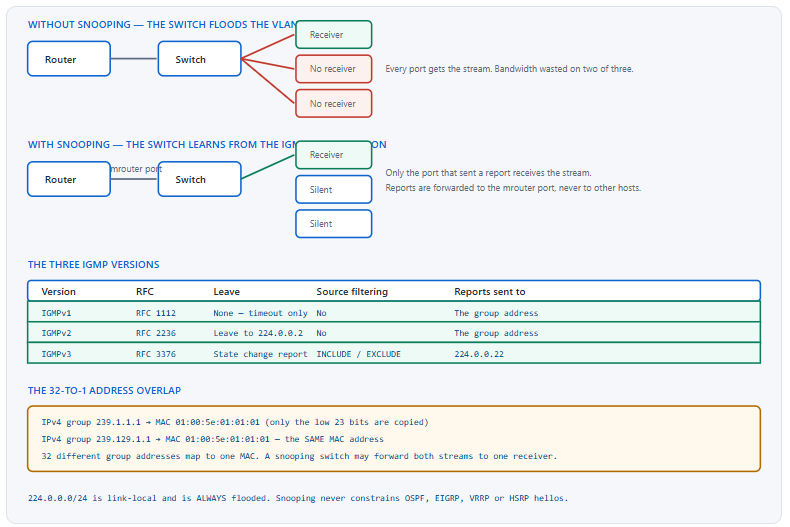
IGMP is how a host tells the router on its segment which multicast groups it wants. The host sends a membership report when it joins; the router sends a general query every 60 seconds by default asking who still wants anything; hosts that still want a group answer. The router keeps forwarding a group onto the segment as long as at least one host answers for it, and stops when nobody has answered for the group membership interval. The three versions differ in how a host leaves, whether it can specify sources, and how many messages the whole exchange costs.
A Deeper Dive into IGMP
IGMPv1 and its one real problem
IGMPv1 has no leave message at all. A host that stops wanting a group simply stops answering queries, and the router removes the group only after the membership interval expires — which, with the default timers, is over three minutes of a stream continuing to flow to a segment where nobody wants it. On a low-rate group that is a nuisance; on a video stream on a congested access link it is an outage. IGMPv1 also has no querier election, relying on the PIM designated router to be the only querier, which couples multicast group management to PIM in a way the later versions removed.
IGMPv2, which is what most networks actually run
IGMPv2 added three things that matter. A Leave Group message, sent to the all-routers address 224.0.0.2, which lets a host announce that it is done. A group-specific query, which the router sends after a leave to check whether anyone else still wants that group before removing it. And a querier election, in which the router with the lowest IP address on the segment wins and the others stay quiet — decoupling the querier role from PIM.
! IGMPv2 is the default on Cisco IOS interfaces
interface GigabitEthernet0/1
 ip address 10.1.1.1 255.255.255.0
 ip pim sparse-mode
 ip igmp version 2
!
! The timers that decide how fast a group ages out
interface GigabitEthernet0/1
 ip igmp query-interval 60
 ! ^ general query every 60 s, the default
 ip igmp query-max-response-time 10
 ! ^ hosts answer within 10 s, the default
 ip igmp last-member-query-interval 1000
 ! ^ milliseconds. Group-specific query after a leave.
 ip igmp last-member-query-count 2
The timers and the number they produce
Group membership interval is the value that decides how long a group survives without an answer, and it is derived rather than configured: robustness variable times query interval, plus one query response interval. With the Cisco defaults of robustness 2, query interval 60 seconds and max response time 10 seconds, that is 130 seconds. Every "the receiver stopped getting the stream about two minutes after something changed" report is this number.
| Timer | Cisco default | What it controls | Effect of lowering it |
|---|---|---|---|
| Query interval | 60 s | How often the querier sends a general query | Faster detection, more control traffic on every segment |
| Query max response time | 10 s | The window hosts randomise their replies across | Faster replies, more report bursts |
| Robustness variable | 2 | Multiplier for tolerated packet loss | Shorter membership interval, less loss tolerance |
| Group membership interval | 130 s (derived) | How long a group survives with no report | Not set directly — it follows the three above |
| Last member query interval | 1000 ms | Group-specific query spacing after a leave | Faster leave, more queries per leave |
IGMPv3 and source filtering
IGMPv3 lets a host name the sources it wants, using an INCLUDE list to accept only those sources or an EXCLUDE list to accept everything except them. That is what makes Source-Specific Multicast possible: with SSM, a receiver joins the pair (S,G) directly and the network never needs an RP or a shared tree at all. IGMPv3 reports also go to a dedicated address, 224.0.0.22, rather than to the group address — which matters for snooping, because a switch has to know to look there.
! IGMPv3 with SSM in the 232.0.0.0/8 range
ip pim ssm default
! ^ 'default' means 232.0.0.0/8. Or name a range with an ACL.
!
interface GigabitEthernet0/1
 ip pim sparse-mode
 ip igmp version 3
!
! Verify what the hosts actually asked for
R1# show ip igmp groups detail
Interface:      GigabitEthernet0/1
Group:          232.1.1.1
Flags:          SSM
Uptime:         00:12:41
Group mode:     INCLUDE
Last reporter:  10.1.1.55
Source list is empty
  Source Address   Uptime    v3 Exp   CSR Exp   Fwd  Flags
  192.0.2.10       00:12:41  00:02:51  stopped   Yes  Remote
Version interoperability, which is a downgrade
A segment runs one IGMP version, and it is the lowest one present. A single IGMPv2 host on a segment of IGMPv3 receivers pushes the querier back to v2 behaviour, at which point source filtering stops working for everyone and any SSM group on that segment fails. This is not a soft degradation — an SSM join simply has nowhere to put the source address in a v2 report — so version mismatches show up as "SSM does not work on this VLAN" rather than as a version warning.
! What version is the interface actually running?
R1# show ip igmp interface GigabitEthernet0/1
GigabitEthernet0/1 is up, line protocol is up
  Internet address is 10.1.1.1/24
  IGMP is enabled on interface
  Current IGMP host version is 3
  Current IGMP router version is 3
  IGMP query interval is 60 seconds
  IGMP querier timeout is 120 seconds
  IGMP max query response time is 10 seconds
  Last member query count is 2
  Last member query response interval is 1000 ms
  IGMP querying router is 10.1.1.1 (this system)
show ip igmp interface shows Current IGMP host version is 2 despite ip igmp version 3 being configured. Fix: find the v2 host with debug ip igmp filtered by the group, and either upgrade it or move it to a separate VLAN that carries no SSM groups.show ip igmp interface names the querying router. On a segment with two routers, the one you expected to be querier frequently is not, because the election is won by the lowest IP address and nothing about that is visible from the multicast configuration.How Does IGMP Snooping Stop Multicast From Flooding a VLAN?
What is the switch actually doing?
A switch has no Layer 2 way to know who wants a multicast group, because multicast destination MAC addresses are never source addresses and therefore never appear in the MAC table through normal learning. Without help, the only correct behaviour is to flood. IGMP snooping is the help: the switch inspects IGMP membership reports as they pass through, notes which port each report arrived on, and builds a forwarding entry for that group containing only those ports plus the ports where routers live.
A Deeper Dive into Snooping
Why flooding is the default and not a bug
The destination MAC of an IPv4 multicast frame is built from the group address: the fixed prefix 01:00:5e, then a zero bit, then the low 23 bits of the IP group address. No host ever sends a frame with that address as its source, so the switch never learns which port it belongs to, so an unknown destination is flooded exactly as the standard requires. Snooping is an optimisation layered on top of correct default behaviour, which is why disabling it degrades efficiency rather than connectivity.
The 32-to-1 overlap
Nine of the 32 IP address bits are discarded in that mapping, so 32 different group addresses produce the same MAC address. 239.1.1.1 and 239.129.1.1 are indistinguishable at Layer 2. On a switch doing MAC-based snooping, a receiver that joined one of them receives both streams, and the second one is discarded by the host's IP stack after consuming the bandwidth. Modern Catalyst platforms snoop on the IP group and avoid this, but the overlap is real on older hardware and it is a genuine consideration when allocating group addresses.
! The mapping, and the overlap it creates
! 239.  1.  1.  1  -> low 23 bits -> 01:00:5e:01:01:01
! 239.129.  1.  1  -> low 23 bits -> 01:00:5e:01:01:01   SAME
! 224.  1.  1.  1  -> low 23 bits -> 01:00:5e:01:01:01   SAME
!
! What the switch has actually programmed
SW1# show mac address-table multicast vlan 10
Vlan    Mac Address         Type      Ports
----    -----------         ----      -----
  10    0100.5e01.0101      IGMP      Gi1/0/5, Gi1/0/9
Where reports are forwarded, and where they are not
A snooping switch forwards membership reports only towards multicast router ports, never out other host ports. That is deliberate: IGMPv2 hosts suppress their own report if they hear another host report the same group, so a switch that flooded reports would silence every host except one and lose the per-port granularity it exists to provide. The switch also generates its own behaviour around leaves, sending group-specific queries out the port that left rather than the whole VLAN.
! Snooping is on by default globally and per VLAN
SW1# show running-config | include igmp snooping
! ^ Often empty. The default is enabled, so it is not displayed.
!
! Explicit configuration
ip igmp snooping
ip igmp snooping vlan 10
!
! Report suppression - on by default, occasionally harmful
no ip igmp snooping report-suppression
! ^ Disable when a monitoring tool needs to see every report,
!   or when a downstream snooping switch needs them all.
Multicast router ports
An mrouter port is a port through which a multicast router is reachable, and the switch floods every group out every mrouter port regardless of membership, because the router is the path to the rest of the network. The switch discovers these ports by watching for IGMP general queries and PIM hellos. Where a router cannot be discovered dynamically — behind a device that does not forward those messages, for example — the port can be configured statically.
! Which ports does the switch think reach a router?
SW1# show ip igmp snooping mrouter
Vlan    ports
----    -----
  10    Gi1/0/1(dynamic), Gi1/0/24(static)
  20    Gi1/0/1(dynamic)
!
! Static configuration where discovery does not work
ip igmp snooping vlan 10 mrouter interface GigabitEthernet1/0/24
!
! And a static group entry, for a receiver that never sends reports
ip igmp snooping vlan 10 static 239.1.1.1 interface GigabitEthernet1/0/7
! ^ Useful for a device with a broken or absent IGMP implementation.
Reading the snooping table
! The primary verification command
SW1# show ip igmp snooping groups
Vlan      Group           Type     Version  Port List
------------------------------------------------------------
10        239.1.1.1       igmp     v2       Gi1/0/5, Gi1/0/9, Gi1/0/1
10        239.1.1.20      igmp     v2       Gi1/0/12, Gi1/0/1
20        239.2.2.2       igmp     v3       Gi1/0/14, Gi1/0/1
! ^ Gi1/0/1 appears in every row - that is the mrouter port.
!
! Per-VLAN state and counters
SW1# show ip igmp snooping vlan 10
Global IGMP Snooping configuration:
-----------------------------------
IGMP snooping                : Enabled
IGMPv3 snooping              : Enabled
Report suppression           : Enabled
!
Vlan 10:
--------
IGMP snooping                : Enabled
IGMPv2 immediate leave       : Disabled
Explicit host tracking       : Enabled
Multicast router learning mode: pim-dvmrp
Immediate leave and when it is safe
Immediate leave removes the port from the group the moment a leave message arrives, skipping the group-specific query and the wait for other members to answer. On an access port with exactly one host it is correct and saves several seconds of unwanted traffic. On a port with two hosts it is a bug that removes both when one leaves, and the second host recovers only when the querier's next general query prompts it to report again — up to sixty seconds of black video.
! Safe ONLY where each port has exactly one receiver
ip igmp snooping vlan 10 immediate-leave
!
! Explicit host tracking makes it safe with multiple hosts
ip igmp snooping vlan 10 explicit-tracking
! ^ The switch tracks each host separately, so it removes the
!   port only when the LAST host on it leaves. IGMPv3 only.
show ip igmp snooping groups shows the port disappearing from the group immediately after one leave, while other hosts on it are still running. Fix: disable immediate leave on any port that is not a single directly attached receiver, or enable explicit host tracking, which makes the feature safe by counting hosts rather than ports.Who Sends the Queries When There Is No Router?
Why does this break?
IGMP snooping is entirely reactive: it learns from reports, and hosts send reports mainly in response to queries. In a VLAN with no multicast router — a storage replication VLAN, a market data feed, an isolated video segment — nothing sends queries, so hosts stop reporting, so the switch ages out its groups after the membership interval and reverts to flooding, or on some configurations stops forwarding to the receivers entirely. The fix is the IGMP snooping querier: the switch itself generates queries so that the conversation snooping depends on actually happens.
A Deeper Dive into the Snooping Querier
Configuring the querier
The snooping querier needs a source address, because a query with a source of 0.0.0.0 is ignored or mishandled by many host stacks. Give it an address from the VLAN's subnet, or configure a global querier address that applies to every VLAN. The querier also participates in the normal election, so an address chosen carelessly can beat a real router and take over querying for a segment that already had one.
! Enable the querier globally and per VLAN
ip igmp snooping querier
ip igmp snooping querier address 10.10.10.1
ip igmp snooping vlan 10 querier
ip igmp snooping vlan 10 querier address 10.10.10.1
!
! Optional tuning - match the real routers if any exist
ip igmp snooping querier query-interval 60
ip igmp snooping querier max-response-time 10
ip igmp snooping querier version 2
!
! Verify it is actually running and who won
SW1# show ip igmp snooping querier
Vlan      IP Address     IGMP Version   Port
-------------------------------------------------
10        10.10.10.1     v2             Switch
20        10.20.20.254   v2             Gi1/0/1
! ^ VLAN 10 is queried by this switch, VLAN 20 by a real router.
The election, and how to lose it on purpose
Querier election is won by the lowest IP address on the segment, and a snooping querier competes in it like anything else. On a VLAN that has a real router, the snooping querier should be configured with an address higher than the router's so that it loses and stays dormant, ready to take over only if the router disappears. Configuring it with a low address produces a switch querying a segment where a router is present, which works until the two disagree about version or timers.
| VLAN situation | Snooping querier needed | Address to choose | Why |
|---|---|---|---|
| Has a multicast router | As a standby only | Higher than the router's | It loses the election and stays quiet |
| Layer 2 only, no router | Required | Any address in the subnet | Nothing else will ever send a query |
| Two switches, no router | Required on both | Different addresses, lowest wins | The loser becomes an automatic standby |
| Router present but on the far side of a firewall | Usually required | Higher than the router's | Queries frequently do not traverse the firewall |
The symptom this prevents
Without a querier, the failure has a characteristic shape: multicast works perfectly for the first two minutes after a receiver joins, and then stops. The membership entry was created by the initial unsolicited report, nothing ever refreshed it, and the group membership interval expired. Anyone reporting "it works when I restart the application and then dies a couple of minutes later" is describing a missing querier, and the two-minute figure is the 130-second interval.
! The diagnostic sequence for a "works then stops" report
SW1# show ip igmp snooping querier
! ^ Nothing listed for the VLAN? That is the answer.
!
SW1# show ip igmp snooping groups vlan 10
! ^ Run twice, three minutes apart. Entries vanishing = no querier.
!
SW1# show ip igmp snooping mrouter vlan 10
! ^ Empty means the switch sees no router either.
!
SW1# show ip igmp snooping vlan 10 | include Querier|snooping
show ip igmp snooping querier lists it, yet hosts still stop reporting and groups still age out. Cause: without a configured address the switch may source queries from 0.0.0.0, and many host IP stacks silently discard IGMP queries from that source. The queries are transmitted and nothing answers them. Confirm: a capture on a host port shows queries with source 0.0.0.0, and the host sends no report in response. Fix: configure ip igmp snooping querier address with a real address from the VLAN subnet, globally or per VLAN.ip igmp snooping querier makes a Layer 2 switch generate IGMP queries. It does not make the switch route multicast, does not create any PIM state, and does not replace a multicast router for traffic that has to leave the VLAN. It exists purely so that snooping has a conversation to listen to.What Changes for IPv6 with MLD and MLD Snooping?
How different is MLD really?
Conceptually not at all. MLDv1 is IGMPv2 and MLDv2 is IGMPv3, with the same state machines, the same timer structure and the same relationship to snooping. What differs is the packaging: MLD messages are ICMPv6 rather than a separate IP protocol, they are sent from link-local source addresses with a hop limit of 1 and a Router Alert option, and the addresses involved are entirely different. That packaging difference is why MLD snooping is a separate feature that has to be enabled separately, and why a switch correctly snooping IPv4 can be flooding IPv6 on the same VLAN.
A Deeper Dive into MLD
The message types and addresses
MLD uses ICMPv6 types rather than its own protocol number. Type 130 is a query, 131 an MLDv1 report, 132 an MLDv1 done, and 143 an MLDv2 report. Queries go to FF02::1, the all-nodes link-local address, and MLDv2 reports go to FF02::16, which is the direct analogue of IGMPv3's 224.0.0.22. Everything is sourced from a link-local address, which means an interface with no global IPv6 address still participates normally.
| Function | IPv4 / IGMP | IPv6 / MLD | Notes |
|---|---|---|---|
| Basic membership | IGMPv2 (RFC 2236) | MLDv1 (RFC 2710) | Same state machine |
| Source filtering | IGMPv3 (RFC 3376) | MLDv2 (RFC 3810) | Same INCLUDE / EXCLUDE model |
| Carried as | IP protocol 2 | ICMPv6 | Types 130, 131, 132, 143 |
| Query destination | 224.0.0.1 | FF02::1 | All nodes on the link |
| Version-2/3 report destination | 224.0.0.22 | FF02::16 | All MLDv2-capable routers |
| Leave / done destination | 224.0.0.2 | FF02::2 | All routers on the link |
| MAC mapping prefix | 01:00:5e (23 bits) | 33:33 (32 bits) | IPv6 has no address overlap |
The MAC mapping, which IPv6 got right
IPv6 multicast maps to a MAC address by taking the fixed prefix 33:33 and appending the low 32 bits of the IPv6 group address. Thirty-two bits is enough that the 32-to-1 collision problem of IPv4 does not arise in practice, and a switch doing MAC-based MLD snooping is therefore as accurate as one snooping on the address itself. It is a small design improvement with a disproportionate effect on how much you need to think about group address allocation.
! IPv6 mapping - low 32 bits, no ambiguity
! FF38::1:2:3:4  ->  MAC 33:33:00:03:00:04
! FF3E::1:2:3:4  ->  MAC 33:33:00:03:00:04  (scope differs only)
!
! Enable MLD on the routed interface
interface GigabitEthernet0/1
 ipv6 address 2001:db8:10::1/64
 ipv6 pim
 ipv6 mld version 2
 ipv6 mld query-interval 60
 ipv6 mld query-max-response-time 10
MLD snooping is a separate switch feature
On Catalyst platforms MLD snooping is configured independently of IGMP snooping and, on many releases, is not enabled by default. A VLAN carrying both IPv4 and IPv6 multicast can therefore be constraining one and flooding the other, which produces the confusing report that "multicast works but the IPv6 video floods". Enabling it is two commands and the verification commands mirror the IGMP ones exactly.
! MLD snooping - separate from IGMP snooping
ipv6 mld snooping
ipv6 mld snooping vlan 10
!
! And its own querier, for VLANs with no IPv6 router
ipv6 mld snooping querier
ipv6 mld snooping vlan 10 querier
!
! Verification mirrors the IGMP commands
SW1# show ipv6 mld snooping
SW1# show ipv6 mld snooping vlan 10
SW1# show ipv6 mld snooping mrouter
SW1# show ipv6 mld snooping address
Vlan   Group             Type    Version  Port List
-------------------------------------------------------
  10   FF38::1:2:3:4     mld     v2       Gi1/0/5, Gi1/0/1
Router state on the IPv6 side
! What the router thinks the hosts want
R1# show ipv6 mld groups
MLD Connected Group Membership
Group Address                     Interface       Uptime    Expires
FF38::1:2:3:4                     Gi0/1           00:22:14  00:02:47
!
R1# show ipv6 mld interface GigabitEthernet0/1
GigabitEthernet0/1 is up, line protocol is up
  Internet address is FE80::1/10
  MLD is enabled on interface
  Current MLD version is 2
  MLD query interval is 60 seconds
  MLD querier timeout is 125 seconds
  MLD max query response time is 10 seconds
  MLD querying router is FE80::1 (this system)
The scope field, which has no IPv4 equivalent
An IPv6 multicast address carries an explicit scope in the address itself — the fourth hex digit — where IPv4 relies on convention and TTL. FF02:: is link-local and never leaves the segment, FF05:: is site-local, FF0E:: is global. This is genuinely useful, because a group that must not leave a link can be made unable to by choosing its address, rather than by relying on a TTL value that any device in the path can change.
ipv6 mld snooping to the standard switch template alongside the IGMP equivalent costs nothing and removes a class of problem that only appears once IPv6 traffic actually starts flowing, which may be years after the switch was configured.Which Layer 2 Multicast Failures Look Like Something Else?
What are the failures worth memorising?
Five. The missing querier, whose signature is a two-minute delay before failure. Immediate leave on a shared port. The link-local range, which snooping deliberately never constrains and which therefore is not evidence that snooping is broken. Multicast that survives a topology change but not a reconvergence, because the mrouter port moved and nothing told the switch. And a hardware forwarding table that filled, at which point the switch falls back to flooding or to software forwarding with no message that anything changed.
A Deeper Dive into the Failure Catalogue
The link-local range that is always flooded
Addresses in 224.0.0.0/24 are link-local control traffic — OSPF hellos on 224.0.0.5, EIGRP on 224.0.0.10, VRRP on 224.0.0.18, HSRP on 224.0.0.2 — and IGMP snooping is required to flood them rather than constrain them. Hosts do not send membership reports for these groups and routing protocols would break if the switch pruned them. Someone capturing traffic and finding 224.0.0.5 arriving on a port that never joined anything has found correct behaviour, not a snooping failure.
! These are always flooded, by design
! 224.0.0.1   all hosts
! 224.0.0.2   all routers
! 224.0.0.5   OSPF all routers
! 224.0.0.6   OSPF designated routers
! 224.0.0.10  EIGRP
! 224.0.0.13  PIM
! 224.0.0.18  VRRP
! 224.0.0.22  IGMPv3 reports
!
! They do not appear in the snooping table at all
SW1# show ip igmp snooping groups vlan 10 | include 224.0.0
! ^ Empty. That is correct, not a fault.
The topology change that moves the router
show ip igmp snooping mrouter lists a port that is now blocking or down. Fix: ensure the querier's query interval is short enough that recovery is acceptable, and verify the platform is configured to flush multicast entries on a topology change — on Catalyst this is tied to receiving a TCN, and the recovery window is one query interval.The full forwarding table
show platform hardware fed switch active fwd-asic resource tcam utilization or the platform equivalent shows multicast entries at capacity; show processes cpu sorted shows multicast processes consuming CPU. Fix: reduce the number of distinct groups, split VLANs across more switches, or move to hardware with a larger table. There is no configuration that makes the table bigger.The diagnostic order that works
Bottom-up, and stop as soon as something is missing. Is a querier present? Is the receiver's port in the group? Is the mrouter port correct? Is the router creating state? Only then look at PIM and the routing side. Most Layer 2 multicast cases resolve in the first two steps, and starting at the routing end means walking backwards through a working part of the network to reach the broken one.
! Bottom-up, in this order, every time
SW1# show ip igmp snooping querier vlan 10
! ^ nothing? Enable one. Most cases end here.
SW1# show ip igmp snooping groups vlan 10
! ^ receiver port missing? The host is not reporting.
SW1# show ip igmp snooping mrouter vlan 10
! ^ wrong or empty? The switch cannot reach the router.
SW1# show mac address-table multicast vlan 10
! ^ confirms what is actually programmed in hardware
R1#  show ip igmp groups
! ^ router has no group? Reports are not reaching it.
R1#  show ip mroute 239.1.1.1
! ^ only now is this a routing question
Capturing the conversation
Where the state does not explain itself, watching the messages does. Debug on a production switch needs an ACL limiting it to one group, and even then it is worth doing during a window. On a receiver, a packet capture filtered to IGMP shows exactly whether the host is reporting, whether it is answering queries, and which version it is using — three facts that resolve most remaining cases and none of which are visible from the switch.
! Limit debug to one group before enabling it
ip access-list standard DBG-GROUP
 permit host 239.1.1.1
!
R1# debug ip igmp 239.1.1.1
IGMP(0): Received v2 Report on Gi0/1 from 10.1.1.55 for 239.1.1.1
IGMP(0): Received Group record for group 239.1.1.1, mode 2 from 10.1.1.55
IGMP(0): Updating EXCLUDE group timer for 239.1.1.1
IGMP(0): MRT Add/Update Gi0/1 for (*,239.1.1.1) by 0
!
! And on the switch side
SW1# debug ip igmp snooping group 239.1.1.1
Blueprint framing
The CCIE Enterprise Infrastructure v1.1 blueprint places IGMP and multicast within the infrastructure domain, and lab tasks tend to combine the Layer 2 and Layer 3 halves in a single requirement: build a working multicast path where one segment has no router in it, or where a receiver is behind a switch that has to be configured to constrain the traffic. Knowing that the snooping querier exists, and knowing which show command names it, is worth more in that setting than a detailed recollection of the IGMPv3 report format.
show ip igmp snooping groups tells you what the switch will forward within the VLAN. show ip mroute tells you what the router will forward between VLANs. A group present in the first and absent from the second is a report that never reached the router; the reverse is a router forwarding into a VLAN where the switch has pruned every port. The two commands answer different questions and both are needed.Conclusion
IGMP snooping is one of the few features that is enabled by default, works most of the time, and fails in a way that points at everything except itself. The reason is structural: snooping is reactive, it learns only from a conversation between hosts and routers, and it has no way to signal that the conversation has stopped. A VLAN with no router produces no queries, hosts stop reporting, and the switch ages out state it can no longer refresh — with the failure arriving 130 seconds after the last report, long enough after any change that the two rarely get connected.
The version history is worth knowing for one practical reason each. IGMPv1's absence of a leave message explains why leave behaviour was worth adding. IGMPv2's querier election explains why the router you expected to be querier often is not. IGMPv3's source filtering is what makes SSM possible, and its downgrade behaviour explains why a single legacy host can break source-specific multicast for an entire segment. MLD repeats all of it for IPv6 with different packaging, and MLD snooping is a separate feature that is frequently left off.
The practical takeaways are short. Configure a snooping querier with a real source address in every VLAN that carries multicast, whether or not a router is present. Leave immediate leave off unless every port genuinely has one receiver, or use explicit host tracking. Enable MLD snooping alongside IGMP snooping in the standard template. And troubleshoot bottom-up, because the switch answers the question in two commands far more often than the routing table does.
External Links
- RFC 2236 — Internet Group Management Protocol, Version 2
- RFC 3376 — Internet Group Management Protocol, Version 3
- RFC 2710 — Multicast Listener Discovery (MLD) for IPv6
- RFC 3810 — Multicast Listener Discovery Version 2 (MLDv2) for IPv6
- RFC 4541 — Considerations for IGMP and MLD Snooping Switches
- Cisco IOS XE — IP Multicast: IGMP Configuration Guide
- Cisco Learning Network — CCIE Enterprise Infrastructure
Reference Notes
- RFC 1112 defines IGMP version 1, which has no leave mechanism, so group state on a segment is removed only by timeout.
- RFC 2236 defines IGMP version 2, adding the Leave Group message sent to 224.0.0.2, the group-specific query, and querier election in which the lowest IP address wins.
- RFC 2236 defines the group membership interval as the robustness variable multiplied by the query interval, plus one query response interval — 130 seconds with the Cisco defaults of robustness 2, 60 seconds and 10 seconds.
- RFC 3376 defines IGMP version 3, adding source filtering through INCLUDE and EXCLUDE source lists, and specifying that version 3 membership reports are sent to 224.0.0.22.
- RFC 3376 specifies the IGMPv3 membership report message type as 0x22, distinct from the version 1 and version 2 report types.
- RFC 2710 defines MLD version 1 for IPv6, carried in ICMPv6 with query type 130, report type 131 and done type 132, sourced from a link-local address with hop limit 1.
- RFC 3810 defines MLD version 2, the IPv6 analogue of IGMPv3, whose reports use ICMPv6 type 143 and are sent to FF02::16.
- RFC 4541 documents recommended behaviour for IGMP and MLD snooping switches, including the requirement that traffic addressed to the link-local range 224.0.0.0/24 be forwarded on all ports rather than constrained.
- RFC 4541 also describes forwarding membership reports only towards multicast router ports, so that host report suppression does not hide members from the snooping switch.
- Cisco documentation describes the IGMP snooping querier, configured with
ip igmp snooping querierand an address, for VLANs where no multicast router is present to send queries. - Cisco documentation describes explicit host tracking for IGMPv3 snooping, which allows the switch to track individual hosts on a port so that immediate leave remains correct when several receivers share the port.
- The CCIE Enterprise Infrastructure v1.1 unified exam topics include multicast within the infrastructure domain, covering IGMP and multicast forwarding behaviour.