

Dual stack is described as running two protocols side by side, and that description is what causes most of the trouble. The two stacks share physical links, share a device, and share nothing else — separate routing tables, separate adjacencies, separate neighbour resolution, separate MTU behaviour. A link that is perfectly healthy for IPv4 tells you almost nothing about whether IPv6 works across it, and the first time that becomes obvious is usually during an outage that IPv4 monitoring did not detect.
The routing protocols look familiar and behave differently in ways that matter. OSPFv3 forms adjacencies over link-local addresses and requires a 32-bit router ID that has no IPv6 source, so a router with no IPv4 address anywhere simply refuses to start the process. EIGRP for IPv6 in classic mode starts administratively shut down. BGP carries IPv6 prefixes with two next hops rather than one, and over an IPv4 session it carries a next hop that is unusable unless something rewrites it.
This article covers what genuinely changes at the link layer, then each of the three protocols in the form you would actually configure, then the failure catalogue — the address-family activation that is missing, the link-local next hop that resolves to the wrong interface, and the ICMPv6 filter that breaks path MTU discovery for everything larger than a ping.
What Actually Changes When You Add IPv6 to a Routed Network?
What is different that matters operationally?
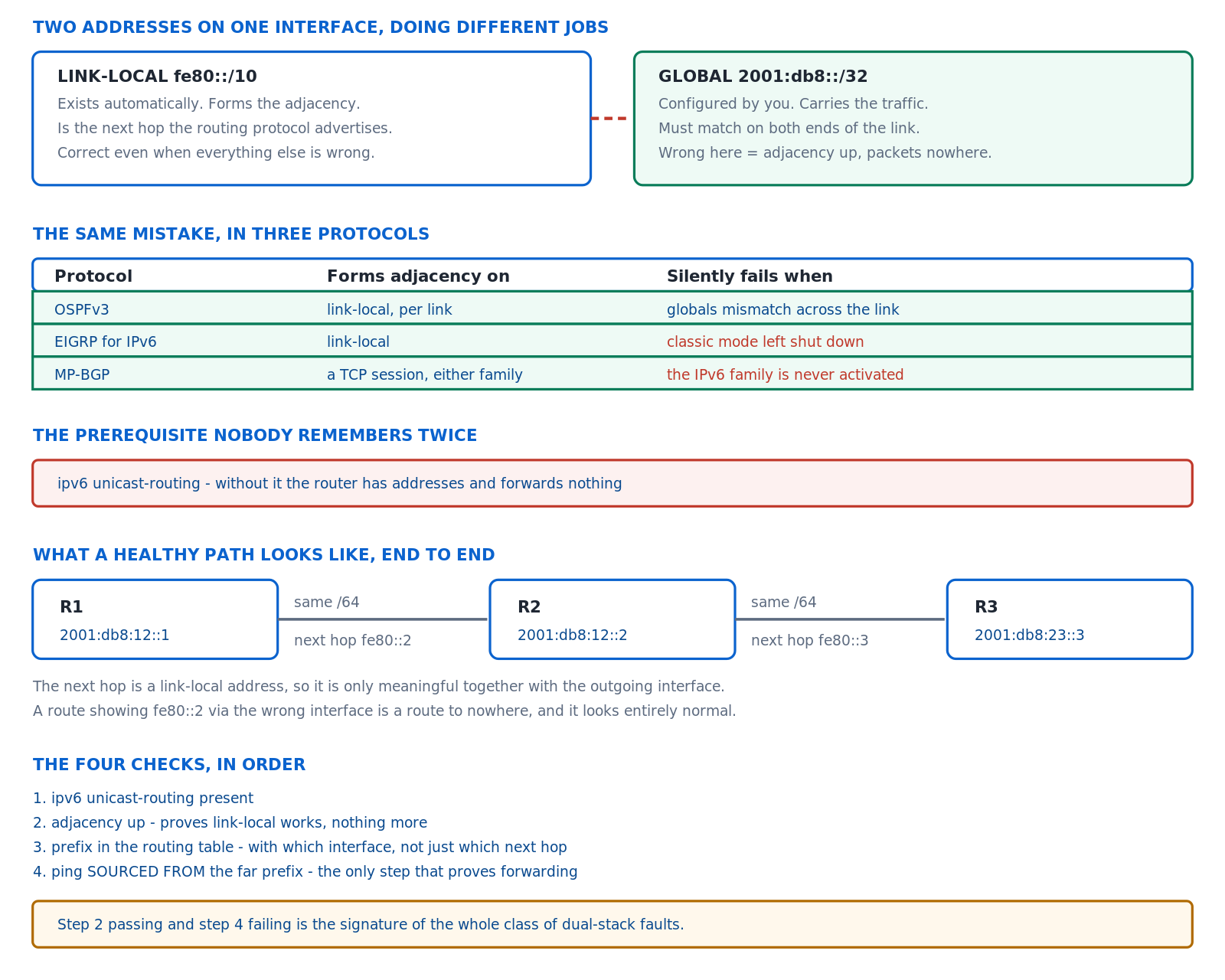
Five things. Global forwarding must be enabled explicitly with ipv6 unicast-routing or the router behaves as a host. Neighbour resolution is Neighbor Discovery over ICMPv6 multicast rather than ARP over broadcast, so ICMPv6 filtering breaks reachability rather than just breaking ping. Routers never fragment, so path MTU discovery is mandatory rather than an optimisation. Next hops are link-local, so an interface is part of every next hop. And routing protocols form adjacencies over link-local addresses, which means the global addressing can be entirely wrong while the adjacency comes up perfectly.
A Deeper Dive into the Differences
The command that is always missing
ipv6 unicast-routing is a single global command with no default and no warning. Without it a router accepts IPv6 addresses on interfaces, responds to pings, forms no routing adjacencies that require forwarding, and drops every transit packet. Everything looks configured and nothing routes, which makes it the first thing to check on any IPv6 problem on a device that has never carried IPv6 before.
! The baseline. Nothing works without it.
ipv6 unicast-routing
ipv6 cef
!
interface GigabitEthernet0/1
 ip address 10.0.12.1 255.255.255.0
 ipv6 address 2001:db8:12::1/64
 ipv6 address FE80::1 link-local
! ^ A manual link-local makes next hops readable in show output
!   instead of an EUI-64 string derived from the MAC.
!
! Confirm forwarding is actually enabled
R1# show ipv6 interface brief
GigabitEthernet0/1     [up/up]
    FE80::1
    2001:DB8:12::1
Neighbor Discovery instead of ARP
ND replaces ARP with ICMPv6 messages sent to the solicited-node multicast address rather than to a broadcast. That is more efficient and it introduces a hard dependency on ICMPv6 being permitted. An access list that blocks ICMPv6 in the name of security breaks neighbour resolution, router advertisement, duplicate address detection and path MTU discovery simultaneously, and the resulting failure looks like a routing problem rather than a filter.
! ND message types worth recognising in a capture
!  133  Router Solicitation
!  134  Router Advertisement
!  135  Neighbor Solicitation   (the ARP request equivalent)
!  136  Neighbor Advertisement  (the ARP reply equivalent)
!  137  Redirect
!    2  Packet Too Big          (path MTU discovery depends on it)
!
! The neighbour table - the ARP table equivalent
R1# show ipv6 neighbors
IPv6 Address            Age Link-layer Addr State Interface
2001:DB8:12::2            0 a0b4.0100.0200  REACH Gi0/1
FE80::2                   1 a0b4.0100.0200  STALE Gi0/1
! ^ STALE is normal and does not mean broken. It means
!   unverified recently, and it will be probed on next use.
An ACL that does not break the network
! Every IPv6 ACL needs these before its deny
ipv6 access-list EDGE-IN
 permit icmp any any nd-na
 permit icmp any any nd-ns
 permit icmp any any router-advertisement
 permit icmp any any router-solicitation
 permit icmp any any packet-too-big
 permit tcp any any established
 deny ipv6 any any log
!
! Note: unlike IPv4, IOS adds implicit permits for nd-na and
! nd-ns before the implicit deny - but an explicit deny ipv6
! any any placed before them removes that protection.
Routers never fragment
An IPv6 router that receives a packet too large for the outgoing link discards it and sends an ICMPv6 Packet Too Big back to the source. There is no router-side fragmentation at all. That makes path MTU discovery a requirement rather than an optimisation, and it makes an ICMPv6 filter anywhere along the path produce the classic symptom of small packets working perfectly and large transfers hanging — which is diagnosed as an application problem far more often than as a filter.
! Minimum IPv6 MTU is 1280. Below that, nothing works.
interface Tunnel0
 ipv6 mtu 1400
!
! Test the actual path MTU rather than assuming it
R1# ping ipv6 2001:db8:5::5 size 1400 df-bit
Packet sent with the DF bit set
!!!!!
R1# ping ipv6 2001:db8:5::5 size 1500 df-bit
! ^ Failure here with success above locates the MTU exactly.
!
! What the router has learned about path MTUs
R1# show ipv6 mtu
Address planning that survives operations
The temptation with a /48 of address space is to allocate creatively, and the result is a network where no address can be read without a spreadsheet. The plans that work assign structure by location and function in fixed nibble boundaries — a /48 per site, a /56 per building, a /64 per link and per VLAN — so that a router's address states where it is without a lookup. Nibble boundaries matter because they keep every boundary on a hex digit, which makes summarisation and ACL writing mechanical rather than error-prone.
A /64 per point-to-point link looks wasteful and is the right answer anyway. The address space exists in quantities that make conservation pointless, and the alternative — /126 or /127 links — saves nothing measurable while breaking the assumption that every link is a /64 that half of IPv6 tooling makes. Where a link genuinely needs a longer prefix for security reasons, RFC 6164 documents /127 for inter-router links specifically, and that is a deliberate exception rather than a general practice.
The two stacks are genuinely independent
| Component | IPv4 | IPv6 | Shared? |
|---|---|---|---|
| Routing table | show ip route |
show ipv6 route |
No |
| Neighbour resolution | ARP, broadcast | ND, ICMPv6 multicast | No |
| Access lists | ip access-list |
ipv6 access-list |
No |
| Fragmentation | Routers may fragment | Source only | No |
| Next-hop address | Global, same subnet | Link-local | No |
| Physical link state | Same interface | Same interface | Yes — the only thing |
ipv6 unicast-routing, an IPv6 ACL, an IPv6 address on the wrong subnet, or a missing IPv6 adjacency produces total IPv6 failure with no IPv4 symptom whatsoever. Confirm: repeat every test with the IPv6 form — ping ipv6, show ipv6 route, show ipv6 interface brief. Fix: add IPv6 equivalents to every monitoring check, because a dual-stack network that is only monitored on IPv4 is effectively unmonitored for half its traffic.How Do I Run OSPFv3, and What Is the Address-Family Form?
What is the short version?
OSPFv3 is enabled per interface rather than with network statements, forms adjacencies over link-local addresses, and needs a 32-bit router ID that must be configured manually when the router has no IPv4 address to borrow one from. There are two configuration forms: the original ipv6 ospf commands, and the address-family form under router ospfv3 which can carry both IPv4 and IPv6 in one process. The address-family form is the modern choice and it is what current documentation and lab tasks assume.
A Deeper Dive into OSPFv3
The address-family configuration
One process, two address families, and each interface joins whichever families it needs. The IPv4 family inside OSPFv3 is genuinely useful — it means one protocol, one adjacency mechanism and one set of timers for both stacks — but it runs its transport over IPv6, so an interface carrying OSPFv3 IPv4 still needs an IPv6 link-local address to form the adjacency.
! One process, both address families
router ospfv3 1
 router-id 10.0.0.1
 ! ^ Mandatory if the router has no IPv4 address anywhere
 !
 address-family ipv4 unicast
  passive-interface default
  no passive-interface GigabitEthernet0/1
 exit-address-family
 !
 address-family ipv6 unicast
  passive-interface default
  no passive-interface GigabitEthernet0/1
 exit-address-family
!
! Interfaces join per address family
interface GigabitEthernet0/1
 ospfv3 1 ipv4 area 0
 ospfv3 1 ipv6 area 0
 ospfv3 network point-to-point
 ospfv3 cost 10
The traditional form, still common
! The original syntax - still valid, still seen everywhere
ipv6 router ospf 1
 router-id 10.0.0.1
 passive-interface default
 no passive-interface GigabitEthernet0/1
!
interface GigabitEthernet0/1
 ipv6 ospf 1 area 0
 ipv6 ospf network point-to-point
 ipv6 ospf cost 10
!
! Verification is the same either way
R1# show ospfv3 neighbor
R1# show ipv6 ospf neighbor
Neighbor ID     Pri   State           Dead Time   Interface ID    Interface
10.0.0.2          1   FULL/  -        00:00:34    4               Gi0/1
! ^ Note: no neighbour ADDRESS column. It is link-local.
Per link, not per subnet
OSPFv2 advertises subnets and forms adjacencies between routers whose addresses match. OSPFv3 does neither: it runs per link, adjacencies are formed over link-local addresses, and prefixes are carried separately in Intra-Area-Prefix LSAs. The practical consequence is that two routers with completely mismatched global prefixes on a link will form a full adjacency and exchange routes, and the resulting connectivity failure has to be found by inspecting the addressing rather than by noticing that the adjacency never came up.
! R1 and R2 have mismatched prefixes on the same link
R1: interface Gi0/1  ipv6 address 2001:db8:12::1/64
R2: interface Gi0/1  ipv6 address 2001:db8:99::2/64
!
! The adjacency comes up ANYWAY - it uses link-local
R1# show ipv6 ospf neighbor
Neighbor ID     Pri   State           Dead Time   Interface
10.0.0.2          1   FULL/DR         00:00:37    Gi0/1
! ^ In OSPFv2 this mismatch would prevent adjacency entirely.
!
! Find it by checking the prefixes, not the adjacency
R1# show ipv6 interface brief GigabitEthernet0/1
R1# show ipv6 route connected
LSA types, renamed and extended
| LSA | OSPFv2 | OSPFv3 | Carries |
|---|---|---|---|
| Type 1 | Router LSA | Router LSA | Topology only — no prefixes in v3 |
| Type 2 | Network LSA | Network LSA | Multi-access link membership |
| Type 3 | Summary | Inter-Area Prefix LSA | Prefixes from another area |
| Type 4 | ASBR Summary | Inter-Area Router LSA | Reachability to an ASBR |
| Type 5 | External | AS-External LSA | Redistributed prefixes |
| Type 8 | — | Link LSA | Link-local address and on-link prefixes |
| Type 9 | — | Intra-Area Prefix LSA | Prefixes, separated from topology |
Areas and summarisation, which behave as expected
Area types carry over unchanged: stub, totally stubby, and NSSA all exist with the same meanings and the same trade-offs. Summarisation is configured in the same two places — area range on an ABR for inter-area prefixes, and summary-prefix on an ASBR for redistributed ones. What changes is only the syntax location, since both now sit inside an address family, and the prefix lengths involved make summarisation considerably more natural than it usually is in IPv4.
! ABR summarisation, inside the address family
router ospfv3 1
 address-family ipv6 unicast
  area 1 range 2001:DB8:1::/48
  area 1 stub no-summary
 exit-address-family
!
! ASBR summarisation of redistributed prefixes
router ospfv3 1
 address-family ipv6 unicast
  summary-prefix 2001:DB8:F000::/36
  redistribute bgp 65001
 exit-address-family
!
! Confirm the summary and its component routes
R1# show ospfv3 ipv6 database prefix | include 2001:DB8:1
R1# show ipv6 route ospf | include 2001:DB8:1::/48
Authentication, which is not built in
OSPFv3 as originally specified has no authentication fields, relying on IPsec instead. RFC 7166 later added an authentication trailer that works much like OSPFv2's cryptographic authentication and is considerably simpler to deploy than IPsec on every link. On IOS this is configured with a key chain, and the mismatch symptom is the familiar one: an adjacency that reaches a state and stops.
! Authentication trailer with a key chain (RFC 7166)
key chain OSPFV3-KEYS
 key 1
  key-string SharedSecretValue
  cryptographic-algorithm hmac-sha-256
!
interface GigabitEthernet0/1
 ospfv3 authentication key-chain OSPFV3-KEYS
!
! Or the IPsec form (RFC 4552)
interface GigabitEthernet0/1
 ipv6 ospf authentication ipsec spi 500 sha1 <40-hex-digit-key>
!
! Verify it is actually in use
R1# show ospfv3 interface GigabitEthernet0/1 | include auth
show ipv6 ospf reports that the router ID is not configured. Cause: the OSPF router ID is a 32-bit value and OSPFv3 has no IPv6 source to derive one from. On a router with any IPv4 address it borrows one silently; on an IPv6-only router there is nothing to borrow and the process will not start. Confirm: show ipv6 ospf shows Router ID not configured or the process is absent from show ipv6 protocols. Fix: configure router-id explicitly on every OSPFv3 process regardless of whether IPv4 exists, which also removes the risk of the ID changing when an IPv4 loopback is renumbered.How Do I Run EIGRP and BGP for IPv6?
What is different in each?
EIGRP for IPv6 in classic mode has one memorable trap: the process starts administratively shut down and does nothing until no shutdown is entered under it. Named mode does not have that behaviour and is the better choice for new configuration. BGP's difference is that an IPv6 address family exists but is not activated for a neighbour by default, so a session comes up, reports established, and exchanges no IPv6 prefixes at all until activate is added.
A Deeper Dive into EIGRP and BGP
EIGRP classic mode and the shutdown
! Classic mode - note the no shutdown
ipv6 router eigrp 100
 eigrp router-id 10.0.0.1
 no shutdown
 ! ^ WITHOUT THIS, NOTHING HAPPENS. It starts shut.
!
interface GigabitEthernet0/1
 ipv6 eigrp 100
! ^ Enabled per interface. There is no network statement.
!
! The symptom of forgetting it
R1# show ipv6 eigrp neighbors
! ^ Empty. No error. No log message.
R1# show ipv6 protocols | include eigrp
IPv6 Routing Protocol is "eigrp 100"
  EIGRP-IPv6 Protocol is in shutdown state
EIGRP named mode, which is the better form
! One process, both address families, no shutdown trap
router eigrp CORP
 address-family ipv4 unicast autonomous-system 100
  eigrp router-id 10.0.0.1
  network 10.0.0.0 0.0.255.255
  af-interface default
   passive-interface
  exit-af-interface
  af-interface GigabitEthernet0/1
   no passive-interface
   authentication mode hmac-sha-256 SharedSecret
  exit-af-interface
 exit-address-family
 !
 address-family ipv6 unicast autonomous-system 100
  eigrp router-id 10.0.0.1
  af-interface default
   passive-interface
  exit-af-interface
  af-interface GigabitEthernet0/1
   no passive-interface
   authentication mode hmac-sha-256 SharedSecret
  exit-af-interface
 exit-address-family
! ^ Note: no network statement in the IPv6 AF. Interfaces
!   with an IPv6 address participate unless made passive.
! Verification, both families
R1# show eigrp address-family ipv6 neighbors
EIGRP-IPv6 VR(CORP) Address-Family Neighbors for AS(100)
H   Address              Interface   Hold Uptime   SRTT   RTO  Q  Seq
0   Link-local address: FE80::2
                         Gi0/1         13 01:22:41   12   100  0  9
! ^ The neighbour is identified by its LINK-LOCAL address.
!
R1# show ipv6 eigrp topology
R1# show ipv6 route eigrp
D   2001:DB8:5::/64 [90/3072] via FE80::2, GigabitEthernet0/1
BGP and the activate command
A BGP neighbour is activated per address family, and only IPv4 unicast is activated by default. An IPv6 peering therefore comes up, reports Established, shows a healthy uptime, and exchanges nothing — which is the most confusing possible failure because every summary command says the session is fine. The prefix count of zero in show bgp ipv6 unicast summary is the tell.
! IPv6 peering over an IPv6 TCP session
router bgp 65001
 no bgp default ipv4-unicast
 ! ^ Strongly recommended: stops accidental IPv4 activation
 neighbor 2001:DB8:12::2 remote-as 65002
 !
 address-family ipv6 unicast
  neighbor 2001:DB8:12::2 activate
  network 2001:DB8:1::/48
  neighbor 2001:DB8:12::2 route-map IPV6-IN in
  neighbor 2001:DB8:12::2 route-map IPV6-OUT out
 exit-address-family
!
! The symptom of forgetting activate
R1# show bgp ipv6 unicast summary
Neighbor    V   AS MsgRcvd MsgSent  TblVer  InQ OutQ Up/Down  State/PfxRcd
2001:DB8:12::2
            4 65002    412   409       1    0    0 06:41:22   0
! ^ Established for six hours. Zero prefixes. Not activated.
IPv6 prefixes over an IPv4 session
Carrying IPv6 NLRI across an IPv4 BGP session is possible and the next hop is the problem: BGP sets an IPv4-mapped value that no IPv6 forwarding table can use. Two answers exist. An outbound route-map rewriting the next hop to a real IPv6 address is the traditional fix. The extended next-hop encoding capability, standardised in RFC 8950, lets an IPv6 next hop be carried natively and is the better answer where both ends support it.
! Traditional fix - rewrite the next hop outbound
route-map V6-NEXTHOP permit 10
 set ipv6 next-hop 2001:DB8:12::1
!
router bgp 65001
 neighbor 10.0.12.2 remote-as 65002
 address-family ipv6 unicast
  neighbor 10.0.12.2 activate
  neighbor 10.0.12.2 route-map V6-NEXTHOP out
 exit-address-family
!
! Confirm the next hop is usable
R2# show bgp ipv6 unicast 2001:DB8:1::/48 | include next hop
    2001:DB8:12::1 from 10.0.12.1 (10.0.0.1)
! ^ A real IPv6 address. Without the route-map this would be
!   ::FFFF:10.0.12.1, which nothing can forward to.
Peering over link-local addresses
BGP can peer over a link-local address, and doing so removes any dependency on global addressing being correct on the link. It also requires the update source interface to be specified, because a link-local peer address is ambiguous without it — the same constraint that applies to every other use of link-local addresses. It is a reasonable choice for eBGP between directly connected routers and a poor one for iBGP, where the whole point of peering to loopbacks is that the session survives a link failure.
! eBGP over a link-local peer address
router bgp 65001
 neighbor FE80::2%GigabitEthernet0/1 remote-as 65002
 address-family ipv6 unicast
  neighbor FE80::2%GigabitEthernet0/1 activate
 exit-address-family
!
! iBGP to a loopback, which is the normal choice
router bgp 65001
 neighbor 2001:DB8::5 remote-as 65001
 neighbor 2001:DB8::5 update-source Loopback0
 address-family ipv6 unicast
  neighbor 2001:DB8::5 activate
  neighbor 2001:DB8::5 next-hop-self
 exit-address-family
The three protocols side by side
| Aspect | OSPFv3 | EIGRP for IPv6 | BGP IPv6 unicast |
|---|---|---|---|
| Router ID required | Yes, 32-bit | Yes, 32-bit | Yes, 32-bit |
| Interface enablement | Per interface | Per interface (classic) / by address (named) | N/A |
| Adjacency address | Link-local | Link-local | Configured peer address |
| Default state | Runs | Shut down in classic mode | Not activated per AF |
| Authentication | IPsec or RFC 7166 trailer | HMAC-SHA-256 key | TCP-AO or MD5 |
| Most common first error | Missing router ID | Missing no shutdown |
Missing activate |
no bgp default ipv4-unicast from the startIt makes every address family explicit, which means a neighbour that exchanges nothing is immediately explained by an absent activate line rather than hidden behind an IPv4 family that was activated automatically. On a dual-stack router it turns an invisible default into a visible configuration decision.no shutdown, a missing activate — and none of the three produces a message when you make it.How Do I Build and Verify a Dual-Stack Lab End to End?
What is the build order?
Addressing first and verified with link-local pings, then one protocol at a time with its adjacency confirmed before the next is added, then redistribution if the design needs it, then a verification pass that repeats every check in both stacks. Building both stacks simultaneously on all protocols is how a lab produces a state where three things are wrong at once and none of them is isolatable.
A Deeper Dive into the Build
An address plan that reads well
Manual link-local addresses are the single highest-value convention in an IPv6 lab. An EUI-64 link-local derived from a MAC address is a sixteen-character string that appears in every route and every neighbour table and tells you nothing; FE80::1 on R1 and FE80::2 on R2 makes every next hop self-documenting. It costs one line per interface and it changes how readable the whole exercise is.
! A convention that pays for itself immediately
! R1
interface GigabitEthernet0/1
 ip address 10.0.12.1 255.255.255.0
 ipv6 address 2001:DB8:12::1/64
 ipv6 address FE80::1 link-local
!
! R2
interface GigabitEthernet0/1
 ip address 10.0.12.2 255.255.255.0
 ipv6 address 2001:DB8:12::2/64
 ipv6 address FE80::2 link-local
!
! Now routes are readable
R1# show ipv6 route ospf
O   2001:DB8:5::/64 [110/2]
     via FE80::2, GigabitEthernet0/1
! ^ instead of via FE80::A2B4:1FF:FE00:0200
Verifying the link before the protocol
A link-local ping proves the layer-2 path, neighbour discovery, and the absence of an ICMPv6 filter, all before any routing protocol is involved. It needs the exit interface specified, because a link-local address is only meaningful in the context of a link — and being asked for the interface is itself a useful reminder of what makes IPv6 next hops different.
! The exit interface is mandatory for a link-local ping
R1# ping ipv6 FE80::2
Output Interface: GigabitEthernet0/1
Type escape sequence to abort.
!!!!!
Success rate is 100 percent (5/5), round-trip min/avg/max = 1/2/4 ms
!
! Or in one line
R1# ping FE80::2%GigabitEthernet0/1
!
! Then the global address, which tests the addressing too
R1# ping ipv6 2001:DB8:12::2
!
! And the neighbour table proves ND worked
R1# show ipv6 neighbors GigabitEthernet0/1
Redistribution between the address families
Redistribution in IPv6 works the same way it does in IPv4 with one addition worth remembering: OSPFv3 and EIGRP for IPv6 both require the include-connected keyword to redistribute the connected interfaces of the source protocol, which is not the default. A redistribution that carries the routed prefixes and omits every link network is nearly always this keyword.
! Mutual redistribution, IPv6 address families
router ospfv3 1
 address-family ipv6 unicast
  redistribute eigrp 100 include-connected
  redistribute connected route-map CONN-TO-OSPF
 exit-address-family
!
router eigrp CORP
 address-family ipv6 unicast autonomous-system 100
  topology base
   redistribute ospf 1 metric 1000000 100 255 1 1500 include-connected
  exit-af-topology
 exit-address-family
!
! Tag and filter exactly as in IPv4 - the tools are the same
route-map CONN-TO-OSPF permit 10
 match interface Loopback0
 set tag 100
Router advertisements, which affect the lab more than expected
Every router interface with IPv6 enabled sends router advertisements by default, and hosts on that segment autoconfigure addresses and a default gateway from them. In a lab that is convenient. On a segment where two routers both advertise, hosts acquire two default gateways and use whichever answered most recently, which produces asymmetry that is invisible from either router. On a segment that should have no gateway at all, the advertisements are simply wrong and need suppressing explicitly.
The controls are per interface and worth knowing before a design depends on them. Suppression stops the advertisements entirely; the no-autoconfig flag on a prefix stops hosts building addresses from it while still advertising the router; and the other-config-flag and managed-config-flag steer hosts towards DHCPv6 for the rest of their configuration.
! Stop advertising a gateway on this segment entirely
interface GigabitEthernet0/2
 ipv6 nd ra suppress all
!
! Advertise the router but not the prefix for SLAAC
interface GigabitEthernet0/1
 ipv6 nd prefix 2001:DB8:12::/64 no-autoconfig
!
! Point hosts at DHCPv6 for addressing and options
interface GigabitEthernet0/3
 ipv6 nd managed-config-flag
 ipv6 nd other-config-flag
!
! What is actually being advertised
R1# show ipv6 interface GigabitEthernet0/1 | begin ND
  ND DAD is enabled, number of DAD attempts: 1
  ND reachable time is 30000 milliseconds
  ND advertised reachable time is 0 milliseconds
  ND advertised retransmit interval is 0 milliseconds
  ND router advertisements are sent every 200 seconds
  ND router advertisements live for 1800 seconds
A verification pass that covers both stacks
! Run every one of these in BOTH forms
show ip interface brief          |  show ipv6 interface brief
show ip route                    |  show ipv6 route
show ip route summary            |  show ipv6 route summary
show ip protocols                |  show ipv6 protocols
show ip ospf neighbor            |  show ospfv3 neighbor
show ip eigrp neighbors          |  show eigrp address-family ipv6 neighbors
show bgp ipv4 unicast summary    |  show bgp ipv6 unicast summary
show ip cef 10.0.5.5             |  show ipv6 cef 2001:DB8:5::5
ping 10.0.5.5                    |  ping ipv6 2001:DB8:5::5
traceroute 10.0.5.5              |  traceroute ipv6 2001:DB8:5::5
! ^ A green result on the left column means nothing about the right.
Confirming the forwarding plane, not just the RIB
A route in the RIB is a control-plane statement of intent; CEF is what forwards. Checking show ipv6 cef for a destination confirms the recursion resolved to a real adjacency, and it is the step that catches a next hop that is present in the route and unresolvable in practice — the characteristic outcome of a link-local next hop learned from a neighbour that has since gone away.
! The RIB says one thing, CEF is what forwards
R1# show ipv6 cef 2001:DB8:5::5
2001:DB8:5::/64
  nexthop FE80::2 GigabitEthernet0/1
!
! An unresolved entry looks like this
R1# show ipv6 cef 2001:DB8:9::9
2001:DB8:9::/64
  no route
!
! And the adjacency itself
R1# show adjacency GigabitEthernet0/1 detail | include IPV6|FE80
Which Dual-Stack Failures Only Appear on the IPv6 Side?
What are the failures worth memorising?
Five. The missing ipv6 unicast-routing. The ICMPv6 filter that breaks neighbour discovery and path MTU discovery at once. The BGP session that is established and not activated. The link-local next hop that becomes ambiguous when the same address appears on several links. And the MTU mismatch that produces working pings and hanging transfers, which is the hardest of the five to attribute correctly because everything small works.
A Deeper Dive into the Failure Catalogue
The ICMPv6 filter
show ipv6 neighbors shows entries in INCMP state; show ipv6 access-list shows hits on the deny line. Fix: permit at minimum nd-na, nd-ns, router-advertisement, router-solicitation and packet-too-big before any deny in every IPv6 ACL.The MTU black hole
ping ipv6 <dest> size 1400 df-bit succeeds and size 1500 df-bit fails, while no Packet Too Big is received. Fix: permit ICMPv6 type 2 end to end, and set ipv6 mtu or ipv6 tcp adjust-mss on tunnel interfaces so that the mismatch does not arise.The ambiguous link-local next hop
show ipv6 route shows the next hop with an interface that is not the one facing that neighbour. Fix: always specify the exit interface on any static route with a link-local next hop — ipv6 route 2001:DB8:5::/64 GigabitEthernet0/1 FE80::2 — and prefer global next hops for statics where a global address exists.Static routes, which need more care than IPv4
! WRONG - a link-local next hop with no interface
ipv6 route 2001:DB8:5::/64 FE80::2
! ^ Rejected or ambiguous. FE80::2 exists on many links.
!
! CORRECT - interface then next hop
ipv6 route 2001:DB8:5::/64 GigabitEthernet0/1 FE80::2
!
! Also correct - a global next hop needs no interface
ipv6 route 2001:DB8:5::/64 2001:DB8:12::2
!
! Fully specified, which is the most robust form
ipv6 route 2001:DB8:5::/64 GigabitEthernet0/1 2001:DB8:12::2
!
! Verify what was actually installed
R1# show ipv6 route static
S   2001:DB8:5::/64 [1/0]
     via FE80::2, GigabitEthernet0/1
The diagnostic order for dual stack
Confirm which stack is broken before anything else, because half the possible causes disappear the moment that is known. Then confirm the link, then neighbour resolution, then the adjacency, then the route, then CEF. Each step either passes or explains everything downstream, and the whole sequence is six commands.
! Which stack, then bottom-up in that stack
1. ping 10.0.5.5  AND  ping ipv6 2001:DB8:5::5
   ! ^ narrows the problem to one stack immediately
2. show ipv6 interface brief
   ! ^ addresses present, link-local present, interface up?
3. show ipv6 neighbors
   ! ^ INCMP entries mean ND is being blocked
4. show ipv6 ospf neighbor  /  show eigrp address-family ipv6 neighbors
   ! ^ adjacency up?
5. show ipv6 route <prefix>
   ! ^ is the route there, and via which link-local neighbour?
6. show ipv6 cef <address>
   ! ^ did it resolve to a real adjacency?
Why dual stack beats the transition mechanisms
Tunnelling IPv6 over IPv4, or translating between them, exists for cases where native dual stack is impossible — and every one of those mechanisms adds an MTU reduction, a state table, or an address-translation layer that has to be understood during every subsequent outage. Native dual stack has none of that: each protocol takes its own path, each is independently diagnosable, and a failure in one leaves the other working.
The cost of dual stack is that everything is configured twice and monitored twice, which is real work and is bounded and predictable. The cost of a transition mechanism is a permanent dependency that becomes load-bearing and then becomes difficult to remove, because by the time it is worth removing there are applications relying on its behaviour. Where the hardware and the addressing allow native dual stack, taking it is almost always correct even when it looks like more configuration.
Blueprint framing
The CCIE Enterprise Infrastructure v1.1 blueprint covers IPv6 routing across the infrastructure domain rather than as a separate topic, which reflects how it appears in practice: a task specifies a topology and expects both stacks to work, with the IPv6 half carrying the traps that the IPv4 half does not. Knowing the three first-time errors cold — router ID, no shutdown, activate — recovers more time in a lab than any amount of protocol theory.
Conclusion
Dual stack is not one network carrying two protocols, it is two networks sharing cables. Once that framing is accepted, most of the surprises stop being surprising: separate tables need separate verification, separate ACLs need separate review, and an IPv4 monitoring system reports on half the traffic while appearing to report on all of it. The single most valuable operational change when enabling IPv6 is duplicating every existing check rather than adding new ones.
The three routing protocols each carry one first-time error and none of them announces itself. OSPFv3 will not start without a 32-bit router ID it has no way to derive. EIGRP for IPv6 in classic mode starts shut down. BGP activates only IPv4 unicast by default, so an IPv6 session runs Established and empty. Configuring the router ID explicitly everywhere, preferring named mode for EIGRP, and using no bgp default ipv4-unicast removes all three by construction.
The failures that have no IPv4 equivalent are worth the most attention, because instinct does not cover them. Link-local next hops make the exit interface part of the address. Routers never fragment, so path MTU discovery is load-bearing and an ICMPv6 filter turns it into a black hole that only affects large packets. Neither of those behaves like anything in IPv4, and both are configuration decisions made by people who were thinking about something else entirely.
External Links
- RFC 8200 — Internet Protocol, Version 6 (IPv6) Specification
- RFC 4861 — Neighbor Discovery for IP version 6 (IPv6)
- RFC 5340 — OSPF for IPv6
- RFC 7166 — Supporting Authentication Trailer for OSPFv3
- RFC 4760 — Multiprotocol Extensions for BGP-4
- RFC 8950 — Advertising IPv4 NLRI with an IPv6 Next Hop
- Cisco IOS XE — IPv6 Configuration Guide
Reference Notes
- RFC 8200 specifies IPv6, including a minimum link MTU of 1280 octets and the requirement that fragmentation be performed only by the source rather than by intermediate routers.
- RFC 8200 defines the Packet Too Big mechanism as the basis for path MTU discovery, which is mandatory for IPv6 because routers cannot fragment.
- RFC 4861 defines Neighbor Discovery, including Router Solicitation (type 133), Router Advertisement (134), Neighbor Solicitation (135), Neighbor Advertisement (136) and Redirect (137).
- RFC 4861 describes the solicited-node multicast address used for neighbour solicitation, which replaces the broadcast used by ARP in IPv4.
- RFC 5340 specifies OSPF for IPv6, in which adjacencies are formed using link-local source addresses and protocol operation is per link rather than per subnet.
- RFC 5340 introduces the Link LSA (type 8) and the Intra-Area-Prefix LSA (type 9), separating prefix information from the topology carried in Router and Network LSAs.
- RFC 5340 retains a 32-bit Router ID, which must be configured manually when no IPv4 address is available for the router to derive one from.
- RFC 4552 defines IPsec-based authentication and confidentiality for OSPFv3; RFC 7166 subsequently defines an authentication trailer that does not require IPsec.
- RFC 4760 defines the multiprotocol extensions used to carry IPv6 NLRI in BGP, including the MP_REACH_NLRI attribute which may carry both a global and a link-local next hop.
- RFC 8950 defines the extended next-hop encoding capability that allows IPv4 NLRI to be advertised with an IPv6 next hop, obsoleting the earlier RFC 5549.
- Cisco documentation describes
ipv6 unicast-routingas the global command that enables IPv6 forwarding, without which the device does not forward IPv6 transit traffic. - Cisco documentation notes that an
ipv6 router eigrpprocess is created in the shutdown state and requires an explicitno shutdownbefore it becomes operational.