

A first hop redundancy protocol solves a problem that has nothing to do with routing: a host has one default gateway, that gateway is a single address, and if the device owning it fails the host has no mechanism to find another. HSRP, VRRP and GLBP all answer this the same way — a virtual IP and a virtual MAC that move between physical routers — and they differ in the details that decide whether the failover actually helps.
Those details matter more than the protocol choice. A gateway that fails over correctly when the router loses power but not when it loses its uplink is worse than useless, because the failure it does not detect is far more common than the one it does. Tracking is what closes that gap, and tracking configured without a matching decrement value is the most common way to build a redundancy design that verifies clean and does nothing during the outage it was built for.
This article covers what the three protocols genuinely do differently, how priority and preemption and timers interact, how to build tracking that triggers a useful failover rather than a decorative one, how to align the FHRP with spanning tree and the rest of the design, and the failure catalogue — starting with the preempt that causes an outage every time a router reloads.
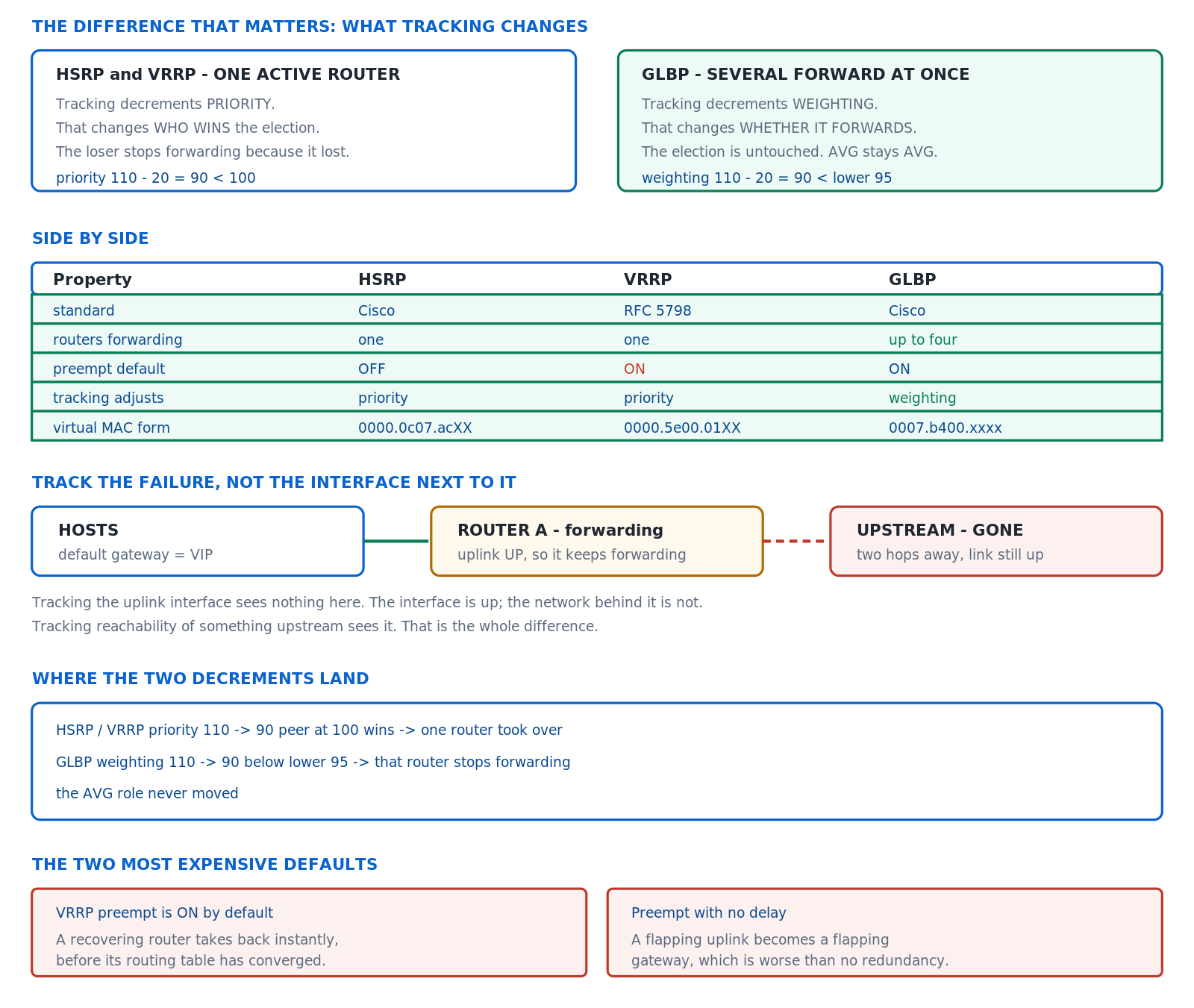
What Do the Three FHRPs Actually Do Differently?
Which one should I use?
HSRP if the environment is entirely Cisco and you want the most widely deployed option with the most operational familiarity. VRRP if there is any non-Cisco equipment involved or a standards requirement, since it is functionally equivalent and interoperates. GLBP if you want genuine load sharing across gateways without configuring multiple groups and staggering priorities, and you accept the Cisco dependency. Functionally the three are close enough that the choice rarely matters as much as the tracking configuration on top of it.
A Deeper Dive into the Protocols
HSRP and the version distinction
HSRP version 1 and version 2 are not compatible on the same group and differ in ways that matter for anything modern. Version 2 supports group numbers up to 4095 rather than 255, which allows the common convention of matching the group number to the VLAN ID; it uses a different multicast address and virtual MAC range; and it supports IPv6. On any network with more than 255 VLANs, version 2 is not optional.
! HSRP version 2, group number matching the VLAN
interface Vlan10
 ip address 10.10.10.2 255.255.255.0
 standby version 2
 standby 10 ip 10.10.10.1
 standby 10 priority 110
 standby 10 preempt delay minimum 60
 standby 10 authentication md5 key-string SharedSecret
 standby 10 name GATEWAY-VLAN10
!
! Version differences that matter
!   v1: groups 0-255,  224.0.0.2,   0000.0C07.ACxx
!   v2: groups 0-4095, 224.0.0.102, 0000.0C9F.Fxxx, IPv6 capable
!
R1# show standby Vlan10 brief
Interface  Grp Pri P State   Active          Standby         Virtual IP
Vl10        10 110 P Active  local           10.10.10.3      10.10.10.1
VRRP, and the preemption default that catches people
VRRP is functionally HSRP with different names and one significant behavioural difference: preemption is enabled by default. A router added to an existing VRRP group with a higher priority takes over immediately, with no configuration expressing that intent. On HSRP the same addition does nothing until preempt is configured, which is a safer default and a less convenient one.
! VRRP - note preempt is already ON
interface Vlan10
 ip address 10.10.10.2 255.255.255.0
 vrrp 10 ip 10.10.10.1
 vrrp 10 priority 110
 vrrp 10 preempt delay minimum 60
 ! ^ You configure the DELAY, not the preempt itself
 vrrp 10 timers advertise 1
 vrrp 10 description GATEWAY-VLAN10
!
! Disable it explicitly if that is what you want
 no vrrp 10 preempt
!
R1# show vrrp brief
Interface     Grp Pri Time  Own Pre State   Master addr     Group addr
Vl10           10 110 3570      Y   Master  10.10.10.2      10.10.10.1
GLBP, which actually load-shares
HSRP and VRRP put all traffic through one router; sharing load means configuring several groups and splitting hosts between them by default gateway, which is administratively awkward and fragile. GLBP solves this properly: one Active Virtual Gateway answers all ARP requests for the virtual IP and hands out up to four different virtual MAC addresses, so hosts on the same segment forward through different physical routers while all using one gateway address.
! GLBP - one virtual IP, up to four forwarders
interface Vlan10
 ip address 10.10.10.2 255.255.255.0
 glbp 10 ip 10.10.10.1
 glbp 10 priority 110
 glbp 10 preempt delay minimum 60
 glbp 10 load-balancing host-dependent
 ! round-robin (default) | weighted | host-dependent
 glbp 10 authentication md5 key-string SharedSecret
!
R1# show glbp Vlan10 brief
Interface  Grp Fwd Pri State    Address         Active router   Standby router
Vl10        10  -  110 Active   10.10.10.1      local           10.10.10.3
Vl10        10  1   -  Active   0007.B400.0A01  local           -
Vl10        10  2   -  Listen   0007.B400.0A02  10.10.10.3      -
! ^ Two forwarders, two virtual MACs, traffic split between them.
The load-balancing algorithms
| Algorithm | How it assigns | Best for | Weakness |
|---|---|---|---|
round-robin (default) |
Next forwarder MAC per ARP request | Many similar hosts | A host's gateway changes on ARP refresh |
weighted |
Proportional to configured weighting | Routers with different uplink capacity | Weighting must be maintained by hand |
host-dependent |
Hash of the host MAC — stable per host | Stateful paths, firewalls | Uneven split with few hosts |
Authentication, which is about accidents more than attacks
An unauthenticated FHRP group will accept a hello from any device on the segment claiming a higher priority, and the realistic scenario is not an attacker but a lab switch plugged into a production VLAN with a leftover configuration on it. That device becomes the active gateway for a segment it has no route out of, and the outage lasts until someone finds the cable. Authentication makes that impossible with one line per group.
All three protocols support a keyed digest, and the key chain form is preferable to an inline key string because it supports rotation without an outage — two keys valid simultaneously during the change window, then the old one removed. The failure mode of mismatched authentication is worth recognising: both routers become active, because neither accepts the other's hellos, which is the same symptom as a broken Layer 2 path.
! Key chain form, which supports rotation
key chain FHRP-KEYS
 key 1
  key-string OldSharedSecret
  accept-lifetime 00:00:00 Jan 1 2026 01:00:00 Sep 1 2026
  send-lifetime   00:00:00 Jan 1 2026 00:00:00 Sep 1 2026
 key 2
  key-string NewSharedSecret
  accept-lifetime 00:00:00 Aug 1 2026 infinite
  send-lifetime   00:00:00 Sep 1 2026 infinite
!
interface Vlan10
 standby 10 authentication md5 key-chain FHRP-KEYS
!
! VRRP and GLBP take the same construct
 vrrp 10 authentication md5 key-chain FHRP-KEYS
 glbp 10 authentication md5 key-chain FHRP-KEYS
!
! Mismatch symptom: both routers Active
R1# show standby Vlan10 brief | include Vl10
Vl10        10 110 P Active  local  unknown  10.10.10.1
IPv6 and the FHRP
All three support IPv6, and the addressing model differs: the virtual address on an IPv6 group is a link-local address, because that is what hosts use as a default gateway. HSRP can generate it automatically with the autoconfig keyword, which is preferable to typing one, and the group still advertises global prefixes through normal router advertisements.
! HSRP for IPv6 - link-local virtual address
interface Vlan10
 ipv6 address 2001:DB8:10::2/64
 standby version 2
 standby 10 ipv6 autoconfig
 standby 10 priority 110
 standby 10 preempt delay minimum 60
!
! VRRPv3 handles both families in one group construct
fhrp version vrrp v3
interface Vlan10
 vrrp 10 address-family ipv6
  address FE80::1 primary
  priority 110
  vrrpv3 timers advertise 1000
!
R1# show standby Vlan10 | include IPv6|Virtual
R1# show vrrp Vlan10 address-family ipv6
How Do Priority, Preemption and Timers Decide Who Forwards?
What is the interaction?
Priority decides who should be active; preemption decides whether a higher-priority router takes over from a lower-priority one that is already active; and the timers decide how quickly a failure is noticed. All three have to be considered together, because priority without preemption produces a group where the intended active router sits in standby indefinitely after any transient event, and preemption without a delay produces an outage on every reboot.
A Deeper Dive into the Decision
Priority without preemption does nothing after the first failover
This is the behaviour that surprises people on HSRP. Configure priority 110 on the intended primary and 100 on the secondary, leave preempt off, and the design works until the primary reloads once. After that the secondary is active, the primary is standby with a higher priority, and it stays there forever — quietly, with no alarm, until someone notices during the next incident that the traffic is on the wrong device.
! Priority set, preempt absent - a trap
interface Vlan10
 standby 10 ip 10.10.10.1
 standby 10 priority 110
! ^ No preempt. After one failover this router never comes back.
!
R1# show standby Vlan10 brief
Interface  Grp Pri P State    Active       Standby      Virtual IP
Vl10        10 110   Standby  10.10.10.3   local        10.10.10.1
! ^ Priority 110, in Standby, behind a router with 100.
!   The blank P column is the whole story.
!
! The fix, with a delay so it is safe
 standby 10 preempt delay minimum 60 reload 120
The delay values and what each covers
| Keyword | Applies after | Typical value | Why |
|---|---|---|---|
preempt delay minimum |
Any interface coming up | 60 s | Lets routing converge before taking traffic |
preempt delay reload |
A system reload | 120–180 s | Full boot needs longer than a link flap |
standby delay minimum |
Any interface event | 30 s | Delays participation, not just preemption |
standby delay reload |
A system reload | 120 s | The strongest protection against the reload blackhole |
! Both mechanisms, because they cover different things
interface Vlan10
 standby delay minimum 30 reload 120
 ! ^ Do not participate in HSRP at all until this expires
 standby 10 ip 10.10.10.1
 standby 10 priority 110
 standby 10 preempt delay minimum 60 reload 180
 ! ^ Participate, but do not take over until this expires
!
! Confirm the delays are in effect after a reload
R1# show standby Vlan10 | include delay|State
  State is Standby
    Preemption enabled, delay min 60 secs, reload 180 secs
Timers, and how far down to go
The HSRP defaults of a 3-second hello and 10-second hold mean up to ten seconds of blackholing on a failure, which is a long time for voice and unremarkable for most other traffic. Sub-second timers are configurable and they increase control-plane load on every switch in the group, on every VLAN. Where sub-second failover genuinely matters, BFD is the better mechanism: it detects the failure in milliseconds and tells the FHRP, without the FHRP itself sending hellos any faster.
! Millisecond timers - possible, and rarely the right answer
interface Vlan10
 standby 10 timers msec 200 msec 750
 !                    ^hello      ^hold
!
! Better: let BFD do the detection
interface Vlan10
 bfd interval 250 min_rx 250 multiplier 3
 standby 10 bfd
!
! Or globally for all groups on the interface
 standby bfd all-interfaces
!
R1# show standby brief | include Vl10
R1# show bfd neighbors | include 10.10.10.3
Reading the state machine
HSRP moves through Initial, Learn, Listen, Speak, Standby and Active. A router stuck in Speak is hearing hellos and not winning; stuck in Listen means it has learned the virtual IP and is not even contending; stuck in Init usually means the interface is down or the virtual IP has not been configured. Each state points at a different cause, which makes the state name more useful than it first appears.
! What each stuck state means
!  Init    - interface down, or no virtual IP configured
!  Listen  - knows the virtual IP, not contending (low priority)
!  Speak   - contending and not winning
!  Standby - the designated backup. Normal.
!  Active  - forwarding. Normal for exactly one router.
!
R1# show standby Vlan10
Vlan10 - Group 10 (version 2)
  State is Active
    2 state changes, last state change 04:12:19
  Virtual IP address is 10.10.10.1
  Active virtual MAC address is 0000.0C9F.F00A
  Hello time 3 sec, hold time 10 sec
  Preemption enabled, delay min 60 secs, reload 180 secs
  Priority 110 (configured 110)
    Track object 10 state Up decrement 30
  Group name is "GATEWAY-VLAN10"
show standby on both shows Active with Standby listed as unknown or as its own address. Fix: verify the Layer 2 path carries the VLAN end to end, and that version, authentication and timers match on both sides.How Do I Make Tracking Trigger a Failover That Helps?
What is tracking for?
An FHRP without tracking detects one failure: the active router stopping. It does not detect the active router losing its uplink, losing its routing adjacency, or losing reachability to anything beyond itself — and those are the failures that actually happen. Tracking connects an external condition to the FHRP priority, so that a router which can no longer forward usefully lowers its own priority and hands over. The chain has four links and it breaks silently at the last one.
A Deeper Dive into Tracking
Enhanced object tracking, not the legacy form
The legacy syntax tracks an interface directly from the FHRP command and can only track interface state. Enhanced object tracking creates a named object first, which can track an interface, a route's presence in the table, an IP SLA result, or a boolean combination of other objects — and the same object can drive several FHRP groups. There is no reason to use the legacy form in new configuration.
! Legacy - interface state only, one use
standby 10 track GigabitEthernet0/0 30
!
! Enhanced - the object exists independently
track 10 interface GigabitEthernet0/0 line-protocol
 delay down 10 up 30
!
track 20 ip route 0.0.0.0 0.0.0.0 reachability
 delay down 10 up 60
!
track 30 ip sla 1 reachability
 delay down 10 up 30
!
! One object, many groups
interface Vlan10
 standby 10 track 20 decrement 30
interface Vlan20
 standby 20 track 20 decrement 30
Tracking a route rather than an interface
An interface being up says nothing about whether the router can reach anything. Tracking the presence of the default route, or of a specific prefix that only exists when the WAN is healthy, is a far better proxy for "can this router still do its job". It also survives the case where the uplink interface stays up because it terminates on a switch while the device beyond it has failed.
! Track what actually matters: can we still reach the core?
track 20 ip route 10.0.0.0 255.0.0.0 reachability
 delay down 10 up 60
!
! Or the default route specifically
track 21 ip route 0.0.0.0 0.0.0.0 reachability
!
! Or the metric, to detect a degraded rather than failed path
track 22 ip route 10.0.0.0 255.0.0.0 metric threshold
 threshold metric up 100 down 200
!
! Verify the object independently of the FHRP
R1# show track 20
Track 20
  IP route 10.0.0.0 255.0.0.0 reachability
  Reachability is Up (OSPF)
    1 change, last change 04:41:02
  First-hop interface is GigabitEthernet0/0
  Tracked by:
    HSRP Vlan10 10
    HSRP Vlan20 20
The decrement arithmetic, which is where it breaks
A tracking configuration only does something if the decrement is large enough to push the priority below the peer's. With priorities of 110 and 100, a decrement of 10 produces 100 — a tie, which the active router keeps. A decrement of 30 produces 80, which loses. This is arithmetic rather than configuration, it is not validated by the CLI, and a decrement chosen without doing it is the most common reason a tracked failover does not happen.
! R1 priority 110, R2 priority 100
!
! WRONG - 110 - 10 = 100. A tie. R1 stays Active.
standby 10 track 20 decrement 10
!
! ALSO WRONG - default decrement is 10 if omitted
standby 10 track 20
!
! CORRECT - 110 - 30 = 80, which is below 100
standby 10 track 20 decrement 30
!
! Verify the maths after forcing the object down
R1# show standby Vlan10 | include Priority|Track
  Priority 80 (configured 110)
    Track object 20 state Down decrement 30
R1# show standby Vlan10 brief | include Vl10
Vl10        10  80 P Standby 10.10.10.3  local  10.10.10.1
! ^ It actually handed over. That is the test.
GLBP weighting, which is a different mechanism
GLBP tracking does not adjust priority — priority only decides which router is the Active Virtual Gateway. Forwarding is controlled by weighting, with configurable upper and lower thresholds: a forwarder whose weighting drops below the lower threshold stops forwarding, and resumes only when it climbs back above the upper one. That hysteresis is deliberate and it means the two thresholds must differ, or the forwarder oscillates.
! GLBP: weighting controls forwarding, priority controls AVG
interface Vlan10
 glbp 10 ip 10.10.10.1
 glbp 10 priority 110
 glbp 10 weighting 110 lower 85 upper 105
 glbp 10 weighting track 20 decrement 30
 glbp 10 forwarder preempt delay minimum 60
! 110 - 30 = 80, which is below the lower threshold of 85.
! It stops forwarding, and resumes only above 105.
!
R1# show glbp Vlan10 | include Weighting|weighting
  Weighting 80 (configured 110), thresholds: lower 85, upper 105
    Track object 20 state Down decrement 30
IP SLA for reachability beyond the next hop
! Prove the path works, not just that a route exists
ip sla 1
 icmp-echo 10.0.0.1 source-interface GigabitEthernet0/0
 frequency 5
 threshold 1000
 timeout 2000
ip sla schedule 1 life forever start-time now
!
track 30 ip sla 1 reachability
 delay down 15 up 60
 ! ^ Fail away quickly, return slowly. Stops flapping.
!
interface Vlan10
 standby 10 track 30 decrement 30
!
R1# show ip sla statistics 1 | include return code|successes
R1# show track brief
show track confirms it, the priority visibly decreases, and the router remains Active. The failover that the whole design exists for does not happen. Cause: the resulting priority is still equal to or greater than the peer's, and an active router keeps the role on a tie. A default decrement of 10 against a 10-point priority gap is the classic instance. Confirm: show standby on both routers, compare the decremented priority against the peer's configured priority. Fix: set the decrement to at least the priority gap plus one — and test it by shutting the tracked interface rather than by reading the configuration.How Do I Align the FHRP With Spanning Tree and the Rest of the Design?
What has to line up?
Three things, per VLAN. The FHRP active router should be the spanning tree root, so that Layer 2 and Layer 3 agree on which switch traffic converges towards. The FHRP active router should be the one with the better routing path outward, so that traffic does not cross the inter-switch link twice. And where load sharing across VLANs is the design, the alternation of root and active must match, or half the VLANs take the long path in both directions.
A Deeper Dive into Alignment
Root and active on the same switch
If SW1 is the spanning tree root for VLAN 10 and SW2 is the HSRP active router, every frame from a host in VLAN 10 travels to SW1 because that is where spanning tree points, then crosses the trunk to SW2 because that is where the gateway MAC lives, then leaves. The traffic works, the trunk carries twice what it should, and a trunk failure becomes a total outage for that VLAN instead of a degradation. Aligning them costs nothing and removes both problems.
! SW1 - root AND active for VLAN 10, backup for VLAN 20
spanning-tree vlan 10 root primary
spanning-tree vlan 20 root secondary
!
interface Vlan10
 standby 10 ip 10.10.10.1
 standby 10 priority 110
 standby 10 preempt delay minimum 60 reload 180
interface Vlan20
 standby 20 ip 10.10.20.1
 standby 20 priority 100
 standby 20 preempt delay minimum 60 reload 180
!
! SW2 - the mirror image
spanning-tree vlan 10 root secondary
spanning-tree vlan 20 root primary
interface Vlan10
 standby 10 priority 100
interface Vlan20
 standby 20 priority 110
! Verify the alignment rather than assuming it
SW1# show spanning-tree vlan 10 | include This bridge|Root ID
Root ID    Priority    24586
           This bridge is the root
!
SW1# show standby Vlan10 brief | include Vl10
Vl10        10 110 P Active  local  10.10.10.3  10.10.10.1
! ^ Root and Active on the same switch. Correct.
!
! And the mirror on VLAN 20
SW1# show spanning-tree vlan 20 | include This bridge
SW1# show standby Vlan20 brief | include Vl20
The SVI that stays up when it should not
A switched virtual interface stays up as long as at least one access port in its VLAN is up, or as long as the VLAN is allowed on any up trunk. That means an SVI can remain up on a switch whose only path to the rest of the network has failed, so the FHRP sees a healthy interface and keeps the gateway role. This is the specific case that makes tracking a route rather than an interface the better default: the SVI is up, and it leads nowhere.
autostate controls part of this behaviour and is enabled by default, bringing the SVI down when no port in the VLAN is forwarding. What it does not do is notice that the uplink beyond the switch has gone, which is why the tracked object should be something on the far side of the failure rather than something local.
! Why the SVI is up - and why that proves nothing
SW1# show interfaces Vlan10 | include line protocol
Vlan10 is up, line protocol is up
!
SW1# show vlan id 10 | include Gi|Te
10   CLIENTS    active    Gi1/0/5, Gi1/0/6, Te1/1/1
! ^ One access port up keeps the SVI up.
!
! Autostate is on by default; this disables it (rarely wanted)
interface Vlan10
 no autostate
!
! Track something beyond the switch instead
track 20 ip route 10.0.0.0 255.0.0.0 reachability
interface Vlan10
 standby 10 track 20 decrement 30
Where the FHRP is not needed at all
A switch stack, a VSS pair, or a StackWise Virtual domain presents two physical switches as one logical device with one control plane. There is no second router to fail over to, because there is no second router — the gateway address lives on the logical device and survives a member failure without any FHRP involvement. Configuring HSRP inside a stack is a configuration with no peer, and it appears more often than it should as a habit carried over from a previous design.
Routed access, which removes the question
Where the access layer is routed rather than switched, each access switch is the default gateway for its own directly connected subnets and there is no shared segment for an FHRP to protect. Redundancy becomes a routing problem solved by equal-cost paths and fast IGP convergence, which converge faster than any FHRP and need no tracking configuration at all. It is a larger design change and it eliminates this entire topic where it is applicable.
| Design | FHRP needed | Failover mechanism | Typical convergence |
|---|---|---|---|
| Layer 2 access, separate distribution switches | Yes | HSRP / VRRP / GLBP with tracking | Hold timer, or BFD |
| Layer 2 access, stacked or VSS distribution | No | Stack member failover | Sub-second |
| Routed access | No | IGP equal-cost paths | IGP convergence |
| SD-Access fabric edge | No | Anycast gateway on every edge node | N/A — the gateway is everywhere |
Anycast gateway, which generalises the idea
Modern fabric designs put the same gateway address and MAC on every edge switch simultaneously, so a host's default gateway is always local and no failover is needed for it at all. This is the direction the problem has moved: rather than electing one router to own an address, every router owns it and the fabric ensures traffic reaches the right destination. Understanding the FHRP remains necessary because the installed base is enormous, but the design question is increasingly whether an FHRP is needed rather than which one.
VLAN10 clients - HSRP active here, STP root here makes the intended state visible to whoever is looking at the switch at 3am. Without it, discovering whether the current state is the designed state means comparing two switches and reasoning about priorities, which is slower and error-prone under pressure.Which FHRP Mistakes Create Outages Instead of Preventing Them?
What are the failures worth memorising?
Five. Preemption without a delay, which makes every reload an outage. A tracking decrement too small to cross the peer's priority. Two routers both active because they cannot hear each other. An FHRP configured on a stack where there is no peer. And a design that was never tested by actually failing the primary, which is how the first four survive into production.
A Deeper Dive into the Failure Catalogue
The reload blackhole
show standby shows a state change to Active with an uptime of a few seconds. Fix: standby delay minimum 30 reload 120 and standby N preempt delay minimum 60 reload 180, sized against your actual IGP convergence time.The FHRP on a stack
show standby reports the router as Active with no standby peer, permanently, and a log message about a missing peer appears at intervals. Nothing fails, and nothing is protected either. Cause: a stack is one logical device with one control plane. There is no second router to elect, so the group has exactly one member. The redundancy the configuration appears to provide is delivered by the stack itself and the FHRP contributes nothing. Confirm: show standby brief shows the Standby column as unknown; show switch confirms multiple members in one stack. Fix: remove the FHRP configuration, and rely on the stack's own member failover.The untested design
show standby brief on both routers. If the active role does not move, the design does not work. Fix: make an induced failover part of commissioning, and repeat it after any change to priorities, tracking or routing.A commissioning test that takes four minutes
! Run this before the design is considered finished
! 1. Baseline - who is active where?
show standby brief
show spanning-tree summary
!
! 2. Fail the tracked object, not the router
interface GigabitEthernet0/0
 shutdown
!
! 3. Did the priority drop AND the role move?
show standby Vlan10 | include Priority|Track|State
show standby brief
! ^ Both must change. Priority alone is not a pass.
!
! 4. Restore and confirm it comes back after the delay
interface GigabitEthernet0/0
 no shutdown
!
! 5. Then reload the primary and time the outage
reload
Logging that makes the next incident faster
! State changes should be logged and collected
standby 10 name GATEWAY-VLAN10
!
! The messages worth alerting on
! %HSRP-5-STATECHANGE: Vlan10 Grp 10 state Standby -> Active
! %TRACK-6-STATE: 20 ip route 10.0.0.0/8 reachability Up -> Down
!
! Confirm history is being kept
R1# show standby Vlan10 | include state change
    4 state changes, last state change 00:14:22
!
R1# show track 20 | include change
    3 changes, last change 00:14:31
! ^ A state change count that keeps rising is a flap.
What to do when the roles flap
A group whose state change counter keeps climbing is oscillating, and the cause is almost always one of three things: a tracked object with no damping, so a marginal link moves the role every time it blinks; timers tuned low enough that a busy control plane misses a hello; or two groups on the same segment with priorities close enough that a small decrement crosses back and forth. All three are visible in the state change count, which is why that counter is worth reading before the configuration is.
The fix in every case is hysteresis. Asymmetric delay down and delay up on the tracked object handles the marginal link. Raising the timers, or moving detection to BFD, handles the missed hellos. And separating priorities by considerably more than the decrement handles the third, because it means the role can only move when the tracked condition genuinely changes rather than when a value hovers near a threshold.
Blueprint framing
The CCIE Enterprise Infrastructure v1.1 blueprint includes first hop redundancy protocols in the infrastructure domain, and lab tasks generally specify behaviour rather than commands: make this router the gateway, make it hand over when this link fails, make it take the role back afterwards. That phrasing maps directly onto priority, tracking with an adequate decrement, and preemption with a delay — three things rather than one, and the middle one is where marks are lost.
Conclusion
The choice between HSRP, VRRP and GLBP is the least consequential decision in a first hop redundancy design. All three move a virtual IP and MAC between routers, all three take a priority and a preemption setting, and all three integrate with the same object tracking infrastructure. The differences that matter are VRRP preempting by default, GLBP sharing load within a single group, and HSRP version 2 being required for group numbers above 255 or for IPv6.
What determines whether the design works is the layer above the protocol. Preemption needs a delay sized against IGP convergence, or every reload becomes an outage that arrives when the router returns rather than when it leaves. Tracking needs a decrement larger than the priority gap, arithmetic that nothing validates. And the tracked object should be a route or an SLA rather than an interface, because an interface that is up proves considerably less than it appears to.
Finally, alignment and testing. The FHRP active router and the spanning tree root belong on the same switch for each VLAN, or every frame crosses the trunk twice and a trunk failure becomes a VLAN outage. And every one of the failures in this article survives a configuration review while none survives shutting the tracked interface and watching whether the role actually moves — which takes four minutes and is the only evidence that the redundancy is real.
External Links
- RFC 5798 — Virtual Router Redundancy Protocol (VRRP) Version 3 for IPv4 and IPv6
- RFC 3768 — Virtual Router Redundancy Protocol (VRRP) Version 2
- RFC 2281 — Cisco Hot Standby Router Protocol (HSRP)
- RFC 5880 — Bidirectional Forwarding Detection (BFD)
- Cisco IOS XE — First Hop Redundancy Protocols Configuration Guide
- Cisco IOS XE — IP SLAs Configuration Guide
- Cisco Learning Network — CCIE Enterprise Infrastructure
Reference Notes
- RFC 2281 documents HSRP, including the Active and Standby roles and the election by highest priority with the higher IP address as the tie-break.
- Cisco documentation describes HSRP version 2, which supports group numbers up to 4095, uses the multicast address 224.0.0.102, and adds IPv6 support relative to version 1.
- Cisco documentation gives the HSRP version 2 virtual MAC range as 0000.0C9F.Fxxx, distinct from the version 1 range of 0000.0C07.ACxx.
- RFC 5798 specifies VRRP version 3 for both IPv4 and IPv6, using IP protocol number 112 and the multicast address 224.0.0.18 for IPv4.
- RFC 5798 specifies that a VRRP router which owns the virtual address uses priority 255, and that preemption is enabled by default.
- RFC 5798 gives the VRRP virtual MAC address format as 00-00-5E-00-01-{VRID} for IPv4.
- Cisco documentation describes GLBP, in which an Active Virtual Gateway answers ARP requests and distributes up to four virtual MAC addresses belonging to Active Virtual Forwarders.
- Cisco documentation describes the GLBP load-balancing algorithms round-robin, weighted and host-dependent, with round-robin as the default.
- Cisco documentation describes GLBP weighting with configurable lower and upper thresholds, where a forwarder stops forwarding below the lower threshold and resumes only above the upper one.
- Cisco documentation describes enhanced object tracking, including
track ... interface line-protocol,track ... ip route reachabilityandtrack ... ip sla reachability, withdelay upanddelay downtimers. - Cisco documentation describes
standby delay minimumandstandby delay reload, which postpone HSRP participation after an interface event or a system reload respectively. - The CCIE Enterprise Infrastructure v1.1 unified exam topics include first hop redundancy protocols within the infrastructure domain.