

Bundling four ten-gigabit links into one logical interface sounds like it should give you forty gigabits. It does not — not for any individual conversation. An EtherChannel distributes traffic by hashing selected header fields into a fixed number of buckets and mapping each bucket to a member link, which means every frame belonging to a given flow always takes the same physical port. A single TCP session between two servers gets ten gigabits, not forty, no matter how many links you add. Understanding that one property is the difference between designing a link aggregation that solves a problem and designing one that hides it until a backup job saturates a single member and everyone else's traffic queues behind it.
Everything else about EtherChannel follows from two decisions. First, which negotiation protocol: LACP, standardised as IEEE 802.3ad and now part of 802.1AX, which interoperates with every vendor; PAgP, which is Cisco-proprietary; or static on mode, which negotiates nothing and will happily forward into a misconfigured neighbour and form a loop. Use LACP unless you have a specific reason not to. Second, which fields to hash: source MAC, destination MAC, source and destination IP, or a combination including Layer 4 ports. The right answer depends entirely on the traffic pattern crossing the bundle, and the default is frequently wrong for the position the bundle occupies in the topology.
This article covers building and operating EtherChannels on Cisco switches with the reasoning behind each choice. Section one establishes the compatibility requirements — the eight attributes that must match before two interfaces will bundle at all, and what happens when one does not. Section two builds Layer 2 and Layer 3 channels and works through the negotiation mode matrix. Section three covers the LACP options that actually change behaviour: system and port priority, hot-standby links via max-bundle, minimum links, timer rate, and standalone-port suppression. Section four is load balancing, the eight-bucket hash model, and how to verify which link a specific flow will take. Section five is the failure catalogue, starting with the mode mismatch that creates a loop.
What Must Match Before Two Interfaces Will Bundle?
Which attributes must be identical on all members?
Eight, and a mismatch in any one prevents the port from joining. Speed and duplex must match. Switchport mode must match — all access or all trunk, never mixed. On access ports, the access VLAN must match. On trunks, the encapsulation, the native VLAN, and the allowed VLAN list must all match. Spanning-tree port cost and port priority must be consistent, though these are configured on the Port-channel interface rather than the members. And all members must be on the same switch, or on switches presenting a shared identity such as StackWise Virtual, VSS, or a Nexus vPC pair. A port failing any of these is either suspended or left standalone, depending on the negotiation protocol.
A Deeper Dive into Compatibility and Failure Behaviour
The eight attributes, and how each one fails
| Attribute | Must match across | Symptom if mismatched | Where to check |
|---|---|---|---|
| Speed | All local members | Port suspended; %EC-5-CANNOT_BUNDLE2 |
show interfaces status |
| Duplex | All local members | Port suspended | show interfaces status |
| Switchport mode (access/trunk) | All local members | Port suspended with an explicit log message | show interfaces X switchport |
| Access VLAN | All local members, if access | Port suspended | show vlan brief |
| Trunk encapsulation | All local members, if trunk | Port suspended | show interfaces trunk |
| Native VLAN | All local members and both ends | Local: suspended. Cross-link: bundle forms but bridges two VLANs | show interfaces trunk |
| Allowed VLAN list | All local members | Port suspended | show interfaces trunk |
| Layer 2 vs Layer 3 | All local members | %EC-5-L3DONTBNDL2 and the port stays out |
show etherchannel summary |
Suspended versus standalone — a distinction that decides whether you get a loop
When a port cannot join a bundle, two outcomes are possible. Suspended means the port is held down and forwards nothing: safe. Standalone — shown as (I) for individual in show etherchannel summary — means the port operates as an ordinary independent interface outside the channel. On a Layer 2 link between two switches, two independent ports where one bundle was intended is a loop that spanning tree has to catch. Spanning tree usually does catch it, but "usually" is doing real work in that sentence.
LACP's default behaviour on many IOS platforms is to leave a port standalone when no LACPDUs are received. port-channel standalone-disable changes that to suspended, which is the safer default and should be configured on every Layer 2 EtherChannel.
! Suspend rather than run standalone when LACP negotiation fails
interface Port-channel1
 port-channel standalone-disable
! Equivalent behaviour is 'lacp suspend-individual' on some platforms.
! Verify which one your image supports before templating it.
Configure the members, then let the Port-channel inherit
The order that avoids trouble: put the physical interfaces into the channel group first, then configure Layer 2 or Layer 3 properties on the Port-channel interface. Configuration applied to the Port-channel propagates down to the members. Configuration applied directly to a member after bundling can create the very mismatch that suspends it.
! ===== Correct order =====
! 1. Clean the members first
interface range TenGigabitEthernet1/1/1 - 4
 default interface TenGigabitEthernet1/1/1
!
! 2. Create the bundle by adding members
interface range TenGigabitEthernet1/1/1 - 4
 description ---- member of Po1 to DIST-1 ----
 channel-protocol lacp
 channel-group 1 mode active
!
! 3. Configure properties ONCE, on the logical interface
interface Port-channel1
 description ---- LACP bundle to DIST-1 ----
 switchport mode trunk
 switchport nonegotiate
 switchport trunk native vlan 999
 switchport trunk allowed vlan 10,20,100,200
show etherchannel summary shows it as (s) suspended. The log reads %EC-5-CANNOT_BUNDLE2: Te1/1/3 is not compatible with Po1 and will be suspended (trunk mode of Te1/1/3 is trunk, Po1 is access). Cause: a switchport command was applied to the member rather than to the Port-channel, so the member no longer matches the bundle. Confirm: show running-config interface Te1/1/3 and compare against show running-config interface Port-channel1. Fix: remove the member-level command; the Port-channel configuration will reapply. As a rule, after a bundle exists, never configure a member directly.Layer 3 channels need no switchport before the group
A routed EtherChannel is built by making the members routed ports first. Adding a Layer 2 interface to a channel group and then trying to convert the Port-channel to Layer 3 produces a mismatch. Make the members routed, bundle them, then address the Port-channel.
! ===== Layer 3 EtherChannel =====
interface range TenGigabitEthernet1/1/5 - 6
 no switchport
 no ip address
 channel-group 2 mode active
!
interface Port-channel2
 description ---- routed uplink to CORE-1 ----
 no switchport
 ip address 10.255.0.1 255.255.255.252
 ip ospf network point-to-point
 ip ospf 1 area 0
How Do I Configure a Bundle, and Which Negotiation Mode Should I Use?
Which mode should I choose?
LACP active on both ends, in nearly every case. LACP is IEEE 802.3ad / 802.1AX and interoperates with every vendor, and configuring both ends as active means the bundle forms regardless of which side comes up first. PAgP is Cisco-proprietary and offers no advantage on a modern network unless you are attaching to legacy equipment that only speaks it. Static on mode negotiates nothing: it brings the links up immediately and verifies nothing about the far end, so a cabling error or a one-sided configuration produces a forwarding loop rather than a suspended port. Reserve on for connections to devices that genuinely cannot run LACP, and even then prefer to solve it differently.
A Deeper Dive into Protocols and Modes
The three protocols side by side
| Property | LACP | PAgP | Static (on) |
|---|---|---|---|
| Standard | IEEE 802.3ad / 802.1AX | Cisco proprietary | None — no protocol runs |
| Modes | active, passive |
desirable, auto |
on |
| Destination MAC | 01:80:C2:00:00:02 | 01:00:0C:CC:CC:CC | — |
| Encapsulation | EtherType 0x8809 (Slow Protocols), subtype 0x01 | SNAP, protocol type 0x0104 | — |
| Max ports | 16 configured: 8 active + 8 hot-standby | 8 | 8 |
| Detects far-end misconfiguration | Yes | Yes | No |
| Timer options | Slow 30 s (default) or fast 1 s | Fixed 30 s | — |
| Multi-vendor | Yes | No | Yes, but unverified |
The mode matrix, and the one combination that must never ship
| Local | Remote | Result | Why |
|---|---|---|---|
active |
active |
Bundle forms | Both sides send LACPDUs — the recommended configuration |
active |
passive |
Bundle forms | Active initiates, passive responds |
passive |
passive |
No bundle | Neither side initiates; ports stay independent |
desirable |
desirable or auto |
Bundle forms | PAgP equivalent of active |
auto |
auto |
No bundle | PAgP equivalent of passive+passive |
on |
on |
Bundle forms | Nothing is verified — correct only if both sides are certain |
on |
active / passive / auto / desirable |
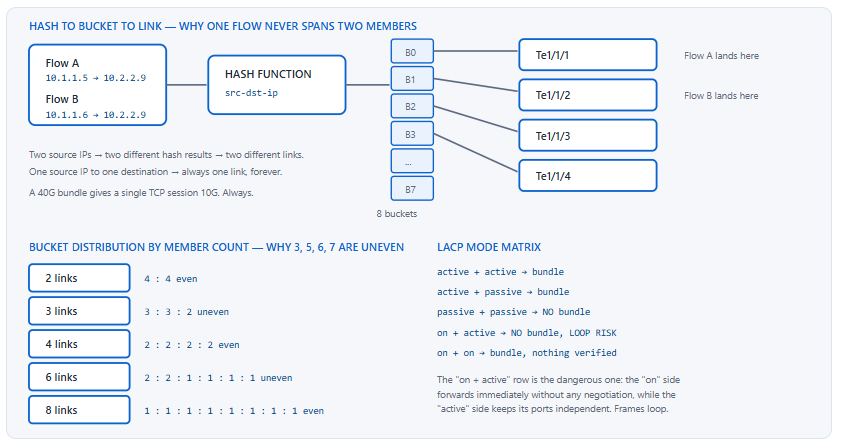
No bundle — loop risk | The on side forwards on all members immediately while the other side keeps them independent |
| LACP | PAgP | No bundle | Different protocols; neither understands the other's frames |
on at one end and active at the other Symptom: intermittent connectivity, MAC address flapping logged as %SW_MATM-4-MACFLAP_NOTIF, and spanning-tree topology changes on a link that was just configured. Cause: the on side bundles unconditionally and starts forwarding across all members; the LACP side never completes negotiation and treats each member as an independent link. The result is multiple parallel forwarding paths between the same two switches. Confirm: show etherchannel summary on both ends — one shows (P) bundled, the other shows (I) individual or (D) down. Fix: set both ends to active. Never use on unless you have verified that the far end is also on and the cabling is correct.Building a Layer 2 bundle end to end
! ===== ACC-1: four-member LACP trunk toward DIST-1 =====
interface range TenGigabitEthernet1/1/1 - 4
 description ---- Po1 member to DIST-1 ----
 channel-protocol lacp
 channel-group 1 mode active
!
interface Port-channel1
 description ---- LACP trunk to DIST-1 ----
 switchport mode trunk
 switchport nonegotiate
 switchport trunk native vlan 999
 switchport trunk allowed vlan 10,20,100,200
 port-channel standalone-disable
 spanning-tree link-type point-to-point
 spanning-tree guard loop
! ===== DIST-1: mirror image - note 'active' on this side too =====
interface range TenGigabitEthernet1/0/5 - 8
 description ---- Po1 member to ACC-1 ----
 channel-protocol lacp
 channel-group 1 mode active
!
interface Port-channel1
 description ---- LACP trunk to ACC-1 ----
 switchport mode trunk
 switchport nonegotiate
 switchport trunk native vlan 999
 switchport trunk allowed vlan 10,20,100,200
 port-channel standalone-disable
 spanning-tree guard root
Removing a member safely
Taking a member out of a bundle changes the aggregate bandwidth, which changes the spanning-tree cost, which may move the topology. On a bundle at capacity, removing a member also redistributes the hash buckets, so flows that were on other links may move. Shut the member first, confirm the bundle is stable at the reduced size, then remove it from the group.
! Safe member removal
interface TenGigabitEthernet1/1/4
 shutdown
! Verify the bundle survived and traffic redistributed
!   show etherchannel summary
!   show interfaces port-channel 1 counters
 no channel-group 1 mode active
 no shutdown
Which LACP Options Actually Change Behaviour?
What can you tune beyond the mode?
Five things matter. System priority decides which of the two devices controls port selection when the two disagree — lower wins. Port priority decides which links become active and which sit in hot standby when more members are configured than can be active — again, lower wins. lacp max-bundle caps the number of active links, enabling hot standby up to a total of sixteen configured ports. port-channel min-links keeps the bundle down until a minimum number of members are up, so a degraded bundle can be taken out of service rather than carrying full load on half its capacity. And lacp rate fast drops the LACPDU interval from 30 seconds to 1, cutting failure detection from 90 seconds to 3.
A Deeper Dive into LACP Tuning
System priority and who decides
Each LACP speaker has a System ID made of a two-byte system priority and its system MAC address. When both ends have opinions about which ports should be active, the device with the numerically lower System ID makes the decision and the other follows. Default priority is 32768, so without configuration the tie is broken by MAC address — deterministic but arbitrary. If you intend to control port selection with port priorities, set the system priority low on the device where you are configuring those priorities, or they will be ignored.
! DIST-1 controls port selection for every bundle it terminates
lacp system-priority 100
! Default is 32768. Lower wins. Set this on the device where
! your port-priority decisions live, or they will be overridden.
!
DIST-1# show lacp sys-id
100, 0011.2233.4455
Hot standby: max-bundle plus port priority
LACP allows sixteen ports in a channel group, of which at most eight can be active. Configuring lacp max-bundle below the member count puts the surplus into hot standby, shown as (H) in the summary output. Which members go active is decided by port priority, lowest first, with the interface number breaking ties. A standby member is negotiated and ready, so promotion on a member failure is immediate rather than requiring a fresh negotiation.
! Six members, four active, two hot standby
interface range TenGigabitEthernet1/1/1 - 6
 channel-group 1 mode active
!
interface Port-channel1
 lacp max-bundle 4
!
! Choose WHICH four are active - lower priority value wins
interface range TenGigabitEthernet1/1/1 - 4
 lacp port-priority 100
!
interface range TenGigabitEthernet1/1/5 - 6
 ! Higher value = standby
 lacp port-priority 200
Minimum links: fail the bundle rather than run it degraded
A four-member 40 Gbps bundle that loses three members still forwards, at 10 Gbps, carrying traffic engineered for 40. In a design with an alternative path — a second bundle, an ECMP route — it is better for the degraded bundle to go down entirely so traffic reroutes. port-channel min-links expresses that: below the threshold, the Port-channel interface goes down and every protocol running over it reconverges.
! Four members; take the whole bundle down if fewer than three survive
interface Port-channel1
 port-channel min-links 3
! Requires LACP - min-links has no effect with static 'on' mode.
!
! What it looks like when the threshold is not met
DIST-1# show etherchannel summary | include Po1
1      Po1(SD)         LACP      Te1/1/1(P) Te1/1/2(w) Te1/1/3(D) Te1/1/4(D)
! (SD) = layer2, down.  (w) = waiting to be aggregated, min-links unmet.
min-links configured without an alternative path Symptom: a single fibre failure on a four-member bundle takes the entire uplink down and isolates an access switch, where previously it would have degraded to 30 Gbps. Cause: port-channel min-links was set to 4 or to a value the bundle cannot sustain after a single failure, and there is no second path to reroute onto. Confirm: show etherchannel summary shows (SD) on the Port-channel with members in (w) state. Fix: set min-links only where a viable alternative path exists, and set it below the count that a single member failure produces. Minimum links is a rerouting trigger, not a health check.LACP rate: 30 seconds versus 1 second
The default LACPDU interval is 30 seconds and a peer is declared dead after three missed intervals — 90 seconds. That is far too slow to be the primary failure detector, which is why in practice link-down detection handles most member failures instantly. LACP fast rate reduces the interval to 1 second and the timeout to 3, which matters for failures where the link stays up but the far end stops processing: a supervisor switchover, a control-plane hang, or a transparent optical path. Both ends should be configured; the rate is signalled in the LACPDU, so a mismatch means each side ages the other at a different speed.
! Fast LACP - 1 second interval, 3 second timeout. Both ends.
interface range TenGigabitEthernet1/1/1 - 4
 lacp rate fast
!
! Confirm what is actually negotiated
ACC-1# show lacp internal | include Port|LACPDUs|Flags
Flags:  S - Device is requesting Slow LACPDUs
        F - Device is requesting Fast LACPDUs
        A - Device is in Active mode       P - Device is in Passive mode
| Option | Default | Effect | Configure on | Both ends required? |
|---|---|---|---|---|
lacp system-priority |
32768 | Lower value controls port selection | Global | No — but only the lower one takes effect |
lacp port-priority |
32768 | Lower value becomes active rather than standby | Member interface | Only on the controlling device |
lacp max-bundle |
8 | Caps active members; surplus becomes hot standby | Port-channel | No |
port-channel min-links |
None | Bundle goes down below the threshold | Port-channel | No, but symmetric config is clearer |
lacp rate fast |
Slow (30 s) | 1 s interval, 3 s timeout | Member interface | Yes, for symmetric detection |
port-channel standalone-disable |
Off | Suspend rather than run independently | Port-channel | Recommended both ends |
standalone-disable exists to prevent.How Does Load Balancing Distribute Traffic, and How Do I Verify It?
How does a switch decide which member link a frame takes?
It runs selected header fields through a hash function, producing a value that indexes into a fixed set of buckets, and each bucket is statically mapped to a member link. Classic Catalyst platforms use eight buckets, which is why an even distribution is only possible when the member count is a power of two — two, four, or eight. With three, five, six, or seven members some links receive twice the bucket share of others. The fields hashed are chosen with port-channel load-balance, and the correct choice depends entirely on what the traffic looks like at that point in the topology.
A Deeper Dive into Hashing, Field Selection, and Verification
Choosing the hash fields to match the traffic
The goal is to pick fields that vary across the conversations crossing the bundle. A distribution-to-core uplink carrying traffic from thousands of clients to a handful of servers has enormous source-IP variety and almost no destination variety, so hashing on destination alone concentrates everything on one link. A link in front of a server farm behind a load balancer may show the opposite. And a link carrying traffic between two routers has only two MAC addresses on it, which makes any MAC-based hash useless.
| Position in the topology | What varies | Recommended hash | What to avoid and why |
|---|---|---|---|
| Access to distribution | Many client MACs and IPs, few server destinations | src-dst-ip |
dst-mac — the destination is always the default gateway |
| Distribution to core (routed) | Many source and destination IPs | src-dst-ip or src-dst-mixed-ip-port |
Any MAC-based hash — only two MACs exist on a routed link |
| Switch to server with NIC teaming | Few IPs, many Layer 4 ports | src-dst-mixed-ip-port |
src-dst-ip — too few distinct pairs to spread |
| Backup or replication link | One source, one destination, one session | Nothing helps | Do not use an EtherChannel here — use ECMP or a faster single link |
! Global load-balance method on most Catalyst platforms
port-channel load-balance src-dst-ip
! Richer option where Layer 4 variety exists
!   port-channel load-balance src-dst-mixed-ip-port
!
! Confirm what is actually in effect - the default varies by platform
SW1# show etherchannel load-balance
EtherChannel Load-Balancing Configuration:
        src-dst-ip

EtherChannel Load-Balancing Mapping:
IPv4: Source XOR Destination IP address
Non-IP: Source XOR Destination MAC address
Predicting which link a specific flow will take
IOS can tell you the answer directly rather than making you infer it from counters. This is the fastest way to prove or disprove a claim that a particular flow is landing on a saturated member.
SW1# test etherchannel load-balance interface Port-channel1 ip 10.1.1.5 10.2.2.9
Would select Te1/1/2 of Po1
!
SW1# test etherchannel load-balance interface Port-channel1 ip 10.1.1.6 10.2.2.9
Would select Te1/1/4 of Po1
! ^ Two clients to the same server land on two different members.
!   One client to that server will ALWAYS use the same member.
Measuring actual distribution
The hash predicts; the counters tell you what happened. Comparing per-member counters on a bundle is the only way to detect the classic pathology — one member at 90% utilisation while three sit at 5% — which the aggregate Port-channel counter completely hides.
SW1# show interfaces port-channel 1 | include rate
  5 minute input rate 14203000 bits/sec, 2841 packets/sec
  5 minute output rate 11884000 bits/sec, 2210 packets/sec
! ^ Looks like 14 Mbps across a 40G bundle. Nothing to see. Now look
!   at the members, which is where the imbalance actually lives:
!
SW1# show interfaces | include ^Te1/1/|5 minute output rate
TenGigabitEthernet1/1/1 is up, line protocol is up
  5 minute output rate 9640000000 bits/sec, 812000 packets/sec
TenGigabitEthernet1/1/2 is up, line protocol is up
  5 minute output rate 412000000 bits/sec, 38000 packets/sec
TenGigabitEthernet1/1/3 is up, line protocol is up
  5 minute output rate 388000000 bits/sec, 35000 packets/sec
TenGigabitEthernet1/1/4 is up, line protocol is up
  5 minute output rate 401000000 bits/sec, 36000 packets/sec
! ^ Member 1 at 9.6 Gbps of 10. One elephant flow. The bundle is
!   dropping traffic while showing 14 Mbps average utilisation.
Reading show etherchannel summary flags
The flag letters in this output carry the whole diagnosis, and they are worth memorising because they are the first thing you look at on any EtherChannel problem.
ACC-1# show etherchannel summary
Flags:  D - down        P - bundled in port-channel
        I - stand-alone s - suspended
        H - Hot-standby (LACP only)
        R - Layer3      S - Layer2
        U - in use      f - failed to allocate aggregator
        M - not in use, minimum links not met
        u - unsuitable for bundling
        w - waiting to be aggregated
        d - default port

Number of channel-groups in use: 2
Number of aggregators:           2

Group  Port-channel  Protocol    Ports
------+-------------+-----------+---------------------------------------
1      Po1(SU)          LACP        Te1/1/1(P)  Te1/1/2(P)
                                 Te1/1/3(P)  Te1/1/4(P)
2      Po2(RU)          LACP        Te1/1/5(P)  Te1/1/6(P)
! SU = layer 2, in use. All members (P) = bundled. This is healthy.
| Flag | Meaning | Healthy? | What to do |
|---|---|---|---|
(P) |
Bundled in the port-channel | Yes | Nothing |
(D) |
Down | No | Check Layer 1 and the far end |
(I) |
Stand-alone — operating outside the bundle | No — loop risk | Fix negotiation; add standalone-disable |
(s) |
Suspended — incompatible with the bundle | No, but safe | Find the mismatched attribute in the logs |
(H) |
Hot standby | Yes, if intended | Confirm max-bundle is deliberate |
(w) |
Waiting to be aggregated | Transient, or min-links unmet | Check port-channel min-links |
(u) |
Unsuitable for bundling | No | Speed, duplex, or mode mismatch |
Po1(SD) |
Layer 2 bundle, down | No | All members down, or min-links unmet |
Confirming the far end sees what you see
ACC-1# show lacp neighbor
Flags:  S - Device is requesting Slow LACPDUs
        F - Device is requesting Fast LACPDUs
        A - Device is in Active mode    P - Device is in Passive mode

Channel group 1 neighbors

Partner's information:
                  LACP port                        Admin  Oper   Port    Port
Port      Flags   Priority  Dev ID          Age    key    Key    Number  State
Te1/1/1   FA      32768     0011.2233.4455  12s    0x0    0x1    0x105   0x3D
Te1/1/2   FA      32768     0011.2233.4455  19s    0x0    0x1    0x106   0x3D
! FA = partner is requesting Fast LACPDUs and is in Active mode.
! A single Dev ID across all members = one peer, which is correct.
! Two different Dev IDs = you are bundling toward two devices. Stop.
show etherchannel summary | include \(I\)|\(s\)|\(u\)|\(D\) returns nothing on a healthy switch. Anything it returns is a member that is not bundled, and the flag tells you which category of problem it is before you look at anything else.Which EtherChannel Mistakes Break Production?
What fails most often?
Six failures cover almost everything. A mode mismatch with on at one end creates parallel forwarding paths and a loop. Configuration applied to a member instead of the Port-channel suspends that member. A member left standalone after failed negotiation forwards independently. A hash choice that does not match the traffic concentrates everything on one link. A member count that is not a power of two produces permanently uneven bucket distribution. And a bundle built across two devices that do not share an LACP System ID splits into independent links that spanning tree then has to contain.
A Deeper Dive into Production Failure Modes
The elephant flow problem
A single high-volume conversation — a database replication stream, a backup job, a storage replication link — hashes to exactly one member and can saturate it while the rest of the bundle idles. No load-balance method fixes this, because every method produces one answer per flow by design. Changing the hash moves the flow to a different link; it does not split it.
The only real remedies are architectural. Split the workload into multiple parallel sessions so the hash has something to distribute. Use a single faster link instead of a bundle. Or move to Layer 3 ECMP where per-packet or flowlet-based distribution is available on some platforms. Recognising that this is not a configuration problem saves considerable time.
test etherchannel load-balance interface Port-channel1 ip <src> <dst> names one member; per-member counters show that member saturated. Fix: this is not fixable with load-balance configuration. Parallelise the transfer into multiple sessions, use a single higher-speed link, or move the path to routed ECMP.Non-power-of-two member counts
With eight hash buckets, three members receive three, three, and two buckets — a permanent 37.5/37.5/25 split. Six members receive two, two, one, one, one, one. The imbalance is structural, not statistical, so it does not average out over time. Where even distribution matters, build bundles of two, four, or eight members. Where you have six links available, four in the bundle plus two elsewhere often outperforms six in one bundle.
| Members | Bucket split (8-bucket model) | Best link share | Worst link share | Even? |
|---|---|---|---|---|
| 2 | 4 : 4 | 50% | 50% | Yes |
| 3 | 3 : 3 : 2 | 37.5% | 25% | No |
| 4 | 2 : 2 : 2 : 2 | 25% | 25% | Yes |
| 5 | 2 : 2 : 2 : 1 : 1 | 25% | 12.5% | No |
| 6 | 2 : 2 : 1 : 1 : 1 : 1 | 25% | 12.5% | No |
| 7 | 2 : 1 : 1 : 1 : 1 : 1 : 1 | 25% | 12.5% | No |
| 8 | 1 : 1 : 1 : 1 : 1 : 1 : 1 : 1 | 12.5% | 12.5% | Yes |
A hash that ignores the varying field
The default load-balance method on many switches is MAC-based. On an access-to-distribution uplink, every frame heading upstream has the same destination MAC — the default gateway — so a dst-mac hash puts all upstream traffic on one link. The reverse case is equally common: a routed link between two switches has exactly two MAC addresses, so any MAC-based hash produces exactly one bucket in use.
! Diagnose a hash mismatch: check the method, then test real flows
SW1# show etherchannel load-balance
EtherChannel Load-Balancing Configuration:
        dst-mac
! ^ On an uplink to the default gateway, this is a single bucket.
!
SW1(config)# port-channel load-balance src-dst-ip
!
! Verify the change spreads real client traffic
SW1# test etherchannel load-balance interface Port-channel1 ip 10.1.1.5 10.2.2.9
SW1# test etherchannel load-balance interface Port-channel1 ip 10.1.1.6 10.2.2.9
SW1# test etherchannel load-balance interface Port-channel1 ip 10.1.1.7 10.2.2.9
! Three different answers means the hash is doing its job.
Members bundling toward two different devices
A patching error puts two of four members into a different switch. Both peers send LACPDUs with different System IDs, so the local switch can only bundle with one of them; the other members either stay standalone or suspend. If they stay standalone on a Layer 2 link, you now have a bundle plus two independent parallel links between switches — a loop that spanning tree must block, with all the reconvergence that implies.
! Detect a split bundle - look for more than one Dev ID
ACC-1# show lacp neighbor | include Dev ID|^Te
Te1/1/1   FA   32768  0011.2233.4455  12s  0x0  0x1  0x105  0x3D
Te1/1/2   FA   32768  0011.2233.4455  19s  0x0  0x1  0x106  0x3D
Te1/1/3   FA   32768  00aa.bbcc.ddee  8s   0x0  0x1  0x107  0x3D
! ^ Te1/1/3 has a different partner. Wrong patch panel port.
!
! Cross-check against CDP or LLDP before touching anything
ACC-1# show cdp neighbors TenGigabitEthernet1/1/3
Recovering from a suspended member
Suspension always names a reason in the log. Read it rather than guessing, because the message states exactly which attribute differs and in which direction.
! The log message names the attribute and both values
%EC-5-CANNOT_BUNDLE2: Te1/1/3 is not compatible with Po1 and will be
 suspended (native vlan of Te1/1/3 is 1, Po1 is 999)
!
! Fix: remove the member-level override so it inherits the bundle
ACC-1(config)# interface TenGigabitEthernet1/1/3
ACC-1(config-if)# no switchport trunk native vlan
! Then confirm it rejoins
ACC-1# show etherchannel summary | include Po1
1      Po1(SU)   LACP   Te1/1/1(P) Te1/1/2(P) Te1/1/3(P) Te1/1/4(P)
| Failure | First symptom | Confirming command | Fix | Prevention |
|---|---|---|---|---|
Mode mismatch with on |
MAC flapping, STP topology changes | show etherchannel summary both ends |
LACP active both ends |
Ban on mode in the template |
| Member configured directly | One member suspended after a change | %EC-5-CANNOT_BUNDLE2 in the log |
Remove the member-level command | Configure only the Port-channel |
| Standalone member | Loop or unexpected parallel path | (I) flag in the summary |
port-channel standalone-disable |
Put it in the base template |
| Wrong hash for the traffic | One member saturated, others idle | Per-member show interfaces rates |
port-channel load-balance src-dst-ip |
Choose the hash per topology position |
| Non-power-of-two members | Persistent uneven utilisation | Per-member counters over time | Rebuild at 2, 4, or 8 members | Design bundle sizes as powers of two |
| Split bundle across two peers | Members suspended or standalone | show lacp neighbor Dev ID column |
Correct the patching | Verify with CDP/LLDP before bundling |
| Elephant flow | One member at line rate; drops | test etherchannel load-balance |
Parallelise, or use a faster link | Do not size bundles for single flows |
show etherchannel summary flag letters are worth knowing without reference.Conclusion
An EtherChannel is a hash function with cables attached. Every property that surprises people follows from that: a single conversation cannot span two members because a hash produces one answer; utilisation is uneven with three members because eight buckets do not divide by three; a MAC-based hash on a routed link uses one member because only two MAC addresses exist there. None of this is a limitation to work around. It is the mechanism, and designing with it in mind produces bundles that behave the way the design document says they will.
The operational discipline is short. Bundle with LACP active on both ends and never with on, because on verifies nothing and its failure mode is a loop rather than a down port. Configure the Port-channel and let the members inherit, because a member configured directly will eventually diverge and suspend. Add port-channel standalone-disable so a negotiation failure produces a safe down port instead of an independent forwarding path. Choose the hash fields to match what actually varies at that point in the topology, and verify the choice with test etherchannel load-balance against real address pairs rather than trusting the default. And read per-member counters, not the aggregate, because the aggregate is designed to hide exactly the imbalance you are looking for.
In production this buys you link aggregation that degrades predictably, fails safely, and distributes traffic the way you intended. In the lab it buys you a bundle that comes up first time and stays up while you build the spanning tree, routing, and security tasks that sit on top of it. Build the four-member reference bundle, then break it deliberately — set one end to on, apply a native VLAN to a single member, change the hash to dst-mac and watch a single member absorb everything — and learn what each verification command reports while it is broken. Those output patterns are the actual skill.
External Links Recommendations
- IEEE 802.1AX — Link Aggregation: the current standard that absorbed 802.3ad, covering LACP frame format, system and port priorities, and the selection logic.
- Cisco — Understanding EtherChannel Load Balancing and Redundancy: the hash-to-bucket model and the distribution table for each member count.
- Cisco — Configuring EtherChannel Between Catalyst Switches: worked LACP and PAgP configurations with verification output.
- Cisco — Troubleshooting EtherChannel and LACP: the
%EC-5-CANNOT_BUNDLE2family of messages and their causes. - Catalyst 9300 Layer 2 Configuration Guide: current IOS-XE syntax for
channel-group,lacp max-bundle,port-channel min-links, and load-balance methods. - Cisco — Understanding and Configuring PAgP: PAgP modes, learn methods, and encapsulation for legacy interoperability.
- Cisco Learning Network — CCIE Enterprise Infrastructure: current blueprint and lab equipment list.
Reference Notes
- IEEE Std 802.1AX — Link Aggregation: LACP System ID composed of a two-byte system priority and the system MAC address; the lower System ID controls port selection.
- IEEE Std 802.1AX — LACP Data Unit transmission to the Slow Protocols multicast address 01:80:C2:00:00:02 with EtherType 0x8809 and subtype 0x01.
- IEEE Std 802.1AX — short and long LACP timeout values, corresponding to Cisco's
lacp rate fast(1 s interval, 3 s timeout) and default slow rate (30 s interval, 90 s timeout). - IEEE Std 802.1AX — port priority determines which links are selected as active when more links are attached than the aggregator will carry.
- Cisco, "Understanding EtherChannel Load Balancing and Redundancy" — the eight-bucket hash distribution model and the resulting per-member share for 2 through 8 members.
- Cisco, "Understanding EtherChannel Load Balancing and Redundancy" — load-balance field options and the guidance to match the hash to the varying header fields at that point in the topology.
- Cisco Catalyst Layer 2 Configuration Guide — LACP supports up to 16 ports per channel group with a maximum of 8 active; PAgP and static mode support 8.
- Cisco Catalyst Layer 2 Configuration Guide — the interface attributes that must match for a port to bundle: speed, duplex, switchport mode, access VLAN, trunk encapsulation, native VLAN, and allowed VLAN list.
- Cisco Catalyst Layer 2 Configuration Guide —
port-channel min-linksbrings the Port-channel down when fewer than the specified number of members are bundled; requires LACP. - Cisco, "Troubleshooting EtherChannel and LACP" —
%EC-5-CANNOT_BUNDLE2and%EC-5-L3DONTBNDL2message semantics and the suspended versus standalone distinction. - Cisco, "Understanding and Configuring PAgP" — PAgP
autoanddesirablemodes, SNAP encapsulation with protocol type 0x0104, and the resulting mode combination matrix. - Cisco Catalyst Layer 2 Configuration Guide —
test etherchannel load-balance interfacefor predicting the egress member for a given address pair.