

EIGRP named mode is usually presented as a cosmetic reorganisation of the CLI, and that framing costs people real capability. The hierarchy is genuinely better — one configuration block covers IPv4, IPv6, and every VRF instead of three separate processes scattered across the configuration, and af-interface default lets you set a property once instead of on forty interfaces. But the important part is that several features exist only in named mode. HMAC-SHA-256 authentication is not available in classic mode. Wide metrics are not available in classic mode. Stub-site, which is what makes EIGRP behave sensibly across a DMVPN, is not available in classic mode. If you are running classic EIGRP on current software, you are running a subset of the protocol.
The migration concern that stops most people is unfounded. Named mode and classic mode are the same protocol on the wire. A router configured with router eigrp CORP and an address family for autonomous system 100 forms a normal adjacency with a router configured as router eigrp 100, exchanges the same packets, and computes the same topology. The autonomous system number is what must match; the configuration style is local. That means conversion is a router-by-router operation with no flag day, and the only genuinely disruptive step is the moment a given router's process restarts as its own configuration changes.
This article covers the conversion end to end. Section one maps the classic configuration onto the named hierarchy so you can read either. Section two builds a complete named-mode configuration including the sub-modes and the interface defaults. Section three covers wide metrics — the actual arithmetic, why the classic metric stops distinguishing links above 10 Gbps, and how the RIB scaling factor works. Section four covers the features that exist only in named mode, particularly HMAC-SHA-256 and stub-site. Section five is the migration procedure and the failure modes it produces.
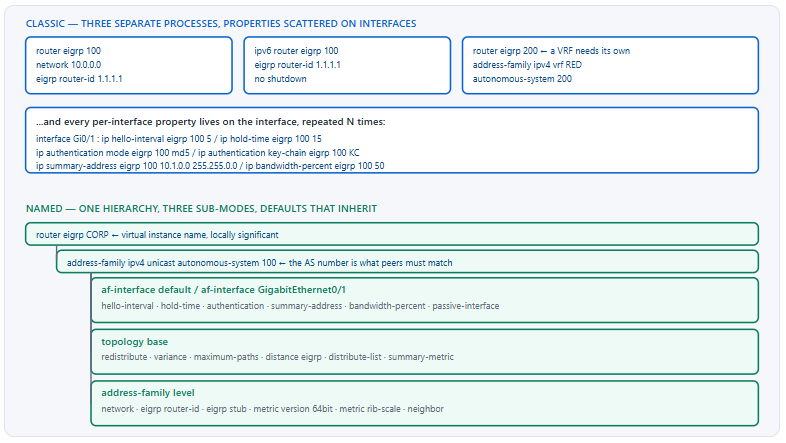
What Is the Difference Between Classic and Named Mode?
Is named mode a different protocol?
No. Named mode changes only how EIGRP is configured on the local router. The packets on the wire are identical, the autonomous system number is what neighbours compare, and a named-mode router peers with a classic-mode router without any special configuration. What changes is the configuration hierarchy — one router eigrp <name> block containing address families for IPv4, IPv6, and any VRF, with per-interface properties moved from the interfaces into af-interface sub-mode — and the fact that several capabilities are exposed only through the named syntax. The virtual instance name is locally significant and does not need to match anywhere.
A Deeper Dive into the Two Configuration Models
What classic mode requires you to repeat
In classic mode, every per-interface EIGRP property is an interface command carrying the autonomous system number: ip hello-interval eigrp 100 5, ip authentication key-chain eigrp 100 KC, ip summary-address eigrp 100 .... On a router with forty interfaces that is forty repetitions of each property, and adding a second autonomous system doubles it. There is no mechanism for a default. Meanwhile IPv6 lives in an entirely separate ipv6 router eigrp process with its own router ID and its own no shutdown requirement, and each VRF needs yet another process.
! ===== CLASSIC: the same property, repeated per interface =====
router eigrp 100
 network 10.0.0.0
 eigrp router-id 1.1.1.1
 passive-interface default
 no passive-interface GigabitEthernet0/1
!
interface GigabitEthernet0/1
 ip hello-interval eigrp 100 5
 ip hold-time eigrp 100 15
 ip authentication mode eigrp 100 md5
 ip authentication key-chain eigrp 100 EIGRP-KC
 ip bandwidth-percent eigrp 100 50
!
interface GigabitEthernet0/2
 ! ...and again, in full, for every interface
 ip hello-interval eigrp 100 5
 ip hold-time eigrp 100 15
 ip authentication mode eigrp 100 md5
 ip authentication key-chain eigrp 100 EIGRP-KC
 ip bandwidth-percent eigrp 100 50
The same configuration in named mode
! ===== NAMED: set once as a default, override where needed =====
router eigrp CORP
 address-family ipv4 unicast autonomous-system 100
  af-interface default
   passive-interface
   hello-interval 5
   hold-time 15
   authentication mode md5
   authentication key-chain EIGRP-KC
   bandwidth-percent 50
  exit-af-interface
  !
  af-interface GigabitEthernet0/1
   no passive-interface
  exit-af-interface
  !
  af-interface GigabitEthernet0/2
   no passive-interface
  exit-af-interface
  !
  network 10.0.0.0
  eigrp router-id 1.1.1.1
 exit-address-family
Prerequisites, and when conversion is not available
Named mode arrived with IOS 15.0(1)M and is present on every current IOS-XE release, so on modern Catalyst and ISR platforms it is simply available. Two constraints still bite in practice. Older ISR G2 and 2900-series routers running 12.4 or early 15.0 trains do not have it, which means a network with a long tail of legacy WAN routers cannot convert those devices and must run mixed indefinitely — workable, since the modes interoperate, but it caps which features you can rely on domain-wide. And some platforms expose named mode without exposing every named-only feature; stub-site in particular arrived later than the rest of the hierarchy. Check show eigrp plugins and the command help on a representative device before planning a rollout around a specific capability.
! Confirm named mode and its feature set on this platform
R1# show eigrp plugins
EIGRP feature plugins:
  eigrp-release          :  23.00.00   : Portable EIGRP Release
  igrp2                  :  3.00.00   : Reliable Transport/Dual Database
  bfd                    :  1.01.00   : BFD Platform Support
  mtr                    :  1.00.01   : Multi-Topology Routing
  eigrp-pfr              :  1.00.01   : Performance Routing Support
!
! Does this image have stub-site?
R1(config-router-af)# eigrp ?
  router-id   Router ID for this EIGRP process
  stub        Set EIGRP as stubbed router
  stub-site   Set EIGRP as stub-site router
The three sub-modes and what belongs in each
| Sub-mode | Scope | Typical commands | Classic equivalent |
|---|---|---|---|
af-interface |
One interface, or default for all |
hello-interval, hold-time, authentication, summary-address, bandwidth-percent, passive-interface, split-horizon, next-hop-self |
Interface-level ip ... eigrp <as> commands |
topology base |
The routing topology within the address family | redistribute, variance, maximum-paths, distance eigrp, distribute-list, summary-metric, traffic-share |
Router-mode commands |
| Address family itself | One AS within one address family | network, eigrp router-id, eigrp stub, metric version, metric rib-scale, neighbor, timers |
Router-mode commands |
Address families in one block
The clearest structural win is that IPv4, IPv6, and VRFs all become address families under a single instance. That removes the separate ipv6 router eigrp process entirely, along with its no shutdown requirement — a classic-mode gotcha that catches people because an IPv6 EIGRP process is administratively down by default.
! ===== One instance, three address families =====
router eigrp CORP
 !
 address-family ipv4 unicast autonomous-system 100
  network 10.0.0.0
  eigrp router-id 1.1.1.1
 exit-address-family
 !
 address-family ipv6 unicast autonomous-system 100
  eigrp router-id 1.1.1.1
  ! No 'no shutdown' needed - named mode does not start it disabled
 exit-address-family
 !
 address-family ipv4 unicast vrf RED autonomous-system 200
  network 172.16.0.0
  eigrp router-id 1.1.1.2
 exit-address-family
Collapsing IPv6 into the same block has a second-order benefit worth naming. In classic mode the IPv4 and IPv6 processes have independent router IDs, independent authentication configuration, and independent passive-interface lists, so the two address families drift apart over time — an interface gets un-passived for IPv4 during a change and nobody touches the IPv6 process. In named mode they sit adjacent under one instance, share the interface naming, and can share a key chain, which makes divergence visible in the configuration rather than only in the neighbour table.
router eigrp CORP and router eigrp BRANCH on two neighbouring routers peer normally, provided both have an address family with the same autonomous system number. The name exists purely to group address families in the configuration. It is not compared, not advertised, and not a security boundary.ip X eigrp <as> <value> becomes X <value> inside af-interface; a router-mode command that affects paths and redistribution moves into topology base; everything else stays at the address-family level. Knowing that mapping means you can convert a configuration on paper without a reference.How Do I Build a Complete Named-Mode Configuration?
What does a production named-mode block look like?
Start with af-interface default and make everything passive, then explicitly un-passive the interfaces that must peer — the same opt-in model that works for OSPF. Put authentication, timers, and bandwidth limits in the default block so they apply everywhere without repetition. Use topology base for redistribution, variance, and maximum-paths. Set the router ID explicitly. Use network statements with wildcard masks that are as specific as your addressing allows, since the passive default already prevents accidental peering.
A Deeper Dive into the Full Configuration
The complete reference block
! ===== Production named-mode configuration =====
key chain EIGRP-KC
 key 1
  key-string Str0ngK3y-2026
  cryptographic-algorithm hmac-sha-256
!
router eigrp CORP
 !
 address-family ipv4 unicast autonomous-system 100
  !
  af-interface default
   ! Opt-in peering, exactly as with OSPF
   passive-interface
   ! Cap EIGRP's share of a low-bandwidth link
   bandwidth-percent 40
   ! HMAC-SHA-256 - named mode only
   authentication mode hmac-sha-256 0 Str0ngK3y-2026
  exit-af-interface
  !
  af-interface GigabitEthernet0/1
   no passive-interface
   hello-interval 5
   hold-time 15
  exit-af-interface
  !
  af-interface GigabitEthernet0/2
   no passive-interface
   hello-interval 5
   hold-time 15
   ! Summarise outbound on this interface only
   summary-address 10.1.0.0 255.255.0.0
  exit-af-interface
  !
  topology base
   variance 2
   maximum-paths 4
   redistribute static metric 100000 100 255 1 1500
   distance eigrp 90 170
  exit-af-topology
  !
  network 10.0.0.0 0.255.255.255
  eigrp router-id 1.1.1.1
  ! 64-bit wide metrics - default in named mode, stated for clarity
  metric version 64bit
 exit-address-family
af-interface default and the inheritance rules
A property set under af-interface default applies to every interface in the address family. A property set under a specific af-interface overrides the default for that interface only. Removing the specific value with no restores the default rather than reverting to the factory setting, which is worth knowing when you are trying to make one interface behave differently.
! Confirm what a specific interface actually inherited
R1# show eigrp address-family ipv4 interfaces detail GigabitEthernet0/1

EIGRP-IPv4 VR(CORP) Address-Family Interfaces for AS(100)
                       Xmit Queue  PeerQ    Mean  Pacing Time  Multicast
Interface     Peers    Un/Reliable Un/Rel   SRTT  Un/Reliable  Flow Timer
Gi0/1           1        0/0       0/0        4     0/0          50
  Hello-interval is 5, Hold-time is 15
  Split-horizon is enabled
  Next-hop-self is enabled
  Authentication mode is HMAC-SHA-256
  Topology-ids on interface - 0
  Bandwidth-percent is 40
! ^ hello/hold from the specific block, auth and bandwidth from default.
topology base and what belongs there
The topology sub-mode exists because EIGRP supports multiple topology tables. In practice almost every deployment uses only topology base, which is the default table. Redistribution, variance, maximum-paths, administrative distance, and distribute-lists all live here. Putting them at the address-family level is a common error and the CLI will reject it.
! These belong in topology base, not at the address-family level
router eigrp CORP
 address-family ipv4 unicast autonomous-system 100
  topology base
   variance 2
   maximum-paths 4
   redistribute ospf 1 metric 1000000 100 255 1 1500
   distribute-list prefix NO-BOGONS out
   ! Metric applied to a summary route generated in this topology
   summary-metric 10.1.0.0/16 1000000 100 255 1 1500
  exit-af-topology
 exit-address-family
Split horizon and next-hop-self, and why they live in af-interface
Two af-interface properties matter disproportionately on hub-and-spoke overlays. Split horizon prevents a router from advertising a route back out the interface it learned it on, which is correct on a point-to-point link and wrong on a multipoint tunnel where the hub must relay spoke routes to other spokes. Next-hop-self makes a router rewrite the next hop to its own address when advertising; disabling it on a DMVPN hub lets spokes learn each other's tunnel addresses directly, which is what enables spoke-to-spoke forwarding in phase 2 and phase 3 designs.
In classic mode these are interface commands carrying the AS number, which means they are easy to apply to the tunnel and forget on a second tunnel. In named mode they sit in the af-interface block for that interface, adjacent to everything else about it, and the default block guarantees the rest of the interfaces keep the safe behaviour.
! ===== DMVPN hub: the two properties that make it work =====
router eigrp CORP
 address-family ipv4 unicast autonomous-system 100
  af-interface Tunnel0
   ! Hub must re-advertise spoke routes back out the same tunnel
   no split-horizon
   ! Preserve the originating spoke as next hop for spoke-to-spoke
   no next-hop-self
   no passive-interface
   hello-interval 5
   hold-time 15
  exit-af-interface
 exit-address-family
!
! Verify both, per interface
R-HUB# show eigrp address-family ipv4 interfaces detail Tunnel0 | include horizon|hop
  Split-horizon is disabled
  Next-hop-self is disabled
Summarisation lives on the interface, not in the topology
EIGRP summarises outbound on a per-interface basis rather than at an area boundary, because it has no areas. That places summary-address in the af-interface sub-mode, and it means a summary applies only to the interface you configured it on — a router with four uplinks needs the summary on all four, or the un-summarised prefixes leak out of the one you missed. The summary-metric command in topology base then controls the metric assigned to that generated summary, which matters because by default a summary inherits the best metric among its components and will therefore change as components come and go.
! Summarise on every uplink, not just one
router eigrp CORP
 address-family ipv4 unicast autonomous-system 100
  af-interface GigabitEthernet0/1
   summary-address 10.1.0.0 255.255.0.0
  exit-af-interface
  af-interface GigabitEthernet0/2
   summary-address 10.1.0.0 255.255.0.0
  exit-af-interface
  topology base
   ! Pin the summary metric so it does not float with its components
   summary-metric 10.1.0.0/16 1000000 100 255 1 1500
  exit-af-topology
 exit-address-family
!
! A summary creates a Null0 discard route locally - this is expected
R1# show ip route 10.1.0.0 255.255.0.0
  Known via "eigrp 100", distance 5, metric 10240, type internal
  Routing Descriptor Blocks:
  * directly connected, via Null0
Verification commands change too
Named mode adds a parallel command set. The classic show ip eigrp ... commands still work, but the named forms give more detail and are the ones that display address families and virtual instance names properly.
| Purpose | Classic command | Named command |
|---|---|---|
| Neighbours | show ip eigrp neighbors |
show eigrp address-family ipv4 neighbors |
| Topology table | show ip eigrp topology |
show eigrp address-family ipv4 topology |
| Interfaces | show ip eigrp interfaces |
show eigrp address-family ipv4 interfaces detail |
| Protocol summary | show ip protocols |
show eigrp protocols |
| Instance overview | — | show eigrp plugins, show eigrp tech-support |
R1# show eigrp protocols
EIGRP-IPv4 VR(CORP) Address-Family Protocol for AS(100)
  Metric weight K1=1, K2=0, K3=1, K4=0, K5=0 K6=0
  Metric rib-scale 128
  Metric version 64bit
  NSF-aware route hold timer is 240
  Router-ID: 1.1.1.1
  Topology : 0 (base)
    Active Timer: 3 min
    Distance: internal 90 external 170
    Maximum path: 4
    Maximum hopcount 100
    Maximum metric variance 2
no passive-interface after setting the default Symptom: after converting to named mode with af-interface default / passive-interface, every EIGRP adjacency on the router disappears at once. Cause: the default block made all interfaces passive and the specific af-interface exceptions were not applied, so no interface sends Hellos. Confirm: show eigrp address-family ipv4 interfaces lists no interfaces, or lists them with zero peers. Fix: add an af-interface block per peering interface with no passive-interface. Configure the exceptions in the same change as the default, never afterwards.af-interface default is not brevity but consistency — a property set once cannot be forgotten on the forty-first interface, which is the actual failure mode the classic model produces.What Are Wide Metrics and Why Does the Classic Metric Break Above 10 Gbps?
What is wrong with the classic 32-bit metric?
The classic composite metric derives its bandwidth term from 107 divided by the minimum interface bandwidth along the path, expressed in kilobits per second. At 10 Gbps that division yields 1. At 40 Gbps and 100 Gbps it yields a fraction that rounds to the same value, so every link at or above 10 Gbps contributes an identical bandwidth term and the metric can no longer distinguish them. Wide metrics fix this by moving to a 64-bit metric with a much larger scaling factor and picosecond delay granularity, which restores differentiation across modern link speeds. Wide metrics are enabled by default in named mode and are unavailable in classic mode.
A Deeper Dive into the Metric Arithmetic
The classic metric, and where it saturates
With default K values — K1 and K3 set to 1, K2, K4 and K5 set to 0 — the classic metric reduces to a bandwidth term plus a delay term, scaled by 256. Bandwidth is the minimum along the path; delay is cumulative.
! Classic composite metric with default K values (K1=K3=1, rest 0)
!
!   metric = 256 x [ (10^7 / minimum_bandwidth_kbps) + (sum_of_delays / 10) ]
!
! where delay is expressed in tens of microseconds.
!
! Bandwidth term at each speed:
!   100 Mbps  -> 10^7 / 100000   = 100
!     1 Gbps  -> 10^7 / 1000000  = 10
!    10 Gbps  -> 10^7 / 10000000 = 1
!    40 Gbps  -> 10^7 / 40000000 = 0.25  -> rounds to 1
!   100 Gbps  -> 10^7 / 10^8     = 0.1   -> rounds to 1
!
! Everything at or above 10 Gbps produces the same bandwidth term.
! Verify the K values and metric version actually in use
R1# show eigrp protocols | include Metric
  Metric weight K1=1, K2=0, K3=1, K4=0, K5=0, K6=0
  Metric rib-scale 128
  Metric version 64bit
!
! Classic mode reports 32bit and no K6:
R2# show ip protocols | include EIGRP metric
  EIGRP metric weight K1=1, K2=0, K3=1, K4=0, K5=0
What wide metrics change
Wide metrics keep the same structure but widen the arithmetic. The metric becomes a 64-bit value, the bandwidth term is scaled by a much larger constant so that gigabit-class differences remain visible, delay is tracked with picosecond granularity rather than tens of microseconds, and a sixth coefficient K6 is introduced to carry extended attributes such as jitter and energy for future use. K6 defaults to 0, which is what keeps wide-metric routers compatible with classic ones.
| Property | Classic (32-bit) | Wide (64-bit) | Consequence |
|---|---|---|---|
| Metric width | 32 bits | 64 bits | Far larger range before saturation |
| Bandwidth reference | 107 kbps | 107 kbps scaled by 65536 | Links above 10 Gbps remain distinguishable |
| Delay granularity | Tens of microseconds | Picoseconds | Low-latency links differentiate correctly |
| K coefficients | K1–K5 | K1–K5 plus K6 | K6 carries extended attributes; must be 0 for classic compatibility |
| RIB representation | Direct | Divided by metric rib-scale, default 128 |
The 64-bit value is scaled down to fit the 32-bit RIB field |
| Availability | Both modes | Named mode only | Classic-mode routers cannot use it |
RIB scaling and why the routing table shows a different number
The RIB stores a 32-bit metric. A 64-bit EIGRP metric therefore has to be divided before it can be installed, and metric rib-scale is that divisor, defaulting to 128. This is why the metric in show ip route differs from the one in the EIGRP topology table — they are the same value at different scales. Lowering the rib-scale increases precision in the RIB at the cost of a smaller representable range; raising it does the reverse.
! The same route at two scales
R1# show eigrp address-family ipv4 topology 10.2.0.0/16
EIGRP-IPv4 VR(CORP) Topology Entry for AS(100)/ID(1.1.1.1) for 10.2.0.0/16
  State is Passive, Query origin flag is 1, 1 Successor(s), FD is 1310720
  Descriptor Blocks:
  10.0.1.2 (GigabitEthernet0/1), from 10.0.1.2, Send flag is 0x0
      Composite metric is (1310720/1048576), route is Internal
!
R1# show ip route 10.2.0.0
Routing entry for 10.2.0.0/16
  Known via "eigrp 100", distance 90, metric 10240
! ^ 1310720 / 128 = 10240. Same metric, RIB scale applied.
!
! Adjust the divisor if you need finer RIB granularity
router eigrp CORP
 address-family ipv4 unicast autonomous-system 100
  metric rib-scale 64
Compatibility between wide and classic routers
A named-mode router running wide metrics forms a normal adjacency with a classic-mode router and exchanges routes correctly, because EIGRP converts between the representations. The requirement is that K1 through K5 match — they are compared during adjacency formation, exactly as in classic EIGRP — and that K6 is zero, since a classic router has no concept of it. Setting a non-zero K6 in a mixed network prevents adjacencies with classic routers.
%DUAL-5-NBRCHANGE ... K-value mismatch. Cause: K1 through K5 are compared in the Hello and must match exactly on both ends; changing them on one router isolates it. Confirm: show eigrp protocols | include Metric weight on both routers and compare all six values. Fix: revert the change, or apply the same K values across every router in the autonomous system in a single window. Setting K6 to a non-zero value has the same effect against any classic-mode neighbour.Tuning the metric: adjust delay, not bandwidth
Both terms of the metric are configurable on the interface, and only one of them should be. The bandwidth command is read by QoS, by NetFlow's utilisation calculations, by SNMP interface speed reporting, and by any policy that references a percentage of interface bandwidth — changing it to influence EIGRP silently changes all of those too. The delay command is read by EIGRP and by little else, which makes it the correct instrument for path preference. Delay is also cumulative along the path while bandwidth takes the minimum, so a delay adjustment on one interface produces a predictable, additive effect rather than one that may be masked by a slower link further along.
! WRONG: changing bandwidth to steer EIGRP
interface GigabitEthernet0/2
 bandwidth 500000
! ^ Also changes QoS percentages, SNMP ifSpeed, and NetFlow utilisation.
!
! RIGHT: adjust delay, in tens of microseconds
interface GigabitEthernet0/2
 delay 200
! ^ 200 = 2000 microseconds. EIGRP metric rises; nothing else changes.
!
! Confirm the values EIGRP is actually using
R1# show interfaces GigabitEthernet0/2 | include BW|DLY
  MTU 1500 bytes, BW 1000000 Kbit/sec, DLY 2000 usec,
Which Features Exist Only in Named Mode?
What do you lose by staying on classic?
Four things that matter. HMAC-SHA-256 authentication — classic mode supports only MD5 via key chains. Wide metrics, covered above. Stub-site, which lets a router behave as a stub toward the hub while still routing normally within its own site, and which is what makes EIGRP work correctly over DMVPN. And per-interface authentication with a directly configured key rather than a key chain, which removes a layer of configuration. Named mode also exposes multiple topology tables, though few enterprises use them.
A Deeper Dive into Named-Mode-Only Features
HMAC-SHA-256 authentication
Classic EIGRP authentication is MD5 with a key chain. Named mode adds HMAC-SHA-256, configured with the key supplied directly in the authentication mode command rather than through a key chain. Both ends must support and use the same mode; a router configured for HMAC-SHA-256 will not authenticate with one using MD5.
! ===== HMAC-SHA-256: named mode only =====
router eigrp CORP
 address-family ipv4 unicast autonomous-system 100
  af-interface default
   authentication mode hmac-sha-256 0 Str0ngK3y-2026
  exit-af-interface
 exit-address-family
!
! ===== MD5 with a key chain, which both modes support =====
key chain EIGRP-KC
 key 1
  key-string OldK3y-2026
!
router eigrp CORP
 address-family ipv4 unicast autonomous-system 100
  af-interface GigabitEthernet0/3
   authentication mode md5
   authentication key-chain EIGRP-KC
  exit-af-interface
 exit-address-family
! Confirm which mode is actually running per interface
R1# show eigrp address-family ipv4 interfaces detail | include Interface|Authentication
Gi0/1
  Authentication mode is HMAC-SHA-256
Gi0/3
  Authentication mode is md5, key-chain is "EIGRP-KC"
Stub versus stub-site
Classic EIGRP stub tells a router to advertise only a restricted set of routes and, more importantly, to reply immediately to any query rather than propagating it. That bounds query scope, which is the main cause of stuck-in-active problems. The limitation is that a stub router advertises nothing learned from EIGRP, which breaks a site that has two routers connected to the same hub — neither can carry the other's routes.
Stub-site solves this. A router configured with stub-site behaves as a stub toward interfaces marked as WAN-facing, while behaving normally toward interfaces inside the site. Two routers at one branch can therefore exchange routes with each other and still bound the hub's query scope. It exists only in named mode.
! ===== Classic stub: bounds queries, but breaks dual-router sites
router eigrp CORP
 address-family ipv4 unicast autonomous-system 100
  eigrp stub connected summary
 exit-address-family
!
! ===== Stub-site: stub toward the WAN, normal inside the site =====
router eigrp CORP
 address-family ipv4 unicast autonomous-system 100
  eigrp stub-site 100:1
  !
  af-interface Tunnel0
   ! Mark the hub-facing interface as the WAN boundary
   stub-site wan-interface
  exit-af-interface
  !
  af-interface GigabitEthernet0/1
   ! LAN side - no wan-interface, so normal EIGRP behaviour
   no passive-interface
  exit-af-interface
 exit-address-family
! Verify stub-site status and which interfaces are WAN-facing
R-BRANCH# show eigrp address-family ipv4 topology | include stub|Stub
R-BRANCH# show eigrp protocols | include stub
  Stub-Site enabled, site-id 100:1
!
R-HUB# show eigrp address-family ipv4 neighbors detail
  ...
  Version 23.0/2.0, Retrans: 0, Retries: 0, Prefixes: 14
  Topology-ids from peer - 0
  Stub Peer Advertising ( CONNECTED SUMMARY ) Routes
  Suppressing queries
! ^ 'Suppressing queries' on the hub is the point of the whole feature.
| Feature | Classic mode | Named mode | Why it matters |
|---|---|---|---|
| MD5 authentication | Yes, via key chain | Yes, via key chain | Baseline; available everywhere |
| HMAC-SHA-256 authentication | No | Yes | Modern algorithm; direct key, no chain needed |
| Wide (64-bit) metrics | No | Yes, default | Distinguishes links above 10 Gbps |
| Classic stub | Yes | Yes | Bounds query scope; breaks dual-router sites |
| Stub-site | No | Yes | Bounds queries without breaking a dual-router branch |
af-interface default |
No | Yes | Consistency across dozens of interfaces |
| IPv6 in the same block | No — separate process | Yes | One router ID, one authentication policy |
| Multiple topology tables | No | Yes | Rarely used outside service-provider designs |
stub-site wan-interface and the LAN interfaces left normal. That single feature is often the entire business case for migrating a WAN edge to named mode.How Do I Migrate From Classic to Named Mode Safely?
What is the migration procedure?
Because the two modes interoperate on the wire, migration is a per-router operation with no coordination required between routers. On each router you either convert in place with eigrp upgrade-cli, which rewrites the classic configuration into named form, or build the named configuration manually and remove the classic one. Both restart the EIGRP process on that router, which drops its adjacencies for a few seconds. The order is therefore driven by blast radius: convert leaf routers first, hub and core routers last, and never two routers that are each other's only path in the same change.
A Deeper Dive into the Migration
The in-place conversion command
eigrp upgrade-cli takes the existing classic configuration and rewrites it as a named-mode block, preserving the autonomous system number and every configured property. It is the fastest path and it is not free — the process restarts, so every adjacency on that router resets. Run it with the console available, not over an EIGRP-learned path.
! In-place conversion. The process restarts; adjacencies drop.
R1(config)# router eigrp 100
R1(config-router)# eigrp upgrade-cli CORP
Configuration will be converted from router eigrp 100 to
router eigrp CORP mode. Are you sure? [yes/no]: yes
Configuration converted successfully.
!
! Confirm the result before saving
R1# show running-config | section router eigrp
router eigrp CORP
 !
 address-family ipv4 unicast autonomous-system 100
  !
  topology base
  exit-af-topology
  network 10.0.0.0
  eigrp router-id 1.1.1.1
 exit-address-family
eigrp upgrade-cli restarts the EIGRP process, withdrawing every route the router was advertising and every route it had learned. If your management path depended on one of those routes, it disappears with them. Confirm: before converting, show ip route <your management source> and check whether the path is EIGRP-learned. Fix: ensure out-of-band access or a static route for the management path before converting any router, and convert the routers furthest from your management station first.The manual path, which gives you control
Building the named configuration by hand takes longer but lets you introduce af-interface default, passive-by-default, and HMAC-SHA-256 in the same change rather than converting first and improving later. The classic and named configurations cannot coexist for the same autonomous system, so the removal and addition happen together.
! ===== Manual conversion, single change block =====
! 1. Remove the classic process
no router eigrp 100
!
! 2. Build the named equivalent, improved
router eigrp CORP
 address-family ipv4 unicast autonomous-system 100
  af-interface default
   passive-interface
   authentication mode hmac-sha-256 0 Str0ngK3y-2026
  exit-af-interface
  af-interface GigabitEthernet0/1
   no passive-interface
  exit-af-interface
  topology base
   variance 2
   maximum-paths 4
  exit-af-topology
  network 10.0.0.0 0.255.255.255
  eigrp router-id 1.1.1.1
 exit-address-family
! ^ Paste as one block. Between step 1 and step 2 this router has
!   no EIGRP at all, so do not type it line by line.
Authentication during a phased migration
HMAC-SHA-256 is the one property that cannot be introduced router-by-router, because it must match on both ends of every link. A router converted to named mode with HMAC-SHA-256 will not authenticate with a classic neighbour still using MD5. The workable sequence is: convert everything to named mode keeping MD5, verify the whole domain is stable, then change authentication mode link by link with both ends in the same change.
| Phase | Action | Adjacency impact | Rollback |
|---|---|---|---|
| 1 | Convert each router to named mode, keeping MD5 and existing timers | That router's adjacencies reset once | Re-apply the classic block |
| 2 | Verify neighbour count and route count domain-wide | None | — |
| 3 | Introduce af-interface default with passive-by-default plus explicit exceptions |
None if exceptions are in the same change | Remove the default block |
| 4 | Change authentication to HMAC-SHA-256, both ends of a link together | That link only, for seconds | Revert both ends to MD5 |
| 5 | Enable stub-site on branch routers, mark WAN interfaces | Branch adjacencies re-negotiate | Remove eigrp stub-site |
Verifying the migration at each step
! Neighbour and prefix counts should be unchanged after conversion
R1# show eigrp address-family ipv4 neighbors
EIGRP-IPv4 VR(CORP) Address-Family Neighbors for AS(100)
H   Address     Interface   Hold Uptime   SRTT   RTO  Q  Seq
                            (sec)         (ms)       Cnt Num
1   10.0.1.2    Gi0/1         13 00:02:41    4   100  0  187
0   10.0.2.2    Gi0/2         12 00:02:44    5   100  0  204
!
! Compare route counts before and after
R1# show ip route eigrp | count ^D
Number of lines which match regexp = 47
!
! Confirm the peer is running the mode you expect
R1# show eigrp address-family ipv4 neighbors detail 10.0.1.2 | include Version
  Version 23.0/2.0, Retrans: 0, Retries: 0, Prefixes: 21
! ^ The version pair identifies the software and EIGRP release running
!   on the peer, which is how you spot a router still on classic.
The metrics will look completely different, and that is expected
The most common post-migration alarm is that every metric in the topology table changed by orders of magnitude. Nothing is wrong. A converted router now computes wide 64-bit metrics while its unconverted neighbours still compute classic 32-bit ones, and EIGRP translates between the two representations at the boundary. The relative ordering of paths is preserved — the same path wins — but the absolute numbers are not comparable between a converted and an unconverted router, and any monitoring that alerts on metric values rather than on path changes will fire.
The practical consequence is that "did the metric change" is a useless validation check during migration. Validate on outcomes instead: the same number of neighbours, the same number of prefixes in the RIB, and the same next hop for a sample of important destinations. Those three are invariant across the conversion and will genuinely catch a mistake.
! Before conversion - classic 32-bit metric
R1# show ip eigrp topology 10.2.0.0/16 | include Composite
      Composite metric is (3072/2816), Route is Internal
!
! After conversion - wide 64-bit metric, same path
R1# show eigrp address-family ipv4 topology 10.2.0.0/16 | include Composite
      Composite metric is (1310720/1048576), route is Internal
!
! Validate on invariants, not on the numbers
R1# show eigrp address-family ipv4 neighbors | count ^[0-9]
Number of lines which match regexp = 4
R1# show ip route eigrp | count ^D
Number of lines which match regexp = 47
R1# show ip route 10.2.5.1 | include via
  * 10.0.1.2, from 10.0.1.2, 00:01:12 ago, via GigabitEthernet0/1
! ^ Neighbour count, prefix count, and next hop unchanged = success.
autonomous-system value in the address-family line does not match the neighbours' AS. Unlike the instance name, this number is compared on the wire, and a mismatch produces silence rather than a message. Confirm: show eigrp protocols | include AS on both routers and compare. Fix: correct the AS number in the address-family statement. Because it is part of the address-family line, changing it means removing and re-adding the address family, not editing it in place.Conclusion
The case for named mode is not that the configuration reads better, although it does. It is that classic mode is a frozen subset. Wide metrics, HMAC-SHA-256, and stub-site are all named-mode-only, and each addresses something a current network actually has: link speeds above 10 Gbps that the classic metric cannot distinguish, an MD5 requirement that no longer satisfies a security review, and dual-router branches over DMVPN where classic stub breaks the site while classic non-stub floods the hub with queries. Staying on classic is a decision to keep those three problems.
The migration is far less risky than its reputation. The two modes are the same protocol on the wire, so a converted router peers with an unconverted one and the domain never has to be consistent. The only genuinely disruptive moment is when a given router's process restarts, and the only property that requires both ends to change together is authentication mode. That yields a clean sequence: convert routers one at a time keeping the existing authentication, verify neighbour and prefix counts are unchanged, then introduce the improvements — passive-by-default, HMAC-SHA-256, stub-site — as separate, reversible changes.
What is worth internalising beyond the procedure is the mapping between the two styles, because you will read both for years. An interface command with an AS number in it becomes a property inside af-interface; anything about paths, redistribution, or distance moves into topology base; everything else stays at the address-family level. Build a two-router lab, configure one classically and one in named mode with the same AS, watch them peer normally, then convert the classic one with eigrp upgrade-cli and diff the result against what you would have written by hand. The difference between those two outputs is exactly the set of improvements a mechanical conversion will not give you.
External Links Recommendations
- RFC 7868 — Cisco's Enhanced Interior Gateway Routing Protocol (EIGRP): the informational specification covering the composite metric, wide metrics, and DUAL.
- Cisco IOS-XE EIGRP Configuration Guide: current named-mode syntax,
af-interface,topology base, andeigrp upgrade-cli. - Cisco — Introduction to EIGRP: the classic composite metric formula and the role of the K values.
- Cisco — EIGRP Stub Routing: query scoping, the classic stub options, and why stub bounds active routes.
- Cisco — EIGRP Wide Metrics: the 64-bit metric, K6, and the
metric rib-scaledivisor. - Cisco — Configuring EIGRP Authentication: key chains, MD5, and per-interface authentication behaviour.
- Cisco Learning Network — CCIE Enterprise Infrastructure: current blueprint and lab equipment list.
Reference Notes
- RFC 7868, Section 5.5 — the EIGRP composite metric and the K1 through K5 coefficients, with defaults K1 = K3 = 1 and K2 = K4 = K5 = 0.
- RFC 7868, Section 5.6 — wide metrics: the 64-bit metric representation, the K6 coefficient for extended attributes, and increased delay precision.
- RFC 7868, Section 5.6.2 — the RIB scale factor used to convert a 64-bit EIGRP metric into the 32-bit value stored in the routing table.
- RFC 7868, Section 6.5 — Hello packets carry the K values, and neighbours with mismatched K values do not form an adjacency.
- RFC 7868, Section 4.3 — the autonomous system number identifies the EIGRP instance and must match between neighbours.
- Cisco IOS-XE EIGRP Configuration Guide — named mode configuration hierarchy:
router eigrp <name>,address-family,af-interface, andtopologysub-modes. - Cisco IOS-XE EIGRP Configuration Guide —
af-interface defaultapplies a property to all interfaces in the address family; a specificaf-interfaceblock overrides it. - Cisco IOS-XE EIGRP Configuration Guide —
eigrp upgrade-cliconverts an existing classic configuration to named mode and restarts the EIGRP process. - Cisco IOS-XE EIGRP Configuration Guide —
authentication mode hmac-sha-256is available in named mode only; classic mode supports MD5 with key chains. - Cisco IOS-XE EIGRP Configuration Guide —
metric version 64bitis the default in named mode;metric rib-scaledefaults to 128. - Cisco, "EIGRP Stub Routing" — stub routers reply immediately to queries rather than propagating them, which bounds active-route scope.
- Cisco IOS-XE EIGRP Configuration Guide —
eigrp stub-siteand thestub-site wan-interfaceaf-interface command, available in named mode only.