

VLAN configuration looks like the easiest thing on a Catalyst switch and generates a disproportionate share of production incidents. The commands are three words long, the concepts fit on a whiteboard, and yet native VLAN mismatches bridge two broadcast domains together, an switchport trunk allowed vlan typed without add silently removes forty VLANs from a live uplink, and a switch left in the default DTP mode will happily form a trunk with anything that asks. None of these are exotic failures. They are what happens when a configuration that reads correctly does something different from what the operator intended.
The mental model that prevents most of it is simple: an access port belongs to exactly one VLAN and sends every frame untagged; a trunk port carries many VLANs and tags all of them except one — the native VLAN — which it sends untagged. The 802.1Q tag is four bytes inserted after the source MAC address, containing a 16-bit TPID of 0x8100 and a 16-bit control field whose lower twelve bits are the VLAN ID. Everything else in VLAN configuration is a consequence of those two facts: the native VLAN exists because 802.1Q needed backward compatibility with untagged devices, the allowed-VLAN list exists to limit which tags a trunk will carry, and DTP exists to negotiate which of the two roles a port takes — a negotiation you should almost always disable.
This article is a configuration guide with the reasoning attached. Section one covers what you need to know before typing anything: VLAN number ranges and where they are stored, the tag format, and the reference topology. Section two builds access ports properly, including voice VLANs and the protection features that belong on every edge port. Section three covers trunks — encapsulation, allowed-VLAN lists, DTP modes, and the native VLAN decision. Section four is verification: which command answers which question and what healthy output looks like. Section five is the failure catalogue, including the two VLAN hopping attacks and the exact configuration that stops each of them.
switchport trunk allowed vlan replacing instead of appending, and switchport mode dynamic auto forming a trunk you never asked for.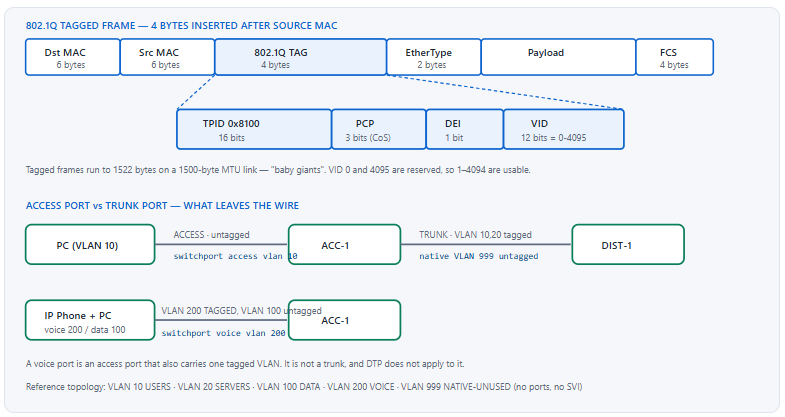
What Do You Need to Know Before Configuring a Single VLAN?
What are the VLAN ranges and where are VLANs stored?
VLAN IDs 1 through 1005 are the normal range and are stored in a separate file, vlan.dat in flash, not in the running configuration. VLANs 1002 through 1005 are reserved for legacy FDDI and Token Ring and cannot be reused. VLANs 1006 through 4094 are the extended range; on VTP version 1 and 2 the switch must be in VTP transparent mode to create them, while VTP version 3 supports the extended range in server mode. VLAN 1 always exists and cannot be deleted. Because normal-range VLANs live in vlan.dat, copying a configuration to a new switch does not carry the VLAN database with it — a fact that produces a switch full of correct port assignments to VLANs that do not exist.
A Deeper Dive into Ranges, Storage, and the Tag
The vlan.dat problem
Two operations expose this. Restoring a configuration onto a replacement switch brings the interface commands but not the VLAN database, so every access port lands in an inactive VLAN and the ports go down. And write erase alone does not reset a switch to factory state, because vlan.dat survives it — a lab switch that "still has the old VLANs" after an erase is the normal, documented behaviour.
! Full reset - erasing the config alone leaves the VLAN database
SW1# write erase
SW1# delete flash:vlan.dat
Delete filename [vlan.dat]?
Delete flash:/vlan.dat? [confirm]
SW1# reload
!
! Confirm which VLANs actually exist before assigning ports
SW1# show vlan brief
Creating VLANs, and the shortcut that hides mistakes
Assigning a port to a VLAN that does not exist causes IOS to create it automatically on most platforms — helpful in a lab, dangerous in production, because a typo in the VLAN number creates a new VLAN rather than producing an error. Create VLANs explicitly with names, then assign ports, and any typo becomes an inactive-VLAN symptom you can see rather than a silent new broadcast domain.
! Explicit VLAN creation with names - do this before assigning ports
vlan 10
 name USERS
vlan 20
 name SERVERS
vlan 100
 name DATA
vlan 200
 name VOICE
! A dedicated, unused VLAN reserved for the trunk native - no ports, no SVI
vlan 999
 name NATIVE-UNUSED
! Extended range on VTP v1/v2 requires transparent mode
vtp mode transparent
vlan 1500
 name EXTENDED-EXAMPLE
! On VTP v3 the extended range works in server mode:
!   vtp version 3
| Range | VLAN IDs | Stored in | VTP constraint | Notes |
|---|---|---|---|---|
| Reserved | 0, 4095 | — | — | Not usable; VID 0 means "priority tagged, no VLAN" |
| Default | 1 | vlan.dat |
None | Cannot be deleted; carries CDP, VTP, DTP, PAgP regardless of pruning |
| Normal | 2–1001 | vlan.dat |
Propagated by VTP in server/client mode | The everyday range |
| Legacy reserved | 1002–1005 | vlan.dat |
— | FDDI and Token Ring; cannot be reused or deleted |
| Extended | 1006–4094 | Running config (VTPv1/v2 transparent) or vlan.dat (VTPv3) |
Transparent mode required on VTPv1/v2 | Needed for large multi-tenant designs |
The tag, and why frames grow by four bytes
An 802.1Q tag adds four bytes: a 16-bit TPID of 0x8100 that identifies the frame as tagged, followed by three bits of Priority Code Point (the Layer 2 CoS value), one Drop Eligible Indicator bit, and twelve bits of VLAN ID. A standard 1518-byte Ethernet frame therefore becomes 1522 bytes on a trunk. Switches handle these "baby giants" natively, but an intermediate device with a strict 1518-byte limit — an old media converter, a misconfigured provider circuit — will drop them, producing a link where small frames pass and large ones do not.
ISL is gone, and what that means for your commands
Cisco's proprietary ISL encapsulated the entire original frame inside a 26-byte header and a 4-byte trailer. It is not supported on Catalyst 9000 or any current platform, which is why switchport trunk encapsulation dot1q is rejected as an unknown command on a Catalyst 9300 — there is nothing to select between. Older platforms that support both require the encapsulation to be set before the mode, because a port cannot become a trunk while encapsulation is negotiate and the mode is trunk.
switchport trunk encapsulation dot1q before switchport mode trunk. On a Catalyst 9200/9300/9500 the command does not exist. Configuration templates that target both generations need conditional handling, and a template that unconditionally includes the encapsulation line will fail silently or noisily depending on your deployment tooling.How Do I Configure Access Ports Correctly?
What does a complete access port configuration look like?
Five lines, not one. Set the mode statically with switchport mode access so DTP cannot negotiate the port into a trunk. Assign the VLAN with switchport access vlan. Disable negotiation explicitly with switchport nonegotiate. Enable spanning-tree portfast edge so the port forwards immediately and does not generate topology-change notifications. Add spanning-tree bpduguard enable so that a switch plugged into that port error-disables it rather than joining your topology. Omitting any of the last three turns an access port into an attack surface or a convergence event.
A Deeper Dive into Access Port Configuration
The baseline data access port
! ===== Standard user access port =====
interface range GigabitEthernet1/0/1 - 40
 description ---- user access ----
 switchport mode access
 switchport access vlan 100
 ! Refuse DTP outright - this port will never become a trunk
 switchport nonegotiate
 ! Immediate forwarding, no TCN generated on link transitions
 spanning-tree portfast edge
 ! A switch plugged in here err-disables the port instead of joining STP
 spanning-tree bpduguard enable
 no shutdown
Why switchport mode access alone is not enough
Setting the mode to access does prevent the port from becoming a trunk, and on modern IOS-XE it also stops DTP frames from being sent. But switchport nonegotiate is still worth configuring explicitly for two reasons: it makes the intent visible to the next engineer reading the configuration, and on some older platforms and code versions the behaviour of an access-mode port with respect to DTP frames has varied. Configuring it costs nothing and removes the ambiguity.
Voice VLAN: an access port that carries a tagged VLAN
A port with switchport voice vlan is not a trunk, despite carrying two VLANs. The data VLAN remains untagged and the voice VLAN is tagged, and the phone learns the voice VLAN ID through CDP or LLDP-MED. DTP does not apply. This distinction matters when you audit trunk ports: show interfaces trunk will not list voice ports, which is correct and occasionally confusing.
! ===== Access port with an attached IP phone =====
interface range GigabitEthernet1/0/1 - 40
 description ---- phone + PC ----
 switchport mode access
 switchport access vlan 100
 switchport voice vlan 200
 switchport nonegotiate
 spanning-tree portfast edge
 spanning-tree bpduguard enable
 ! The phone learns VLAN 200 via CDP or LLDP-MED; both must be enabled
 cdp enable
 lldp transmit
 lldp receive
! Variants for phones that cannot tag, or that need only CoS
interface GigabitEthernet1/0/5
 ! Phone sends voice traffic untagged on the access VLAN
 switchport voice vlan untagged
!
interface GigabitEthernet1/0/6
 ! Phone tags with VLAN 0 - priority only, no separate VLAN
 switchport voice vlan dot1p
Port security on an access port
Port security caps how many MAC addresses a port will learn and what happens when the cap is exceeded. On a phone-plus-PC port the count must be at least two, and in practice three, because the phone presents a MAC on both the voice and data VLANs during some boot sequences. Sticky learning writes learned addresses into the running configuration, which persists them only if you save.
! ===== Port security sized for a phone + PC =====
interface range GigabitEthernet1/0/1 - 40
 switchport port-security
 switchport port-security maximum 3
 ! Per-VLAN cap: 1 MAC on voice, 2 on data
 switchport port-security maximum 1 vlan voice
 switchport port-security maximum 2 vlan access
 ! restrict = drop + log + counter; shutdown = err-disable the port
 switchport port-security violation restrict
 switchport port-security aging time 5
 switchport port-security aging type inactivity
| Violation mode | Traffic from offending MAC | Port state | Syslog / SNMP trap | Violation counter |
|---|---|---|---|---|
protect |
Dropped | Stays up | No | Not incremented |
restrict |
Dropped | Stays up | Yes | Incremented |
shutdown (default) |
Dropped | Err-disabled | Yes | Incremented |
Moving a port between VLANs safely
Changing switchport access vlan on a live port is instant and does not bounce the link, which means the attached host keeps its old IP address and ARP cache while sitting in a new subnet. On a user port that is briefly annoying; on a server port it is an outage. Bounce the port after the change, or schedule it.
connected in show interfaces status but the host has no connectivity, and show vlan brief does not list the VLAN. Cause: depending on platform and code, IOS either auto-creates the VLAN or leaves the port in an inactive state. In the auto-create case a typo silently produces a new isolated broadcast domain. Confirm: show interfaces GigabitEthernet1/0/7 switchport and read the Access Mode VLAN line — it will show (Inactive) if the VLAN does not exist. Fix: create the VLAN explicitly, or correct the port assignment. Always pre-create VLANs rather than relying on auto-creation.switchport access vlan are the ones that determine whether the port is safe to hand to a user.How Do I Configure Trunks, and What Should the Native VLAN Be?
What is the correct trunk configuration?
Set the mode statically to trunk, disable DTP with switchport nonegotiate, set the native VLAN to a dedicated unused VLAN rather than leaving it at VLAN 1, and prune the allowed list to exactly the VLANs the link must carry. On platforms that still support ISL, set switchport trunk encapsulation dot1q first. Never leave a trunk at the default allowed list of 1–4094 on an interswitch link you care about, because every VLAN you later create is automatically carried everywhere, including through spanning-tree instances you did not intend to extend.
A Deeper Dive into Trunk Configuration, DTP, and the Native VLAN
The complete trunk configuration
! ===== Interswitch trunk, IOS-XE Catalyst 9000 =====
interface TenGigabitEthernet1/1/1
 description ---- uplink to DIST-1 Te1/0/5 ----
 switchport mode trunk
 ! Refuse DTP - the mode is decided here, not negotiated
 switchport nonegotiate
 ! Dedicated unused native VLAN, identical on both ends
 switchport trunk native vlan 999
 ! Explicit allowed list - only what this link must carry
 switchport trunk allowed vlan 10,20,100,200
 spanning-tree link-type point-to-point
 spanning-tree guard loop
 udld port aggressive
! ===== Same trunk on a platform that still supports ISL =====
interface GigabitEthernet0/1
 ! Encapsulation MUST be set before the mode on these platforms
 switchport trunk encapsulation dot1q
 switchport mode trunk
 switchport nonegotiate
 switchport trunk native vlan 999
 switchport trunk allowed vlan 10,20,100,200
DTP modes and what each combination produces
Dynamic Trunking Protocol negotiates whether a link becomes a trunk. There are five settings, and the default on most Catalyst platforms is dynamic auto — a port that will not initiate trunking but will accept it if the far end asks. That default is why an attacker who can send a DTP frame from a laptop can turn an access port into a trunk and reach every VLAN on the switch.
| Local mode | Remote: access | Remote: dynamic auto | Remote: dynamic desirable | Remote: trunk |
|---|---|---|---|---|
access |
Access | Access | Access | Mismatch — limited connectivity |
dynamic auto |
Access | Access — neither side initiates | Trunk | Trunk |
dynamic desirable |
Access | Trunk | Trunk | Trunk |
trunk |
Mismatch | Trunk | Trunk | Trunk |
trunk + nonegotiate |
Mismatch | Local trunk, remote access | Same — remote never learns | Trunk |
The bottom row is the one worth internalising. With nonegotiate, no DTP frames are sent, so a remote port in dynamic auto or dynamic desirable never learns it should trunk and stays in access mode. That produces a one-sided trunk — the classic outcome of configuring nonegotiate on one end of a link and leaving the other end at default. Configure both ends statically or neither.
switchport nonegotiate on one end only Symptom: only the native VLAN passes across a link between two switches; tagged VLANs are dropped. show interfaces trunk lists the port on one switch and shows nothing on the other. Cause: one end is a static trunk with DTP suppressed, the other is in dynamic auto and never received a DTP frame telling it to trunk. Confirm: show interfaces <intf> switchport on both ends and compare Operational Mode — one will read trunk and the other static access. Fix: configure switchport mode trunk and switchport nonegotiate on both ends. Never rely on one side to negotiate the other into place.The allowed VLAN list, and the keyword everyone forgets
The default trunk allowed list is 1–4094. Once you set an explicit list, the plain form of the command replaces the entire list rather than adding to it. Typing switchport trunk allowed vlan 30 on a trunk that was carrying 10, 20, 100 and 200 removes all four and leaves only VLAN 30. On a production uplink this is an immediate multi-VLAN outage, and it is one of the most common self-inflicted incidents in switching.
! DANGEROUS on a live trunk - this REPLACES the entire list
switchport trunk allowed vlan 30
!
! SAFE - append VLAN 30 to whatever is already permitted
switchport trunk allowed vlan add 30
! Remove a single VLAN
switchport trunk allowed vlan remove 20
! Everything except a few
switchport trunk allowed vlan except 300-400
! Nothing at all - useful for staging, catastrophic if forgotten
switchport trunk allowed vlan none
add or remove every single time, even when you believe the list is empty. The cost of an unnecessary add is zero. The cost of a forgotten one is a multi-VLAN outage on a distribution uplink at the moment you were making an unrelated change.Choosing the native VLAN
The native VLAN is the one VLAN sent untagged on an 802.1Q trunk. It defaults to VLAN 1, and leaving it there is a design weakness for two reasons. First, VLAN 1 carries control-plane traffic — CDP, VTP, DTP, PAgP — and mixing user data with it is unnecessary. Second, the 802.1Q double-tagging attack requires the attacker to be in the native VLAN of a trunk; if the native VLAN is a dedicated VLAN with no access ports in it, no attacker can be in it.
The correct pattern is a VLAN created for this purpose only: no access ports assigned, no SVI, and excluded from the trunk allowed list so no traffic is carried in it at all. On modern platforms you can go further and tag everything, eliminating the untagged case entirely.
! ===== Hardened native VLAN configuration =====
vlan 999
 name NATIVE-UNUSED
!
interface TenGigabitEthernet1/1/1
 switchport mode trunk
 switchport nonegotiate
 switchport trunk native vlan 999
 ! 999 is deliberately NOT in the allowed list - nothing rides untagged
 switchport trunk allowed vlan 10,20,100,200
!
! Strongest form: tag the native VLAN too, so nothing is ever untagged
vlan dot1q tag native
! ^ Global. Both ends must have it, or the trunk breaks entirely.
%CDP-4-NATIVE_VLAN_MISMATCH: Native VLAN mismatch discovered on GigabitEthernet1/0/1 (999), with SW2 GigabitEthernet0/1 (1). Hosts in two different VLANs can reach each other. Under PVST+, spanning tree may block the port with a PVID inconsistency. Cause: the two ends disagree on which VLAN is untagged, so frames leaving untagged in VLAN 999 arrive and are placed in VLAN 1 — the two broadcast domains are now bridged. Confirm: show interfaces trunk on both ends and compare the Native vlan column; show spanning-tree inconsistentports for the PVID case. Fix: set the same native VLAN on both ends. Treat this as a security incident as well as a configuration error — two VLANs were merged.Pruning: manual versus VTP
Limiting which VLANs traverse a trunk reduces broadcast propagation and shrinks the spanning-tree topology. Manual pruning via the allowed list is explicit and auditable. VTP pruning is dynamic — a switch tells its neighbour it has no active ports in a VLAN, and the neighbour stops forwarding that VLAN's flooded traffic. VTP pruning never prunes VLAN 1. Manual pruning is generally preferred in designs where predictability matters more than administrative convenience.
! VTP pruning - dynamic, requires VTP server/client mode
vtp pruning
! Control which VLANs are eligible for dynamic pruning
interface TenGigabitEthernet1/1/1
 switchport trunk pruning vlan 10,20,100,200
! Manual pruning - explicit, works regardless of VTP mode
 switchport trunk allowed vlan 10,20,100,200
How Do I Verify a VLAN and Trunk Configuration?
Which command answers which question?
show vlan brief tells you which VLANs exist and which ports are assigned to each — note that it lists only access ports, never trunks. show interfaces trunk is the single most useful trunk command: it shows mode, encapsulation, native VLAN, the configured allowed list, and — critically — the list of VLANs actually forwarding after spanning tree and pruning are applied. show interfaces <intf> switchport gives you the administrative versus operational mode for one port, which is how you diagnose a DTP mismatch. show interfaces status gives a fast per-port summary including the VLAN column.
A Deeper Dive into Verification Output
The four sections of show interfaces trunk
ACC-1# show interfaces trunk

Port        Mode         Encapsulation  Status        Native vlan
Te1/1/1     on           802.1q         trunking      999
Te1/1/2     on           802.1q         trunking      999

Port        Vlans allowed on trunk
Te1/1/1     10,20,100,200
Te1/1/2     10,20,100,200

Port        Vlans allowed and active in management domain
Te1/1/1     10,20,100,200
Te1/1/2     10,20,100,200

Port        Vlans in spanning tree forwarding state and not pruned
Te1/1/1     10,100,200
Te1/1/2     20
! ^ THIS is the section that matters. VLAN 20 is blocked on Te1/1/1
!   and forwarding on Te1/1/2 - that is MST/PVST load balancing at work.
Reading these four sections in order answers four different questions. Section one: is the port trunking at all, and what is the native VLAN? Section two: what did I configure? Section three: which of those VLANs actually exist on this switch? Section four: which are actually forwarding right now? A VLAN present in section two but absent from section three does not exist in the VLAN database. A VLAN present in section three but absent from section four is blocked by spanning tree or pruned.
Diagnosing a mode mismatch
ACC-1# show interfaces GigabitEthernet1/0/47 switchport
Name: Gi1/0/47
Switchport: Enabled
Administrative Mode: trunk
Operational Mode: static access
Administrative Trunking Encapsulation: dot1q
Negotiation of Trunking: Off
Access Mode VLAN: 1 (default)
Trunking Native Mode VLAN: 999 (NATIVE-UNUSED)
Administrative Native VLAN tagging: enabled
Voice VLAN: none
Trunking VLANs Enabled: 10,20,100,200
Pruning VLANs Enabled: 2-1001
! ^ Administrative says trunk, Operational says access. The far end
!   is refusing, or the local encapsulation was never resolved.
Checking VLAN existence and port membership
ACC-1# show vlan brief

VLAN Name                    Status    Ports
---- ----------------------- --------- -------------------------------
1    default                 active    Gi1/0/45, Gi1/0/46
10   USERS                   active    Gi1/0/1, Gi1/0/2, Gi1/0/3
20   SERVERS                 active
100  DATA                    active    Gi1/0/10, Gi1/0/11
200  VOICE                   active    Gi1/0/10, Gi1/0/11
999  NATIVE-UNUSED           active
! Trunk ports NEVER appear in this output. VLAN 20 having no ports
! listed does not mean it is unused - it may exist only on trunks.
!
ACC-1# show vlan id 100
VLAN Name         Status    Ports
---- ------------ --------- -----------------------------------------
100  DATA         active    Gi1/0/10, Gi1/0/11
Fast per-port triage
ACC-1# show interfaces status

Port      Name               Status       Vlan       Duplex  Speed Type
Gi1/0/1   user access        connected    100        a-full  a-1000 10/100/1000
Gi1/0/7   user access        connected    1          a-full  a-1000 10/100/1000
Gi1/0/8   user access        err-disabled 100          auto    auto 10/100/1000
Te1/1/1   uplink DIST-1      connected    trunk      full    10G   10Gbase-SR
! Gi1/0/7 fell back to VLAN 1 - the access vlan command is missing
! or the VLAN was deleted. Gi1/0/8 needs 'show interfaces status err-disabled'.
!
ACC-1# show interfaces status err-disabled
Port      Name               Status       Reason               Err-disabled Vlans
Gi1/0/8   user access        err-disabled bpduguard
| Question | Command | What to look at | Failure indicator |
|---|---|---|---|
| Does this VLAN exist? | show vlan brief |
Status column | VLAN absent, or status act/unsup |
| Is this port trunking? | show interfaces trunk |
Section 1, Status column | Port not listed at all |
| Do both ends agree on native? | show interfaces trunk on both |
Native vlan column | Different values; CDP mismatch log |
| Which VLANs actually forward? | show interfaces trunk |
Section 4 | VLAN missing from section 4 but present in section 3 |
| Why is this port in access mode? | show interfaces X switchport |
Administrative vs Operational Mode | The two disagree |
| Why is the port down? | show interfaces status err-disabled |
Reason column | bpduguard, psecure-violation, udld |
interface Vlan10 comes up only when VLAN 10 exists in the database, is not shut down, and at least one port in VLAN 10 is in spanning-tree forwarding state — including a trunk that carries it. This is autostate. A distribution switch whose only VLAN 10 presence is a trunk to a switch that has just rebooted will show the SVI down, which looks like a routing problem and is not. switchport autostate exclude on a specific port removes it from that calculation.show interfaces trunk — VLANs in forwarding state and not pruned — is the only output that reflects reality; the three sections above it describe intent, existence, and configuration, none of which guarantee a frame will pass.Which VLAN Misconfigurations Cause Outages or Security Exposure?
What are the highest-impact VLAN mistakes?
Six. The allowed vlan command typed without add removes every other VLAN from a live trunk. A native VLAN mismatch bridges two broadcast domains and can trigger a spanning-tree PVID inconsistency. DTP left at the default lets an attacker negotiate a trunk from an access port — switch spoofing. An attacker sitting in the native VLAN can double-tag frames into another VLAN. A restored configuration without vlan.dat leaves every access port in an inactive VLAN. And an SVI that will not come up because no port in its VLAN is forwarding looks like a routing failure while being a Layer 2 one.
A Deeper Dive into the Failure and Attack Catalogue
Switch spoofing: the attack DTP enables
An attacker connects to an access port left in dynamic auto or dynamic desirable and sends a DTP frame requesting trunk mode. The switch obliges. The attacker's port is now a trunk carrying every VLAN in the allowed list — by default, all of them. From there, tagging a frame with any VLAN ID reaches that VLAN directly, bypassing every inter-VLAN access control you configured on the router.
The fix costs two commands per port and there is no operational reason to omit them. Static mode plus nonegotiate removes the negotiation entirely.
! ===== The two commands that eliminate switch spoofing =====
interface range GigabitEthernet1/0/1 - 40
 switchport mode access
 switchport nonegotiate
!
! Audit: find every port still capable of negotiating a trunk
SW1# show interfaces switchport | include Name|Negotiation
! Any port showing 'Negotiation of Trunking: On' is exposed.
Double tagging: the attack the native VLAN enables
The attacker sends a frame with two 802.1Q tags: an outer tag matching the trunk's native VLAN and an inner tag naming the target VLAN. The first switch strips the outer tag — because that VLAN is native and therefore untagged on egress — and forwards the frame across the trunk still carrying the inner tag. The second switch reads the inner tag and delivers the frame into the target VLAN. The attack is one-way, since no return path exists, but one-way is sufficient for many purposes.
It requires the attacker to be in the native VLAN. Three configurations independently break it: use a dedicated native VLAN with no access ports, exclude that VLAN from the trunk allowed list, or tag the native VLAN globally so nothing ever travels untagged.
show interfaces trunk native VLAN column, cross-referenced with show vlan brief for VLAN 1 port membership. Fix: create a dedicated native VLAN with no ports and no SVI, set it on every trunk, and leave it out of the allowed list. Where all devices support it, add global vlan dot1q tag native.
! ===== Complete anti-VLAN-hopping baseline =====
vlan 999
 name NATIVE-UNUSED
!
! 1. No access ports in VLAN 1 or 999
interface range GigabitEthernet1/0/1 - 40
 switchport mode access
 switchport access vlan 100
 switchport nonegotiate
 spanning-tree bpduguard enable
!
! 2. Trunks use the dedicated native VLAN and an explicit allowed list
interface range TenGigabitEthernet1/1/1 - 2
 switchport mode trunk
 switchport nonegotiate
 switchport trunk native vlan 999
 switchport trunk allowed vlan 10,20,100,200
!
! 3. Shut down every unused port and park it in a black-hole VLAN
vlan 666
 name PARKING
interface range GigabitEthernet1/0/41 - 44
 switchport mode access
 switchport access vlan 666
 switchport nonegotiate
 shutdown
The allowed-list replacement outage
Worth restating on its own because of how often it happens. An engineer adds VLAN 30 to a distribution uplink during business hours, types switchport trunk allowed vlan 30, and instantly removes VLANs 10, 20, 100 and 200 from that trunk. Everything behind the access switch loses connectivity. Recovery is fast once diagnosed, but diagnosis takes longer than it should because the running configuration now reads as though VLAN 30 was always the only allowed VLAN.
! Before the change - capture the current list
SW1# show interfaces TenGigabitEthernet1/1/1 trunk | include Vlans allowed
Te1/1/1     10,20,100,200
!
! The safe change
SW1(config-if)# switchport trunk allowed vlan add 30
!
! Recovery if the unsafe form was already applied
SW1(config-if)# switchport trunk allowed vlan 10,20,30,100,200
The vlan.dat gap during hardware replacement
A switch fails, a spare is racked, the saved configuration is restored, and every access port comes up in an inactive VLAN because the VLAN database was never on the spare. The interface configuration looks perfect. show vlan brief shows only VLAN 1 and the reserved VLANs. The fix is to create the VLANs, which means your change process needs the VLAN list stored somewhere other than the switch it lives on.
! Verify before declaring a replacement switch ready
SW-NEW# show vlan brief | count active
Number of lines which match regexp = 6
! If that count is 5 (VLAN 1 + 1002-1005), no user VLANs exist.
!
SW-NEW# show interfaces status | include inactive
Gi1/0/1  user access  inactive  100  auto auto 10/100/1000
SVI down with everything apparently correct
An SVI requires a forwarding port in its VLAN. If the only member port is a trunk to a switch that is rebooting, or if all access ports in that VLAN are administratively down, the SVI goes down and the routed subnet disappears. This is autostate working correctly, and it is regularly misdiagnosed as an OSPF or HSRP problem because the symptom appears at Layer 3.
! Diagnose an SVI that will not come up
DIST-1# show interfaces Vlan20
Vlan20 is down, line protocol is down (autostate enabled)
!
DIST-1# show vlan id 20
VLAN Name       Status    Ports
---- ---------- --------- --------------------------------------
20   SERVERS    active
! ^ No ports. No trunk carries VLAN 20 in forwarding state either.
!
! Option A (correct): fix the Layer 2 path so a port forwards VLAN 20
! Option B (deliberate): exclude a port from the autostate calculation
DIST-1(config)# interface TenGigabitEthernet1/0/5
DIST-1(config-if)# switchport autostate exclude
| Failure | First symptom | Confirming command | Fix | Prevention |
|---|---|---|---|---|
| Allowed list replaced | Multiple VLANs lose connectivity instantly | show interfaces trunk, section 2 |
Restore the full list | Always type add / remove |
| Native VLAN mismatch | Two VLANs bridged; CDP mismatch log | show interfaces trunk native column |
Match both ends | Dedicated native VLAN in the template |
| DTP left at default | Attacker negotiates a trunk from an access port | show interfaces switchport Negotiation line |
switchport nonegotiate |
Static mode on every port, always |
| Double tagging possible | One-way injection into another VLAN | Native VLAN vs VLAN 1 port membership | Dedicated unused native VLAN | vlan dot1q tag native where supported |
Missing vlan.dat |
Access ports inactive after replacement | show vlan brief |
Create the VLANs | Store the VLAN list in config management |
| SVI down (autostate) | Routed subnet disappears; looks like a routing fault | show interfaces Vlan<N> |
Restore a forwarding L2 port, or exclude | Understand autostate before blaming the IGP |
| One-sided trunk | Only the native VLAN passes | show interfaces X switchport both ends |
Static trunk both ends | Never mix static and dynamic modes |
nonegotiate, and a native VLAN that has no members — which makes their continued presence in production networks a template problem rather than a technical one.Conclusion
VLANs are the one part of switching where the gap between what a command reads like and what it does is widest. switchport trunk allowed vlan 30 reads like adding VLAN 30 and means "the allowed list is now exactly VLAN 30". switchport mode dynamic auto reads like a sensible default and means "I will become a trunk if anyone asks me to". switchport trunk native vlan 1 reads like nothing at all, because it is the default and never appears in the configuration, and it means user traffic and control traffic share a broadcast domain that is also the prerequisite for a documented attack. None of this is hidden; all of it is documented behaviour. It causes incidents because the configuration reads as intent rather than as effect.
The discipline that closes the gap is small and mechanical. Create VLANs explicitly with names before assigning ports, so a typo becomes an inactive port rather than a new broadcast domain. Configure both port roles statically and add nonegotiate, so no port's role is ever decided by a frame from the other end. Use a dedicated native VLAN with no members and keep it out of the allowed list. Type add or remove every time you touch an allowed list. And verify from section four of show interfaces trunk, because that is the only output describing what is actually forwarding rather than what you asked for.
In production this yields a Layer 2 domain whose behaviour matches its documentation and whose edge ports cannot be talked into becoming trunks. In the lab it means the VLAN groundwork is finished in five minutes and stays correct while you build the routing, spanning tree, and security tasks that depend on it. Build the reference topology, then deliberately reproduce each of the seven failures in the table above and watch what each verification command reports while it is broken — particularly the allowed-list replacement, because recognising that output pattern in three seconds is worth more than any amount of theory about it.
External Links Recommendations
- IEEE 802.1Q — Bridges and Bridged Networks: the VLAN tag format, the TPID value, and the reserved VLAN identifiers.
- Cisco — Configuring 802.1Q Trunking Between Catalyst Switches: worked trunk configuration and verification examples.
- Cisco — Dynamic Trunking Protocol Technote: the mode combination matrix and DTP frame behaviour.
- Cisco — Understanding VLAN Trunk Protocol (VTP): VTP modes, versions, pruning, and the extended-range constraint.
- Catalyst 9300 VLAN Configuration Guide: current IOS-XE syntax, VLAN ranges, and platform defaults.
- Catalyst 9300 Security Configuration Guide: port security, violation modes, and VLAN-based MAC limits.
- Cisco Learning Network — CCIE Enterprise Infrastructure: current blueprint and lab equipment list.
Reference Notes
- IEEE Std 802.1Q — VLAN tag structure: 16-bit TPID (0x8100), 3-bit Priority Code Point, 1-bit Drop Eligible Indicator, 12-bit VLAN Identifier.
- IEEE Std 802.1Q — reserved VLAN identifiers: VID 0 indicates priority-tagged frames with no VLAN, and VID 4095 is reserved, leaving 1–4094 usable.
- IEEE Std 802.1Q — maximum tagged frame size of 1522 bytes on a 1500-byte MTU link.
- Cisco Catalyst VLAN Configuration Guide — normal-range VLANs 1–1005 stored in
vlan.dat; VLANs 1002–1005 reserved for FDDI and Token Ring; VLAN 1 cannot be deleted. - Cisco Catalyst VLAN Configuration Guide — extended-range VLANs 1006–4094 require VTP transparent mode under VTP versions 1 and 2; VTP version 3 supports the extended range in server mode.
- Cisco, "Dynamic Trunking Protocol Technote" — the five DTP settings and the resulting mode for each combination, including the access-plus-trunk mismatch case.
- Cisco, "Configuring 802.1Q Trunking Between Catalyst Switches" — the requirement that
switchport trunk encapsulationbe set beforeswitchport mode trunkon dual-encapsulation platforms. - Cisco Catalyst VLAN Configuration Guide —
switchport trunk allowed vlanwithoutaddorremovereplaces the entire allowed list. - Cisco Catalyst VLAN Configuration Guide —
vlan dot1q tag nativecauses all frames on 802.1Q trunks to be tagged, including the native VLAN. - Cisco, "Understanding VLAN Trunk Protocol (VTP)" — VTP pruning behaviour and the fact that VLAN 1 is never pruned.
- Cisco Catalyst Security Configuration Guide — port security violation modes
protect,restrict, andshutdown, and their differing logging and counter behaviour. - Cisco Catalyst Interface and Hardware Components Configuration Guide — SVI autostate behaviour and the
switchport autostate excludeinterface command.