

BGP does not store what a peer sent it. It stores what survived inbound policy. That single implementation detail is the reason a policy change does not take effect on routes already in the table — the router no longer has the original updates to re-evaluate, only the filtered result. In 1994 the answer to that was to reset the session, which meant tearing down TCP, withdrawing every prefix learned from that peer, and rebuilding from scratch. On a session carrying a full internet table that is minutes of missing routes to fix a route-map typo.
Two mechanisms replaced it, and they solve the problem from opposite directions. Soft reconfiguration inbound keeps an unmodified copy of everything the peer sent, so the local router can re-run policy against its own stored copy — at the cost of roughly doubling the memory that session consumes. Route refresh, specified in RFC 2918, adds a message that simply asks the peer to send everything again, which costs no memory and requires only that both ends negotiated the capability. Route refresh is negotiated by essentially every implementation shipped in the last twenty years, which makes soft reconfiguration a troubleshooting tool rather than a design element.
This article covers all of it. Section one explains why a reset is needed at all and what the three kinds of reset actually do. Section two covers soft reconfiguration inbound, what it stores, and the memory arithmetic. Section three covers route refresh, the capability negotiation, and the enhanced variant that adds begin and end markers. Section four covers Outbound Route Filtering, which pushes your filter to the peer so the routes are never sent. Section five is the failure catalogue, starting with the hard reset that nobody meant to type.
clear ip bgp X soft — a hard reset withdraws a full table to fix a route-map, and there has been no reason to do that since route refresh was standardised.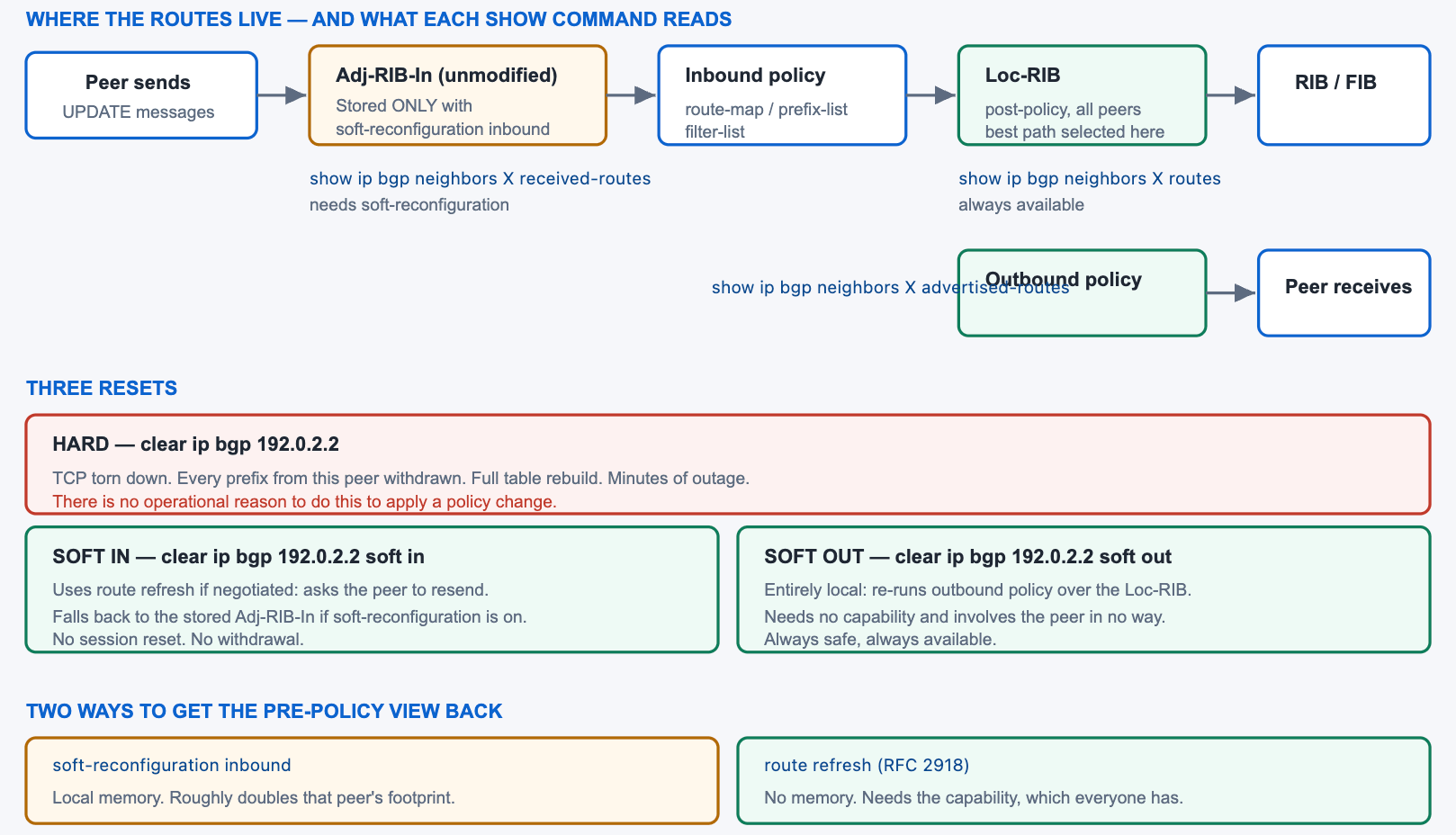
Why Does a Policy Change Need a Reset at All?
What does the router actually keep?
By default a BGP speaker applies inbound policy as updates arrive and stores only the result. There is no retained copy of what the peer sent, so when you change that policy there is nothing to re-evaluate — the prefixes rejected by the old policy are gone, and the ones accepted carry attributes the old policy set. A reset is therefore not a refresh of a cache; it is the only way to obtain the original data again. Outbound is different: the local router still holds its Loc-RIB, so re-running outbound policy needs no cooperation from anyone and is always available.
A Deeper Dive into the RIB Model and the Three Resets
The three RIBs, and which commands read them
RFC 4271 describes three conceptual databases. Adj-RIB-In holds routes as received from each peer, before policy. Loc-RIB holds the routes the local router selected after policy and best-path selection. Adj-RIB-Out holds what is advertised to each peer after outbound policy. Cisco does not materialise Adj-RIB-In by default, which is precisely the storage decision this whole article is about.
| Database | Contents | Command to view | Materialised by default |
|---|---|---|---|
| Adj-RIB-In | Exactly what the peer sent, pre-policy | show ip bgp neighbors X received-routes |
No — needs soft reconfiguration |
| Loc-RIB (per neighbour view) | What survived inbound policy from that peer | show ip bgp neighbors X routes |
Yes |
| Loc-RIB (whole table) | All post-policy paths from all peers | show ip bgp |
Yes |
| Adj-RIB-Out | What is advertised, after outbound policy | show ip bgp neighbors X advertised-routes |
Computed on demand |
What a hard reset costs
A hard reset closes the TCP session. Every prefix learned from that peer is withdrawn from the local table and from every router the local router advertised them to, which propagates outward. The session then re-establishes, renegotiates capabilities, and the peer re-sends its entire table. On a full-table session that is a substantial outage to correct a configuration error, and it is entirely avoidable.
! DO NOT do this to apply a policy change
R1# clear ip bgp 192.0.2.2
!
! What actually happens
%BGP-5-ADJCHANGE: neighbor 192.0.2.2 Down User reset
%BGP_SESSION-5-ADJCHANGE: neighbor 192.0.2.2 IPv4 Unicast topology base
 removed from session  User reset
!
R1# show ip bgp summary | include 192.0.2.2
192.0.2.2  4 64500  3  2  0  0  0 00:00:08 Idle
! ^ Every prefix from this peer is gone, and will be for minutes.
The three resets compared
| Command | Session impact | Requires | Applies | When to use |
|---|---|---|---|---|
clear ip bgp X |
Torn down | Nothing | Everything, from scratch | Almost never — a genuinely stuck session |
clear ip bgp X soft in |
None | Route refresh, or soft reconfiguration | Inbound policy | After any inbound policy change |
clear ip bgp X soft out |
None | Nothing | Outbound policy | After any outbound policy change |
clear ip bgp X soft |
None | As for soft in | Both directions | The safe default |
clear ip bgp * |
All sessions torn down | Nothing | Everything | Never on a production router |
Why outbound is always free
Re-running outbound policy requires only the Loc-RIB, which the router already has. No message is sent to the peer asking for anything, no capability is involved, and nothing is withdrawn — the router simply recomputes what it should be advertising and sends the differences. That is why clear ip bgp X soft out is safe on any session at any time, and why there is no such thing as needing soft reconfiguration for the outbound direction.
! Outbound is always available and always safe
R1# clear ip bgp 192.0.2.2 soft out
!
! Nothing appears in the log, because nothing happened to the session
R1# show ip bgp summary | include 192.0.2.2
192.0.2.2  4 64500  84213 1102 1892441 0 0 3w2d  941208
! ^ Uptime unchanged. The session never noticed.
soft keyword with no direction does bothclear ip bgp 192.0.2.2 soft performs an inbound and an outbound soft reset. It is the safest form and the one worth putting in a runbook, because it removes the possibility of applying an inbound change and refreshing only outbound.clear ip bgp 192.0.2.2 and clear ip bgp 192.0.2.2 soft is a multi-minute outage and four characters. Where your platform supports it, put the soft form in an alias and remove the bare form from every runbook and change template you control.How Does Soft Reconfiguration Inbound Work?
What does it store and what does it cost?
neighbor X soft-reconfiguration inbound tells the router to keep an unmodified copy of every update received from that peer, materialising the Adj-RIB-In that is otherwise conceptual. A subsequent inbound soft reset then re-runs policy against that stored copy, entirely locally, with no message to the peer. The cost is memory: the router now holds the pre-policy set alongside the post-policy set, which roughly doubles that neighbour's footprint. On a session carrying a full internet table that is a substantial and permanent allocation to support an operation that route refresh performs for free.
A Deeper Dive into Soft Reconfiguration
Configuration and what it enables
! Store the pre-policy copy for this neighbour
router bgp 65000
 address-family ipv4 unicast
  neighbor 192.0.2.2 soft-reconfiguration inbound
 exit-address-family
!
! Takes effect for updates received AFTER it is configured, so a
! refresh is needed to populate the stored copy
R1# clear ip bgp 192.0.2.2 soft in
!
! Now the pre-policy view is available
R1# show ip bgp neighbors 192.0.2.2 received-routes
   Network          Next Hop      Metric LocPrf Weight Path
 *> 203.0.113.0/24   192.0.2.2          0             0 64500 65100 i
 *  10.0.0.0/8       192.0.2.2          0             0 64500 65200 i
! ^ Includes prefixes your inbound policy rejects. That is the point.
The memory arithmetic
The stored copy holds every path the peer sent, including the ones policy discards. On a session where inbound policy accepts a small fraction of what arrives — a transit session filtered down to a partial table, for instance — the stored copy is much larger than the accepted set, so the overhead is worse than doubling. Measure before enabling it on anything carrying volume.
! Compare what was sent against what was kept
R1# show ip bgp neighbors 192.0.2.2 received-routes | include Total
Total number of prefixes 941208
R1# show ip bgp neighbors 192.0.2.2 routes | include Total
Total number of prefixes 41208
! ^ 941k stored to support policy on 41k accepted. Poor trade.
!
! Overall BGP memory before and after
R1# show ip bgp summary | include memory|prefixes
BGP activity 1892441/994203 prefixes, 2104882/1102338 paths, scan interval 60 secs
!
R1# show processes memory sorted | include BGP
It is per address family, like everything else
Soft reconfiguration is configured under an address family and applies only there. A neighbour activated for IPv4 unicast, IPv6 unicast, and VPNv4 needs the command in each family where the pre-policy view is wanted, and enabling it in one does not enable it in the others. The same is true of the resets: clear ip bgp 192.0.2.2 soft in refreshes IPv4 unicast, and the IPv6 or VPNv4 equivalents are separate commands against separate address families.
This catches people during multi-protocol troubleshooting, where received-routes works for IPv4 and returns nothing for IPv6 on the same session — which looks like the peer sending nothing rather than a missing command in one family.
! Per family, as with all neighbour policy
router bgp 65000
 address-family ipv4 unicast
  neighbor 192.0.2.2 soft-reconfiguration inbound
 exit-address-family
 address-family ipv6 unicast
  neighbor 2001:db8::2 soft-reconfiguration inbound
 exit-address-family
!
! And the resets are per family too
R1# clear ip bgp 192.0.2.2 soft in
R1# clear bgp ipv6 unicast 2001:db8::2 soft in
R1# clear bgp vpnv4 unicast 10.0.0.9 soft in
!
! Or refresh everything at once, softly
R1# clear ip bgp * soft
! ^ Note: 'soft' makes the wildcard safe. Without it, catastrophic.
When it is still the right tool
- Peering with an implementation that does not negotiate route refresh, which in practice means very old or very unusual equipment.
- A short troubleshooting window where you want to compare pre-policy and post-policy views repeatedly without asking the peer to resend each time.
- A low-volume session — a customer sending a handful of prefixes — where the memory cost is negligible and the diagnostic convenience is real.
- Environments where policy is under active development and the pre-policy view is consulted many times an hour.
! A reasonable pattern: enable, investigate, remove
R1(config-router-af)# neighbor 192.0.2.2 soft-reconfiguration inbound
R1# clear ip bgp 192.0.2.2 soft in
!
! ... compare the two views to find what policy is dropping ...
R1# show ip bgp neighbors 192.0.2.2 received-routes | include Total
R1# show ip bgp neighbors 192.0.2.2 routes | include Total
!
! ... then release the memory
R1(config-router-af)# no neighbor 192.0.2.2 soft-reconfiguration inbound
soft-reconfiguration inbound was enabled during a troubleshooting session on a transit peer and never removed, so the router permanently holds a second copy of a full table. Confirm: show running-config | include soft-reconfiguration, cross-referenced with the prefix counts on those sessions. Fix: remove it. Route refresh provides the same capability on demand at no memory cost, and every modern peer negotiates it.soft-reconfiguration inbound starts storing updates from that moment; it does not retroactively recover what the peer sent earlier. show ip bgp neighbors X received-routes immediately afterwards therefore returns nothing and looks like the feature is broken. A soft reset populates the store, and only then is the pre-policy view complete.How Does Route Refresh Work, and Why Is It Better?
What does the capability do?
RFC 2918 defines a capability advertised during session establishment and a ROUTE-REFRESH message that either end may send afterwards. Receiving one obliges the peer to re-advertise its entire Adj-RIB-Out for the specified address family. The local router then runs its current inbound policy against the freshly received updates, achieving exactly what soft reconfiguration achieves and storing nothing in the meantime. The capability is negotiated per session and per address family, and is supported by every implementation in current use.
A Deeper Dive into Route Refresh
Verifying the capability
R1# show ip bgp neighbors 192.0.2.2 | include Route refresh|Neighbor capabilities
  Neighbor capabilities:
    Route refresh: advertised and received(new)
    Four-octets ASN Capability: advertised and received
    Address family IPv4 Unicast: advertised and received
    Enhanced Refresh Capability: advertised and received
! '(new)' = the standard RFC 2918 capability code.
! '(old & new)' = both the standard and Cisco's earlier proprietary code.
! Absent entirely = the peer does not support it; you need
! soft-reconfiguration for that session.
What happens on the wire
A ROUTE-REFRESH message names an AFI and SAFI and nothing else. The peer responds by re-sending its complete outbound view for that family. There is no acknowledgement in the base specification and no marker indicating where the refresh ends, which means the requesting router cannot tell when the peer has finished — it simply processes updates as they arrive and any prefix the peer no longer has is left stale until something else removes it.
! Scope the debug before enabling it on a full-table session
R1# debug ip bgp 192.0.2.2 updates
R1# clear ip bgp 192.0.2.2 soft in
!
BGP: 192.0.2.2 sending REFRESH_REQ(5) for afi/safi: 1/1
BGP: 192.0.2.2 rcvd UPDATE w/ attr: nexthop 192.0.2.2, origin i, path 64500 65100
BGP: 192.0.2.2 rcvd 203.0.113.0/24
! ...and so on for the entire table
R1# undebug all
Enhanced route refresh
RFC 7313 adds Begin-of-RIB and End-of-RIB markers around the refreshed updates, so the requesting router knows exactly which updates belong to the refresh and can remove anything not re-sent. Without it, a prefix the peer has stopped advertising between the original updates and the refresh stays in the local table as a stale entry. With it, the stale route is removed cleanly at the end of the refresh. It is negotiated as a separate capability and is enabled by default on current IOS-XE.
! The capability that adds the begin and end markers
R1# show ip bgp neighbors 192.0.2.2 | include Enhanced
    Enhanced Refresh Capability: advertised and received
!
! Visible in the debug as explicit start and end of the refresh
BGP: 192.0.2.2 send message type 5, length 23   ! ROUTE-REFRESH
BGP: 192.0.2.2 rcvd BoRR for afi/safi: 1/1
BGP: 192.0.2.2 rcvd ... updates ...
BGP: 192.0.2.2 rcvd EoRR for afi/safi: 1/1
BGP: 192.0.2.2 removing stale routes for afi/safi: 1/1
A refresh is not free on a full-table session
Route refresh costs no memory, but it does cost a full table transfer and the CPU to process it. On a session carrying a million prefixes, an inbound refresh means the peer re-sends everything and the local router re-runs best-path selection across all of it. That takes tens of seconds to minutes depending on the platform, during which the router's CPU is elevated and other control-plane work is competing for it. Refreshing every session at once multiplies that.
The practical consequences are two. Refresh one session at a time rather than using a wildcard on a router with several full-table peers. And on a router already under control-plane pressure, treat a refresh as a change that needs a window rather than something to type casually while investigating.
clear ip bgp * soft on a router with three full-table peers, CPU runs at 100% for several minutes, other protocols report adjacency instability, and in some cases a BFD or IGP session times out during the processing burst. Cause: all three peers resend a million prefixes each, and the local router runs best-path selection across the combined set while its control plane is saturated. Confirm: show processes cpu sorted during the event shows the BGP router and BGP scanner processes dominating; show logging shows unrelated adjacency events at the same timestamps. Fix: refresh one neighbour at a time and wait for the prefix count to settle before the next. Reserve the wildcard for routers with small tables.
! One at a time, waiting for each to settle
R1# clear ip bgp 192.0.2.2 soft in
R1# show ip bgp summary | include 192.0.2.2
! ... wait for the prefix count to stop climbing ...
R1# clear ip bgp 192.0.2.6 soft in
!
! Watch the cost while it happens
R1# show processes cpu sorted | include BGP
 178   4821203   1204821   4003  64.11%  12.03%  3.11%  0 BGP Router
 179    892103    421083   2118  18.44%   4.21%  1.02%  0 BGP Scanner
Route refresh versus soft reconfiguration
| Property | Route refresh | Soft reconfiguration inbound |
|---|---|---|
| Memory cost | None | Roughly doubles that peer's footprint |
| Requires peer support | Yes — universally present | No |
| Network cost | The peer resends its whole table | None |
Enables received-routes |
No | Yes |
| Removes stale prefixes | Only with enhanced refresh | Not applicable |
| Configuration required | None — negotiated automatically | One command per neighbour |
| Appropriate as a permanent setting | Yes | Only on low-volume sessions |
Graceful restart is a different problem
Graceful restart, sometimes confused with these mechanisms, addresses what happens when a router's BGP process restarts while its forwarding plane keeps working. The peer retains the previously advertised routes as stale and continues forwarding over them until the restarting router re-establishes and re-advertises, rather than withdrawing everything immediately. It does not help with policy changes and is not an alternative to a soft reset; the two solve unrelated problems and both belong in a well-configured session.
! Graceful restart - about process restarts, not policy changes
router bgp 65000
 bgp graceful-restart
 bgp graceful-restart restart-time 120
 bgp graceful-restart stalepath-time 360
!
R1# show ip bgp neighbors 192.0.2.2 | include Graceful|Restart
  Graceful Restart Capability: advertised and received
    Remote Restart timer is 120 seconds
    Address families advertised by peer:
      IPv4 Unicast (was preserved)
clear ip bgp X soft covers inbound and outbound in one command. Getting into that habit removes a whole class of confusion where an outbound change was made, only the inbound direction was refreshed, and the peer's view stayed stale for hours until something else triggered an update.How Do I Use ORF to Make the Peer Filter for Me?
What problem does Outbound Route Filtering solve?
Both mechanisms so far accept that the peer sends everything and you discard most of it. On a session where you want only a small fraction of a full table, that means receiving and processing a million prefixes to keep forty thousand — wasted bandwidth, wasted CPU, and a refresh that takes far longer than it needs to. ORF, specified in RFC 5291 with the prefix-list variant in RFC 5292, lets you push your inbound prefix filter to the peer, so the peer applies it before sending. The prefixes you would have discarded are never transmitted.
A Deeper Dive into ORF
Configuring it on both ends
ORF is a negotiated capability with a direction. The receiving router advertises that it can send an ORF, and the sending router advertises that it can receive and act on one. Both halves must be present, which in practice means a peer who has agreed to support it — this is not something you can enable unilaterally.
! ===== Local router: we SEND the filter =====
ip prefix-list ONLY-WHAT-WE-NEED seq 5 permit 0.0.0.0/0
ip prefix-list ONLY-WHAT-WE-NEED seq 10 permit 203.0.0.0/8 le 24
!
router bgp 65000
 address-family ipv4 unicast
  neighbor 192.0.2.2 capability orf prefix-list send
  neighbor 192.0.2.2 prefix-list ONLY-WHAT-WE-NEED in
 exit-address-family
!
! ===== Peer: they RECEIVE and apply it =====
router bgp 64500
 address-family ipv4 unicast
  neighbor 192.0.2.1 capability orf prefix-list receive
 exit-address-family
!
! 'both' where each side may push a filter to the other
!   neighbor X capability orf prefix-list both
Pushing and re-pushing the filter
The filter is transmitted when the session establishes and whenever you explicitly push it again. Changing the prefix-list does not automatically re-send it, so a dedicated refresh form exists that pushes the current filter and asks for a fresh table under it.
! Push the current prefix-list and request a refreshed table
R1# clear ip bgp 192.0.2.2 in prefix-filter
!
! Confirm the capability was negotiated in the expected direction
R1# show ip bgp neighbors 192.0.2.2 | include ORF|Outbound
  Outbound Route Filter (ORF) type (128) Prefix-list:
    Send-mode: advertised
    Receive-mode: received
!
! See what the peer is holding on our behalf
R1# show ip bgp neighbors 192.0.2.2 received prefix-filter
Address family: IPv4 Unicast
ip prefix-list 192.0.2.2:
   seq 5 permit 0.0.0.0/0
   seq 10 permit 203.0.0.0/8 le 24
Why ORF is rarer than it deserves to be
ORF is elegant and lightly deployed, for reasons that are commercial rather than technical. It requires configuration on the peer, which on a transit session means persuading a provider to enable a capability for one customer — and providers have limited appetite for per-customer features on their edge. It also overlaps with something providers already offer: a set of communities that let a customer request a partial table, which achieves a similar result through a mechanism the provider already operates at scale.
That leaves ORF strongest inside a network you own, between a route reflector and clients, where both ends are yours and the coordination cost is zero. Knowing it exists matters for the exam and for the occasional case where a peer is willing; expecting to deploy it toward a transit provider generally does not survive contact with the provider.
Where ORF pays and where it does not
| Situation | ORF worth deploying | Reason |
|---|---|---|
| Transit session, you want a partial table | Yes | Avoids receiving ~900k prefixes to keep 40k |
| Route reflector to a client with limited memory | Yes | Both ends are yours; easy to coordinate |
| Customer session sending a handful of prefixes | No | Nothing meaningful to save |
| Peer who has not agreed to support it | Not possible | Requires configuration on both ends |
| Filter based on AS path or community | No | Only the prefix-list ORF type is widely implemented |
ORF inside your own network
The clearest deployment is between a route reflector and clients that cannot hold a full table. The reflector holds everything, each client pushes a prefix-list describing what it needs, and the reflector sends only that. Because both ends are under your control, negotiating support is not a commercial conversation, and the memory saving on the clients is exactly the constraint that motivated the design.
! On a memory-constrained RR client
ip prefix-list CLIENT-NEEDS seq 5 permit 0.0.0.0/0
ip prefix-list CLIENT-NEEDS seq 10 permit 10.0.0.0/8 le 24
!
router bgp 65000
 address-family ipv4 unicast
  neighbor 10.0.0.9 capability orf prefix-list send
  neighbor 10.0.0.9 prefix-list CLIENT-NEEDS in
 exit-address-family
!
! On the reflector
router bgp 65000
 address-family ipv4 unicast
  neighbor CLIENTS capability orf prefix-list receive
 exit-address-family
!
! Measure the saving on the client
R-CLIENT# show ip bgp summary | include 10.0.0.9
10.0.0.9  4 65000  1204 892 41208 0 0 2d04h  41208
! ^ Instead of the reflector's full table.
Which Reset Mistakes Cause Outages or Memory Problems?
What goes wrong?
Five things. A hard reset typed instead of a soft one withdraws a full table to apply a route-map. clear ip bgp * does the same to every session simultaneously. A policy change applied and never refreshed governs only prefixes received afterwards, so it appears to work partially. Soft reconfiguration enabled for a troubleshooting session and left in place permanently doubles memory on a full-table peer. And a session with no route refresh capability silently fails to soft-reset, leaving the old policy in force with no error that anybody notices.
A Deeper Dive into the Failure Catalogue
The reset that was not soft
! Check the uptime column after any reset - it is the tell
R1# show ip bgp summary | include ^192.0.2
192.0.2.2  4 64500  3  2  0 0 0 00:00:14  1204
192.0.2.6  4 64600 84213 1102 0 0 0 3w2d   940887
! ^ 14 seconds of uptime and a prefix count still climbing means
!   this session was hard reset and is rebuilding.
!
! The log confirms it
R1# show logging | include ADJCHANGE
%BGP-5-ADJCHANGE: neighbor 192.0.2.2 Down User reset
%BGP-5-ADJCHANGE: neighbor 192.0.2.2 Up
The refresh that never happened
! Policy applied, count unchanged - it was never re-evaluated
R1(config-router-af)# neighbor 192.0.2.2 route-map TIGHTER in
R1# show ip bgp neighbors 192.0.2.2 routes | include Total
Total number of prefixes 941208
! ^ The new map should have cut this to a few thousand.
!
R1# clear ip bgp 192.0.2.2 soft in
R1# show ip bgp neighbors 192.0.2.2 routes | include Total
Total number of prefixes 41208
! ^ Now it is in effect. The count is the validation.
The soft reset that silently did nothing
If a peer does not support route refresh and soft reconfiguration is not configured, an inbound soft reset has no data to work with. On some releases this produces a warning and on others it does not, and in both cases the old policy remains in force. The prefix count is the reliable indicator, because it does not change.
show ip bgp neighbors X | include Route refresh returns nothing. Fix: enable soft-reconfiguration inbound for that neighbour, refresh, and apply the policy — or, if the peer is under your control, upgrade it. A hard reset also works and is the reason people reach for it; on a low-volume session that is acceptable, on a full-table session it is not.What this means for automation
A configuration management system that pushes BGP policy has to issue the refresh itself, because pushing configuration alone leaves the change inert. That is easy to forget when the tooling reports success — the lines were applied, the device accepted them, and nothing indicates that the routes were never re-evaluated. Any automation touching inbound policy needs the soft reset in the same task, and ideally a verification step comparing prefix counts before and after so the change is confirmed rather than assumed.
The related trap is a tool that issues a bare clear ip bgp because that was the command in an old runbook. On a lab device the difference is invisible; on a production border it is an outage that the automation will happily repeat on every run.
! What an automation task should do, in order
! 1. Capture the baseline
show ip bgp neighbors 192.0.2.2 routes | include Total
!
! 2. Push the policy
configure terminal
 router bgp 65000
  address-family ipv4 unicast
   neighbor 192.0.2.2 route-map NEW-POLICY in
!
! 3. Apply it - THIS STEP IS NOT OPTIONAL
clear ip bgp 192.0.2.2 soft
!
! 4. Verify, and fail the task if the count did not change
show ip bgp neighbors 192.0.2.2 routes | include Total
show ip bgp summary | include 192.0.2.2
!    Uptime must be unchanged. If it reset, something used the
!    hard form and the task should be flagged.
Building a safe change procedure
! 1. Record the counts you expect to change
R1# show ip bgp neighbors 192.0.2.2 routes | include Total
R1# show ip bgp neighbors 192.0.2.6 advertised-routes | include Total
!
! 2. Confirm route refresh before you rely on it
R1# show ip bgp neighbors 192.0.2.2 | include Route refresh
!
! 3. Apply the policy change
R1(config-router-af)# neighbor 192.0.2.2 route-map NEW-POLICY in
!
! 4. Refresh BOTH directions
R1# clear ip bgp 192.0.2.2 soft
!
! 5. Compare the counts
R1# show ip bgp neighbors 192.0.2.2 routes | include Total
R1# show ip bgp neighbors 192.0.2.6 advertised-routes | include Total
!
! 6. Confirm no session was reset
R1# show ip bgp summary | include ^192.0.2
!    Uptime should be unchanged on every line.
| Mistake | Symptom | Confirming command | Fix |
|---|---|---|---|
| Hard reset instead of soft | Full table withdrawn and rebuilt | show ip bgp summary uptime column |
Always use soft; alias the safe form |
clear ip bgp * |
Every session down at once | Multiple ADJCHANGE log entries |
Remove from every runbook |
| No refresh after a change | Policy applies to new prefixes only | Prefix count unchanged | clear ip bgp X soft |
| Soft reconfiguration left enabled | Memory far above a sibling router | show running-config | include soft-reconfig |
Remove after troubleshooting |
| No route refresh capability | Soft reset silently does nothing | show ip bgp neighbors X | include Route refresh |
Enable soft reconfiguration, or upgrade the peer |
| Only one direction refreshed | Peer's view stays stale | advertised-routes | include Total |
Use soft with no direction keyword |
| ORF filter changed but not pushed | Peer still sends the old set | show ip bgp neighbors X received prefix-filter |
clear ip bgp X in prefix-filter |
received-routes requires soft reconfiguration, and that route refresh and soft reconfiguration are alternatives rather than complements. ENARSI 300-410 covers the same commands directly.Conclusion
The whole subject follows from one implementation decision: a BGP speaker stores post-policy routes and discards the originals. Everything else is a consequence. A policy change needs the originals back, which is why a reset is required at all. Outbound needs nothing, because the Loc-RIB was never discarded. Soft reconfiguration answers the question by keeping the originals locally, at a memory cost proportional to what the peer sends rather than to what you keep. Route refresh answers it by asking the peer to send them again, which costs nothing until the moment you use it.
In practice that makes the choice easy. Route refresh is negotiated automatically by every implementation in current use, requires no configuration, and imposes no ongoing cost, so it is the mechanism to rely on. Soft reconfiguration is worth enabling temporarily when you specifically want to compare what a peer sent against what your policy kept, and worth removing when that investigation ends. A configuration carrying soft-reconfiguration inbound on a full-table session is nearly always a troubleshooting session that nobody closed.
The operational discipline is three commands. Check show ip bgp neighbors X | include Route refresh before relying on a soft reset. Use clear ip bgp X soft with no direction keyword, so both directions are covered. And compare prefix counts before and after — received, kept, and advertised — because that comparison catches the hard reset you did not mean to type, the refresh you forgot, and the policy that did something other than what you intended, all with the same three numbers.
External Links Recommendations
- RFC 2918 — Route Refresh Capability for BGP-4: the capability and the ROUTE-REFRESH message.
- RFC 7313 — Enhanced Route Refresh Capability for BGP-4: Begin-of-RIB and End-of-RIB markers and stale route removal.
- RFC 4271 — A Border Gateway Protocol 4 (BGP-4): Section 3.2 defines Adj-RIB-In, Loc-RIB, and Adj-RIB-Out.
- RFC 5291 — Outbound Route Filtering Capability for BGP-4: the ORF mechanism and its negotiation.
- RFC 5292 — Address-Prefix-Based Outbound Route Filter for BGP-4: the prefix-list ORF type used in practice.
- RFC 4724 — Graceful Restart Mechanism for BGP: the separate problem of surviving a control-plane restart.
- Cisco IOS-XE BGP Configuration Guide: current syntax for
soft-reconfiguration inbound,clear ip bgp soft, and ORF.
Reference Notes
- RFC 4271, Section 3.2 — the three conceptual databases Adj-RIB-In, Loc-RIB, and Adj-RIB-Out.
- RFC 4271, Section 9.1 — inbound policy is applied before routes enter Loc-RIB, which is why pre-policy data is not retained by default.
- RFC 2918, Section 2 — the Route Refresh capability, capability code 2, negotiated at session establishment.
- RFC 2918, Section 3 — the ROUTE-REFRESH message, type 5, carrying an AFI and SAFI.
- RFC 2918, Section 4 — a BGP speaker receiving a ROUTE-REFRESH re-advertises its Adj-RIB-Out for the specified address family.
- RFC 7313, Section 3 — the Enhanced Route Refresh capability and the BoRR and EoRR subtypes.
- RFC 7313, Section 4 — removal of stale routes after End-of-RIB, which the base specification does not provide.
- RFC 5291, Section 3 — the Outbound Route Filtering capability and its send and receive modes.
- RFC 5292 — the Address Prefix ORF type, the variant implemented by Cisco as
capability orf prefix-list. - RFC 4724, Section 3 — Graceful Restart, which addresses control-plane restarts rather than policy changes.
- Cisco IOS-XE BGP Configuration Guide —
neighbor soft-reconfiguration inboundstores received updates unmodified, increasing memory consumption. - Cisco IOS-XE BGP Configuration Guide —
clear ip bgp ... soft outrequires no capability, because outbound policy is re-applied from the local table.