

Multihoming is asymmetric in a way that surprises people the first time they try to use it. Controlling which way your traffic leaves is easy — you set local preference and every router in your autonomous system obeys. Controlling which way traffic arrives is not, because that decision is made by thousands of networks you have no relationship with, running policy you cannot see, applying local preference at their own ingress before they ever look at the AS path you carefully lengthened. Outbound is a configuration problem. Inbound is a negotiation.
Before either question arises there is a more basic one: what does the multihoming actually protect against? Two links to one provider protect against a fibre cut and nothing else — the provider's own routing failure takes both down. Two providers into one router protect against a provider failure and not against that router. Two providers into two routers protect against all three and cost twice as much. Each design has a specific failure it does not survive, and choosing one means choosing which failure you are accepting. A great many multihomed networks discover during their first outage that they bought link redundancy when they thought they were buying provider redundancy.
This article works through both halves. Section one covers the four topologies and what each one survives. Section two covers how much of the internet table to accept, which is the decision that determines whether you can make any local routing choice at all. Section three covers outbound control — local preference, weight, and where each belongs. Section four covers inbound control and why prepending so often fails. Section five is the failure catalogue, including the session that stays up while the path behind it is dead.
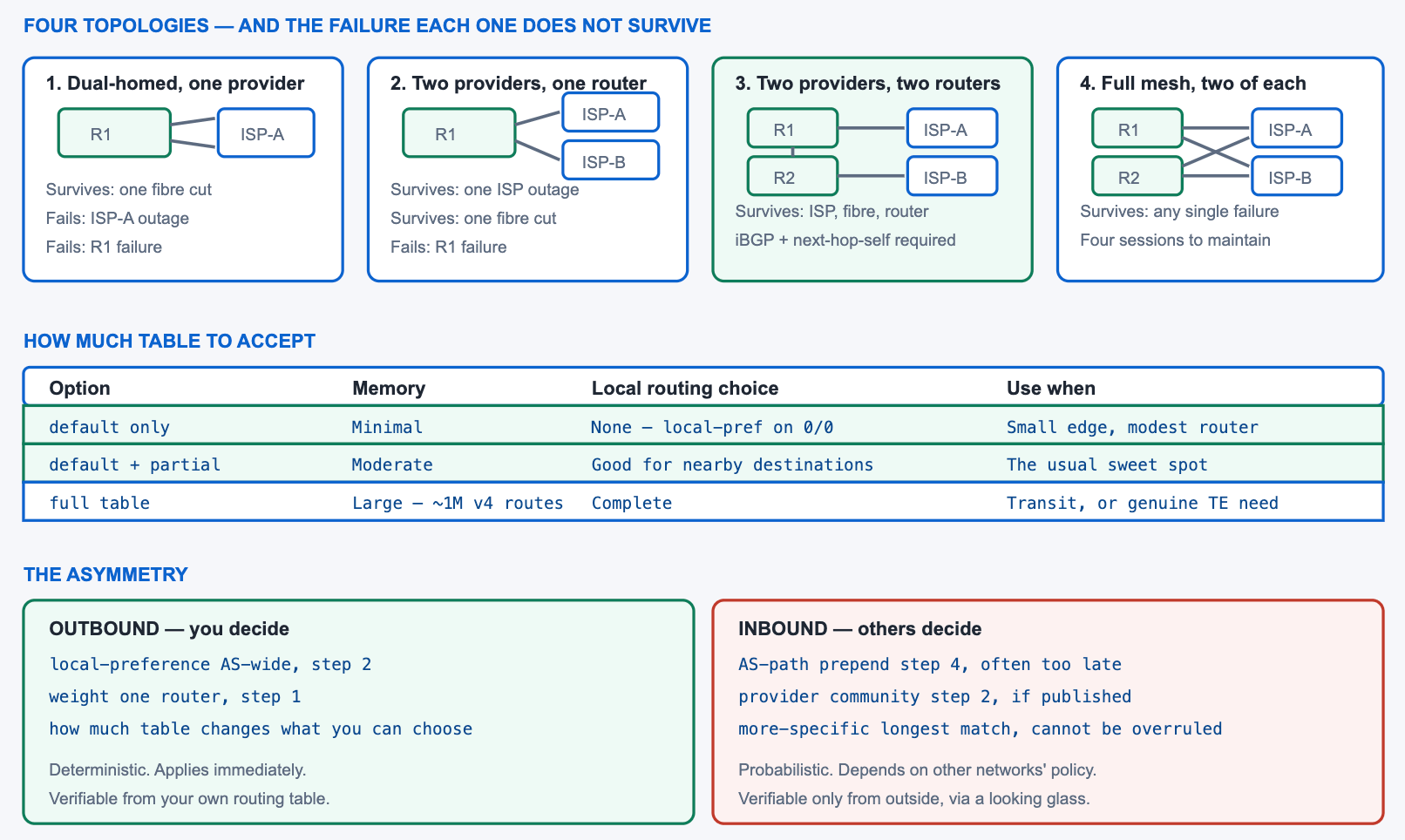
What Are the Multihoming Topologies and What Does Each Protect Against?
Which failure does each design survive?
Two links to one provider survive a fibre cut and a single provider-edge router failure, and do not survive that provider having a routing problem — which is a more common cause of outage than a cut fibre. Two providers into one of your routers survive a provider failure and a fibre cut, and do not survive your router failing or being reloaded for an upgrade. Two providers into two of your routers survive all three. A full mesh, where each of your routers connects to both providers, additionally survives the loss of one of your routers without losing a provider relationship. Each step up costs more and removes one specific failure mode.
A Deeper Dive into the Topologies
What each design requires of you
| Design | Survives fibre cut | Survives ISP outage | Survives your router failure | Requires |
|---|---|---|---|---|
| Single-homed | No | No | No | Nothing — a default route suffices |
| Dual-homed, one ISP | Yes | No | No | One eBGP session per link, or one over a bundle |
| Two ISPs, one router | Yes | Yes | No | PI address space and your own ASN |
| Two ISPs, two routers | Yes | Yes | Yes | iBGP between borders, next-hop-self, an IGP |
| Full mesh (2×2) | Yes | Yes | Yes, keeping both ISPs | Four eBGP sessions plus the above |
Prerequisites for real multihoming
Multihoming to two providers requires address space you can announce to both, which means provider-independent space rather than an allocation from one of them. It also requires an autonomous system number, because you are now originating prefixes rather than being a leaf of somebody else's announcement. Some providers will multihome a customer using a private AS that they strip on the way out, which works but leaves your prefix appearing to originate in their AS — acceptable for a small site, unworkable if you ever want to change providers without renumbering.
! ===== Border router 1, two ISPs, two of our routers =====
router bgp 65000
 bgp router-id 10.0.0.1
 bgp log-neighbor-changes
 !
 ! The eBGP session to ISP-A
 neighbor 192.0.2.2 remote-as 64500
 neighbor 192.0.2.2 description ---- ISP-A ----
 ! iBGP to the other border
 neighbor 10.0.0.2 remote-as 65000
 neighbor 10.0.0.2 update-source Loopback0
 !
 address-family ipv4 unicast
  ! Our own allocation, originated unconditionally
  network 203.0.113.0 mask 255.255.255.0
  neighbor 192.0.2.2 activate
  neighbor 10.0.0.2 activate
  ! Without this, the other border cannot resolve external next hops
  neighbor 10.0.0.2 next-hop-self
 exit-address-family
!
ip route 203.0.113.0 255.255.255.0 Null0 250
Why the two-router design needs an IGP and next-hop-self
With two borders, each learns external prefixes from its own provider and must share them with the other over iBGP. iBGP does not rewrite NEXT_HOP, so the second border receives paths pointing at the first border's external peer address — which it has no route to. next-hop-self on each border's iBGP session fixes that. The IGP is separately required so both borders can reach each other's loopbacks for the iBGP session itself and so internal routers can reach whichever border is chosen.
! Symptom of the missing piece, on BR-2
BR-2# show ip bgp 8.8.8.0/24
Paths: (1 available, no best path)
  64500 15169
    192.0.2.2 (inaccessible) from 10.0.0.1 (10.0.0.1)
      Origin IGP, localpref 100, valid, internal
! ^ 192.0.2.2 is ISP-A's address on BR-1's link. BR-2 has no route.
!
! On BR-1
router bgp 65000
 address-family ipv4 unicast
  neighbor 10.0.0.2 next-hop-self
Multihoming with a private AS
Some providers will multihome a customer without the customer holding an autonomous system number, by assigning a private AS and stripping it with remove-private-as before advertising onward. It works, and it has one property that decides whether it is acceptable: the prefix then appears to the internet as originating in the provider's AS. Anyone filtering on origin AS sees the provider, not you, and moving to a different provider means either renumbering or a coordinated origin change that the new provider has to arrange.
For a small site with a single provider relationship and no plans to change, this is a reasonable saving. For anything that expects to add a second provider later, obtaining an autonomous system number at the outset is considerably cheaper than untangling it afterwards.
! Customer side: an ordinary eBGP session using the assigned private AS
router bgp 65100
 neighbor 192.0.2.1 remote-as 64500
 address-family ipv4 unicast
  network 203.0.113.0 mask 255.255.255.0
 exit-address-family
!
! Provider side: strip it before advertising to the internet
router bgp 64500
 address-family ipv4 unicast
  neighbor 198.51.0.6 remove-private-as all replace-as
 exit-address-family
!
! What the internet sees - our AS is not in the path at all
R-INTERNET# show ip bgp 203.0.113.0/24
  64500 64500
! ^ 'replace-as' kept the length honest by substituting 64500.
Multihoming to the same provider is a different problem
Two links to one provider is the one case where MED works, because MED is compared only between paths from the same neighbouring autonomous system. Sending a lower MED over your preferred link tells that provider which of your two links to use for inbound traffic, and because it is a bilateral relationship the provider generally honours it. That makes single-provider multihoming the only situation where inbound engineering is straightforward.
! Two links to the SAME provider - MED is comparable and honoured
route-map MED-PRIMARY permit 10
 set metric 50
route-map MED-BACKUP permit 10
 set metric 200
!
router bgp 65000
 address-family ipv4 unicast
  neighbor 192.0.2.2 route-map MED-PRIMARY out
  neighbor 192.0.2.6 route-map MED-BACKUP out
 exit-address-family
! ^ Both neighbours are in AS 64500, so step 6 compares these.
!   With two DIFFERENT providers, MED is never compared at all.
network statement and its Null0 static identically on every border, so each can announce independently and ordinary best-path selection chooses between them.How Much of the Table Should I Accept?
What does each option give up?
Accepting only a default route from each provider costs almost nothing in memory and gives up all local routing choice: every destination looks identical, so the only decision available is which default route to prefer. Accepting a default plus each provider's own customer routes — a partial table — costs a moderate amount of memory and lets you send traffic destined for a provider's customers directly to that provider, which is where most of the benefit lies. Accepting a full table costs substantial memory and CPU and gives complete choice, which matters only if you have a specific engineering requirement that partial routes cannot satisfy.
A Deeper Dive into Table Acceptance
What partial routes actually buy
The value of a partial table is that it makes the common case correct without paying for the rare one. Traffic destined for a network that is a customer of ISP-A should go to ISP-A regardless of which default route you prefer, because that path is short and does not transit a third party. A partial table gives you exactly that, for both providers, and falls back to the default for everything else. The remaining benefit of a full table — choosing between two transit paths to a network that is a customer of neither provider — is real but small, and it is the part that costs a million routes.
! Ask each provider to send customer routes plus a default
! (they publish a community for this; format varies per provider)
!
! Or filter locally on AS path length - accept short paths only
ip as-path access-list 40 permit ^64500$
ip as-path access-list 40 permit ^64500_[0-9]+$
! ^ ISP-A's own prefixes and its direct customers, nothing further
!
router bgp 65000
 address-family ipv4 unicast
  neighbor 192.0.2.2 filter-list 40 in
  ! Plus the default they send us
  neighbor 192.0.2.2 default-originate
 exit-address-family
!
! Measure what you actually accepted
R1# show ip bgp neighbors 192.0.2.2 routes | include Total
Total number of prefixes 41208
! ^ Rather than roughly a million. Verify against platform capacity.
Sizing against the platform
A full IPv4 table is on the order of a million prefixes and continues to grow; a full IPv6 table is smaller but growing faster in proportion. Two full tables means two copies in the BGP RIB before best-path selection, and platforms with hardware forwarding have a separate and usually much smaller FIB limit that is the real constraint. Exceeding the FIB is worse than exceeding memory, because the router keeps working while silently punting some prefixes to software.
! What is currently held, and how much memory it costs
R1# show ip bgp summary | include prefixes|memory
BGP activity 1892441/994203 prefixes, 2104882/1102338 paths, scan interval 60 secs
!
R1# show bgp ipv4 unicast summary | begin Neighbor
Neighbor    V  AS  MsgRcvd MsgSent  TblVer  InQ OutQ Up/Down  State/PfxRcd
192.0.2.2   4  64500  84213   1102  1892441   0    0 3w2d      941208
192.0.2.6   4  64600  83991   1102  1892441   0    0 3w2d      940887
!
! The hardware limit that actually matters on a switching platform
R1# show platform hardware fed switch active fwd-asic resource tcam utilization
!
! Always cap what a session may send, whatever you intend to accept
router bgp 65000
 address-family ipv4 unicast
  neighbor 192.0.2.2 maximum-prefix 1200000 90 restart 30
 exit-address-family
Convergence cost of a full table
Table size has a second cost that memory figures do not show: the time to converge after a session comes up. A router receiving a full table has to process roughly a million UPDATE messages, run best-path selection on each, and program the resulting entries into hardware. On a modest platform that is minutes rather than seconds, and during it the router is advertising incomplete information to its own peers. A design where a border router reload means several minutes of partial reachability is not what most people mean by redundancy.
Two mechanisms help. Graceful restart lets a peer continue forwarding using the previously advertised routes while the restarting router rebuilds its table, so a control-plane restart does not withdraw everything. And accepting a partial table simply makes the problem smaller, which is the more reliable of the two because it does not depend on the peer implementing anything.
! Measure how long a full-table session takes to converge
R1# clear ip bgp 192.0.2.2
R1# show ip bgp summary | include 192.0.2.2
192.0.2.2  4 64500  12  4  0  0  0 00:00:41  184203
! ^ 41 seconds in and only 184k of ~940k prefixes received.
!
! Graceful restart, so a control-plane restart does not black-hole
router bgp 65000
 bgp graceful-restart
 bgp graceful-restart restart-time 120
 bgp graceful-restart stalepath-time 360
!
R1# show ip bgp neighbors 192.0.2.2 | include Graceful
  Graceful Restart Capability: advertised and received
The three options compared
| Option | Prefixes held | Outbound choice available | Failure behaviour | Appropriate for |
|---|---|---|---|---|
| Default only | 2 (one per provider) | Which default to prefer | Clean — the default withdraws | Branch or small edge |
| Default + partial | Tens of thousands | Direct path to each provider's customers | Clean, plus better locality | Most enterprises |
| Full table | ~1M per provider | Complete | Slow convergence on a full reload | Transit networks, content, real TE need |
| Full table, one provider only | ~1M plus a default | Asymmetric — detailed one way | Confusing under failure | Rarely a deliberate choice |
maximum-prefix was configured, so the router accepted roughly a million prefixes it has neither the memory nor the FIB capacity for. Confirm: show bgp ipv4 unicast summary shows a prefix count in the hundreds of thousands; platform TCAM utilisation is at or above capacity. Fix: configure maximum-prefix on every eBGP session before it is first brought up, sized to what you intend to accept plus headroom, and filter inbound to a partial table if the platform cannot hold a full one.How Do I Control Outbound Traffic?
Which instrument for which scope?
Local preference for anything that should apply across the autonomous system, which is nearly everything. It is set inbound on the border router that receives the prefix, propagates through iBGP to every internal router, and decides at best-path step two, ahead of AS path length and everything after. Weight for a decision that should apply on one router only — a single-router site with two upstreams, or a targeted override during an incident. Both are set with a route-map applied inbound, and the difference is entirely one of scope: weight never leaves the router that set it.
A Deeper Dive into Outbound Control
Active/backup with local preference
! ISP-A is primary for everything, ISP-B is backup
route-map ISP-A-IN permit 10
 set local-preference 200
 set community 65000:1100 additive
!
route-map ISP-B-IN permit 10
 set local-preference 100
 set community 65000:1200 additive
!
router bgp 65000
 address-family ipv4 unicast
  neighbor 192.0.2.2 route-map ISP-A-IN in
  neighbor 192.0.2.6 route-map ISP-B-IN in
 exit-address-family
!
! Every router in the AS now prefers ISP-A, including the border
! that does not have an ISP-A session.
R-CORE# show ip bgp 8.8.8.0/24 | include localpref
      Origin IGP, metric 0, localpref 200, valid, internal, best
Load sharing by destination
Preferring one provider for everything wastes the second circuit. Splitting by destination — prefer ISP-A for prefixes originated near ISP-A, ISP-B for the rest — uses both and is expressible as an AS-path match. The split does not need to be precise; the goal is roughly proportional utilisation rather than an exact balance, and any reasonable partition of the address space achieves it.
! Prefer whichever provider is closer to the destination
ip as-path access-list 50 permit ^64500_
ip as-path access-list 51 permit ^64600_
!
route-map ISP-A-IN permit 10
 ! Destinations behind ISP-A: strongly prefer this path
 match as-path 50
 set local-preference 250
route-map ISP-A-IN permit 20
 set local-preference 150
!
route-map ISP-B-IN permit 10
 match as-path 51
 set local-preference 250
route-map ISP-B-IN permit 20
 set local-preference 150
!
! Verify the split is actually happening
R1# show interfaces GigabitEthernet0/1 | include 5 minute output
R1# show interfaces GigabitEthernet0/2 | include 5 minute output
Weight, and where it is the right answer
Weight decides at step one and is never advertised, so it is correct exactly when the decision belongs to one router and wrong when it does not. A single-router site with two upstreams is the clean case. On a two-border design, setting weight on one border gives that border a different opinion from the other, and which one traffic reaches is then decided by the IGP rather than by your policy — which is not a decision anyone made.
! Correct: one router, two upstreams, no other BGP speakers
router bgp 65000
 address-family ipv4 unicast
  neighbor 192.0.2.2 weight 200
  neighbor 192.0.2.6 weight 100
 exit-address-family
!
! Wrong on a two-border design - each border decides differently
! Use local-preference there instead.
!
! Check for the mistake: compare best paths across borders
BR-1# show ip bgp 8.8.8.0/24 | include best
BR-2# show ip bgp 8.8.8.0/24 | include best
! ^ Different answers on the two borders means weight is in play
!   where local preference should have been.
What happens when the preferred provider fails
With local preference set, failover is automatic and requires no configuration change: the preferred paths are withdrawn, the remaining paths become best, and traffic moves. The speed of that transition depends on how quickly the failure is detected, which is a separate problem covered by session timers, fast external fallover, and BFD. The routing part is instantaneous once the withdrawal arrives.
! Before the failure
R1# show ip bgp 8.8.8.0/24
Paths: (2 available, best #1, table default)
  64500 15169
    192.0.2.2 from 192.0.2.2 (192.0.2.2)
      Origin IGP, localpref 200, valid, external, best
  64600 6939 15169
    192.0.2.6 from 192.0.2.6 (192.0.2.6)
      Origin IGP, localpref 100, valid, external
!
! After ISP-A withdraws - the second path becomes best immediately
R1# show ip bgp 8.8.8.0/24
Paths: (1 available, best #1, table default)
  64600 6939 15169
    192.0.2.6 from 192.0.2.6 (192.0.2.6)
      Origin IGP, localpref 100, valid, external, best
How Do I Control Inbound Traffic?
What are the options, ordered by reliability?
Advertising a more-specific prefix over the preferred path is the most reliable, because longest-match forwarding cannot be overruled by anyone's policy — the cost is an extra prefix in the global table. A provider's published community that sets local preference inside their network is next, because it acts at step two and the provider agreed to honour it. AS-path prepending is third and frequently ineffective, because it acts at step four and any network that set local preference at ingress has already decided. MED works only toward a single provider across two links. Withdrawing an advertisement entirely is the blunt instrument that always works.
A Deeper Dive into Inbound Control
Why prepending so often changes nothing
The decision you are trying to influence happens inside somebody else's router, running the same thirteen-step algorithm you do. Step two is local preference, which most transit providers set on ingress according to their own commercial policy — customer routes high, peer routes medium, transit routes low. Step four is AS path length. If a network reaches your prefix through two of its own neighbours with different local preferences, the comparison never reaches step four and your prepends are irrelevant. Prepending works only among paths that are already tied at steps one through three.
! Prepend toward the provider that should be the backup
route-map PREPEND-ISP-B permit 10
 set as-path prepend 65000 65000 65000
!
router bgp 65000
 address-family ipv4 unicast
  neighbor 192.0.2.6 route-map PREPEND-ISP-B out
 exit-address-family
!
! Confirm the prepends are present from OUTSIDE, not from here
! (any public looking glass in a third-party AS)
!   show ip bgp 203.0.113.0/24
!     64600 65000 65000 65000 65000   localpref 100
!     64500 65000                     localpref 100  best
! ^ Equal localpref means step 4 decided. Prepending worked.
!
!     64600 65000 65000 65000 65000   localpref 200  best
!     64500 65000                     localpref 100
! ^ Different localpref means step 2 decided. Prepending is moot.
The more-specific, which always works
Longest-match forwarding is not a policy decision and cannot be overridden. Advertising 203.0.113.0/25 and 203.0.113.128/25 over different providers, alongside the /24 over both, guarantees that each half arrives on the provider you chose. The cost is two extra prefixes in every routing table on the internet, which is why this is the tool of last resort rather than of first choice — but it is the only technique that works regardless of anyone else's policy.
! The /24 goes to both providers; each /25 goes to one
ip prefix-list LOWER-HALF seq 5 permit 203.0.113.0/25
ip prefix-list UPPER-HALF seq 5 permit 203.0.113.128/25
!
route-map ISP-A-OUT permit 10
 match ip address prefix-list UPPER-HALF
 set as-path prepend 65000 65000
route-map ISP-A-OUT permit 20
!
router bgp 65000
 address-family ipv4 unicast
  network 203.0.113.0 mask 255.255.255.0
  network 203.0.113.0 mask 255.255.255.128
  network 203.0.113.128 mask 255.255.255.128
  neighbor 192.0.2.2 route-map ISP-A-OUT out
 exit-address-family
!
ip route 203.0.113.0 255.255.255.128 Null0 250
ip route 203.0.113.128 255.255.255.128 Null0 250
! ^ Some providers filter longer than /24. Check before relying on it.
Provider communities
Most transit providers publish a set of communities that let a customer influence local preference inside the provider's network, and often a set that controls whether the prefix is advertised to the provider's own peers or transits. Because these act at step two, they succeed where prepending fails, and because the provider defined them, honouring them is part of the service. They are documented on the provider's website or in their IRR objects.
! Ask ISP-B to treat our prefix as lower preference internally
route-map ISP-B-OUT permit 10
 ! Example format only - each provider publishes its own values
 set community 64600:80 additive
!
router bgp 65000
 address-family ipv4 unicast
  neighbor 192.0.2.6 route-map ISP-B-OUT out
  neighbor 192.0.2.6 send-community
 exit-address-family
! ^ Without send-community the tag never leaves this router.
The four techniques compared
| Technique | Acts at step | Can the receiver override it | Cost | Reliability |
|---|---|---|---|---|
| More-specific prefix | — longest match, before BGP | No | Extra prefixes in the global table | Always works |
| Provider community | 2 (local preference) | Only by breaking their own policy | None | High, where published |
| MED | 6 | Yes, but rarely does within one AS | None | High — single provider only |
| AS-path prepending | 4 | Yes, routinely | None | Low to moderate |
| Withdraw the advertisement | — | No | Loses the path entirely | Absolute, and blunt |
Which Multihoming Designs Fail During a Real Outage?
What actually goes wrong?
Five failures dominate. A session that stays established while the path behind it is dead, so traffic is black-holed for up to the hold timer. Two circuits that share a physical path, so both fail together. A missing next-hop-self that only manifests when the second border has to carry traffic. An outbound filter that permits transit routes, so a provider failure turns into your network carrying somebody else's traffic. And a backup path that has never been tested, discovered to be misconfigured at the moment it is needed.
A Deeper Dive into the Failure Catalogue
The session that outlives the path
BGP's default hold timer is 180 seconds with a 60-second keepalive. If a provider's router stops forwarding but keeps the TCP session up — a control-plane fault, a forwarding-plane failure, a misconfiguration upstream — your router keeps sending traffic into it for up to three minutes. On a directly connected eBGP session, bgp fast-external-fallover is enabled by default and drops the session immediately when the interface goes down, but that helps only when the link itself fails.
! Default timers - three minutes of black-holing in the worst case
R1# show ip bgp neighbors 192.0.2.2 | include hold time|Keepalive
  Last read 00:00:23, last write 00:00:11, hold time is 180, keepalive interval is 60 seconds
!
! Faster session timers - per neighbour, negotiated to the lower value
router bgp 65000
 neighbor 192.0.2.2 timers 10 30
 ! Below about 3 seconds, use BFD instead of BGP timers
!
! Confirm fast external fallover is on (it is, by default)
R1# show running-config | include fast-external-fallover
! (absent = enabled; 'no bgp fast-external-fallover' would disable it)
The shared-fate circuit pair
The untested backup
A backup path is a claim until it has carried production traffic. The way to convert it into a fact is to shut the primary session during a maintenance window and confirm that traffic moves, that the backup carries it acceptably, and that nothing depended on the primary in a way nobody documented. Doing this quarterly is unglamorous and is the single highest-value operational practice in a multihomed design.
! The failover test, done deliberately rather than discovered
R1(config-router)# neighbor 192.0.2.2 shutdown
!
! 1. Did the routes move?
R1# show ip bgp 8.8.8.0/24 | include best
!
! 2. Is traffic actually flowing over the backup?
R1# show interfaces GigabitEthernet0/2 | include 5 minute output
!
! 3. Is the backup carrying it acceptably?
R1# ping 8.8.8.8 source Loopback0 repeat 100
R1# show interfaces GigabitEthernet0/2 | include drops|errors
!
! 4. Restore
R1(config-router)# no neighbor 192.0.2.2 shutdown
What to monitor on a multihomed edge
Six signals catch nearly everything, and all of them are cheap to poll. Prefix count received per session detects a provider sending far more or far less than expected. Prefix count advertised per session detects a leak within one update cycle and is the single most valuable of the six. Session uptime detects flapping that is being masked by the second provider. Per-interface utilisation detects a failover that happened without anyone noticing. Adjacency change messages give the timestamps. And platform FIB utilisation detects the slow approach to a hard limit that will otherwise be discovered during a growth spurt.
! The six, as commands - all suitable for scheduled polling
R1# show ip bgp summary | include ^192.0.2
R1# show ip bgp neighbors 192.0.2.2 advertised-routes | include Total
R1# show ip bgp neighbors 192.0.2.2 | include Up for|Last reset
R1# show interfaces GigabitEthernet0/1 | include 5 minute
R1# show logging | include BGP-5-ADJCHANGE
R1# show platform hardware fed switch active fwd-asic resource tcam utilization
!
! The one that matters most, with a threshold worth alerting on:
!   advertised prefixes per external session
!   expected: a small constant. Any increase is a leak in progress.
The outbound filter that was never there
A multihomed network with no outbound filter advertises everything it knows to both providers, which makes it a transit path between them. Under normal conditions the traffic volume may be modest and go unnoticed; when one provider has a routing problem, the other's traffic can arrive in quantity. The filter that prevents this is four lines and belongs on every eBGP session from the day it is turned up.
! The only correct outbound policy for a non-transit network
ip as-path access-list 20 permit ^$
! Plus one line per customer AS, if you have customers
!
route-map TRANSIT-OUT permit 10
 match as-path 20
 set comm-list ALL-OURS delete
!
router bgp 65000
 address-family ipv4 unicast
  neighbor 192.0.2.2 route-map TRANSIT-OUT out
  neighbor 192.0.2.6 route-map TRANSIT-OUT out
 exit-address-family
!
! The count is the whole validation
R1# show ip bgp neighbors 192.0.2.6 advertised-routes | include Total
Total number of prefixes 3
| Failure | Symptom | Confirming command | Fix |
|---|---|---|---|
| Session outlives the path | Black hole for up to 180 s | show ip bgp neighbors X | include hold time |
BFD, or lower session timers |
| Shared-fate circuits | Both providers fail together | Circuit path documentation | Contractual diversity, re-verified |
Missing next-hop-self |
Second border installs nothing | show ip bgp <prefix> — inaccessible |
next-hop-self on iBGP sessions |
| No outbound filter | Becoming transit between providers | advertised-routes | include Total |
AS-path filter permitting ^$ |
| Untested backup | Failover does not work when needed | Scheduled failover test | Test quarterly, in a window |
| Weight instead of local preference | Borders disagree; IGP decides | Compare best paths across borders | Local preference AS-wide |
| Full table on an undersized platform | FIB exhaustion, software switching | Platform TCAM utilisation | maximum-prefix, accept partial |
Conclusion
Multihoming is two separate problems that share a topology. The first is redundancy, and it is answered by choosing which single failure you are willing to accept: a fibre cut, a provider outage, or a router reload. Each topology removes one of those and leaves the others, and the design that survives all three costs roughly twice what the design that survives one does. Being explicit about which failure remains is what turns an implicit gap into a decision somebody made.
The second problem is traffic control, and it is asymmetric in a way no amount of configuration removes. Outbound is yours: local preference propagates through your autonomous system, decides at step two, and takes effect the moment you apply it. Inbound belongs to everyone else, and every technique available is a request that a receiving network's own policy may already have overruled. The only exception is a more-specific prefix, which works because longest-match forwarding is not a policy decision — and it works at the cost of an extra prefix in every routing table on the internet, which is why it is a tool of last resort.
What actually determines whether a multihomed network survives an outage is none of this, though. It is whether the outbound filter exists, whether the second circuit genuinely takes a different physical path, and whether anyone has ever shut the primary session and watched what happened. Those three checks take an afternoon and catch more real failures than any amount of policy tuning. Build the two-border topology, verify the prefix count you advertise to each provider, then shut one session and measure — the number that comes back is the whole answer.
External Links Recommendations
- RFC 4271 — A Border Gateway Protocol 4 (BGP-4): the decision process that determines whether your inbound engineering is ever evaluated.
- RFC 7454 — BGP Operations and Security: prefix filtering, maximum-prefix, and the practices that keep a multihomed network from leaking.
- RFC 4116 — IPv4 Multihoming Practices and Limitations: the address-space and ASN prerequisites and the trade-offs of each approach.
- RFC 8212 — Default External BGP Route Propagation Behavior Without Policies: why an eBGP session should exchange nothing until policy exists.
- Cisco — BGP Case Studies: worked multihoming configurations for each topology.
- Cisco IOS-XE BGP Configuration Guide: current syntax for
maximum-prefix,next-hop-self, timers, and fast external fallover. - Cisco Learning Network — CCIE Enterprise Infrastructure: current blueprint and lab equipment list.
Reference Notes
- RFC 4271, Section 9.1.2 — the decision process ordering, in which LOCAL_PREF is evaluated before AS_PATH length.
- RFC 4271, Section 5.1.5 — LOCAL_PREF is carried only to internal peers, which is why it governs outbound policy across an autonomous system.
- RFC 4271, Section 5.1.4 — MULTI_EXIT_DISC is compared only between routes from the same neighbouring AS, restricting its use to single-provider multihoming.
- RFC 4271, Section 4.4 and 6.5 — the Hold Timer and KEEPALIVE mechanism, with a suggested hold time of 90 seconds and a common default of 180.
- RFC 4271, Section 9.1.3 — a BGP speaker advertises only its selected best path, which bounds what inbound engineering can express.
- RFC 4116, Section 3 — multihoming requirements including provider-independent addressing and an autonomous system number.
- RFC 4116, Section 4 — the limitations of AS-path prepending as an inbound traffic-engineering mechanism.
- RFC 7454, Section 9 — maximum-prefix limits as protection against a peer announcing an unexpected volume of routes.
- RFC 7454, Section 6 — outbound prefix filtering and the requirement that a non-transit network advertise only its own and its customers' prefixes.
- RFC 8212 — an eBGP session must exchange no routes until import and export policies are configured.
- Cisco IOS-XE BGP Configuration Guide —
bgp fast-external-falloveris enabled by default and resets a directly connected eBGP session when the interface goes down. - Cisco IOS-XE BGP Configuration Guide —
neighbor next-hop-selfis required for internal peers to resolve next hops learned from external peers.