

An AS-path filter is a regular expression matched against a string, and almost every mistake people make with them comes from being wrong about what that string looks like. It is not a list of numbers. It is a rendered text representation of the AS_PATH attribute, where an ordinary sequence appears as space-separated numbers, an AS_SET appears inside braces, and confederation segments appear inside parentheses. The expression ^65001$ matches a path consisting of exactly AS 65001 and fails against {65001}, because the braces are characters in the string being matched.
The second source of error is the underscore. In every other regular expression dialect an underscore is a literal character. In Cisco's AS-path matching it is a metacharacter that matches any delimiter — a space, a comma, an opening or closing brace, an opening or closing parenthesis, or the beginning or end of the string. That is exactly why it exists: writing _65001_ matches AS 65001 wherever it appears, without also matching inside 650011 or 165001. Writing 65001 without the underscores is a substring match and will produce results nobody intended.
This article is a working guide to writing and applying these filters. Section one establishes precisely what string the expression is evaluated against, including the AS_SET and confederation renderings and the four-byte notation problem. Section two covers every metacharacter with its behaviour, including the two that behave differently from other regular expression dialects. Section three is a catalogue of the expressions you will actually use, with what each one matches and what it does not. Section four covers configuration and application — access-list numbering, filter-lists, route-map matching, and evaluation order. Section five is the failure catalogue and the verification commands that catch each one.
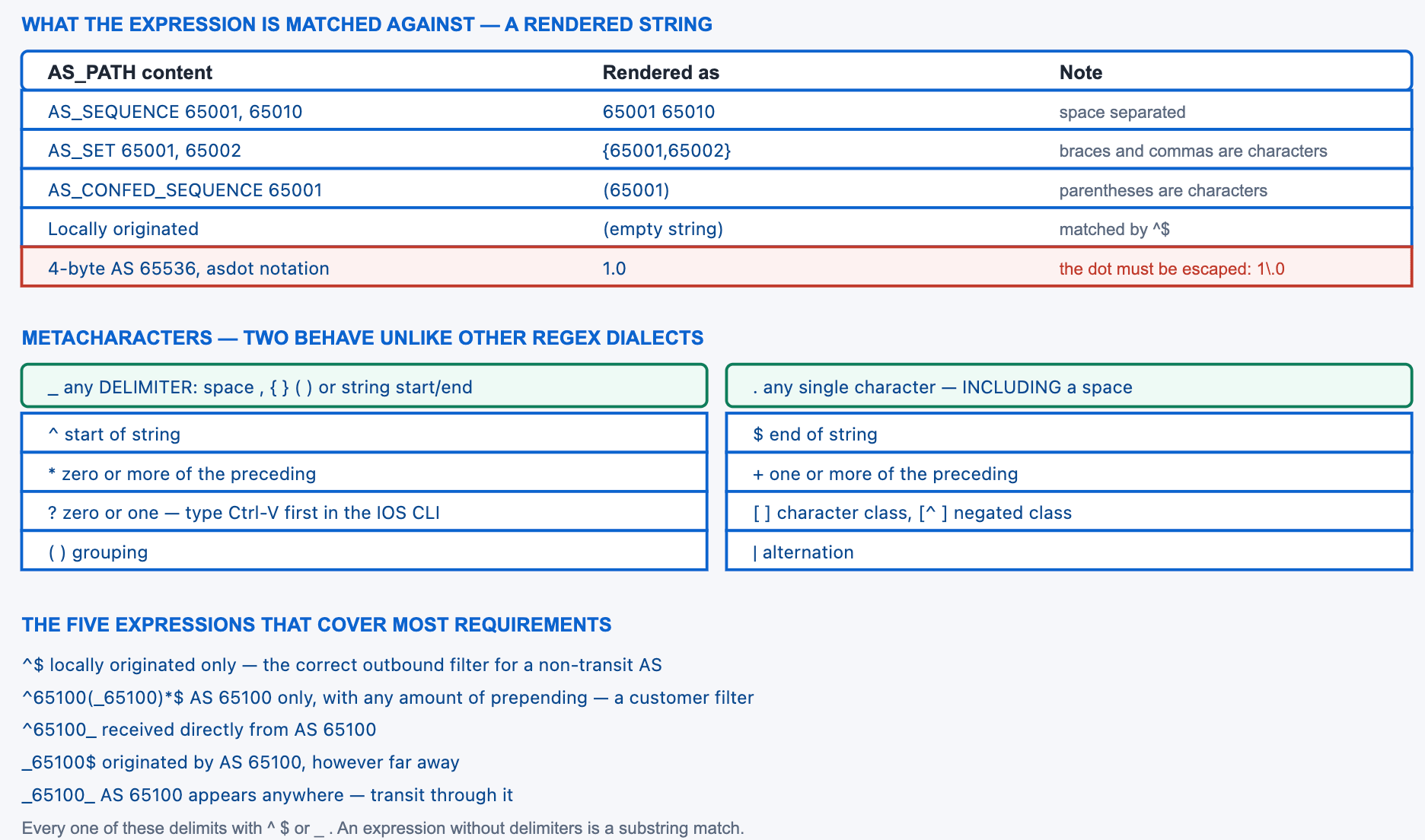
What String Does the Regular Expression Actually Match Against?
How is the AS_PATH rendered for matching?
An AS_SEQUENCE renders as its AS numbers separated by single spaces, in order, leftmost first. An AS_SET renders inside braces with commas between the members, and because AS_SET members have no meaningful order the numbers may appear in any sequence. Confederation segments render inside parentheses. A locally originated prefix has an empty AS_PATH and therefore renders as an empty string, which is why ^$ is the expression for "originated by this autonomous system". All of the punctuation — braces, commas, parentheses — is present in the string and can be matched literally or by the underscore.
A Deeper Dive into the String
Seeing the actual string
The BGP table prints the AS_PATH exactly as the regular expression engine sees it, which makes show ip bgp the reference for what your expression will be tested against. Reading a few real paths before writing a filter is faster than reasoning about the rendering from first principles.
R1# show ip bgp
   Network          Next Hop     Metric LocPrf Weight Path
 *> 10.100.0.0/16    0.0.0.0           0         32768 i
 *> 203.0.113.0/24   192.0.2.2         0             0 65100 i
 *> 198.51.100.0/22  192.0.2.6         0             0 65200 65200 65200 i
 *> 192.0.2.0/24     198.51.0.6                      0 65400 65300 65010 i
 *> 172.16.0.0/12    198.51.0.6                      0 65400 {65001,65002} i
! The trailing i / e / ? is the ORIGIN code, not part of the AS_PATH.
! Row 1 has an EMPTY path - matched by ^$ and nothing else.
! Row 5 contains literal braces and a comma.
AS_SET and why $ often fails against it
A common requirement is "originated by AS 65001", written _65001$. Against the sequence 65400 65001 that matches. Against the aggregate path 65400 {65001,65002} it does not, because the string ends with a closing brace, not with the digits. The underscore handles this correctly on the left because it matches the opening brace, but $ is anchored to the true end of the string. If aggregates with AS_SETs matter in your environment, use _65001_ rather than _65001$, or accept that the two cases need separate lines.
! Test the two forms against a path containing an AS_SET
R1# show ip bgp regexp _65001$
! (no output for 172.16.0.0/12 - the path ends with a brace)
!
R1# show ip bgp regexp _65001_
   Network          Next Hop     Metric LocPrf Weight Path
 *> 172.16.0.0/12    198.51.0.6                    0 65400 {65001,65002} i
! ^ The underscore matched the opening brace. This one works.
Two different things read the AS_PATH
It is worth separating the two mechanisms that consult this attribute, because they are frequently conflated. BGP's built-in loop prevention inspects the AS_PATH of every received eBGP update and discards any that already contains the local AS number. That check is automatic, happens before any policy, and is not configurable except by the features covered in the companion article on allowas-in and local-as. Your AS-path filters are policy, evaluated after that check, and they cannot see a prefix the loop check already dropped.
The practical consequence: a prefix missing from the table because it contained your own AS will never appear in show ip bgp regexp output no matter what expression you write, and no filter-list change will bring it back. The symptom looks like a filtering problem and is not one. show ip bgp neighbors X received-routes with soft reconfiguration enabled shows the pre-policy view but still not routes rejected by loop detection, which is why the diagnostic for that case is the neighbour's advertised-routes rather than anything on the receiving side.
! Prefix is advertised by the peer but never appears locally
R-PEER# show ip bgp neighbors 192.0.2.1 advertised-routes | include 203.0.113
 *> 203.0.113.0/24   192.0.2.2   0   65000 65100 i
!
R1# show ip bgp 203.0.113.0/24
% Network not in table
!
R1# show ip bgp | include Total
! ^ The path contains 65000, which is our own AS. Loop detection
!   dropped it before any filter ran. No regex will change this.
Four-byte AS numbers and the notation problem
A four-byte AS number can be displayed in two notations. Asplain renders 65536 as 65536. Asdot renders the same value as 1.0, where the dot is a literal character in the string. If a router is configured with bgp asnotation dot, every expression referring to a four-byte AS must escape the dot, and an expression written for asplain will not match. Changing the notation on a router does not update existing access-lists, so the change silently breaks every four-byte expression.
! Default is asplain
R1# show ip bgp | include 4200000000
 *> 203.0.113.0/24   192.0.2.2      0    0 4200000000 i
!
R1(config)# router bgp 65000
R1(config-router)# bgp asnotation dot
R1# clear ip bgp * soft
R1# show ip bgp | include 64086
 *> 203.0.113.0/24   192.0.2.2      0    0 64086.59904 i
! ^ Same AS, different rendering. An expression matching 4200000000
!   now matches nothing. The dot must be escaped: 64086\.59904
!
ip as-path access-list 10 permit ^64086\.59904(_64086\.59904)*$
Confederation paths
Inside a confederation, the sub-AS numbers appear in parentheses ahead of the real path. Because the underscore matches parentheses, the ordinary delimited expressions work unchanged. What does not work is ^65001_ against a confederation path, since the string begins with an opening parenthesis rather than a digit.
R-CONFED# show ip bgp 203.0.113.0/24
BGP routing table entry for 203.0.113.0/24
  (65001 65002) 65100
    10.0.0.5 from 10.0.0.5 (10.0.0.5)
! ^ Confed segments in parentheses, then the real external path.
!
! Matches: the underscore handles the parenthesis
R-CONFED# show ip bgp regexp _65100_
! Does NOT match: the string starts with '(' not a digit
R-CONFED# show ip bgp regexp ^65001_
filter-list attaches per address family, so the same list must be referenced separately under each. A filter that works for IPv4 and appears to do nothing for IPv6 is almost always a missing attachment rather than a wrong expression.i, e or ? in show ip bgp output is the ORIGIN attribute, printed adjacent to the path for compactness. It is not in the string the expression matches. An expression ending in i$ matches nothing, and the mistake is common enough to be worth stating explicitly.show ip bgp and look at the actual strings for the prefixes you care about. Two minutes of reading eliminates the AS_SET case, the confederation case, and the notation case before they become a filter that silently drops production routes.What Does Each Metacharacter Do?
Which ones behave differently from ordinary regular expressions?
Two. The underscore, which in most dialects is a literal character, here matches any delimiter — space, comma, open or close brace, open or close parenthesis, and the start or end of the string. And the question mark, which has its usual "zero or one" meaning but cannot be typed directly at the IOS command line because it triggers context-sensitive help; you must press Ctrl-V first. Everything else — caret, dollar, dot, star, plus, square brackets, parentheses, pipe — behaves as expected, with the caveat that the dot matches a space as well as a digit, which makes it far broader than people assume.
A Deeper Dive into the Metacharacters
The complete set
| Character | Meaning | Example | Matches | Does not match |
|---|---|---|---|---|
^ |
Start of string | ^65100 |
65100 65010 |
65400 65100 |
$ |
End of string | 65100$ |
65400 65100 |
65100 65010 |
_ |
Any delimiter or boundary | _65100_ |
65400 65100 65010, {65100,65002} |
651001 |
. |
Any single character, including space | 65.00 |
65100, 65400, 65 00 |
6500 |
* |
Zero or more of the preceding | 65100* |
6510, 65100, 651000 |
— |
+ |
One or more of the preceding | 65100+ |
65100, 651000 |
6510 |
? |
Zero or one of the preceding | 65100? |
6510, 65100 |
651000 |
[ ] |
Character class | ^6[45][0-9]+_ |
64512 ..., 65100 ... |
63000 ... |
[^ ] |
Negated class | ^[^6] |
4200000000 ... |
65100 ... |
( ) |
Grouping | ^65100(_65100)*$ |
65100, 65100 65100 |
65100 65200 |
| |
Alternation | ^(65100|65200)_ |
Either AS at the start | Any other leading AS |
\ |
Escape the next character | 1\.0 |
The literal string 1.0 |
150, 1x0 |
The underscore, precisely
It matches exactly one occurrence of any of: a space, a comma, an opening brace, a closing brace, an opening parenthesis, a closing parenthesis, the start of the string, or the end of the string. That list is why _65100_ works against a sequence, against an AS_SET, against a confederation path, and against a path where 65100 is the only AS — in the last case the two underscores match the string boundaries.
! One expression, four different surroundings, all matched
!   _65100_  against:
!
!     "65100"                 -> both underscores match boundaries
!     "65400 65100 65010"     -> both underscores match spaces
!     "65400 {65001,65100}"   -> left matches ',' right matches '}'
!     "(65100) 65010"         -> left matches '(' right matches ')'
!
! And what it does NOT match, which is the point:
!     "651001"                -> no delimiter after 65100
!     "165100"                -> no delimiter before 65100
Typing a question mark at the CLI
The IOS command line intercepts ? for context-sensitive help, so typing it inside a regular expression produces a help listing instead of a character. Press Ctrl-V immediately before the question mark to insert it literally. The alternative escape sequence Esc followed by Q works on some terminal types. This affects only interactive configuration; a configuration pasted from a file or pushed by automation is unaffected.
! At the CLI, press Ctrl-V then ? to get a literal question mark
R1(config)# ip as-path access-list 20 permit ^65100_65200?$
!                                                        ^
!                                        Ctrl-V pressed before this
!
! Verify what was actually stored
R1# show ip as-path-access-list 20
AS path access list 20
    permit ^65100_65200?$
Why the dot is more dangerous than it looks
The dot matches any single character including a space, so 65.00 matches 65 00 as well as 65100 and 65400. In an AS-path context that means a dot can straddle two adjacent AS numbers, producing matches that have nothing to do with the AS you were thinking about. Character classes are almost always the better tool: 65[14]00 expresses the intent exactly and cannot straddle a delimiter.
65100 with no anchors and no underscores, making it a substring match against the whole rendered path. Confirm: show ip bgp regexp 65100 and compare the count against show ip bgp regexp _65100_; the difference is what the filter is wrongly accepting. Fix: delimit every AS number with ^, $, or _. Treat an expression containing a bare number with no delimiter as a defect regardless of whether it currently matches correctly.[0-9] cannot match a space; . can. On a full table that difference is thousands of prefixes.Which Expressions Should I Actually Use?
What is the working catalogue?
Five expressions cover most requirements. ^$ selects locally originated prefixes and is the core of a non-transit outbound filter. ^65100(_65100)*$ selects a specific AS and nothing else, tolerating any amount of prepending, which is the correct customer filter. ^65100_ selects prefixes received directly from that AS. _65100$ selects prefixes originated by it, however distant. _65100_ selects anything that transited it. Beyond those, private-AS and bogon-AS classes are worth having as standing filters, and ^[0-9]+$ selects paths exactly one AS long.
A Deeper Dive into the Expression Catalogue
The catalogue
| Expression | Selects | Typical placement | Caveat |
|---|---|---|---|
^$ |
Locally originated only | Outbound to any external peer | Does not include customer prefixes |
^65100(_65100)*$ |
AS 65100 only, any prepending | Inbound from a single-homed customer | Rejects a customer's own downstream ASes |
^65100(_[0-9]+)*$ |
Anything originating behind AS 65100 | Inbound from a customer with downstreams | Broader — pair with a prefix-list |
^65100_ |
Received directly from AS 65100 | Classification by direct neighbour | Fails on confederation paths |
_65100$ |
Originated by AS 65100 | Accepting one origin AS | Fails when the path ends in an AS_SET |
_65100_ |
Transits AS 65100 anywhere | Rejecting a specific transit | Also matches origin and direct-neighbour cases |
^[0-9]+$ |
Exactly one AS in the path | Direct peers' own prefixes | Does not allow prepending |
^[0-9]+_[0-9]+$ |
Exactly two ASes | Peer plus one downstream | Brittle — breaks on prepending |
_(6451[2-9]|645[2-9][0-9]|64[6-9][0-9][0-9]|65[0-4][0-9][0-9]|655[0-2][0-9]|6553[0-4])_ |
Any 16-bit private AS | Reject inbound from the internet | Long; test before deploying |
.* |
Everything | Trailing permit in a list | Remember the implicit deny without it |
The customer filter, explained
^65100(_65100)*$ deserves unpacking because it is the single most useful expression in the set. The caret anchors to the start. 65100 matches the first AS. The group (_65100) matches a delimiter followed by another occurrence of the same AS, and the star allows that group zero or more times — which is exactly what prepending produces. The dollar anchors to the end, so no other AS may follow. The result accepts 65100, 65100 65100, and 65100 65100 65100, and rejects 65100 65200 and 65400 65100.
! Test each case against the live table before deploying
R1# show ip bgp regexp ^65100(_65100)*$
   Network          Next Hop     Metric LocPrf Weight Path
 *> 203.0.113.0/24   192.0.2.2         0             0 65100 i
 *> 203.0.114.0/24   192.0.2.2         0             0 65100 65100 65100 i
! Both accepted. A path of 65100 65200 would not appear here.
!
! A customer with their own downstream customers needs the broader form
R1# show ip bgp regexp ^65100(_[0-9]+)*$
Customers with their own downstream autonomous systems
The tight customer expression assumes the customer originates everything they send you. A customer who is themselves a transit provider sends prefixes originated by their own downstream customers, so ^65100(_65100)*$ rejects most of their table. The broader form ^65100(_[0-9]+)*$ accepts anything whose path begins with AS 65100, regardless of what follows — which is correct in the sense that it enforces "reached via this customer" but is much weaker, because it accepts anything the customer chooses to send including a full internet table.
The workable answer pairs the loose AS-path expression with a tight prefix-list built from the customer's registered objects, plus a maximum-prefix limit sized to their expected announcement. The AS-path filter enforces the shape of the path, the prefix-list enforces which addresses, and the maximum-prefix enforces the volume. No one of the three is sufficient alone.
! Customer 65100 has downstream customers of their own
ip as-path access-list 15 permit ^65100(_[0-9]+)*$
!
! ...paired with what they are registered to announce
ip prefix-list CUST-A-PFX seq 5 permit 203.0.113.0/24
ip prefix-list CUST-A-PFX seq 10 permit 198.51.100.0/22 le 24
ip prefix-list CUST-A-PFX seq 15 permit 192.0.2.0/24
!
route-map CUST-A-IN permit 10
 match as-path 15
 match ip address prefix-list CUST-A-PFX
 set community 65000:1000 additive
 set local-preference 300
!
router bgp 65000
 address-family ipv4 unicast
  neighbor 192.0.2.2 route-map CUST-A-IN in
  neighbor 192.0.2.2 maximum-prefix 2000 80 restart 15
 exit-address-family
^65100(_[0-9]+)*$ accepts any path beginning with the customer's AS, which is precisely what a leaked full table looks like. Confirm: show ip bgp neighbors 192.0.2.2 routes | include Total shows a count orders of magnitude above the expected announcement. Fix: pair the AS-path filter with a prefix-list and a maximum-prefix limit. The maximum-prefix alone would have contained this within one update cycle.Private and reserved AS numbers
The 16-bit private range is 64512 to 65534. The 32-bit private range is 4200000000 to 4294967294. AS 0 and AS 65535 are reserved, and AS 23456 is AS_TRANS, used as a placeholder when a four-byte AS traverses a two-byte-only speaker. None of the private or reserved values should ever appear in a path received from the public internet, and a standing inbound filter rejecting them costs nothing.
! Reject anything containing a 16-bit private AS, from the internet
ip as-path access-list 30 deny _(6451[2-9]|645[2-9][0-9]|64[6-9][0-9]{2}|65[0-4][0-9]{2}|655[0-2][0-9]|6553[0-4])_
ip as-path access-list 30 deny _(0|23456|65535)_
ip as-path access-list 30 permit .*
!
! Simpler and adequate in most networks: reject the obvious span
ip as-path access-list 31 deny _6[45][0-9][0-9][0-9]_
ip as-path access-list 31 permit .*
! ^ Broader than the exact range; verify it does not catch a real
!   neighbour AS before deploying it.
!
! Always test the count first
R1# show ip bgp filter-list 30 | include Total
Expressions for the outbound direction
Outbound expressions are shorter than inbound ones because there is only one correct policy for most networks: advertise what you originate and what your customers originate, and nothing else. That is one list with a line per customer AS plus ^$ for your own prefixes, and it is the single filter that prevents your autonomous system becoming an unintended transit path between two providers.
The list grows by one line per customer and never otherwise changes — not when a customer adds a prefix, not when they re-address, not when they add a downstream. That stability is why an AS-path-based outbound filter is preferred over a prefix-list-based one even though both would work on the day they are written.
! The only outbound filter a non-transit network needs
ip as-path access-list 20 permit ^$
ip as-path access-list 20 permit ^65100(_[0-9]+)*$
ip as-path access-list 20 permit ^65200(_65200)*$
! implicit deny - everything from peers and transit is dropped
!
router bgp 65000
 address-family ipv4 unicast
  neighbor 198.51.0.2 filter-list 20 out
  neighbor 198.51.0.6 filter-list 20 out
 exit-address-family
!
! The count is the validation. Should be small and stable.
R1# show ip bgp neighbors 198.51.0.6 advertised-routes | include Total
Total number of prefixes 9
remove-private-as outbound to a regex inboundFiltering private ASes on ingress is defensive and correct. Preventing your own network from advertising them is a different job, and neighbor X remove-private-as all does it properly by editing the path rather than rejecting the prefix. Regular expressions are for deciding whether to accept; the AS-path editing commands are for deciding what to send.^65100(_65100)*$ — because it is the only concise way to say "this AS and nothing else, however much they prepend".How Do I Configure and Apply an AS-Path Filter?
What are the configuration steps?
Create a numbered AS-path access-list with one or more permit or deny lines, each containing a regular expression. Lines are evaluated in configuration order and the first match decides; an implicit deny follows the last line, so a list intended to reject a few things needs a trailing permit .*. Apply it either as a filter-list on a neighbour, which permits or denies with no attribute changes, or as a match as-path condition inside a route-map, which allows attribute changes as well. Applying it requires a soft reset in the relevant direction to take effect on prefixes already exchanged.
A Deeper Dive into Configuration
Creating the list
The access-list number ranges from 1 to 500. Unlike an IP access-list there are no sequence numbers, so lines cannot be inserted in the middle — a change means removing and re-creating the whole list, which is momentarily disruptive if the list is applied. Build lists in a text file and paste them as a block.
! Numbered 1-500. Lines are evaluated in order; first match wins.
ip as-path access-list 10 permit ^65100(_65100)*$
!
! Multiple lines are an OR - any permit line accepts the path
ip as-path access-list 20 permit ^$
ip as-path access-list 20 permit ^65100(_65100)*$
ip as-path access-list 20 permit ^65200(_65200)*$
!
! A deny list MUST end with a permit, or the implicit deny catches all
ip as-path access-list 30 deny _64999_
ip as-path access-list 30 permit .*
!
! Removing a list removes every line at once
R1(config)# no ip as-path access-list 30
Applying it as a filter-list
router bgp 65000
 address-family ipv4 unicast
  ! Inbound: accept only this customer's own prefixes
  neighbor 192.0.2.2 filter-list 10 in
  ! Outbound: advertise only our own and our customers' prefixes
  neighbor 198.51.0.6 filter-list 20 out
  ! Inbound from transit: reject paths through a known bad AS
  neighbor 198.51.0.6 filter-list 30 in
 exit-address-family
!
! Apply it - existing prefixes are not re-evaluated without this
R1# clear ip bgp 192.0.2.2 soft in
R1# clear ip bgp 198.51.0.6 soft out
Applying it inside a route-map
A filter-list only permits or denies. When the requirement also involves setting an attribute — a community tag, a local preference, a prepend — the same access-list becomes a match as-path condition in a route-map.
! Same list, used to classify rather than to filter
route-map CUST-IN permit 10
 match as-path 10
 set community 65000:1000 additive
 set local-preference 300
route-map CUST-IN permit 20
 set community 65000:1100 additive
 set local-preference 200
!
! Outbound: prepend for paths matching one list, not another
route-map TRANSIT-OUT permit 10
 match as-path 21
 set as-path prepend 65000 65000
route-map TRANSIT-OUT permit 20
 match as-path 20
!
router bgp 65000
 address-family ipv4 unicast
  neighbor 192.0.2.2 route-map CUST-IN in
  neighbor 198.51.0.6 route-map TRANSIT-OUT out
 exit-address-family
Evaluation order and how it interacts with other filters
Within a list, the first line whose expression matches decides — a deny line matched before a permit line rejects the path even if a later line would have permitted it. Across mechanisms, a filter-list and a route-map applied in the same direction are both consulted and both must permit. That combination is legal and is a common source of confusion, because a prefix rejected by the filter-list never reaches the route-map and no reading of the route-map explains its absence.
! Order within a list matters - this rejects 65100 entirely
ip as-path access-list 40 deny _65100_
ip as-path access-list 40 permit ^65100(_65100)*$
! ^ The deny on line 1 matches first. Line 2 is unreachable.
!
! Correct order - the specific permit comes first
ip as-path access-list 41 permit ^65100(_65100)*$
ip as-path access-list 41 deny _65100_
ip as-path access-list 41 permit .*
Where AS-path filtering fits against the alternatives
| Mechanism | Enforces | Survives a customer adding a prefix | Cost per evaluation | Best used for |
|---|---|---|---|---|
| AS-path filter-list | The shape of the path | Yes | Regular expression — moderate | Origin and transit enforcement |
| Prefix-list | Which addresses | No — needs editing | Trie lookup — cheap | Exactly what a customer may announce |
| Community match | A prior classification | Yes | Set comparison — cheapest | Repeated internal decisions |
maximum-prefix |
Volume | Yes, within headroom | Counter — free | Bounding the blast radius of any error |
The four are complementary rather than alternatives, and a well-built customer session uses all of them. The AS-path filter is the one that keeps working without maintenance as the customer's announcements change, which is why it belongs on every external session even when a prefix-list is also present.
Verification and testing commands
! Test an expression against the live table, no config change
R1# show ip bgp regexp ^65100(_65100)*$
!
! Expressions containing spaces or shell-hostile characters
R1# show ip bgp quote-regexp "^65100 65200$"
!
! Test a whole access-list, including its deny lines and implicit deny
R1# show ip bgp filter-list 20
!
! Read back what was actually stored
R1# show ip as-path-access-list
AS path access list 10
    permit ^65100(_65100)*$
AS path access list 20
    permit ^$
    permit ^65100(_65100)*$
!
! Counts before and after applying, which is the real validation
R1# show ip bgp neighbors 192.0.2.2 routes | include Total
show ip bgp regexp against a full internet table takes tens of seconds and drives CPU to 100% during that period, and on a busy router this is visible as a control-plane pause. Cause: the expression is evaluated against every path in the table, and a complex expression with alternation and quantifiers is expensive per path. Confirm: show processes cpu sorted | include BGP during the command. Fix: avoid running exploratory regular expressions against a full table on a production router. Test on a lab router with the same table, or scope the query. For repeated matching in policy, classify once with a community at ingress and match the community thereafter, which is a constant-time comparison rather than a regular expression.permit ^65100(_[0-9]+)*$ six months later is indistinguishable from a mistake, and the engineer who finds it will be deciding whether to remove it.Which Regular Expression Mistakes Break Filtering?
What goes wrong most often?
Six things. An expression with no delimiters becomes a substring match and accepts far more than intended. A deny-only list rejects everything because the trailing permit was omitted. A deny line placed before a more specific permit makes the permit unreachable. An expression anchored with $ fails against paths ending in an AS_SET. A four-byte AS expression written for one notation stops matching when the notation changes. And a filter is applied but never soft-reset, so it governs only prefixes that arrive afterwards.
A Deeper Dive into the Failure Catalogue
The missing trailing permit
! WRONG - the implicit deny rejects everything not explicitly denied
ip as-path access-list 50 deny _64999_
!
R1# show ip bgp filter-list 50 | include Total
Total number of prefixes 0
! ^ Zero. The list denies 64999 and then denies everything else.
!
! RIGHT
ip as-path access-list 50 deny _64999_
ip as-path access-list 50 permit .*
!
R1# show ip bgp filter-list 50 | include Total
Total number of prefixes 892104
Anchoring against an AS_SET
! Aggregates with as-set end in a brace, not a digit
R1# show ip bgp regexp _65001$ | include Total
Total number of prefixes 214
R1# show ip bgp regexp _65001_ | include Total
Total number of prefixes 231
! ^ 17 prefixes carry 65001 inside an AS_SET and are missed by $.
!
! Cover both explicitly if the distinction matters
ip as-path access-list 60 permit _65001$
ip as-path access-list 60 permit _65001,
ip as-path access-list 60 permit _65001}
The notation change that breaks four-byte expressions
Switching between asplain and asdot is a display setting that changes the string the regular expression engine matches against. Every expression referring to a four-byte AS by number stops working, silently, and the symptom appears as a filter that suddenly matches nothing. Because the change is usually made for readability rather than for function, the connection to the broken filter is not obvious.
! Audit for four-byte AS references before changing notation
R1# show ip as-path-access-list | include [0-9]{6,}
    permit ^4200000000(_4200000000)*$
! ^ This expression assumes asplain. Under asdot it matches nothing.
!
! The asdot equivalent - note the escaped dot
ip as-path access-list 70 permit ^64086\.59904(_64086\.59904)*$
!
! Confirm the current notation
R1# show running-config | include asnotation
 bgp asnotation dot
Changing a live filter without a gap
An AS-path access-list has no sequence numbers, so modifying one means removing and re-creating it. Between the no ip as-path access-list and the first line of the replacement, the list does not exist — and a filter-list referencing a non-existent list denies everything on IOS. On a session carrying customer prefixes that is a brief outage in the middle of a routine change.
The safe pattern is to build the replacement under a new number, switch the neighbour statement to point at it, verify, and only then delete the old one. The neighbour statement change is atomic and the two lists coexist, so there is no window where any list is undefined.
! DANGEROUS on a live session - a window with no list at all
R1(config)# no ip as-path access-list 10
R1(config)# ip as-path access-list 10 permit ^65100(_[0-9]+)*$
!
! SAFE - build the new list under a new number first
R1(config)# ip as-path access-list 11 permit ^65100(_[0-9]+)*$
!
! Verify the new list selects what you expect, before applying it
R1# show ip bgp filter-list 11 | include Total
Total number of prefixes 1842
!
! Switch atomically, then refresh
R1(config-router-af)# neighbor 192.0.2.2 filter-list 11 in
R1# clear ip bgp 192.0.2.2 soft in
R1# show ip bgp neighbors 192.0.2.2 routes | include Total
!
! Only now remove the old one
R1(config)# no ip as-path access-list 10
Applied but never refreshed
! The filter is in the config and appears to do nothing
R1# show running-config | include filter-list
  neighbor 192.0.2.2 filter-list 10 in
!
R1# show ip bgp neighbors 192.0.2.2 routes | include Total
Total number of prefixes 847
! ^ Unchanged. The peer's existing prefixes were never re-evaluated.
!
R1# clear ip bgp 192.0.2.2 soft in
R1# show ip bgp neighbors 192.0.2.2 routes | include Total
Total number of prefixes 6
! ^ Now the filter is in effect.
| Mistake | Symptom | Confirming command | Fix |
|---|---|---|---|
| No delimiters in the expression | Matches unrelated ASes as substrings | Compare counts with and without _ |
Anchor with ^, $ or _ |
| Deny-only list | Everything rejected | show ip bgp filter-list N returns nothing |
Add permit .* as the last line |
| Deny before a specific permit | The permit line never fires | show ip as-path-access-list N; read in order |
Reorder — specific permits first |
$ against an AS_SET |
Aggregated paths silently missed | Compare _65001$ and _65001_ counts |
Use _AS_, or add brace and comma variants |
| Notation mismatch | Four-byte expression matches nothing | show running-config | include asnotation |
Escape the dot, or standardise on asplain |
| No soft reset | Filter affects only new prefixes | Prefix count unchanged after applying | clear ip bgp X soft in|out |
? typed directly |
CLI prints help instead of accepting the character | show ip as-path-access-list shows a truncated expression |
Press Ctrl-V before the ? |
^$, ^AS(_AS)*$, and the difference between ^AS_ and _AS$. ENARSI 300-410 covers the same material with more emphasis on applying the list and less on the AS_SET and notation edge cases.show ip bgp regexp, which makes testing against the live table the one habit that eliminates the whole category.Conclusion
An AS-path filter is a small regular expression applied to a rendered string, and getting it right is mostly a matter of being precise about both halves. The string contains braces where an AS_SET appears, parentheses where confederation segments appear, and a dot where a four-byte AS is displayed in asdot notation. The expression language is conventional except for two characters: the underscore, which matches any delimiter and is therefore the correct way to bound an AS number, and the question mark, which needs Ctrl-V at the command line.
The practical discipline is short. Delimit every AS number — an expression containing a bare number with no anchor or underscore is a substring match and should be treated as a defect. End every list that contains a deny with an explicit permit .*, because the implicit deny is otherwise doing work you did not intend. Order specific permits before broad denies, since the first matching line decides. And soft-reset after applying, because a filter that has never been applied to the existing table is a filter that has not taken effect.
Above all, test before deploying. show ip bgp regexp evaluates the expression against the table already in memory without touching any configuration, and the prefix count it returns is the entire answer — an expression that returns zero on a full table is almost certainly wrong, and one that returns hundreds of thousands when you expected six is about to cause an incident. Two minutes of testing eliminates every failure in this article's catalogue, and it is the one step that consistently gets skipped.
Reference Notes
- Cisco, "Using Regular Expressions in BGP" — the underscore matches a space, comma, opening or closing brace, opening or closing parenthesis, or the start or end of the string.
- Cisco, "Using Regular Expressions in BGP" — the dot matches any single character including a space; character classes are the precise alternative.
- Cisco, "Using Regular Expressions in BGP" — Ctrl-V must be pressed before a literal question mark at the IOS command line.
- RFC 4271, Section 5.1.2 — AS_PATH segment types AS_SET and AS_SEQUENCE, which determine whether a path renders with braces.
- RFC 5065, Section 5 — AS_CONFED_SEQUENCE and AS_CONFED_SET, rendered within parentheses by Cisco implementations.
- RFC 6793, Section 3 — four-octet AS number representation, and AS_TRANS (23456) as the two-octet placeholder.
- RFC 6793, Section 4 — asplain as the canonical textual representation, with asdot as an alternative display format.
- RFC 6996 — private use AS ranges 64512–65534 for two-octet and 4200000000–4294967294 for four-octet numbers.
- Cisco IOS-XE BGP Configuration Guide —
ip as-path access-listaccepts list numbers 1 through 500, evaluated in configuration order with an implicit deny at the end. - Cisco IOS-XE BGP Configuration Guide —
neighbor filter-listapplies an AS-path access-list per neighbour and direction, per address family. - Cisco IOS-XE BGP Configuration Guide —
match as-pathreferences the same access-list within a route-map, permitting attribute changes alongside the match. - RFC 2918 — the Route Refresh capability used by
clear ip bgp ... softto re-apply policy without resetting the session.