

BGP's default hold timer is 180 seconds. If a neighbour stops forwarding without its interface going down — a supervisor switchover that does not preserve forwarding, a line card failure, a misconfiguration two hops away, a transparent optical path that fails in the middle — the session stays established and your router keeps sending traffic into a hole for up to three minutes. That is not a defect in BGP. BGP was designed to carry a large table across a wide area with modest overhead, and a three-minute hold timer is a reasonable choice for that job. It is simply the wrong mechanism to detect a forwarding failure quickly.
The obvious fix is to lower the timers, and it works up to a point. Below roughly three seconds the cost becomes real: BGP keepalives are generated by the routing process, so aggressive timers on many sessions consume control-plane CPU, and a router busy processing a full table can miss its own keepalive deadline and reset a session that was perfectly healthy. BFD exists because the detection problem and the routing problem want different implementations — a tiny fixed-size hello at a fixed interval, ideally handled on the line card, whose only job is to answer one question about one path.
This article builds BFD for BGP in a lab. Section one covers the prerequisites and the topology. Section two explains precisely why the BGP hold timer and fast external fallover are insufficient, and where each does help. Section three configures BFD for eBGP single-hop and iBGP multihop, with templates. Section four is verification — proving BFD rather than BGP performed the detection. Section five covers the settings that cause false failures, which is the dominant risk with any sub-second detection mechanism.
What Do You Need Before Enabling BFD in the Lab?
What are the prerequisites?
Four. Both ends must support BFD and be configured for it — BFD is a two-party protocol and a one-sided configuration produces a session that never comes up. The interfaces must have a stable IP path between them, since BFD is carried in UDP and needs routing to work before it can protect routing. For echo mode, ICMP redirects must be disabled on the interface, because the echo packet is looped back by the peer's forwarding plane and a redirect breaks that. And you need to know whether your platform offloads BFD to hardware, because that determines which intervals are safe.
A Deeper Dive into Preparation
The reference topology
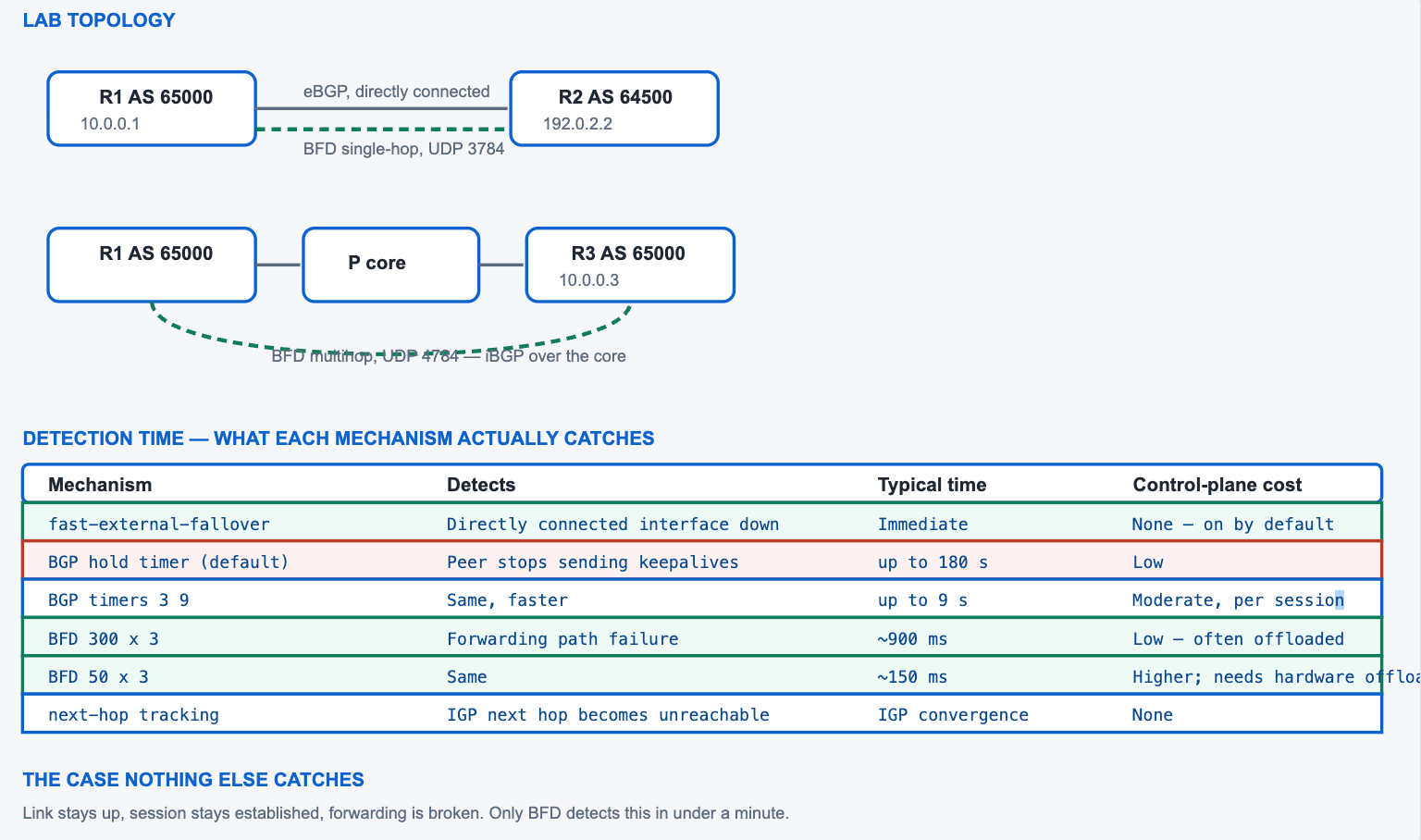
R1 in AS 65000 has a directly connected eBGP session to R2 in AS 64500 and an iBGP session to R3 across a core that R1 and R3 do not touch directly. That covers both BFD variants: single-hop for the eBGP link, defined in RFC 5881 and carried on UDP port 3784, and multihop for the iBGP session, defined in RFC 5883 and carried on UDP port 4784. The two are configured differently and behave differently, and using single-hop syntax for a multihop peering is the most common setup error.
! Baseline before any BFD - the sessions must already work
R1# show ip bgp summary | include ^192.0.2|^10.0.0
192.0.2.2  4 64500  84213 1102 1892441 0 0 3w2d  941208
10.0.0.3   4 65000   4102 4098   18924 0 0 3w2d    1204
!
! And the underlying path for the multihop session must be stable
R1# show ip route 10.0.0.3
  Known via "ospf 1", distance 110, metric 30
  * 10.1.0.2, from 10.0.0.3, 00:14:22 ago, via GigabitEthernet0/2
Platform capability
Whether BFD runs on the route processor or is offloaded to the line card or ASIC determines the intervals you can safely use. Software BFD at 50 milliseconds on twenty sessions is a way to make the control plane the thing that fails; hardware BFD at the same interval is routine. Check before choosing timers, because the failure mode of getting this wrong is sessions dropping during unrelated CPU events.
! What the platform supports
R1# show bfd summary
R1# show platform hardware ... ! platform-specific; check the guide
!
! A conservative starting point that works in software everywhere
!   interval 300  min_rx 300  multiplier 3   -> ~900 ms detection
! Move faster only after confirming hardware offload.
What BFD deliberately does not do
BFD answers exactly one question — is this path forwarding — and refuses to answer anything else. It carries no routing information, computes nothing, and has no opinion about which path should be used. That minimalism is why it can run at intervals a routing protocol never could, and it is also the limit of what deploying it buys you. A BFD session that stays up guarantees packets are traversing the path; it says nothing about whether the peer's routing table is correct, whether the path has degraded to unusable latency, or whether the traffic actually reaching the destination is the traffic you sent.
Two adjacent tools cover the rest. IP SLA measures path quality rather than mere reachability and can track latency, jitter, and loss thresholds. Object tracking connects either of them to a routing decision. Where the requirement is "fail over when the path degrades" rather than "fail over when the path breaks", BFD is the wrong instrument and IP SLA with a tracked object is the right one.
Echo mode and its requirement
BFD echo mode sends a packet addressed to the local router which the peer's forwarding plane loops back without involving its control plane, which tests the forwarding path more directly than an asynchronous exchange between two control planes. It uses UDP port 3785 and requires that ICMP redirects be disabled on the interface, since a redirect would divert the looped packet. Echo mode is enabled by default on many platforms where it is supported.
! Required for echo mode on the interface
interface GigabitEthernet0/1
 no ip redirects
!
! Echo is on by default where supported; disable it explicitly if needed
R1(config)# ! no bfd echo
!
! Confirm which mode a session is using
R1# show bfd neighbors details | include Echo|Mode
Why Is the BGP Hold Timer Not Enough?
What does each existing mechanism actually detect?
Fast external fallover, enabled by default, resets a directly connected eBGP session the moment the interface goes down — so a cut fibre or an unplugged cable is caught instantly, and nothing else is. The hold timer catches a peer that stops sending keepalives, which covers a peer that has crashed or been isolated, in up to 180 seconds by default. Next-hop tracking catches an external next hop becoming unreachable in the IGP, which covers an internal path failure at IGP convergence speed. None of the three catches the case where the link is up, the peer is alive and sending keepalives, and the forwarding path between them is broken.
A Deeper Dive into the Detection Gap
Fast external fallover, and its limit
bgp fast-external-fallover is on by default and applies only to single-hop eBGP sessions where the peer is reachable over a directly connected interface. When that interface transitions down, the session is torn down immediately rather than waiting for the hold timer. It is genuinely useful and costs nothing, and it does nothing at all when the interface stays up — which is the entire category BFD exists for.
! On by default; its absence from the config means enabled
R1# show running-config | include fast-external-fallover
! (nothing) = enabled
!
! Disabling it is occasionally right on an unstable access circuit
router bgp 65000
 ! no bgp fast-external-fallover
!
! Per-neighbour override, where one session should behave differently
router bgp 65000
 neighbor 192.0.2.2 fall-over
! ^ Enables next-hop tracking based fall-over for this neighbour,
!   which is a different mechanism from fast-external-fallover.
Lowering the BGP timers
Session timers are negotiated to the lower of the two ends' configured values. Reducing keepalive and hold to 3 and 9 seconds gives nine-second detection, which is a large improvement over 180 and is adequate for many designs. Below that, the keepalive generation and processing happen in the BGP process itself, competing with table processing — so a router receiving a burst of updates can miss a keepalive deadline and reset a session that had no problem.
! Per-neighbour timers; the session negotiates the lower values
router bgp 65000
 neighbor 192.0.2.2 timers 3 9
 ! keepalive 3, hold 9
!
! Or globally for all neighbours in this process
router bgp 65000
 timers bgp 10 30
!
! Verify what was actually negotiated
R1# show ip bgp neighbors 192.0.2.2 | include hold time|Keepalive
  Last read 00:00:01, last write 00:00:00, hold time is 9, keepalive interval is 3 seconds
  Configured hold time is 9, keepalive interval is 3 seconds
Why not simply set the timers to 1 and 3
Because BGP keepalives are produced and consumed by the BGP process, which is the same process that parses updates and runs best-path selection. On a router receiving a burst — a peer reconverging, a large withdrawal, a refresh — that process is busy, and a one-second keepalive schedule is the first thing to slip. The session then resets, which generates more work, which makes the next keepalive later still. Aggressive BGP timers on a router carrying volume are a positive feedback loop waiting for a trigger.
BFD avoids that by construction: a fixed-size packet on a fixed schedule, with no dependency on table size and, on most platforms, no dependency on the routing process at all. That separation is the entire architectural argument, and it is why nine seconds is a sensible floor for BGP timers and 300 milliseconds is a sensible starting point for BFD on the same session.
timers 1 3 reset during periods of heavy update activity, each reset producing a withdrawal and a re-advertisement that increases the load and makes further resets more likely. The physical path was never affected. Cause: keepalive generation shares a process with table processing, so a busy BGP process misses its own deadline. Confirm: show logging shows Hold timer expired resets correlating with show processes cpu history peaks rather than with any interface event. Fix: return BGP timers to something conservative — 10 and 30 is ample — and deploy BFD for the fast detection. The two mechanisms are complementary and BGP timers are the wrong one to push.The case nothing else catches
Consider an eBGP session across a metro Ethernet service. The provider's switch fails in a way that keeps both customer-facing ports up while forwarding stops between them. Your interface is up, so fast external fallover does not fire. Your peer is alive and its keepalives are queued but not arriving, so you wait the full hold time. Next-hop tracking sees a directly connected next hop that is still connected. Three minutes of traffic goes into the failure before BGP notices. BFD detects it in under a second, because BFD is testing the path rather than the peer's liveness.
| Failure | fast-external-fallover | Hold timer | Next-hop tracking | BFD |
|---|---|---|---|---|
| Directly connected interface down | Immediate | Would catch it eventually | Yes, via IGP | Sub-second |
| Peer router crashes | No — link may stay up | Up to hold time | Only if the IGP notices | Sub-second |
| Forwarding broken, link up | No | Up to hold time | No | Sub-second |
| Internal path to an iBGP peer fails | Not applicable | Up to hold time | IGP convergence | Sub-second, multihop |
| Peer control plane hung, forwarding fine | No | Up to hold time | No | Depends on mode |
| Provider switch fails mid-path | No | Up to hold time | No | Sub-second |
! Next-hop tracking, with a short trigger delay for faster reaction
router bgp 65000
 bgp nexthop trigger enable
 bgp nexthop trigger delay 1
!
R1# show ip bgp | include Next hop tracking
! Or inspect what is being tracked
R1# show ip bgp nexthop
How Do I Configure BFD for eBGP and iBGP?
What are the two configurations?
Single-hop BFD, for a directly connected eBGP session, is configured on the interface with bfd interval, min_rx, and multiplier, and registered with BGP using neighbor X fall-over bfd. Multihop BFD, for a session whose peer is several hops away, uses a BFD map and template rather than interface commands, because there is no single interface to attach it to, and is registered with neighbor X fall-over bfd multi-hop. Both require configuration on both routers. A BFD template is the maintainable way to express the timers once and reference them from many places.
A Deeper Dive into Configuration
Single-hop for the eBGP session
! ===== R1: interface timers, then register BGP as a client =====
interface GigabitEthernet0/1
 description ---- eBGP to R2 ----
 ip address 192.0.2.1 255.255.255.252
 bfd interval 300 min_rx 300 multiplier 3
 ! ~900 ms detection. Required for echo mode:
 no ip redirects
!
router bgp 65000
 neighbor 192.0.2.2 remote-as 64500
 neighbor 192.0.2.2 fall-over bfd
!
! ===== R2: mirror image. BFD needs both ends. =====
interface GigabitEthernet0/1
 ip address 192.0.2.2 255.255.255.252
 bfd interval 300 min_rx 300 multiplier 3
 no ip redirects
!
router bgp 64500
 neighbor 192.0.2.1 remote-as 65000
 neighbor 192.0.2.1 fall-over bfd
What the three numbers mean
interval is the minimum transmit interval in milliseconds — how often this router sends. min_rx is the minimum receive interval it is willing to accept, which constrains how fast the peer may send. multiplier is how many consecutive missed packets constitute a failure. Detection time is approximately the negotiated interval multiplied by the multiplier, where the negotiated interval is the larger of one end's transmit interval and the other's minimum receive interval.
! Detection time arithmetic
!   bfd interval 300 min_rx 300 multiplier 3
!   -> negotiated interval 300 ms, 3 missed = ~900 ms detection
!
!   bfd interval 50 min_rx 50 multiplier 3
!   -> ~150 ms detection, but needs hardware offload
!
! If the two ends differ, the SLOWER values win:
!   R1: interval 50  min_rx 50
!   R2: interval 300 min_rx 300
!   -> negotiated at 300 ms in both directions
Templates, so the timers live in one place
! Define the timers once
bfd-template single-hop FAST-EDGE
 interval min-tx 300 min-rx 300 multiplier 3
 echo
!
! Reference it from every interface that should use it
interface GigabitEthernet0/1
 bfd template FAST-EDGE
 no ip redirects
!
interface GigabitEthernet0/2
 bfd template FAST-EDGE
 no ip redirects
!
! Changing the template changes every interface using it
R1# show bfd-template
bfd-template single-hop FAST-EDGE
    Interval:  min-tx 300  min-rx 300  multiplier 3
Multihop for the iBGP session
An iBGP session between loopbacks crosses one or more routers, so there is no interface to attach BFD to. Multihop BFD uses a map that associates a source and destination address pair with a template, and BGP then registers against that map with the multi-hop keyword.
! ===== R1: multihop template and map =====
bfd-template multi-hop MH-CORE
 interval min-tx 500 min-rx 500 multiplier 3
!
bfd map ipv4 10.0.0.3/32 10.0.0.1/32 MH-CORE
!         destination        source        template
!
router bgp 65000
 neighbor 10.0.0.3 remote-as 65000
 neighbor 10.0.0.3 update-source Loopback0
 neighbor 10.0.0.3 fall-over bfd multi-hop
!
! ===== R3: the map is reversed =====
bfd-template multi-hop MH-CORE
 interval min-tx 500 min-rx 500 multiplier 3
!
bfd map ipv4 10.0.0.1/32 10.0.0.3/32 MH-CORE
!
router bgp 65000
 neighbor 10.0.0.1 remote-as 65000
 neighbor 10.0.0.1 update-source Loopback0
 neighbor 10.0.0.1 fall-over bfd multi-hop
IPv4 and IPv6 on the same link
A dual-stack link carries two BGP sessions and can carry two BFD sessions, one per address family, or share a single one depending on platform behaviour. The interface-level bfd interval command applies to both address families, but the client registration is per neighbour and therefore per family — neighbor 192.0.2.2 fall-over bfd registers the IPv4 session and does nothing for the IPv6 peer on the same wire. Forgetting the second registration produces a design where IPv4 fails over in under a second and IPv6 takes three minutes.
! One interface, one set of timers, TWO client registrations
interface GigabitEthernet0/1
 ip address 192.0.2.1 255.255.255.252
 ipv6 address 2001:db8:ffff::1/64
 bfd interval 300 min_rx 300 multiplier 3
 no ip redirects
!
router bgp 65000
 neighbor 192.0.2.2 remote-as 64500
 neighbor 192.0.2.2 fall-over bfd
 neighbor 2001:db8:ffff::2 remote-as 64500
 neighbor 2001:db8:ffff::2 fall-over bfd
 !
 address-family ipv4 unicast
  neighbor 192.0.2.2 activate
 exit-address-family
 address-family ipv6 unicast
  neighbor 2001:db8:ffff::2 activate
 exit-address-family
!
! Verify both are registered
R1# show bfd neighbors | include 192.0.2.2|2001:db8
Other clients of the same session
Registering additional protocols against an existing BFD session costs nothing extra on the wire, because they share the session rather than each creating one. That is the usual reason BFD is deployed at all — the IGP benefits at least as much as BGP does, and on a link carrying both, one BFD session serves both.
! Register the IGP against the same session
interface GigabitEthernet0/1
 ip ospf bfd
!
! Or for EIGRP, in named mode
router eigrp CORP
 address-family ipv4 unicast autonomous-system 100
  af-interface GigabitEthernet0/1
   bfd
  exit-af-interface
 exit-address-family
!
! Static route tracking, which needs no protocol at all
ip route static bfd GigabitEthernet0/1 192.0.2.2
ip route 10.9.0.0 255.255.0.0 GigabitEthernet0/1 192.0.2.2
!
! One session, several clients
R1# show bfd neighbors details | include Registered
 Registered protocols: BGP OSPF STATIC
Single-hop and multihop compared
| Property | Single-hop (RFC 5881) | Multihop (RFC 5883) |
|---|---|---|
| UDP destination port | 3784 | 4784 |
| Configured on | The interface | A bfd map plus a template |
| BGP registration | fall-over bfd |
fall-over bfd multi-hop |
| Echo mode available | Yes | No |
| Typical interval | 50–300 ms | 300–1000 ms |
| Typical use | Directly connected eBGP | iBGP between loopbacks; multihop eBGP |
| Hardware offload | Common | Less common |
How Do I Verify BFD Is Actually Doing the Detection?
What proves it rather than suggesting it?
Three checks. show bfd neighbors proves a session exists and is up between the expected addresses. show bfd neighbors details proves the negotiated intervals are what you configured and shows which clients are registered against it. And the definitive check is a failure test: break the path, and read the log — a BGP session that went down with reason BFD adjacency down was detected by BFD, while one that went down with Hold timer expired was not, whatever the configuration says. Timing the recovery against a continuous ping turns that into a number.
A Deeper Dive into Verification
Confirming the session exists
R1# show bfd neighbors

IPv4 Sessions
NeighAddr      LD/RD        RH/RS   State   Int
192.0.2.2      1/1          Up      Up      Gi0/1
10.0.0.3       2/2          Up      Up      N/A
! ^ Int N/A on the second line is normal for multihop.
!   'RH/RS Up' and 'State Up' are both required.
!
! A session stuck Down usually means one-sided configuration
! NeighAddr    LD/RD    RH/RS   State   Int
! 192.0.2.2    1/0      Down    Down    Gi0/1
! ^ RD of 0 = we have never heard from the peer. Check their config.
Confirming the timers and the clients
R1# show bfd neighbors details

IPv4 Sessions
NeighAddr      LD/RD   RH/RS   State   Int
192.0.2.2      1/1     Up      Up      Gi0/1
 Session state is UP and using echo function with 300 ms interval.
 Session Host: Software
 OurAddr: 192.0.2.1
 Handle: 1
 Local Diag: 0, Demand mode: 0, Poll bit: 0
 MinTxInt: 300000, MinRxInt: 300000, Multiplier: 3
 Received MinRxInt: 300000, Received Multiplier: 3
 Holddown (hits): 900(0), Hello (hits): 300(4821)
 Rx Count: 4820, Rx Interval (ms) min/max/avg: 296/304/300
 Tx Count: 4821, Tx Interval (ms) min/max/avg: 297/303/300
 Registered protocols: BGP
! ^ 'Holddown 900' is the detection time. 'Registered protocols'
!   confirms BGP is actually a client of this session.
Confirming BGP registered
R1# show ip bgp neighbors 192.0.2.2 | include BFD|fall
  Fall over configured for session
  BFD is configured. BFD peer is Up. Using BFD to detect fast fallover.
!
! If this says 'BFD is configured' but not 'BFD peer is Up', the
! BFD session is not established and BGP is still using the hold timer.
Reading the diagnostic code when a session goes down
BFD carries a diagnostic field explaining why a session transitioned down, and it distinguishes cases that look identical from BGP's perspective. Detection time expired means packets stopped arriving — a genuine path failure, or a false positive. Neighbour signalled session down means the far end tore it down deliberately, which points at a configuration change or a reload rather than a path problem. Administratively down means somebody disabled it. Reading the code before investigating saves chasing a path that was never broken.
R1# show bfd neighbors details | include Diag
 Local Diag: 1, Demand mode: 0, Poll bit: 0
!
! The values that matter, from RFC 5880 section 4.1:
!   0  No Diagnostic
!   1  Control Detection Time Expired   -> packets stopped arriving
!   3  Neighbor Signaled Session Down   -> the far end tore it down
!   5  Path Down                        -> a client reported the path bad
!   7  Administratively Down            -> somebody disabled it
!
! Diag 1 with no interface event is the false-positive signature.
R1# show logging | include BFD|LINK-3-UPDOWN
The failure test, which is the only real proof
! 1. Start a continuous ping to something behind the peer
R1# ping 8.8.8.8 repeat 1000 timeout 1
!
! 2. Break the forwarding path WITHOUT taking the interface down.
!    In a lab: shut the far side of an intermediate switch port,
!    or apply an ACL on the peer blocking the BFD and data path.
!
! 3. Read the reason in the log - this is the definitive answer
%BGP-5-NBR_RESET: Neighbor 192.0.2.2 reset (BFD adjacency down)
%BGP-5-ADJCHANGE: neighbor 192.0.2.2 Down BFD adjacency down
%BFD-6-BFD_SESS_DESTROYED: BFD-SYSLOG: bfd_session_destroyed,
 ld:1 neigh proc:BGP, handle:1 act
! ^ 'BFD adjacency down' = BFD detected it.
!   'Hold timer expired' would mean BFD did not, and you have work to do.
!
! 4. Count the lost pings - that is your real detection time
| Question | Command | Healthy indicator | Failure indicator |
|---|---|---|---|
| Does a BFD session exist? | show bfd neighbors |
State Up, non-zero RD | Absent, or RD of 0 |
| Are the timers what I configured? | show bfd neighbors details |
MinTxInt and Multiplier as set | Negotiated slower than intended |
| Is BGP a client? | show bfd neighbors details |
Registered protocols: BGP |
BGP absent from the list |
| Does BGP know about it? | show ip bgp neighbors X |
BFD peer is Up |
BFD is configured only |
| Did BFD detect the failure? | show logging |
BFD adjacency down |
Hold timer expired |
| How long did it take? | Continuous ping loss count | Close to the holddown value | Seconds or minutes |
Which BFD Settings Cause False Failures?
What goes wrong?
Five things. Intervals faster than the platform can sustain in software cause sessions to drop during unrelated CPU events. A supervisor switchover or an in-service software upgrade can interrupt BFD long enough to trip it, taking down BGP on a router that was recovering successfully. Echo mode without no ip redirects produces a session that never establishes. One-sided configuration produces the same. And a BFD session shared by several protocols means one false positive takes down more than BGP — including the IGP that BGP depends on.
A Deeper Dive into False Failures
Intervals faster than the platform
%BFD-6-BFD_SESS_DESTROYED timestamps with show processes cpu history; show bfd neighbors details shows Session Host: Software. Fix: raise the interval to 300 ms or more on software-based sessions, or move to a platform with hardware offload before using sub-100 ms values. Detection at 900 ms that never lies is better than detection at 150 ms that lies weekly.Supervisor switchover and ISSU
A stateful switchover is designed to preserve forwarding while the control plane fails over, and graceful restart exists so BGP survives it. BFD running in software on the route processor may not survive it, and if it drops, BGP is torn down by BFD even though everything the switchover was designed to protect worked correctly. Platforms differ in whether BFD is switchover-aware; on those where it is not, the interaction has to be understood before enabling BFD on a redundant chassis.
! Check whether BFD is offloaded and switchover-aware
R1# show bfd neighbors details | include Session Host
 Session Host: Hardware
! 'Software' on a redundant chassis is worth investigating before
! relying on BFD through a switchover.
!
! Graceful restart protects BGP through a switchover; BFD can defeat it
router bgp 65000
 bgp graceful-restart
!
! On platforms where the interaction is problematic, a slower BFD
! interval gives the switchover time to complete
interface GigabitEthernet0/1
 bfd interval 1000 min_rx 1000 multiplier 3
Echo mode and redirects
! Session will not come up, and the reason is not obvious
R1# show bfd neighbors
NeighAddr      LD/RD   RH/RS   State   Int
192.0.2.2      1/0     Down    Down    Gi0/1
!
R1# show running-config interface GigabitEthernet0/1 | include redirect
! (nothing) - redirects are enabled, which breaks echo mode
!
R1(config-if)# no ip redirects
!
R1# show bfd neighbors
192.0.2.2      1/1     Up      Up      Gi0/1
BFD toward a provider you do not control
An eBGP session to a transit provider can only use BFD if the provider configures it too, with compatible timers. Many will, on request, at values they standardise across their edge rather than values you choose — commonly a few hundred milliseconds rather than tens. Two consequences follow. The negotiated interval will be the slower of the two ends, so configuring 50 milliseconds locally against a provider running 300 gives you 300. And the provider's timers may change during their own maintenance without notice to you, which means the detection time you designed around is not a property you own.
Where the provider will not support BFD at all, the remaining options are lowering the BGP hold timer to something like nine seconds, relying on fast external fallover for the interface-down case, and accepting that a mid-path forwarding failure will take the full hold time. That is a materially weaker position and is worth stating explicitly in the design rather than leaving as an assumption.
! What was actually negotiated, which may not be what you configured
R1# show bfd neighbors details | include MinTxInt|Received Min
 MinTxInt: 50000, MinRxInt: 50000, Multiplier: 3
 Received MinRxInt: 300000, Received Multiplier: 3
! ^ We send every 50 ms; the peer will only accept 300 ms.
!   Effective detection is 900 ms, not 150 ms.
!
! Confirm the peer supports it at all before designing around it
R1# show bfd neighbors | include 192.0.2.2
! Nothing here after configuring both the interface and fall-over
! means the provider has not enabled their half.
Shared sessions and blast radius
One BFD session between two routers can serve BGP, OSPF, EIGRP, and HSRP simultaneously. That is efficient, and it means a false positive is not scoped to BGP — the IGP drops at the same instant, which withdraws the very next hops BGP would have used to reconverge. The combined effect of a spurious BFD failure is therefore larger than the sum of its parts, and it is a good reason to be conservative with intervals on sessions that many protocols depend on.
! See every protocol registered against one session
R1# show bfd neighbors details | include Registered
 Registered protocols: BGP OSPF EIGRP
! ^ A false positive here takes all three down together.
!
! Register clients deliberately rather than everywhere
router ospf 1
 ! bfd all-interfaces      <- broad; consider per-interface instead
!
interface GigabitEthernet0/1
 ip ospf bfd
Rolling BFD out safely
The failure mode of a bad BFD deployment is sessions dropping that would otherwise have stayed up, which is worse than the slow detection it replaced. That argues for a staged rollout rather than a global change. Start with one link at a conservative interval, leave it for a week and check whether the session flapped, then either tighten the interval or extend to more links at the same value. Because a false positive takes down every registered client at once, the soak period is not optional caution — it is the only way to discover that this platform under this load cannot service the interval you chose.
Two signals during the soak are worth watching. A BFD session that has recorded any destroy events without a corresponding physical failure is telling you the interval is too aggressive for this device. And the transmit and receive interval statistics show whether packets are actually going out on schedule; a max value far above the configured interval means the control plane is already struggling.
! During the soak: has this session ever gone down?
R1# show bfd neighbors details | include Rx Interval|Tx Interval|hits
 Holddown (hits): 900(0), Hello (hits): 300(288402)
 Rx Count: 288401, Rx Interval (ms) min/max/avg: 296/304/300
 Tx Count: 288402, Tx Interval (ms) min/max/avg: 297/303/300
! ^ Holddown hits 0 = never tripped. Max intervals close to the
!   configured 300 = the platform is keeping up comfortably.
!
! A struggling platform looks like this instead:
!  Holddown (hits): 900(4)
!  Tx Interval (ms) min/max/avg: 298/1840/312
! ^ Four trips and a 1.84-second transmit gap. Raise the interval.
!
! And check the log for destroys with no matching interface event
R1# show logging | include BFD_SESS_DESTROYED
Choosing an interval
| Interval / multiplier | Detection | Requires | Appropriate for |
|---|---|---|---|
| 1000 × 3 | ~3 s | Nothing special | Multihop iBGP; conservative starting point |
| 500 × 3 | ~1.5 s | Software is fine | iBGP across a core; slower WAN links |
| 300 × 3 | ~900 ms | Software is fine on most platforms | The usual choice for eBGP edge |
| 100 × 3 | ~300 ms | Hardware offload preferred | Data centre; latency-sensitive designs |
| 50 × 3 | ~150 ms | Hardware offload required | Only where measured and justified |
show bfd neighbors shows a session in Down state with a remote discriminator of zero, BGP reports BFD is configured but never BFD peer is Up, and failure detection continues to take the full hold time. Cause: BFD is a two-party protocol; the peer has not been configured, so no BFD packets ever arrive. Confirm: the RD field of 0 in show bfd neighbors is the definitive indicator. Fix: configure BFD on the peer with compatible timers. On a session to a provider, this requires them to agree — verify support before designing around it, because a one-sided BFD configuration provides no protection whatsoever.neighbor X fall-over bfd is what registers BGP as a client — configuring the interface timers alone does nothing for BGP.Conclusion
BFD exists because detection and routing want different implementations. BGP's timers are appropriate for a protocol whose job is to carry a large table with modest overhead, and they are the wrong instrument for noticing within a second that a path has stopped forwarding. Separating the two lets each be tuned for what it does: BGP keeps conservative timers and a large table, and a small fixed-size hello at a fixed interval — ideally on the line card — answers one question about one path.
The gap BFD uniquely fills is narrow and important. Fast external fallover already catches an interface going down, instantly and for free. Next-hop tracking already catches an internal path failing at IGP speed. Lowering the BGP hold timer to nine seconds is cheap and covers a peer that has gone silent. What none of them catches is the case where both routers are healthy, the interfaces are up, keepalives are being generated, and the path between them has stopped forwarding — and that is exactly the failure a provider's mid-path equipment produces.
Choose the interval as a risk decision rather than a performance target. Three hundred milliseconds with a multiplier of three gives sub-second detection, works in software on nearly every platform, and rarely lies. Fifty milliseconds gives 150-millisecond detection and needs hardware offload, a stable control plane, and a reason. Configure both ends, register BGP explicitly with fall-over bfd, and then run the failure test — because the only evidence that any of it works is a log line saying BFD adjacency down and a ping count that stopped where you expected.
Reference Notes
- RFC 5880, Section 6.8.4 — the Detection Time calculation as the negotiated receive interval multiplied by the Detect Mult.
- RFC 5880, Section 6.8.7 — negotiation of transmit and receive intervals, in which the slower of the two ends governs.
- RFC 5880, Section 6.2 — BFD session states Down, Init, Up, and AdminDown.
- RFC 5880, Section 6.4 — the Echo function, in which packets are looped back by the peer's forwarding plane.
- RFC 5881, Section 4 — single-hop BFD encapsulation using UDP destination port 3784, and echo packets using port 3785.
- RFC 5881, Section 5 — the requirement that single-hop BFD packets be sent with TTL 255 and checked on receipt.
- RFC 5883, Section 3 — multihop BFD encapsulation using UDP destination port 4784.
- RFC 5882, Section 3 — client protocols register with a BFD session and are notified when it changes state.
- RFC 4271, Section 4.4 and 10 — the KEEPALIVE message and Hold Timer, with a suggested hold time of 90 seconds.
- Cisco IOS-XE BFD Configuration Guide —
bfd interval,min_rx, andmultiplieron the interface for single-hop sessions. - Cisco IOS-XE BFD Configuration Guide —
bfd-templateandbfd mapfor multihop sessions, which have no interface to attach to. - Cisco IOS-XE BGP Configuration Guide —
neighbor fall-over bfdregisters BGP as a BFD client; themulti-hopkeyword selects the multihop session type.