

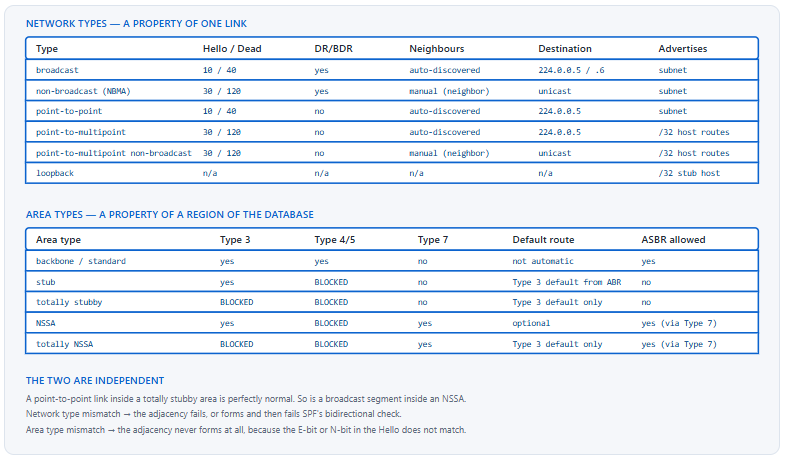
OSPF has two independent classification systems that people routinely conflate. Network types describe how OSPF behaves on a single link: whether it elects a designated router, whether it discovers neighbours automatically, what its Hello and Dead timers default to, and whether it sends to a multicast address or unicasts to a configured list. Area types describe which categories of LSA are allowed to enter a region of the topology, and therefore how much of the network's detail routers inside that region are permitted to see. One is a link property, the other is a routing-domain property, and mixing them up produces questions like "should I use a stub network type" that have no answer.
Both classifications matter for the same underlying reason: OSPF's default behaviour assumes a fully meshed broadcast Ethernet segment with a small database, and real networks are neither. Network types exist because a Frame Relay hub-and-spoke cloud, a point-to-point WAN circuit, and a switched LAN each need different neighbour discovery and different DR behaviour. Area types exist because a branch office with two uplinks and a low-memory router does not need to carry twelve thousand external routes to make a correct forwarding decision — a default route reaches the same conclusion. Choosing correctly in both dimensions is what turns OSPF from a protocol that works into a protocol that scales.
This article covers both systems and the mismatches that break adjacencies between them. Section one enumerates the network types and what each one changes. Section two dissects DR/BDR election — the mechanics, the non-preemptive behaviour that surprises people, and when you want to eliminate the election entirely. Section three covers the area types and exactly which LSAs each one blocks. Section four is the selection guide: stub versus totally stubby versus NSSA, and what each costs. Section five catalogues the mismatches, including the network-type pair that forms an adjacency and still fails to install routes.
What Are the OSPF Network Types and What Does Each One Change?
How many network types are there and what distinguishes them?
Six on Cisco platforms. Broadcast and non-broadcast both elect a DR and BDR; broadcast discovers neighbours automatically via multicast, while non-broadcast requires manually configured neighbours and unicasts to them. Point-to-point and point-to-multipoint both skip the election; point-to-point assumes exactly one neighbour on the subnet, while point-to-multipoint supports several and advertises each interface address as a /32 host route. Point-to-multipoint non-broadcast is point-to-multipoint with manual neighbours. Loopback is not really a link type — it causes the interface to be advertised as a /32 stub host route regardless of its configured mask.
A Deeper Dive into Each Network Type
Broadcast: the default on Ethernet
Broadcast is what an Ethernet interface gets automatically. Neighbours are discovered by sending Hellos to 224.0.0.5, a DR and BDR are elected, and all routers form full adjacencies with the DR and BDR only — with each other they stop at 2-WAY, which is normal and not a fault. The DR originates a Type 2 Network LSA describing the segment. Timers default to a 10-second Hello and a 40-second Dead interval.
! Broadcast is the default on Ethernet; set it explicitly where it matters
interface GigabitEthernet0/0
 ip address 10.0.1.1 255.255.255.0
 ip ospf network broadcast
 ip ospf 1 area 0
! Hello 10 / Dead 40 by default. Both must match the neighbour.
Point-to-point: no election, one neighbour
Point-to-point removes the DR election entirely and therefore removes the Type 2 Network LSA from the database for that link. On a routed link between two switches or routers this is almost always the right setting even though the media is Ethernet: it eliminates an unnecessary election, removes an LSA, and speeds convergence. Timers stay at 10 and 40, which is why this substitution is safe — an interface changed from broadcast to point-to-point keeps the same timers and the adjacency survives.
! Routed Ethernet link between two routers - no DR needed
interface GigabitEthernet0/1
 ip address 10.255.0.1 255.255.255.252
 ip ospf network point-to-point
 ip ospf 1 area 0
! Must be set on BOTH ends. Timers are unchanged (10/40), so the
! adjacency will still form if only one end is changed - see section 5.
Non-broadcast: manual neighbours on a partial mesh
Non-broadcast is the type for media that cannot multicast — classically Frame Relay and ATM. It keeps the DR election but requires you to list neighbours explicitly with the neighbor command under the OSPF process, because Hellos cannot be flooded. The DR must have direct connectivity to every other router on the segment, which on a hub-and-spoke cloud means the hub must be the DR. Timers default to 30 and 120.
! ===== HUB on a non-broadcast cloud =====
interface Serial0/0/0
 ip address 10.1.0.1 255.255.255.0
 ip ospf network non-broadcast
 ! Hub must win the DR election - spokes cannot reach each other
 ip ospf priority 10
 ip ospf 1 area 0
!
router ospf 1
 ! Hellos are unicast to each of these
 neighbor 10.1.0.2
 neighbor 10.1.0.3
!
! ===== SPOKE - must never become DR =====
interface Serial0/0/0
 ip address 10.1.0.2 255.255.255.0
 ip ospf network non-broadcast
 ip ospf priority 0
 ip ospf 1 area 0
Point-to-multipoint: the type that fixes partial meshes
Point-to-multipoint treats the segment as a collection of point-to-point links. There is no DR, neighbours are discovered automatically via multicast, and each router advertises its own interface address as a /32 host route rather than advertising the subnet. That last property is the key: because every router's address is reachable as a host route through whichever neighbour can actually reach it, spokes that cannot talk directly still get correct forwarding through the hub. It solves the partial-mesh problem that non-broadcast handles badly, at the cost of a larger routing table.
! ===== Point-to-multipoint on a partial mesh - no DR, no priority games
interface Serial0/0/0
 ip address 10.1.0.1 255.255.255.0
 ip ospf network point-to-multipoint
 ip ospf 1 area 0
! Timers become 30/120. Both ends must match.
!
! The /32 host routes this produces
R2# show ip route ospf | include 10.1.0
O        10.1.0.1/32 [110/64] via 10.1.0.1, 00:03:12, Serial0/0/0
O        10.1.0.3/32 [110/128] via 10.1.0.1, 00:03:12, Serial0/0/0
! ^ Spoke 3 is reachable via the hub, even with no direct circuit.
Loopback: the /32 that surprises people
An interface with network type loopback is advertised as a /32 stub host route regardless of the mask configured on it. Loopback interfaces get this type automatically, which is why a loopback configured as 10.10.10.1/24 shows up in the routing table as 10.10.10.1/32 everywhere else. If you need the actual subnet advertised, set the network type to point-to-point on the loopback.
! Default behaviour: /24 mask, but advertised as /32
interface Loopback0
 ip address 10.10.10.1 255.255.255.0
 ip ospf 1 area 0
! Elsewhere in the network:  O  10.10.10.1/32 [110/1] via ...
!
! Force the real prefix to be advertised
interface Loopback0
 ip ospf network point-to-point
! Now advertised as 10.10.10.0/24
How Does DR/BDR Election Work, and When Should You Avoid It?
What decides which router becomes DR?
Highest OSPF interface priority wins, and the tiebreaker is the highest router ID. Priority defaults to 1 and ranges from 0 to 255; a priority of 0 means the router will never become DR or BDR. The critical property is that the election is not preemptive: once a DR exists, a router that joins later with a better priority does not take over. It becomes DROTHER and waits. That is deliberate — DR changes are disruptive, because the Type 2 Network LSA is reoriginated and adjacencies are rebuilt — and it is the single most surprising behaviour in OSPF for engineers coming from HSRP, where preemption is available and commonly enabled.
A Deeper Dive into Election Mechanics and DR Avoidance
Why a DR exists at all
On a broadcast segment with n routers, full adjacencies between every pair would require n(n−1)/2 relationships — 45 for ten routers. The DR reduces that to n−1 by acting as a central point: every router forms a full adjacency with the DR and the BDR, and stops at 2-WAY with everyone else. The DR also originates the Type 2 Network LSA that represents the segment as a pseudo-node in the topology graph, which is what allows SPF to model a multi-access link correctly.
R1# show ip ospf neighbor

Neighbor ID  Pri  State       Dead Time  Address    Interface
2.2.2.2        1  FULL/DR     00:00:33   10.0.1.2   GigabitEthernet0/0
3.3.3.3        1  FULL/BDR    00:00:31   10.0.1.3   GigabitEthernet0/0
4.4.4.4        1  2WAY/DROTHER 00:00:38   10.0.1.4   GigabitEthernet0/0
! ^ 2WAY with another DROTHER is CORRECT, not a fault. Only the DR
!   and BDR reach FULL with everyone.
Controlling the election deliberately
Leaving priority at the default means the DR is whichever router has the highest router ID and came up first — a combination that is neither documented nor stable across reloads. Where a DR is genuinely needed, assign priorities explicitly to the two routers that should hold the roles and set priority 0 on everything else.
! ===== Deliberate DR/BDR placement on a broadcast segment =====
! Intended DR
interface GigabitEthernet0/0
 ip ospf priority 255
!
! Intended BDR
interface GigabitEthernet0/0
 ip ospf priority 200
!
! Everything else - never eligible
interface GigabitEthernet0/0
 ip ospf priority 0
The non-preemptive behaviour and how to apply a change
Changing a priority on a live segment has no effect until the current DR goes away. That leads to a specific and common confusion: the configuration says priority 255, the output says DROTHER, and both are correct. Forcing the change requires clearing the OSPF process on the current DR, or bouncing its interface — a disruptive operation that should be scheduled rather than typed casually.
! Priority changed but the role has not moved - this is expected
R4# show ip ospf interface GigabitEthernet0/0 | include State|Priority
  State DROTHER, Priority 255
  Designated Router (ID) 2.2.2.2, Interface address 10.0.1.2
!
! Force a re-election - disruptive, schedule it
R2# clear ip ospf process
! Or, less disruptively, bounce only the segment interface on the DR:
R2(config-if)# shutdown
R2(config-if)# no shutdown
ip ospf priority 255 is not the DR, and an old access switch with priority 1 holds the role. Traffic and LSA origination stay where nobody intended. Cause: OSPF DR election is non-preemptive; the incumbent keeps the role until it disappears. Confirm: show ip ospf interface <intf> shows a high local priority alongside DROTHER state and names the current DR. Fix: clear the OSPF process or bounce the interface on the current DR during a maintenance window. Better: avoid the problem by using ip ospf network point-to-point on routed links where no DR is needed at all.When to eliminate the election entirely
Most modern enterprise links that look like broadcast segments actually have exactly two routers on them: a routed link between two switches, a routed port to a firewall, a transit VLAN with one HSRP pair. On all of those, point-to-point network type is superior. It removes an election, removes the Type 2 LSA from the database, removes the possibility of an unintended DR, and converges marginally faster. Because the timers are identical to broadcast, the migration is non-disruptive if applied to both ends in quick succession.
| Situation | Routers on segment | Recommended network type | Reason |
|---|---|---|---|
| Routed link between two switches | 2 | point-to-point |
No DR value; removes a Network LSA |
| Transit VLAN with an HSRP pair and no other L3 | 2 | point-to-point |
Same as above |
| Server VLAN with several L3 devices | 3+ | broadcast with explicit priorities |
DR genuinely reduces adjacency count |
| Hub-and-spoke WAN, no spoke-to-spoke | 3+ | point-to-multipoint |
Handles the partial mesh; no DR to place |
| Fully meshed non-broadcast cloud | 3+ | non-broadcast with hub as DR |
DR reachability is satisfied |
| DMVPN hub-and-spoke (phase 1) | 3+ | point-to-multipoint on both |
Avoids DR election over the tunnel |
show ip ospf database network lists every Type 2 LSA in the area — one per multi-access segment with an elected DR. If that list is longer than the number of segments where a DR genuinely adds value, each surplus entry is a link that should be point-to-point.What Are the OSPF Area Types and Which LSAs Does Each Block?
What does each area type actually filter?
A standard area accepts everything: Type 1 Router, Type 2 Network, Type 3 Summary, Type 4 ASBR Summary, and Type 5 AS-External LSAs. A stub area blocks Types 4 and 5 and receives a Type 3 default route from the ABR instead. A totally stubby area blocks Types 3, 4, and 5, keeping only the default. An NSSA blocks Types 4 and 5 like a stub but permits Type 7 NSSA-External LSAs, which lets an ASBR live inside it; the ABR translates Type 7 to Type 5 on the way out. A totally NSSA blocks Type 3 as well, keeping the default plus locally originated Type 7s.
A Deeper Dive into Area Types and LSA Filtering
The LSA types being filtered
| LSA type | Name | Originated by | Flooding scope | Describes |
|---|---|---|---|---|
| 1 | Router | Every router | Single area | The router's own links and their costs |
| 2 | Network | The DR | Single area | A multi-access segment as a pseudo-node |
| 3 | Summary (network) | ABR | Single area | A prefix reachable in another area |
| 4 | Summary (ASBR) | ABR | Single area | How to reach an ASBR in another area |
| 5 | AS-External | ASBR | Entire domain except stub/NSSA | A prefix redistributed from outside OSPF |
| 7 | NSSA-External | ASBR inside an NSSA | The NSSA only | An external prefix, translated to Type 5 at the ABR |
Stub and totally stubby configuration
The area N stub command must be configured on every router in the area, including the ABR — the stub flag is carried in the Hello's options field and must match, or adjacencies will not form. The no-summary keyword that makes an area totally stubby is configured on the ABR only, because it changes what the ABR sends rather than what the internal routers accept.
! ===== STUB: on EVERY router in area 2, including the ABR =====
router ospf 1
 area 2 stub
!
! ===== TOTALLY STUBBY: 'no-summary' on the ABR ONLY =====
! ABR:
router ospf 1
 area 2 stub no-summary
! Internal routers keep plain 'area 2 stub' - adding no-summary
! there is harmless but meaningless, since they are not ABRs.
! What an internal router sees in a totally stubby area
R5# show ip route ospf
      10.0.0.0/8 is variably subnetted, 3 subnets, 2 masks
O        10.2.34.0/24 [110/2] via 10.2.45.1, 00:04:11, GigabitEthernet0/0
O*IA  0.0.0.0/0 [110/2] via 10.2.45.1, 00:04:11, GigabitEthernet0/0
! ^ One intra-area route and one default. That is the entire table.
!
R5# show ip ospf database | include Type-5|Summary
! Empty. No Type 3, 4, or 5 LSAs exist in this area at all.
NSSA: the area type that exists because stub is too strict
A stub area cannot contain an ASBR, because an ASBR originates Type 5 LSAs and Type 5 is precisely what a stub area blocks. That is a real constraint: a branch office with a stub area and a single redistributed static route to a local appliance cannot use stub. NSSA solves it by defining Type 7 — functionally identical to Type 5 but scoped to the NSSA — and having the ABR translate Type 7 into Type 5 as the prefix leaves.
! ===== NSSA on every router in area 3 =====
router ospf 1
 area 3 nssa
!
! ===== NSSA ABR: inject a default and block Type 3 as well =====
router ospf 1
 area 3 nssa no-summary default-information-originate
! Without default-information-originate, an NSSA gets NO default route
! automatically - unlike a stub area, which always does.
!
! ===== ASBR inside the NSSA - this is what stub forbids =====
router ospf 1
 area 3 nssa
 redistribute static subnets
! Type 7 inside the NSSA...
R6# show ip route ospf | include N2|N1
O N2     192.168.50.0/24 [110/20] via 10.3.56.1, 00:02:14, Gi0/0
!
! ...becomes Type 5 outside it
R1# show ip route ospf | include E2|E1
O E2     192.168.50.0/24 [110/20] via 10.0.1.2, 00:02:09, Gi0/0
!
! Which ABR is doing the translation?
R1# show ip ospf | include NSSA|translat
    It is an area border router
    Area 3
        It is a NSSA area
        Perform type-7/type-5 LSA translation
area 3 nssa translate type7 always forces a specific ABR to translate regardless, which is occasionally needed for deterministic behaviour but risks duplicates if applied to more than one ABR.The default route behaviour that differs between stub and NSSA
A stub area always receives a Type 3 default route from its ABR automatically. An NSSA does not — the ABR must be told with default-information-originate. This asymmetry catches people converting a stub area to an NSSA to accommodate a new ASBR: the conversion succeeds, adjacencies form, and then everything outside the area becomes unreachable because the default route silently disappeared.
area 3 stub to area 3 nssa on all routers to permit a local ASBR, internal routers lose reachability to everything outside the area. Adjacencies are FULL and the area looks healthy. Cause: a stub area receives a default route automatically; an NSSA does not. Confirm: show ip route 0.0.0.0 on an internal router returns no entry, and show ip ospf database | include 0.0.0.0 is empty. Fix: add default-information-originate to the area 3 nssa statement on the ABR. Include it in the change from the outset rather than discovering it afterwards.How Do I Choose Between Stub, Totally Stubby, and NSSA?
What is the decision rule?
Two questions decide it. Does this area contain an ASBR — a router redistributing anything into OSPF? If yes, stub and totally stubby are unavailable and you need NSSA or totally NSSA. Do routers inside the area need to distinguish between destinations in other areas, or is a default route sufficient? If a default suffices, add no-summary and use the totally variant. Everything else is secondary. Totally stubby gives the smallest database and the fastest convergence, and it is correct for the overwhelming majority of branch and access areas, because a branch with one or two uplinks makes the same forwarding decision with a default route as it would with the full table.
A Deeper Dive into Area Type Selection
The selection matrix
| Requirement | Stub | Totally stubby | NSSA | Totally NSSA | Standard |
|---|---|---|---|---|---|
| ASBR inside the area | No | No | Yes | Yes | Yes |
| Sees inter-area prefixes individually | Yes | No — default only | Yes | No — default only | Yes |
| Sees external prefixes from elsewhere | No | No | No | No | Yes |
| Gets a default route automatically | Yes | Yes | No — must be requested | Yes | No |
| Relative database size | Medium | Smallest | Medium | Small | Largest |
| Can carry a virtual link through it | No | No | No | No | Yes |
| Typical use | Rare — usually superseded by totally stubby | Branch / access areas | Branch with a local redistribution | Branch with local redistribution and no need for inter-area detail | Backbone and transit areas |
Why plain stub is rarely the right answer
A stub area blocks Types 4 and 5 but still carries every Type 3 Summary LSA — one per prefix in every other area. On a network with twenty areas and a few thousand internal prefixes, that is most of the database. The routers in a branch area cannot use that detail for anything, because all their traffic exits through the same one or two ABRs regardless of destination. Adding no-summary replaces all of it with a single default and changes no forwarding decision. Plain stub is the right choice only when an area has multiple ABRs leading to genuinely different parts of the network and internal routers need to pick between them per destination.
! Measure the difference before and after adding no-summary
R5# show ip ospf database database-summary
            OSPF Router with ID (5.5.5.5) (Process ID 1)

Area 2 database summary
  LSA Type      Count    Delete   Maxage
  Router        4        0        0
  Network       1        0        0
  Summary Net   1847     0        0
  Summary ASBR  0        0        0
  Type-7 Ext    0        0        0
  Total         1852     0        0
!
! ...after 'area 2 stub no-summary' on the ABR:
  Router        4        0        0
  Network       1        0        0
  Summary Net   1        0        0
  Total         6        0        0
! 1852 LSAs to 6, with no change to any forwarding decision.
Multiple ABRs and suboptimal routing under a totally stubby area
The one real cost of no-summary is that internal routers can no longer choose an ABR per destination — they choose the closest ABR by cost and send everything there. If the two ABRs lead toward genuinely different parts of the network, some traffic will take a longer path than necessary. Whether that matters depends on the topology: with two ABRs into the same backbone it is irrelevant, and with two ABRs into different regions it can be significant.
show ip route 0.0.0.0 shows a single next hop where two existed before; traceroute shows the extra backbone hops. Fix: either revert to plain stub so Type 3 detail returns, or keep no-summary and leak the specific prefixes that matter back in with an area filter list, accepting a small database plus a few explicit exceptions.Summarisation as the middle path
Before choosing between full Type 3 detail and a bare default, consider summarising at the ABR. area <n> range collapses the prefixes an ABR advertises out of an area, and summary-address does the equivalent for external prefixes at an ASBR. A stub area receiving twelve well-chosen summaries instead of eighteen hundred individual Type 3s keeps per-destination ABR selection while shrinking the database by two orders of magnitude.
! ===== ABR: summarise what leaves area 1 =====
router ospf 1
 area 1 range 10.1.0.0 255.255.0.0
 ! Suppress a range entirely rather than advertising it
 area 1 range 10.1.99.0 255.255.255.0 not-advertise
!
! ===== ASBR: summarise redistributed externals =====
router ospf 1
 summary-address 192.168.0.0 255.255.0.0
!
! ===== ABR: filter Type 3 into or out of an area =====
ip prefix-list ONLY-DC seq 5 permit 10.100.0.0/16
router ospf 1
 area 2 filter-list prefix ONLY-DC in
! 'in' filters Type 3 LSAs entering area 2 from other areas.
Constraints that eliminate options before you choose
- Area 0 cannot be a stub or an NSSA of any kind. The backbone must carry everything.
- A virtual link cannot transit a stub, totally stubby, or NSSA area, because the transit area must carry full LSA information.
- Every router in a stub or NSSA area must agree on the area type, because the E-bit and N-bit in the Hello are compared and a mismatch prevents the adjacency from forming.
- An area containing an ASBR cannot be stub or totally stubby, no matter how convenient that would be.
no-summaryis meaningful only on an ABR; configuring it on an internal router changes nothing.
Which Network-Type and Area-Type Mismatches Break Adjacencies?
What are the mismatch symptoms and how do they differ?
Area type mismatches prevent the adjacency entirely: the stub E-bit and NSSA N-bit are compared in the Hello, and a disagreement means the Hello is discarded and no neighbour ever appears. Network type mismatches split into two categories. Where the default timers differ — broadcast at 10/40 against point-to-multipoint at 30/120 — the Hello parameters do not match and no adjacency forms. Where the timers happen to agree — broadcast at 10/40 against point-to-point at 10/40 — the adjacency reaches FULL and looks healthy, but one router describes the link as a transit network in its Router LSA while the other describes it as point-to-point, SPF's bidirectional check fails, and routes across that link are never installed.
A Deeper Dive into Mismatch Diagnosis
The broadcast versus point-to-point trap
This is the most instructive failure in the whole topic because everything looks correct. The neighbour is FULL. The interfaces are up. The database contains LSAs from both routers. And the prefix on the far side is simply absent from the routing table. The cause is in the Router LSAs: the broadcast side advertises a link of type 2 (transit network) pointing at a DR address, while the point-to-point side advertises a link of type 1 (point-to-point) pointing at the neighbour's router ID. SPF requires each link to be confirmed from both directions, and these two descriptions do not correspond, so the link is excluded from the shortest-path tree.
! Symptom: FULL adjacency, no route
R1# show ip ospf neighbor
Neighbor ID  Pri  State    Dead Time  Address     Interface
2.2.2.2        1  FULL/  -  00:00:36   10.0.1.2    GigabitEthernet0/0
!
R1# show ip route 10.2.0.0
% Network not in table
!
! Diagnosis: compare the network type on both ends
R1# show ip ospf interface GigabitEthernet0/0 | include Network Type
  Process ID 1, Router ID 1.1.1.1, Network Type BROADCAST, Cost: 1
!
R2# show ip ospf interface GigabitEthernet0/0 | include Network Type
  Process ID 1, Router ID 2.2.2.2, Network Type POINT_TO_POINT, Cost: 1
! ^ Timers both 10/40 so the adjacency formed. SPF still rejects the link.
! The evidence in the database - two incompatible descriptions
R1# show ip ospf database router adv-router 1.1.1.1 | begin Link connected
    Link connected to: a Transit Network
     (Link ID) Designated Router address: 10.0.1.1
     (Link Data) Router Interface address: 10.0.1.1
!
R1# show ip ospf database router adv-router 2.2.2.2 | begin Link connected
    Link connected to: another Router (point-to-point)
     (Link ID) Neighboring Router ID: 1.1.1.1
     (Link Data) Router Interface address: 10.0.1.2
! ^ One says transit network, the other says point-to-point.
!   No Type 2 Network LSA exists to reconcile them.
Timer mismatches, which fail cleanly
When the network types have different default timers, the failure is honest: no neighbour appears at all, and the debug names the problem. This is the easier case precisely because nothing partially works.
R1# debug ip ospf hello
OSPF-1 HELLO Gi0/0: Rcv hello from 2.2.2.2 area 0 10.0.1.2
OSPF-1 HELLO Gi0/0: Mismatched hello parameters from 10.0.1.2
OSPF-1 HELLO Gi0/0: Dead R 120 C 40, Hello R 30 C 10  Mask R 255.255.255.0 C 255.255.255.0
! ^ R = received, C = configured. Remote is 30/120 (point-to-multipoint),
!   local is 10/40 (broadcast). Match the network type, or match the timers.
Area type mismatches
R5# debug ip ospf adj
OSPF-1 ADJ   Gi0/0: Rcv pkt from 10.2.45.1 : Mismatched Area Options
 0x12 and 0x02
! Options byte: E-bit = external capability, N-bit = NSSA capability.
! One router thinks the area is standard, the other thinks it is stub.
!
! Confirm what each router believes about the area
R5# show ip ospf | begin Area 2
    Area 2
        Number of interfaces in this area is 2
        It is a stub area
          generates stub default route with cost 1
!
R4# show ip ospf | begin Area 2
    Area 2
        Number of interfaces in this area is 3
! ^ No 'It is a stub area' line - R4 was never configured. Fix R4.
| Mismatch | Adjacency outcome | Symptom | Confirming command | Fix |
|---|---|---|---|---|
| Broadcast vs point-to-point | Forms, reaches FULL | Routes never install across the link | show ip ospf interface | include Network Type both ends |
Match the type on both ends |
| Broadcast vs point-to-multipoint | Never forms | No neighbour appears | debug ip ospf hello — mismatched hello parameters |
Match the type, or manually align timers |
Non-broadcast, no neighbor statements |
Never forms | No neighbour; no error | show ip ospf neighbor is empty |
Add neighbor under the process on the hub |
| Non-broadcast, spoke elected DR | Forms partially | Some spokes cannot see others' LSAs | show ip ospf interface DR address |
ip ospf priority 0 on all spokes |
| Stub flag on some routers only | Never forms | No neighbour on that segment | debug ip ospf adj — Mismatched Area Options |
Configure area N stub on every router |
| NSSA vs stub | Never forms | No neighbour | show ip ospf area description lines |
Agree on one area type domain-wide |
| ASBR inside a stub area | Forms; redistribution silently fails | Redistributed prefixes never appear anywhere | show ip ospf database | include Type-5 empty |
Convert the area to NSSA |
Conclusion
The two classification systems answer different questions and it is worth holding them apart deliberately. Network type answers "how does OSPF behave on this piece of wire" — whether to elect a designated router, whether to discover neighbours or be told about them, which timers to use, and whether to advertise a subnet or a set of host routes. Area type answers "how much of the database may enter this region" — which LSA classes the ABR will pass, and whether a default route stands in for the detail that was removed. A link has a network type; an area has an area type; and no amount of configuration on one will fix a problem originating in the other.
What makes both worth mastering is that the defaults are wrong for most modern topologies in the same direction. Ethernet defaults to broadcast, which elects a designated router on links that have exactly two routers and therefore gain nothing from one — point-to-point is better on nearly every routed inter-device link. Areas default to standard, which floods every branch office with a database it cannot use — totally stubby is better on nearly every access area. Both changes shrink the database, remove failure modes, and speed convergence, and both are one line.
The diagnostic habit that follows is to check network type on both ends of a link as routinely as you check timers and area ID, because it is the only OSPF parameter that can be mismatched while the adjacency still reports FULL. Build a lab with a hub and two spokes, run it as non-broadcast and then as point-to-multipoint and compare the routing tables; convert an area from standard to stub to totally stubby and watch show ip ospf database database-summary collapse; then deliberately set one end of a link to point-to-point and watch a perfectly healthy FULL adjacency carry no routes at all. That last output pattern is the one that will save you the most time.
External Links Recommendations
- RFC 2328 — OSPF Version 2: Section 9 defines interface types and the DR election, and Section 3.6 defines stub areas.
- RFC 3101 — The OSPF Not-So-Stubby Area (NSSA) Option: Type 7 LSAs, the P-bit, and Type 7 to Type 5 translation.
- Cisco — Initial Configuration for OSPF over Non-Broadcast Links: worked examples for non-broadcast and point-to-multipoint on partial meshes.
- Cisco — What Are OSPF Areas and Virtual Links?: area types, LSA filtering behaviour, and the constraints on each.
- Cisco — OSPF Neighbor Problems Explained: the full list of Hello parameters compared during adjacency formation.
- Cisco IOS-XE OSPF Configuration Guide: current syntax for
ip ospf network,area stub,area nssa,area range, andfilter-list. - Cisco Learning Network — CCIE Enterprise Infrastructure: current blueprint and lab equipment list.
Reference Notes
- RFC 2328, Section 9 — OSPF interface types: broadcast, NBMA, point-to-point, point-to-multipoint, and virtual link.
- RFC 2328, Section 9.4 — Designated Router election: highest router priority wins, router ID breaks ties, and the election is non-preemptive.
- RFC 2328, Section 9.5 — a router with interface priority 0 is ineligible to become Designated Router or Backup Designated Router.
- RFC 2328, Section 10.5 — Hello packet parameters that must match for an adjacency: Hello interval, Router Dead interval, network mask on broadcast media, area ID, and the E-bit.
- RFC 2328, Section 3.6 — stub areas: Type 5 AS-External LSAs are not flooded into them, and an ASBR may not reside within one.
- RFC 2328, Section 12.4.1 — Router LSA link types, including type 1 (point-to-point to another router) and type 2 (connection to a transit network).
- RFC 2328, Section 16.1 — the SPF calculation's bidirectional check requiring each link to be described consistently by both endpoints.
- RFC 2328, Appendix A.4.5 — the Type 3 Summary LSA used by an ABR to inject a default route into a stub area.
- RFC 3101 — NSSA definition: Type 7 LSAs are flooded only within the NSSA, and the ABR translates them to Type 5 on egress.
- RFC 3101, Section 3.1 — the N-bit in the Hello options field, which must match between neighbours in an NSSA.
- Cisco IOS-XE OSPF Configuration Guide —
ip ospf network point-to-multipointadvertises interface addresses as /32 host routes and uses 30-second Hello and 120-second Dead intervals. - Cisco IOS-XE OSPF Configuration Guide —
area N stub no-summaryandarea N nssa no-summaryare configured on the ABR only;area N nssa default-information-originateis required for an NSSA to receive a default route.