


Staring at a wall of cybersecurity acronyms—SIEM, PKI, Zero Trust, Kali Linux, Python, CompTIA, CISSP—is enough to make anyone freeze before they even start. If you’re coming from zero IT background, the hardest part isn’t the technical material itself; it’s figuring out what actually matters right now and what you can safely ignore for the next six months. Most beginners burn out because they jump straight into advanced hacking tools before they understand how two computers talk to each other over a network.
If I were mapping out your path from scratch, I wouldn’t hand you a list of fifty random courses. Below, I’ve laid out a practical six-month cybersecurity roadmap that covers the exact skill sequence I’d follow, how to choose between defensive and offensive career tracks, which certifications are worth your money, how to pass your exams on the first try, what to build in your home lab, and a weekly tracker template you can copy today.
Disclosure: this article features SPOTO practice tests, which are promoted by the publisher.
Table of Contents
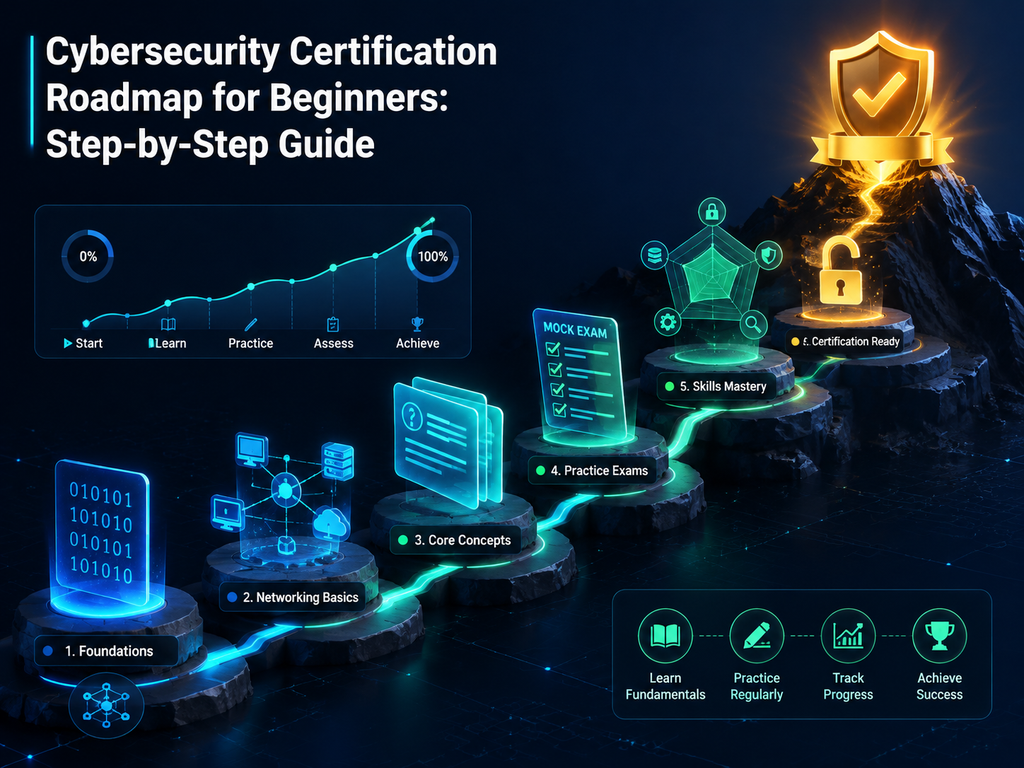
A Step-by-Step 6-Month Cybersecurity Learning Plan From Scratch
If you don’t have prior IT experience, trying to learn cybersecurity before learning core IT is like trying to perform surgery before taking anatomy. Security is really just the art of understanding how systems work well enough to see how they can be abused or defended. Here is the chronological four-phase progression I’d follow over twenty-four weeks, studying roughly ten to twelve hours a week.
Phase 1: Networking Fundamentals (Weeks 1–6)
Every cyberattack and every defensive alert travels across a network, so this is where I’d spend your first six weeks. Focus on how data moves from one endpoint to another:
* The OSI and TCP/IP Models: Learn how data is encapsulated from the application layer down to physical cables, and memorize what lives at Layer 2 (MAC addresses, switches), Layer 3 (IP addresses, routers), and Layer 4 (TCP/UDP ports).
* IPv4/IPv6 and Subnetting: Practice reading CIDR notation (/24, /16), distinguishing private from public IP ranges, and理解 how NAT and VLANs segment traffic.
* Core Network Protocols: Understand the normal behavior of DNS, DHCP, HTTP/HTTPS, SSH, RDP, SMB, and ARP—along with their default port numbers—so you can recognize abnormal traffic later.
* Packet Analysis Basics: Download Wireshark, capture your own home Wi-Fi traffic, and watch a TCP three-way handshake (SYN, SYN-ACK, ACK) and a DNS query happen in real time.
* What I’d skip right now: Don’t lose weeks memorizing complex enterprise routing protocols like BGP or OSPF configuration syntax. You only need to understand how packets move and how firewalls filter them.
Phase 2: Operating Systems and Identity Administration (Weeks 7–12)
Once packets reach a machine, the operating system takes over. You need to feel comfortable beneath the graphical interface on both Linux and Windows:
* Linux Command Line: Spend three weeks inside an Ubuntu or Kali virtual machine using only the terminal. Master file navigation, user and group permissions (chmod, chown, sudo), process inspection (ps, top, systemctl), network utilities (ss, netstat, ip, curl), and system logs inside /var/log/.
* Windows Internals and Active Directory: Most corporate networks run on Windows Active Directory. Learn how Domain Controllers, Group Policy Objects (GPOs), NTFS permissions, the Windows Registry, and authentication protocols (Kerberos and NTLM) work.
* Windows Event Logs: Open Windows Event Viewer and learn to spot key security events, such as Event ID 4624 (successful logon), 4625 (failed logon), 4688 (new process created), and 4720 (user account created).
Phase 3: Security Fundamentals and Threat Mechanics (Weeks 13–18)
With networking and OS internals under your belt, security concepts will click into place instead of feeling like abstract vocabulary:
* Core Security Principles: Study the CIA Triad (Confidentiality, Integrity, Availability), Zero Trust architecture, defense-in-depth, and Identity and Access Management (least privilege, RBAC, MFA).
* Common Attack Vectors and Defenses: Learn how phishing, credential stuffing, malware types, SQL injection, cross-site scripting (XSS), privilege escalation, and lateral movement actually work—and which controls stop them.
* Applied Cryptography: Understand the difference between symmetric encryption, asymmetric encryption, and hashing, plus how Public Key Infrastructure (PKI) and TLS certificates secure web traffic.
* Frameworks and Governance: Get familiar with the MITRE ATT&CK matrix (tactics, techniques, and procedures), the NIST Cybersecurity Framework, and the phases of the incident response lifecycle.
Phase 4: Scripting, Log Analysis, and Cloud Basics (Weeks 19–24)
In your final six weeks, tie everything together with automation and modern infrastructure:
* Foundational Scripting: You don’t need to be a software developer, but you should be able to read and write basic Python, Bash, and PowerShell scripts to parse log files, query threat-intelligence APIs, and automate repetitive tasks.
* SIEM and Log Correlation: Learn how a Security Information and Event Management (SIEM) platform ingests logs from firewalls, endpoints, and cloud services to trigger alerts when suspicious patterns appear.
* Cloud Security Essentials: Understand the Shared Responsibility Model in AWS or Azure, focusing on cloud identity permissions (IAM policies), storage bucket misconfigurations, and virtual network security groups.
Key takeaway: Master networking and operating systems in your first twelve weeks; without them, every security tool you touch will feel like a black box.
Blue Team vs. Red Team: Choosing a Realistic Entry-Level Target
Around the halfway mark of your roadmap, you’ll need to decide whether to aim for defensive security (Blue Team) or offensive security (Red Team). Movies and social media glamorize ethical hacking, which leads most beginners to chase penetration testing first—often running straight into a brick wall during their job search. Here is how the two tracks actually compare when you’re hunting for your first role.
| Comparison Criteria | Blue Team (Defensive / SOC Track) | Red Team (Offensive / Pentesting Track) |
|---|---|---|
| Primary Goal | Monitor systems, detect intrusions, triage alerts, investigate incidents, and harden infrastructure. | Simulate real-world cyberattacks to uncover exploitable vulnerabilities before malicious actors do. |
| Typical First Job Titles | Tier 1 SOC Analyst, Junior Security Operations Analyst, Information Security Analyst, IT Security Specialist. | Junior Penetration Tester, Associate Security Consultant, Vulnerability Assessor. |
| Core Daily Skills | Log analysis, SIEM querying, packet inspection, phishing triage, endpoint detection (EDR), and incident documentation. | Network enumeration, web application exploitation, Active Directory privilege escalation, and client report writing. |
| Common Tools | Splunk, Microsoft Sentinel, Wazuh, CrowdStrike, Wireshark, VirusTotal, TheHive. | Nmap, Burp Suite, Metasploit, BloodHound, Hashcat, Impacket, Cobalt Strike. |
| Entry-Level Hiring Volume | High. Almost every medium-to-large organization and Managed Security Service Provider (MSSP) needs 24/7 monitoring staff. | Low. Companies rarely hire inexperienced beginners to test production networks; most roles expect prior IT/sysadmin or SOC experience. |
| Best Starter Credentials | CompTIA Security+, ISC2 CC, Security Blue Team Level 1 (BTL1), CompTIA CySA+. | eJPT (Junior Penetration Tester), CompTIA PenTest+, PJPT, OSCP (intermediate-to-advanced). |
| Honest Trade-Off | Shift work or alert fatigue can happen at busy MSSPs, but the path to getting hired is much wider and more predictable. | Exciting technical puzzles, but fierce competition for very few junior seats—and roughly half your week is still spent writing formal reports. |
My personal take: If you’re starting from scratch and want to land a paid cybersecurity job within six to nine months, I’d target the Blue Team (SOC Analyst) path without hesitation. There are vastly more entry-level defensive openings than offensive ones, and spending a year or two reading real attacker logs in a SOC is actually the best springboard if you eventually decide to pivot into penetration testing.
The Best Entry-Level Cybersecurity Certifications in Order
Once you know your target role, certifications help you prove your baseline knowledge to hiring managers and get past automated HR resume screens. The mistake I see all the time is buying random exam vouchers out of order. Here is how the top beginner credentials stack up and the sequence I’d recommend.
| Certification & Code | Recommended Sequence | Core Focus Area | Exam Format & Length | Who It’s Best For | Honest Trade-Off |
|---|---|---|---|---|---|
| ISC2 Certified in Cybersecurity (CC) | Step 1 (Optional Starter) | High-level security principles, governance, access controls, and network security basics. | 100 multiple-choice questions; 2 hours (Computer-Adaptive). | Complete beginners who have never sat for a proctored IT exam and want an early confidence boost. | Light on deep technical troubleshooting; carries less weight with HR filters than Security+. |
| CompTIA Network+ (N10-009) | Step 2 (IT Foundation) | Network design, subnetting, routing/switching, wireless security, cloud networking, and troubleshooting. | Up to 90 questions (MCQ + Performance-Based Questions); 90 minutes. | Career switchers with no prior IT help-desk or networking experience who need a rock-solid technical base. | Costs nearly as much as Security+, so budget-conscious learners sometimes study the material without sitting the exam. |
| Cisco CCNA (200-301) | Step 2 Alternative (Deep Networking) | Enterprise routing and switching, IP connectivity, network access, Cisco CLI configuration, and network security. | ~100–120 questions (MCQ + drag-and-drop + simlets); 120 minutes. | Learners who want to enter security through a Network Administrator or Network Security Engineer role. | Much steeper learning curve than Network+ and requires heavy command-line lab practice. |
| CompTIA Security+ (SY0-701 / SY0-801) | Step 3 (Core Anchor) | Threats, vulnerabilities, mitigations, security architecture, SOC operations, Zero Trust, and risk management. | Up to 90 questions (MCQ + Performance-Based Questions); 90 minutes. | Every cybersecurity beginner—this is the single most requested baseline certification in entry-level job descriptions. | Broad rather than deep; passing proves you know the concepts, not that you’ve configured production tools. |
| Security Blue Team Level 1 (BTL1) | Step 4 (Practical Proof) | Phishing analysis, digital forensics, SIEM investigation, threat intelligence, and incident response. | 24-hour practical hands-on incident response lab exam. | Candidates who already hold Security+ and want to prove to a SOC manager that they can actually investigate alerts. | Less recognized by generalist HR recruiters than CompTIA, though technical hiring managers respect it. |
My personal take: If I were working with a tight budget, I’d study the entire CompTIA Network+ (N10-009) syllabus (or take the CCNA route if you love networking), and then put my exam voucher budget straight into CompTIA Security+—just keep in mind that while SY0-801 launched in late 2026, the SY0-701 exam remains available until June 2027, so pick one version and stick to its syllabus. Once I’ve finished working through the study guide for Network+, CCNA, or Security+, I’d move straight to timed mock exams, and SPOTO practice tests are what I’d reach for to uncover weak domains before booking an expensive Pearson VUE exam slot.
How to Prepare For and Pass Beginner Certification Exams Like Security+
Passing a certification exam like CompTIA Security+ or Network+ on the first try comes down to how you transition from passive studying to active testing. Entry-level exams rarely ask simple definitions anymore; they give you a four-sentence workplace scenario and ask for the best or first action to take. Here is the exact three-step prep process I recommend.
Step 1: Turn the Official Exam Syllabus Into Your Study Checklist
Before you watch a single video, download the official exam objectives PDF from the vendor’s website. Go through it topic by topic and highlight every term in green (I can explain this to a friend), yellow (I vaguely recognize this), or red (never heard of it). For the first three to four weeks, pair one concise video series with one written study guide, and focus your daily sixty-to-ninety-minute study blocks on turning those red and yellow objectives green.
Step 2: Validate Your Readiness With the Right Practice Exam Platform
Watching videos creates an illusion of competence—everything makes sense while the instructor is talking, but timed scenario questions feel completely different. Starting three weeks before your planned exam date, shift at least half of your study hours into practice exams. Here is how I’d choose among the leading prep platforms:
- SPOTO practice tests (My Top Pick for Structured Exam Readiness): If I were preparing for a foundational IT or security exam like Security+, Network+, or CCNA, this is my top recommendation for bridging the gap between textbook theory and exam-day performance. First, beginners studying on their own inevitably hit roadblocks on dense topics like PKI certificate chains, subnet calculations, or IAM access models; SPOTO provides expert one-on-one tutoring, giving you direct access to experienced certification tutors who can walk you through difficult questions and close your knowledge gaps. Second, their comprehensive question bank and exam simulation feature exam-aligned questions that follow the official syllabus and mirror the difficulty, phrasing, and scenario-based formats of the real exam. Third, when certification versions shift, their fast and free updates ensure your question bank stays aligned with the latest exam requirements so you don’t waste time on retired objectives. With over 20 years of experience in IT certification training, they have a long-running track record across multiple certification programs—and you can check reviews from exam candidates on Trustpilot to see how other test-takers describe their experience.
- Best for / less ideal if: It’s the best fit if you want realistic exam simulations backed by personalized one-on-one tutor support and rapid syllabus updates; it’s less ideal if you’re still in Week 1 of learning basic vocabulary and haven’t covered the core study guide yet.
- Boson ExSim-Max: Boson has a strong reputation for tough technical questions and thorough written explanations that break down why the right answer is correct and why each distractor fails.
- Best for / trade-off: A solid option if you enjoy deep-dive reading through documentation references after every question, though it lacks live one-on-one tutoring if an explanation still leaves you stuck.
- Vendor-Official Practice Tools (CompTIA CertMaster Practice / ISC2 Official App): Created by the certification bodies themselves, these platforms map one-to-one against the official courseware modules.
- Best for / trade-off: Worth using if you already bought an all-in-one official voucher bundle through school or an employer, though buying them standalone is expensive and the drill style can feel more repetitive than full exam simulations.
- Jason Dion / Professor Messer Practice Exams: Widely used, budget-friendly question sets focused specifically on the CompTIA trifecta.
- Best for / trade-off: Great as a low-cost baseline check if you are already using their free or low-cost video courses, though the question pools are smaller and don’t offer interactive tutoring or coverage if you branch into Cisco or multi-vendor tracks.
Step 3: Run the “Wrong-Answer Autopsy” Loop
Don’t just take mock exams to see your score and immediately click retry—that only teaches you to memorize answer letters. Instead, take a full-length timed practice test in one sitting without looking at your notes. Afterward, log every single missed or guessed question and ask yourself three things:
* Did I miss this because I didn’t know a technical term or acronym?
* Did I miss a keyword in the question prompt (like MOST cost-effective, FIRST step, or preventative vs. detective)?
* Why were the other three options wrong for this specific scenario?
Spend two days reviewing only the weak domains identified by your autopsy before taking your next timed test. Once you’re consistently clearing 85% on fresh timed runs with fifteen minutes to spare, book your exam.
Key takeaway: Never sit for a certification exam based on how many hours of video you watched; book your test only after timed, scenario-based practice exams prove you can apply the material under pressure.
5 Home Lab Projects and Hands-On Platforms to Build Your Portfolio
A certification proves you understand security concepts, but a home lab portfolio proves you can actually do the job. When you apply for entry-level roles without prior IT work history, having two or three documented lab projects on your resume gives interviewers concrete technical work to ask you about. Here are the five hands-on platforms and home lab builds I’d prioritize.
- TryHackMe (SOC Level 1 and Pre-Security Learning Paths)
- What it is: An interactive, browser-based training platform that spins up vulnerable and defensive virtual machines directly in your web browser alongside guided lessons.
- Why I recommend it: If your laptop is old or you’ve never configured virtual machines before, start here. You get immediate hands-on practice with Linux, Wireshark, Nmap, Splunk, and phishing analysis without spending three days debugging your own hypervisor.
Honest trade-off: Guided rooms can make it too easy to follow instructions on autopilot. If you only chase points and streaks without taking structured notes on why each command worked, you’ll forget the material a week later.
A Local SIEM Detection Lab With Wazuh or Splunk
- What it is: A self-hosted virtual environment using VirtualBox or VMware Workstation where an Ubuntu Server runs an open-source SIEM (like Wazuh or a free trial of Splunk) collecting Sysmon logs from a Windows 11 client VM.
- Why I recommend it: If you only build one custom project for your resume, make it this one. Simulate a brute-force SSH login or run a benign PowerShell script on the Windows client, watch the telemetry hit your SIEM dashboard, and write a custom alert rule to detect it. Hiring managers love seeing this because it mirrors real Tier 1 and Tier 2 SOC tasks.
Honest trade-off: Running multiple virtual machines simultaneously requires hardware muscle—you’ll want at least 16 GB of RAM and 100 GB of free SSD space on your host computer, or you’ll need to host the VMs on a free-tier cloud account.
An Active Directory Hardening and Attack Lab
- What it is: A small virtual network featuring a Windows Server Domain Controller and one or two joined Windows workstations configured with user accounts, shared folders, and Group Policies.
- Why I recommend it: Almost every corporate incident involves Active Directory. Setting up your own domain, intentionally misconfiguring permissions, testing a Kerberoasting or pass-the-hash attack, and then applying GPO hardening controls teaches you both sides of enterprise security in a single weekend.
Honest trade-off: Initial setup can be tedious—downloading evaluation ISOs, configuring internal virtual network adapters, and troubleshooting DNS between VMs takes patience.
Packet Forensics With Malware-Traffic-Analysis.net
- What it is: A free repository of real-world
.pcapnetwork traffic captures and incident exercises created by security professionals for practicing network forensics in Wireshark. - Why I recommend it: Unlike synthetic multiple-choice questions, these exercises drop you into realistic network captures and ask you to identify the infected host’s IP address, the domain serving the exploit kit, and the extracted malware payload. Better yet, it runs smoothly on any modest laptop.
Honest trade-off: It focuses strictly on network packet analysis and intrusion detection rather than endpoint remediation or cloud configuration.
A Public GitHub Portfolio of Sanitized Incident Write-Ups
- What it is: A clean GitHub repository (or personal technical blog) where you publish three to five structured reports documenting your home lab architectures and incident investigations.
- Why I recommend it: Simply typing “Built a home lab” on your resume doesn’t stand out anymore. Linking to a clear Markdown write-up—complete with an architecture diagram, the exact SIEM queries you ran, screenshots of the alert logs, and your remediation steps—proves your technical communication skills before the interview even starts.
- Honest trade-off: Never publish step-by-step flag walkthroughs for active, gated challenges on platforms that prohibit spoilers; stick to documenting your own custom home-lab projects and retired public exercises.
Key takeaway: Treat your home lab like real work experience by documenting every build and investigation on GitHub so hiring managers can see tangible proof of your skills.
Copy-and-Paste Cybersecurity Roadmap Checklist and Study Tracker Template
A roadmap only works if it turns into a repeatable weekly routine. Copy the Markdown template below into Notion, Obsidian, GitHub, or any plain-text editor to track your 24-week progression. Notice that I’ve included a dedicated Certification Readiness Gate in the tracker—I’d use that table to log domain-by-domain mock scores from SPOTO practice tests alongside your lab write-ups so you know for certain when you’re ready to book your exam.
# 6-Month Beginner Cybersecurity Roadmap & Study Tracker

**Target Career Track:** [ ] Blue Team (SOC Analyst)  [ ] Red Team (Pentester)
**Target Primary Certification:** _______________________ (e.g., CompTIA Security+ SY0-701 / SY0-801)
**Target Exam Date:** YYYY-MM-DD
**Weekly Study Commitment:** ____ hours/week (Recommended: 10–12 hrs)

---

## 1. Ideal Weekly Study Rhythm
- [ ] **Monday (90 mins):** Core Concept Study (Video course + active notes on Syllabus Objective)
- [ ] **Tuesday (90 mins):** Guided CLI / Lab Practice (Linux, Windows Event Viewer, or TryHackMe)
- [ ] **Wednesday (90 mins):** Core Concept Study + Flashcard Review of Ports/Protocols/Acronyms
- [ ] **Thursday (90 mins):** Custom Home Lab Build or Packet Analysis (Wireshark / SIEM)
- [ ] **Friday (60 mins):** Targeted Practice Questions + Wrong-Answer Autopsy
- [ ] **Weekend (2–3 hrs):** Full Timed Mock Exam OR GitHub Project Documentation Write-Up

---

## 2. 24-Week Milestone Checklist

### Phase 1: Networking Fundamentals (Weeks 1–6)
- [ ] Explain the 7 layers of the OSI model and the 4 layers of the TCP/IP model
- [ ] Calculate IPv4 subnets (/24 to /30) and identify private vs. public IP ranges
- [ ] Memorize core protocols & default ports (DNS 53, HTTP 80, HTTPS 443, SSH 22, RDP 3389, SMB 445)
- [ ] Capture and inspect a TCP 3-way handshake and DNS lookup in Wireshark
- [ ] Understand how stateful firewalls, NAT, VPNs, and VLANs control traffic

### Phase 2: Operating Systems & Identity (Weeks 7–12)
- [ ] Navigate the Linux CLI, manage permissions (`chmod`/`chown`), and inspect `/var/log/`
- [ ] Configure a local Windows Server Active Directory Domain Controller in VirtualBox/VMware
- [ ] Create users, groups, and basic Group Policy Objects (GPOs)
- [ ] Identify key Windows Security Event IDs (`4624`, `4625`, `4688`, `4720`, `7045`)
- [ ] Run basic Bash and PowerShell one-liners to filter processes and network connections

### Phase 3: Core Security & Exam Prep (Weeks 13–18)
- [ ] Map every domain of the official certification exam syllabus (Green / Yellow / Red audit)
- [ ] Master IAM concepts (MFA, SSO, Federation, Least Privilege, RBAC, ABAC)
- [ ] Differentiate symmetric vs. asymmetric encryption, hashing, digital signatures, and PKI
- [ ] Identify common vulnerabilities (SQLi, XSS, CSRF, SSRF, Buffer Overflow, Privilege Escalation)
- [ ] Map an attack scenario to the MITRE ATT&CK framework and NIST Incident Response phases

### Phase 4: Scripting, SIEM Labs & Job Readiness (Weeks 19–24)
- [ ] Write a basic Python script to parse a log file and extract suspicious IP addresses
- [ ] Build a local SIEM lab (Wazuh or Splunk) ingesting Windows Sysmon and Linux logs
- [ ] Trigger a simulated attack, investigate the alert, and write a custom detection rule
- [ ] Publish 3 sanitized technical incident/lab reports to a public GitHub portfolio
- [ ] Tailor resume with certification + clickable links to GitHub lab write-ups

---

## 3. Certification Exam Readiness Gate (Do Not Book Until 3 Consecutive Runs >= 85%)

| Mock Run # | Date | Practice Platform | Timed Score (%) | Time Remaining | Weakest Domain Identified | Autopsy Completed? |
| :--- | :--- | :--- | :--- | :--- | :--- | :--- |
| Run 1 | YYYY-MM-DD | | ___% | ___ mins | | [ ] Yes |
| Run 2 | YYYY-MM-DD | | ___% | ___ mins | | [ ] Yes |
| Run 3 | YYYY-MM-DD | | ___% | ___ mins | | [ ] Yes |
| Run 4 | YYYY-MM-DD | | ___% | ___ mins | | [ ] Yes |

---

## 4. Portfolio Proof-of-Work Tracker
1. **Project 1 (Network/Packet Analysis):** [ ] Lab Built  [ ] Screenshots Saved  [ ] Published to GitHub
2. **Project 2 (Active Directory Hardening):** [ ] Lab Built  [ ] Screenshots Saved  [ ] Published to GitHub
3. **Project 3 (SIEM Alert & Incident Report):** [ ] Lab Built  [ ] Screenshots Saved  [ ] Published to GitHub
Putting Your Roadmap Into Motion
Breaking into cybersecurity as a beginner doesn’t require genius-level math or years of coding—it requires doing the fundamentals in the right order and proving what you know. If I were in your shoes today, I’d spend the first twelve weeks building a rock-solid foundation in networking and Linux/Windows internals, aim for a defensive Blue Team (SOC Analyst) role as your most realistic entry point, anchor your resume with CompTIA Security+ backed by two or three documented GitHub lab projects, and use SPOTO practice tests with their exam simulations and one-on-one tutoring to make sure you pass your certification exam on the first attempt.
Your next step for today is simple: copy the Markdown study tracker above into your favorite notes app, block out five ninety-minute study sessions on your calendar for the next seven days, and spend your first session learning how a packet travels through the TCP/IP model.


Comments